結論
VPCでEC2インスタンス作成する定義の場合は、security_groupsでなくvpc_security_group_idsでセキュリティグループを指定しましょう。
実装例は以下。
事象
お題は以下のコード
コード
resource "aws_instance" "bastion" {
  count = var.host_count

  ami                         = data.aws_ssm_parameter.amzn2_ami.value
  instance_type               = "t3.nano"
  key_name                    = aws_key_pair.my_key.id
  subnet_id                   = aws_subnet.prac_public.id
  security_groups             = [aws_security_group.allow_ssh_icmp.id]
  associate_public_ip_address = true

  tags = {
    Name = "bastion-${count.index}"
  }
}
以前Terraformで作ってたこの内容のEC作成の定義ファイル部分、作成は問題ないけど、EC2の再作成が必要ないはずの変更が生じても強制再作成(作成済みEC2は削除され、同じ定義で別のEC2が新しく作成)されてしまう。
なんなら、定義ファイルを一切変更しなくても、terraform planすると、"no changes"とならずに以下のように「replaced」となってしまう。
動作
前述の定義内容でterraform planすると、EC2部分は以下の通り。
$ terraform plan

[...]

Terraform will perform the following actions:

  # aws_instance.bastion[0] must be replaced
-/+ resource "aws_instance" "bastion" {
      ~ arn                          = "arn:aws:ec2:***:****:instance/i-****" -> (known after apply)
      ~ availability_zone            = "****" -> (known after apply)
      ~ cpu_core_count               = 1 -> (known after apply)
      ~ cpu_threads_per_core         = 2 -> (known after apply)
      - disable_api_termination      = false -> null
      - ebs_optimized                = false -> null
      - hibernation                  = false -> null
      + host_id                      = (known after apply)
      - iam_instance_profile         = "" -> null
      ~ id                           = "i-********" -> (known after apply)
      ~ instance_state               = "running" -> (known after apply)
      ~ ipv6_address_count           = 0 -> (known after apply)
      ~ ipv6_addresses               = [] -> (known after apply)
      - monitoring                   = false -> null
      ~ outpost_arn                  = "" -> (known after apply)
      ~ password_data                = "" -> (known after apply)
      ~ placement_group              = "" -> (known after apply)
      ~ primary_network_interface_id = "eni-****" -> (known after apply)
      ~ private_dns                  = "ip-172-25-10-169.***.compute.internal" -> (known after apply)
      ~ private_ip                   = "172.25.10.169" -> (known after apply)
      ~ public_dns                   = "ec2-********.compute.amazonaws.com" -> (known after apply)
      ~ public_ip                    = "********" -> (known after apply)
      ~ secondary_private_ips        = [] -> (known after apply)
      ~ security_groups              = [ # forces replacement
          + "sg-01281f2eb5db9a2b9",
        ]
        tags                         = {
            "Name" = "bastion-0"
        }
      ~ tenancy                      = "default" -> (known after apply)
      ~ vpc_security_group_ids       = [
          - "sg-01281f2eb5db9a2b9",
        ] -> (known after apply)
        # (7 unchanged attributes hidden)

      - credit_specification {
          - cpu_credits = "unlimited" -> null
        }

      + ebs_block_device {
          + delete_on_termination = (known after apply)
          + device_name           = (known after apply)
          + encrypted             = (known after apply)
          + iops                  = (known after apply)
          + kms_key_id            = (known after apply)
          + snapshot_id           = (known after apply)
          + tags                  = (known after apply)
          + throughput            = (known after apply)
          + volume_id             = (known after apply)
          + volume_size           = (known after apply)
          + volume_type           = (known after apply)
        }

      ~ enclave_options {
          ~ enabled = false -> (known after apply)
        }

      + ephemeral_block_device {
          + device_name  = (known after apply)
          + no_device    = (known after apply)
          + virtual_name = (known after apply)
        }

      ~ metadata_options {
          ~ http_endpoint               = "enabled" -> (known after apply)
          ~ http_put_response_hop_limit = 1 -> (known after apply)
          ~ http_tokens                 = "optional" -> (known after apply)
        }

      + network_interface {
          + delete_on_termination = (known after apply)
          + device_index          = (known after apply)
          + network_interface_id  = (known after apply)
        }

      ~ root_block_device {
          ~ delete_on_termination = true -> (known after apply)
          ~ device_name           = "/dev/xvda" -> (known after apply)
          ~ encrypted             = false -> (known after apply)
          ~ iops                  = 100 -> (known after apply)
          + kms_key_id            = (known after apply)
          ~ tags                  = {} -> (known after apply)
          ~ throughput            = 0 -> (known after apply)
          ~ volume_id             = "vol-0ca9e88e004237231" -> (known after apply)
          ~ volume_size           = 8 -> (known after apply)
          ~ volume_type           = "gp2" -> (known after apply)
        }
    }

Plan: 1 to add, 0 to change, 1 to destroy.
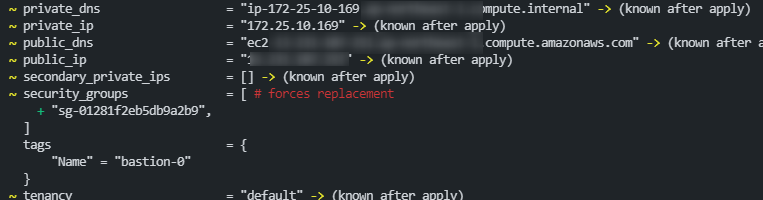
最初は明示的に定義してないストレージ周りの定義でも影響してるんかなと思ったりしたけど、ターミナルで見ると赤字でわざわざ「# forces replacement」とコメント出力されている以下のセキュリティグループの設定が原因。
対応
aws_instanceリソースのsecurity_groupsオプションの項のドキュメントを確認すると以下の通り、vpc_security_group_idsを使うように書いてある。
NOTE:
If you are creating Instances in a VPC, use
vpc_security_group_idsinstead.
ということでコード変更。
--- a/aws/practice/ec2.tf
+++ b/aws/practice/ec2.tf
@@ -14,7 +14,7 @@ resource "aws_instance" "bastion" {
   instance_type               = "t3.nano"
   key_name                    = aws_key_pair.my_key.id
   subnet_id                   = aws_subnet.prac_public.id
-  security_groups             = [aws_security_group.allow_ssh_icmp.id]
+  vpc_security_group_ids      = [aws_security_group.allow_ssh_icmp.id]
   associate_public_ip_address = true

   tags = {
この内容でterraform planを実行すると、期待通り"no changes"になった。
$ terraform plan
aws_key_pair.my_key: Refreshing state... [id=***]
aws_vpc.practice: Refreshing state... [id=***]
aws_internet_gateway.gw: Refreshing state... [id=***]
aws_security_group.allow_ssh_icmp: Refreshing state... [id=***]
aws_subnet.prac_priv2: Refreshing state... [id=***]
aws_subnet.prac_public: Refreshing state... [id=***]
aws_subnet.prac_priv1: Refreshing state... [id=***]
aws_route_table.public_route: Refreshing state... [id=***]
aws_security_group_rule.egress: Refreshing state... [id=***]
aws_security_group_rule.ssh: Refreshing state... [id=***]
aws_security_group_rule.icmp: Refreshing state... [id=***]
aws_instance.bastion[0]: Refreshing state... [id=***]
aws_route_table_association.public_subnet: Refreshing state... [id=***]

No changes. Infrastructure is up-to-date.
これで作成済みEC2に影響しないコード変更を行ったときに、余計なEC2再作成が発生しなくなった。
参考
教訓
勘と雰囲気と勢いも良いけど、ドキュメントちゃんと読もう。
