Dockerで動かしてるGitLab CEにGitLab Runnerもコンテナで追加して、GitLab CE本体とRunnerを同じDocker上(別コンテナ)で動かして、初めてのGitLab Runnerお試し。
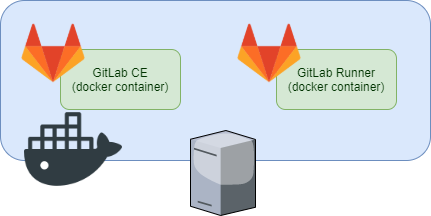
構成の概要としてはこんな感じ。
お題
以前つくったGitLab CE on Dockerに、Runnerも同じDocker上でうごかす。
$ sudo docker-compose ps
         Name                Command          State               Ports
--------------------------------------------------------------------------------
gitlab-                  /assets/wrapper   Up (healthy)   22/tcp, 0.0.0.0:25000-
compose_gitlab-                                           >25000/tcp, 443/tcp,
registry_1                                                80/tcp,
                                                          0.0.0.0:8443->8443/tcp
Runnerコンテナの起動
以下、runnerのコンテナ定義を追加
  gitlab-runner:
    image: gitlab/gitlab-runner:v12.7.1
    restart: always
    volumes:
      - /opt/gitlab-runner/config:/etc/gitlab-runner:Z
      - /var/run/docker.sock:/var/run/docker.sock
docker-compose up -dすると、Runnerのコンテナが起動。
$ sudo docker-compose ps
        Name                 Command             State              Ports
--------------------------------------------------------------------------------
gitlab-                /assets/wrapper        Up (healthy)   22/tcp, 0.0.0.0:250
compose_gitlab-                                              00->25000/tcp,
registry_1                                                   443/tcp, 80/tcp, 0.
                                                             0.0.0:8443->8443/tc
                                                             p
gitlab-                /usr/bin/dumb-init     Up
compose_gitlab-        /entryp ...
runner_1
こんな感じ。
Runnerをただ動かすだけなら、特になんでもない。
Runnerの設定
GitLab CEでトークン確認
Runnerを試してみるプロジェクトのSettings -> CI/CD -> RunnersをExpandして、"registration token"を確認する。
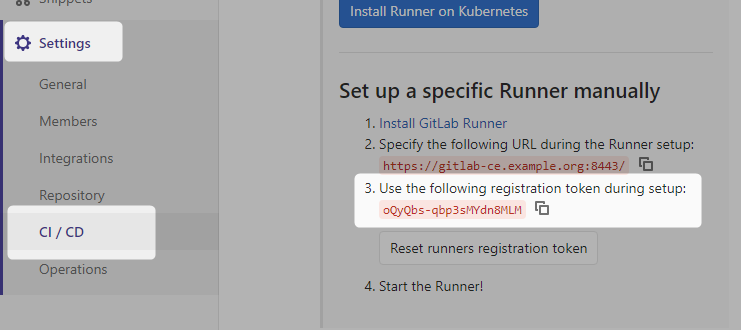
(※: プロジェクト単位でなくGitLab CE全体の設定も可能だけど、ひとまずプロジェクト単位でお試し)
Runnerのregister実行
コンテナのbashを起動し、登録コマンドであるgitlab-runner registerを実行する。
雑に動かすとぽろぽろとエラーが出てくる。
connect: no route to host
$ sudo docker-compose exec gitlab-runner bash
root@1ccbe6c850f1:/#
root@1ccbe6c850f1:/# gitlab-runner register
Runtime platform                                    arch=amd64 os=linux pid=29 revision=003fe500 version=12.7.1
Running in system-mode.

Please enter the gitlab-ci coordinator URL (e.g. https://gitlab.com/):
https://gitlab-ce.example.org:8443/       # GitLab CEのURL入力
Please enter the gitlab-ci token for this runner:
oQyQbs-qbp3sMYdn8MLM                      # webで確認したregistration tokenを入力
Please enter the gitlab-ci description for this runner:
[1ccbe6c850f1]: sample-runner             # runnerの名前
Please enter the gitlab-ci tags for this runner (comma separated):
                                          # tagは(とりあえず)空欄
ERROR: Registering runner... failed                 runner=oQyQbs-q status=couldn't execute POST against https://gitlab-ce.example.org:8443/api/v4/runners: Post https://gitlab-ce.example.org:8443/api/v4/runners: dial tcp 192.168.0.21:8443: connect: no route to host
PANIC: Failed to register this runner. Perhaps you are having network problems
root@1ccbe6c850f1:/#
おや…
root@1ccbe6c850f1:/# curl -I http://gitlab-ce.example.org/yum-repo/
HTTP/1.1 200 OK
:
gitlab-ce.example.orgに対して全く通信できないわけではなさそう。(ホストOS上で動作してるhttpdサーバへは普通にアクセスできる)
いろいろ確認した結果、「コンテナAの中から」「ホストOSのIPアドレスと-pでpublishしたポート番号指定で別のコンテナBに対して」直接通信はできないっぽい。
Dockerの通信仕様というか、Dockerの通信を制御しているiptablesの仕様というか、、だいたいその辺の理由。たぶん。

というわけで、RunnerのコンテナからGitLab CEのコンテナへのコンテナ間通信で、HTTPS通信するためにFQDNでアクセスしたいけど、うまい方法を思いつかないので…
GitLab CEのコンテナ名をFQDNと同じにしよう(・∀・)
(「コンテナ間通信はコンテナ名でアクセスできる」動作によって、FQDNでRunnerからGitLab CEにアクセスする)
--- a/docker-compose.yml
+++ b/docker-compose.yml
@@ -1,7 +1,7 @@
 ---
 version: '3'
 services:
-  gitlab-registry:
+  gitlab-ce.example.org:
     image: gitlab/gitlab-ce:12.7.4-ce.0
     hostname: gitlab-ce.example.org
     restart: always
これでdocker-compose up -d
[zaki@registry gitlab-compose]$ sudo docker-compose ps
       Name               Command               State                Ports
--------------------------------------------------------------------------------
gitlab-              /assets/wrapper      Up (health:          22/tcp, 0.0.0.0:2
compose_gitlab-                           starting)            5000->25000/tcp,
ce.example.org_1                                               443/tcp, 80/tcp,
                                                               0.0.0.0:8443->844
                                                               3/tcp
gitlab-              /usr/bin/dumb-init   Up
compose_gitlab-      /entryp ...
runner_1
こんな感じ。
healthyになるまで待つ。
x509: certificate signed by unknown authority
[zaki@registry gitlab-compose]$ sudo docker-compose exec gitlab-runner bash
root@32511c7a3352:/# gitlab-runner register
Runtime platform                                    arch=amd64 os=linux pid=29 revision=003fe500 version=12.7.1
Running in system-mode.

Please enter the gitlab-ci coordinator URL (e.g. https://gitlab.com/):
https://gitlab-ce.example.org:8443/
Please enter the gitlab-ci token for this runner:
oQyQbs-qbp3sMYdn8MLM
Please enter the gitlab-ci description for this runner:
[32511c7a3352]: sample-runner
Please enter the gitlab-ci tags for this runner (comma separated):

ERROR: Registering runner... failed                 runner=oQyQbs-q status=couldn't execute POST against https://gitlab-ce.example.org:8443/api/v4/runners: Post https://gitlab-ce.example.org:8443/api/v4/runners: x509: certificate signed by unknown authority
PANIC: Failed to register this runner. Perhaps you are having network problems
root@32511c7a3352:/#
今度のエラーはわりと予想通り。
  gitlab-runner:
    image: gitlab/gitlab-runner:v12.7.1
    restart: always
    volumes:
      - /opt/gitlab-runner/config:/etc/gitlab-runner:Z
      - /var/run/docker.sock:/var/run/docker.sock
      - /opt/gitlab-cert:/etc/gitlab-runner/certs
GitLab CE本体でも使用している証明書ファイルが/opt/gitlab-certにあるので、Runnerでも使い回す。
volumesを使ってマウントするホストのディレクトリに、/opt/gitlab-cert:/etc/gitlab-runner/certsを追加。
まぁRun GitLab Runner in a containerのドキュメントよくよく見たら"Installing trusted SSL server certificates"の章に書いてあるんだけど…()
成功編
$ sudo docker-compose exec gitlab-runner bash
root@365f57ba0691:/# gitlab-runner register
Runtime platform                                    arch=amd64 os=linux pid=28 revision=003fe500 version=12.7.1
Running in system-mode.

Please enter the gitlab-ci coordinator URL (e.g. https://gitlab.com/):
https://gitlab-ce.example.org:8443/
Please enter the gitlab-ci token for this runner:
oQyQbs-qbp3sMYdn8MLM
Please enter the gitlab-ci description for this runner:
[365f57ba0691]: sample-runner
Please enter the gitlab-ci tags for this runner (comma separated):

Registering runner... succeeded                     runner=oQyQbs-q
Please enter the executor: docker, ssh, docker-ssh+machine, custom, docker-ssh, parallels, shell, virtualbox, docker+machine, kubernetes:
shell
Runner registered successfully. Feel free to start it, but if it's running already the config should be automatically reloaded!
お、うまくいった。
(executorの設定は、dockerやkubernetesなど試したくなる項目あるけど、とりあえずshellを設定している)
webで設定の"Runners activated for this project"の部分を見ると、追加したRunnerの項目が追加されてることを確認できる。
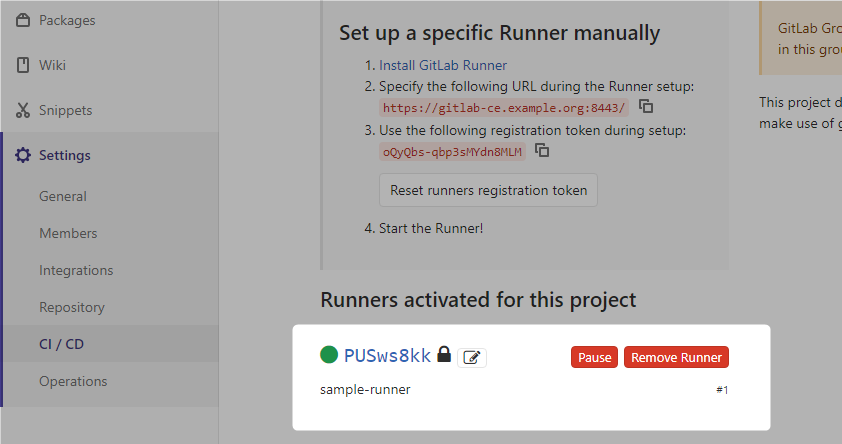
追加した設定は、GitLab Runnerコンテナ内の/etc/gitlab-runner/config.tomlに作成される。これはDockerのボリューム設定によってホストOSの/opt/gitlab-runner/config/config.tomlになっている。
concurrent = 1
check_interval = 0

[session_server]
  session_timeout = 1800

[[runners]]
  name = "sample-runner"
  url = "https://gitlab-ce.example.org:8443/"
  token = "PUSws8kkxEnz5Qn4npye"
  executor = "shell"
  [runners.custom_build_dir]
  [runners.cache]
    [runners.cache.s3]
    [runners.cache.gcs]
Runnerお試し
こんなファイルを用意
---
stages:
  - runner-test

job01:
  stage: runner-test
  script:
    - id
    - uname -r
    - ps auxwwf
    - hostname
    - ls -alF
pushする
% git add .gitlab-ci.yml
% git commit -m "add: gitlab-ciお試し"
% git push
すると、GitLab CE上でpipelineが動き始める。 (中身はコマンド実行するだけなのですぐ完了する)

statusの列("passed"などのリザルト)はリンクになってて、内容を確認できる。
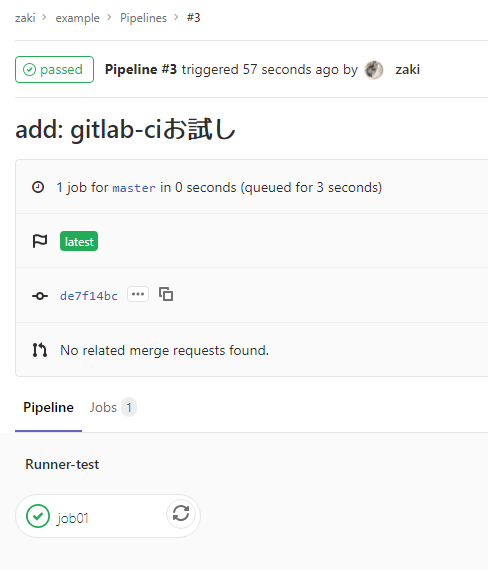
jobの詳細で、CIで実行された処理の出力を確認できる。

$ id
 uid=999(gitlab-runner) gid=999(gitlab-runner) groups=999(gitlab-runner)
 $ uname -r
 3.10.0-1062.9.1.el7.x86_64
 $ ps auxwwf
 USER        PID %CPU %MEM    VSZ   RSS TTY      STAT START   TIME COMMAND
 root         14  0.0  0.0  18496  1940 pts/0    Ss+  22:09   0:00 bash
 root          1  0.0  0.0    164     4 ?        Ss   22:08   0:00 /usr/bin/dumb-init /entrypoint run --user=gitlab-runner --working-directory=/home/gitlab-runner
 root          6  0.1  0.5 137040 19668 ?        Ssl  22:08   0:02 gitlab-runner run --user=gitlab-runner --working-directory=/home/gitlab-runner
 root        109  0.0  0.0  49260  1628 ?        S    22:41   0:00  \_ su -s /bin/bash gitlab-runner -c bash --login
 gitlab-+    110  0.0  0.0   9908  1544 ?        Ss   22:41   0:00      \_ bash --login
 gitlab-+    114  0.0  0.0  10040   908 ?        S    22:41   0:00          \_ bash --login
 gitlab-+    118  0.0  0.0  34392  1528 ?        R    22:41   0:00              \_ ps auxwwf
 $ hostname
 365f57ba0691
 $ ls -alF
 total 4
 drwxrwxr-x. 3 gitlab-runner gitlab-runner  57 Mar 12 22:41 ./
 drwxrwxr-x. 4 gitlab-runner gitlab-runner  40 Mar 12 22:41 ../
 drwxrwxr-x. 6 gitlab-runner gitlab-runner 113 Mar 12 22:41 .git/
 -rw-rw-r--. 1 gitlab-runner gitlab-runner 136 Mar 12 22:41 .gitlab-ci.yml
 -rw-rw-r--. 1 gitlab-runner gitlab-runner   0 Mar 12 22:41 README.md
こんな感じで、gitlab-runner register時にshellを指定しているので、「Runnerが動いてるホスト上でshell実行」されていることが確認できた。
今回Runner自体をコンテナで実行してるので、「Runnerが動いているホスト」が、Runner自身のコンテナ内になってる。
全体のdocker-compose.yml
---
version: '3'
services:
  gitlab-ce.example.org:
    image: gitlab/gitlab-ce:12.7.4-ce.0
    hostname: gitlab-ce.example.org
    restart: always
    ports:
      - "8443:8443"
      - "25000:25000"
    environment:
      GITLAB_OMNIBUS_CONFIG: "external_url 'https://gitlab-ce.example.org:8443'; nginx['listen_port']=8443; gitlab_rails['registry_enabled']=true; registry_external_url 'https://gitlab-ce.example.org:25000'"
    volumes:
      - /opt/gitlab-reg/config:/etc/gitlab:Z
      - /opt/gitlab-reg/logs:/var/log/gitlab:Z
      - /opt/gitlab-reg/data:/var/opt/gitlab:Z
      - /opt/gitlab-reg/registry:/var/opt/gitlab/gitlab-rails/shared/registry:Z
      - /opt/gitlab-cert:/etc/gitlab/ssl
  gitlab-runner:
    image: gitlab/gitlab-runner:v12.7.1
    restart: always
    volumes:
      - /opt/gitlab-runner/config:/etc/gitlab-runner:Z
      - /var/run/docker.sock:/var/run/docker.sock
      - /opt/gitlab-cert:/etc/gitlab-runner/certs
shellじゃなくてdockerについてはこちら
(dindでさらにコンテナ間通信がcompose管理外の構成)
dind(Docker in Docker)については、ホストの/var/run/docker.sockをボリューム設定で共用してる関係で、何も問題なかった。
というかdocker run -p host-port:container-portしたコンテナ、ホストOS外のリモートからの接続は問題ないけど、同じホスト上の別のDockerコンテナからは「ホストのアドレス:port」だと接続できないのね…知らなかった…(というか、何かセオリーあるのかな)
"GitLab CE contaienr"は-pを使ってホストOSからのポートフォワードを設定
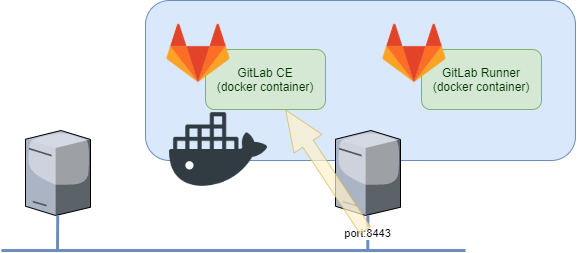
この設定でリモートからのアクセスが可能になる。

でもこの構成だと、別のコンテナからホストOSのIPアドレス:ポート番号のアクセスができなかった。(コンテナ間通信はdocker networkの設定でイケる)
参考文献は
PDF版はインプレスで購入すればOK
