9/1くらいに思い立って、
自分の業務効率化のためにはpuppeteer-rubyをFirefoxに対応させないといけないことがわかった。できるかな…
— Yusuke Iwaki (@yi01imagination) 2020年9月1日
からの、9/8にFirefox対応をリリースしてみた。
puppeteer-rubyのFirefox対応をリリースしたぞ〜https://t.co/mcU5YgsG21
— Yusuke Iwaki (@yi01imagination) 2020年9月7日

どんな感じで開発してたかを少しだけ書いておこうかなと思う。
Firefoxといっても、どんなFirefoxでも動くわけではない
puppeteer-rubyはブラウザダウンロード機能をつけていない。そのため、puppeteer-coreと同様に、ブラウザは自分で用意しないといけない。
さて、Firefoxはどれを使えばいいのだろう...?ここが微妙にハマりどころだった。

なんとFirefoxには4つのバージョンがある。 https://www.mozilla.org/ja/firefox/channel/desktop/
- 通常版
- Beta
- Developer
- Nightly
このうち puppeteerが動作するのはどれか?・・・下ほど不安定なバージョンになるのだが、名前的には、いかにもDeveloperで動きそうに見える。が、動かない・・・。
正解は・・・
puppeteer-coreでFirefox使うときはStableでは当然だめとして、BetaでもDevでもだめで、Nightly版のfirefoxじゃないといけないことを学んだ。
— Yusuke Iwaki (@yi01imagination) 2020年9月5日
そう、2020.09.01現在は、FirefoxのNightly版でのみpuppeteerが動作する。
ポーティング自体はすぐにできた
本家PuppeteerがTypeScript化されてから、だいぶソースが読みやすくなったこともあり、ほとんどコピペで実装は終わった。
ただ、さすがに単体テストくらいは書いておこう、と思い始め、書き始めたのが9/5. ちょうどRubykaigi 2020 takeoutが行われたころ。
Rubykaigiを横目に、puppeteer-rubyでFirefoxを自動操作できるようにした。
— Yusuke Iwaki (@yi01imagination) 2020年9月5日
puppeteer-core相当の動作しか実装はできてないけどhttps://t.co/E1fwTs1SMx
CIを通すのが結構たいへんだった
Chromeでしか流していなかったCIの単体テストを、Firefoxでも流すようにしてみて、最初のCI結果がこれ。
Top 3 slowest example groups:
  Puppeteer::Page
    69.67 seconds average (626.99 seconds / 9 examples) ./spec/integration/click_spec.rb:3
  Puppeteer::BrowserContext
    5.74 seconds average (57.35 seconds / 10 examples) ./spec/integration/browser_context_spec.rb:3
  Puppeteer::Browser
    2.34 seconds average (9.35 seconds / 4 examples) ./spec/integration/browser_spec.rb:3

Finished in 11 minutes 34 seconds (files took 0.66881 seconds to load)
23 examples, 6 failures

Failed examples:

rspec ./spec/integration/browser_context_spec.rb:62 # Puppeteer::BrowserContext target events should fire target events
rspec ./spec/integration/browser_context_spec.rb:95 # Puppeteer::BrowserContext wait for target should wait for a target
rspec ./spec/integration/browser_context_spec.rb:163 # Puppeteer::BrowserContext isolation should work across sessions
rspec ./spec/integration/browser_spec.rb:11 # Puppeteer::Browser user_agent should include WebKit
rspec ./spec/integration/click_spec.rb:41 # Puppeteer::Page with button page even if window.Node is removed should click button
rspec ./spec/integration/click_spec.rb:139 # Puppeteer::Page even when JavaScript is disabled should click with disabled javascript
「6個しか落ちていない。余裕!」とか思っていたわけだが・・・
page.focusでDOM要素にフォーカスしてくれない問題
まて。
69.67 seconds average (626.99 seconds / 9 examples) ./spec/integration/click_spec.rb
この秒数、明らかにおかしい。
手元で流してみたところ、
    before {
      page.goto("http://127.0.0.1:4567/textarea")
    }

    it 'should select the text by triple clicking' do
      page.focus('textarea')
      text = "This is the text that we are going to try to select. Let's see how it goes."
      page.keyboard.type_text(text)
ここのところで、完全にフリーズしていた。
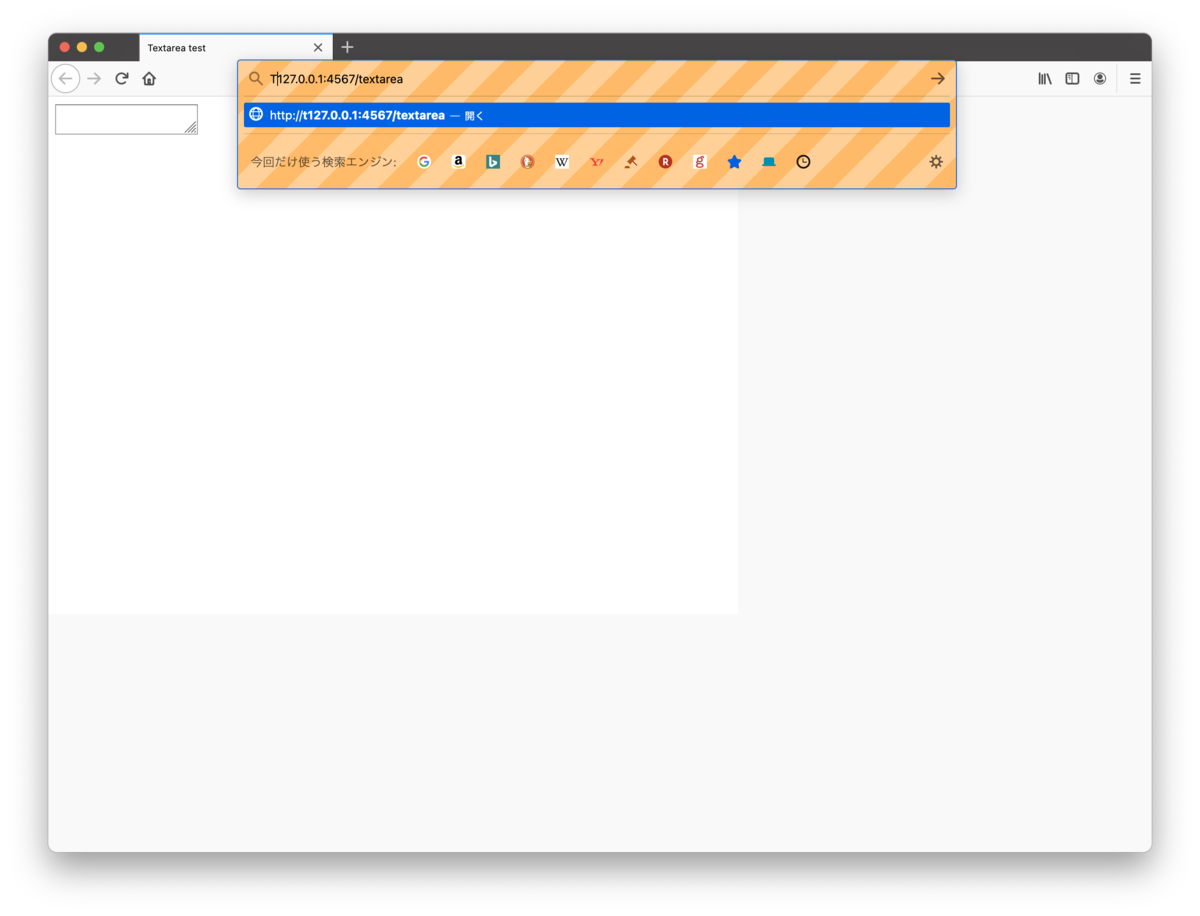
テキストエリアにフォーカスがあたっていなくて、URL入力欄にフォーカスが当たりっぱなしだ。これが、focusを5回連続で呼んだり、適当にsleep入れたりしても解消されなかった。
page.focusをpage.clickにすれば直るんだけども、それだと本家puppeteerと違うことを単体テストしてしまうことになり望ましくない。
puppeteer-rubyの固有の問題なのかpuppeteer本家でも起きるのかの切り分けのために、
const puppeteer = require("puppeteer");

launchOptions = {
  product: "firefox",
  headless: false,
  slow_mo: 50,
};

puppeteer.launch(launchOptions).then(async (browser) => {
  const pages = await browser.newPage();

  await page.goto("http://localhost:8888/textarea.html");

  await page.focus("textarea");
  const text =
    "This is the text that we are going to try to select. Let's see how it goes.";
  await page.keyboard.type(text);
  await page.click("textarea");
  await page.click("textarea", { click_count: 2 });
  await page.click("textarea", { click_count: 3 });
});
ほぼ同じ処理内容をJSで書いてみて実行したところ・・・・・・・ 起きない!!
本家puppeteerだとfocusが効くのにpuppeteer-rubyだとfocusが(firefox限定で)動かない謎
— Yusuke Iwaki (@yi01imagination) 2020年9月7日
ただ、これをpuppeteer-rubyで書き直してみると・・・
Puppeteer.launch(product: 'firefox', headless: false, slow_mo: 50) do |browser|
  page = browser.new_page

  page.goto("http://localhost:8888/textarea.html")

  sleep 5
  page.focus("textarea")
  sleep 5
  text =  "This is the text that we are going to try to select. Let's see how it goes."
  page.keyboard.type_text(text)
  page.click("textarea")
  page.click("textarea", click_count: 2)
  page.click("textarea", click_count: 3)
end
・・・ あれれ??起きない!! RSpecだと起きるのはなんでだ?!
違いというと、Rubyのコードについては browser.new_page か browser.pages.first || browser.new_page かのくらいの違いしかなかった。
では、試しにpuppeteerのコードも const page = await browser.newPage(); を const page = (await browser.pages())[0] || (await browser.newPage()) にすると・・・・ フリーズした!!
そんなわけで、Puppeteer#Pageを使い回さず、都度作り直すようにしたら、この問題は解消された。
Firefoxではどうあがいても通せないspecたち
本家Puppeteerには mochaの it と同様に使える itFailsFirefox っていうメソッドが定義されている。何も特別なことはなくて、firefoxで実行されている場合にはskipするだけだ。
export const itFailsFirefox = (
  description: string,
  body: Mocha.Func
): Mocha.Test => {
  if (isFirefox) return xit(description, body);
  else return it(description, body);
};
たとえばFirefoxでPuppeteer#Keyboard で絵文字を入力しようとすると 'Input.insertText' でプロトコルエラーが起きてしまうので、Firefoxでは試験しない、という感じである。
ところで、我らがRSpecには skip の他に pending がある。
skipは単にすっ飛ばすだけなのに対し、pendingは実行してエラーが出ても無視するというもの。さらにいうと、 pendingは実行してもエラーにならない場合は逆にエラーを出してくれたりもする(pendingじゃなくなったのを検知できる!)
本家Puppeteerでも実は結構適当にitFailsFirefoxが使われていて、実際にはpassするのにskipされているテストがたくさんある。そんな事情もあって、puppeteer-rubyでは pendingを採用した。
実際にpendingにしてみると、「それもう直ってるよ!」ってCIでいくつか指摘された
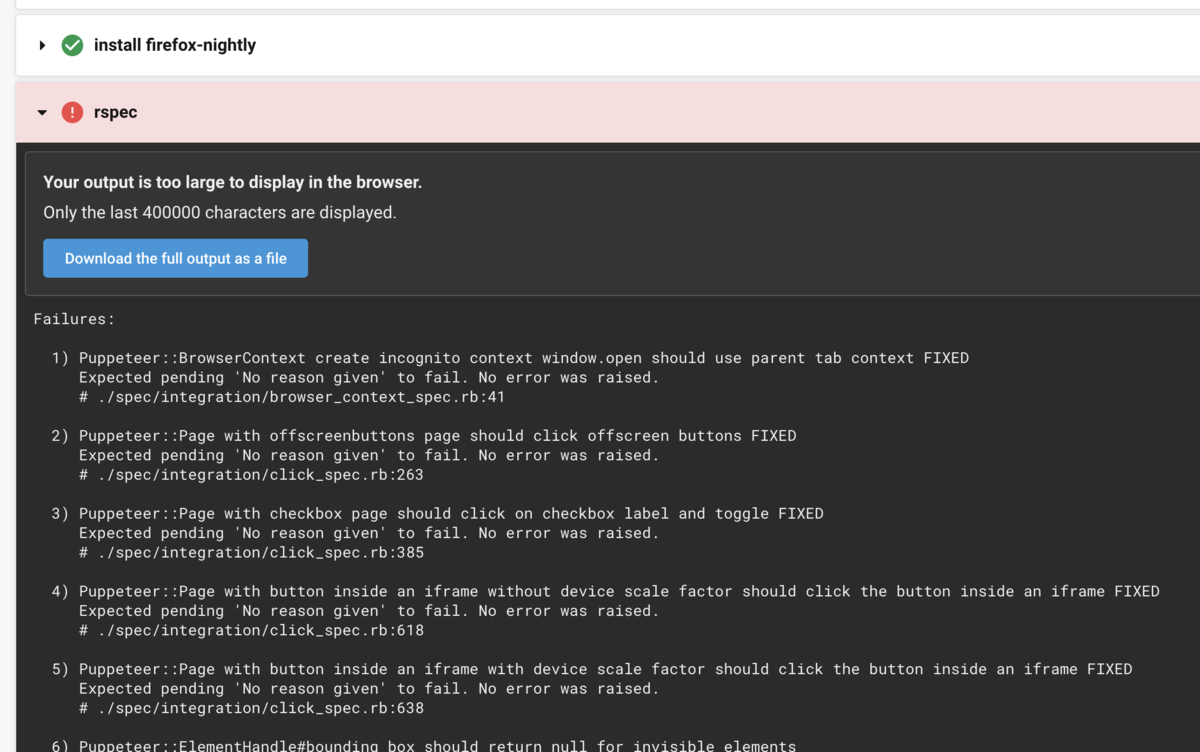
Firefoxでだけ正しく描画されない画面たち...
これが今回のFirefox対応で、最後の最後にハマったところ。
手元のMacだと通るのに、CircleCIだと落ちるspecがてごわい。Linux版のFirefoxでだけflexboxレイアウトが意図したとおりに配置されてないらしいんだけども、見えないものをデバッグできない... pic.twitter.com/DyMEvi5iWx
— Yusuke Iwaki (@yi01imagination) 2020年9月7日
手元のMac版Firefoxでは通るし、CIでもChromeは通っている。CI上でFirefoxで試験実行したときだけ落ちる。
ぱっと見、CSSの指定がいまいちでflexレイアウトが10pxずれてるのはわかるんだけど、手元にLinuxのGUI環境は無いので、画面をインスペクタで確認したり解析ができない。
仕方がないので、適当にDocker環境を作って、binding.pryを仕掛けながら、どこで10pxずれてるのかを探ってみることにした。
From: /Users/yusuke-iwaki/src/github.com/YusukeIwaki/puppeteer-ruby/spec/integration/element_handle_spec.rb:74 :

    69:
    70:         element_handle = page.S('.box:nth-of-type(13)')
    71:         box = element_handle.bounding_box
    72:         require 'pry'
    73:         binding.pry
 => 74:         expect(box.x).to eq(100)
    75:         expect(box.y).to eq(50)
    76:         expect(box.width).to eq(50)
    77:         expect(box.height).to eq(50)
    78:       end
    79:     end

[1] pry(#<RSpec::ExampleGroups::PuppeteerElementHandle::BoundingBox::WithGridPage>)> box
=> #<Puppeteer::ElementHandle::BoundingBox:0x00007f7f1f0fa438 @height=50, @width=50, @x=100, @y=50>
手元のMacだと↑こんな感じで動いている。しかし、DockerでLinux上のFirefoxは違っていて、
From: /puppeteer-ruby/spec/integration/element_handle_spec.rb:74 :

    69:
    70:         element_handle = page.S('.box:nth-of-type(13)')
    71:         box = element_handle.bounding_box
    72:         require 'pry'
    73:         binding.pry
 => 74:         expect(box.x).to eq(100)
    75:         expect(box.y).to eq(50)
    76:         expect(box.width).to eq(50)
    77:         expect(box.height).to eq(50)
    78:       end
    79:     end

[1] pry(#<RSpec::ExampleGroups::PuppeteerElementHandle::BoundingBox::WithGridPage>)> box
=> #<Puppeteer::ElementHandle::BoundingBox:0x00007f809c0734f0 @height=50, @width=50, @x=150, @y=50>
確かに変な値になっている。
「とりあえず画面が見たい!」ということで、
[2] pry(#<RSpec::ExampleGroups::PuppeteerElementHandle::BoundingBox::WithGridPage>)> page.screenshot path: "./firefox.png" ; nil
えい!スクショをとりあえず取ってみる。Firefox (mac), Chrome (linux), Firefox (linux) を見比べてみる。
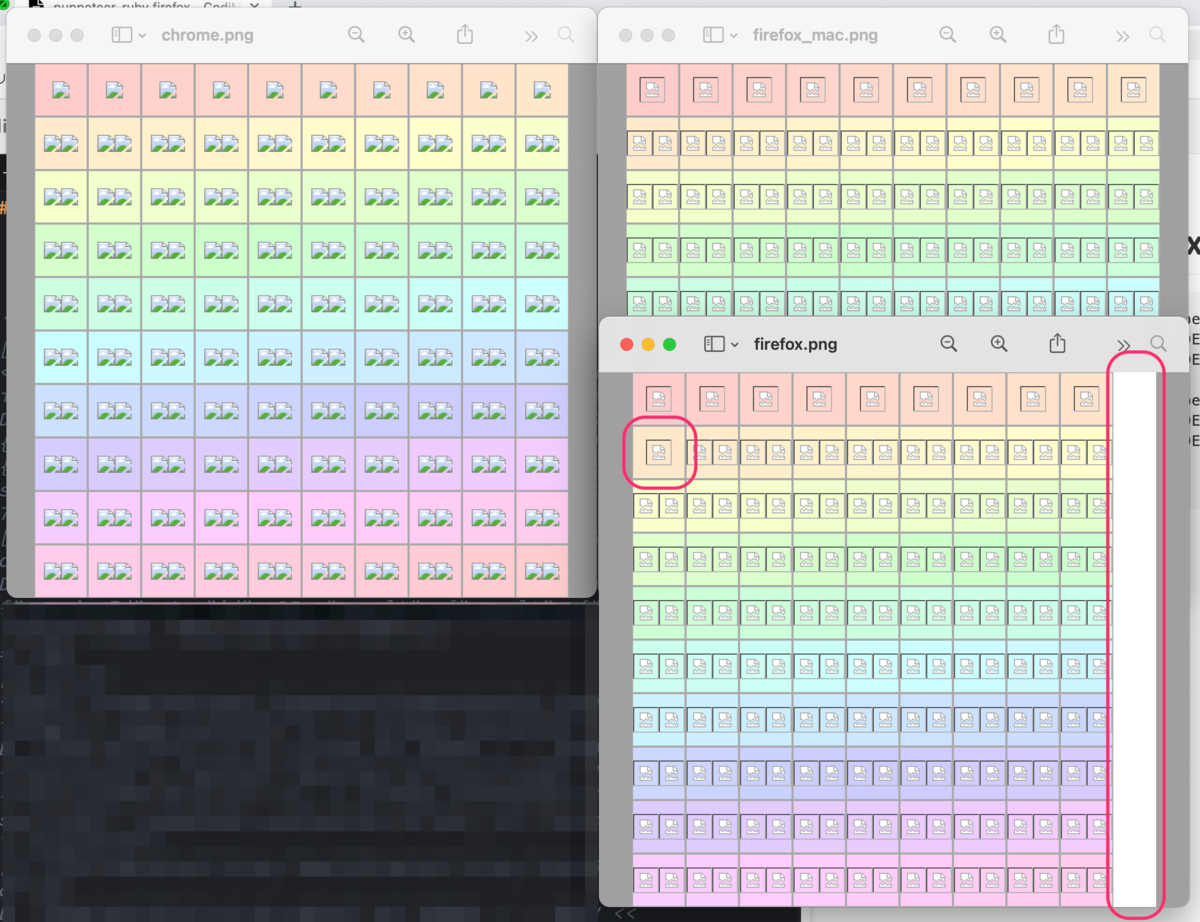
うーん、あきらかにFirefoxのlinuxだけ1列少ない!Flexレイアウトでいれるだけのスペースがあいてなかったのかもしれない。
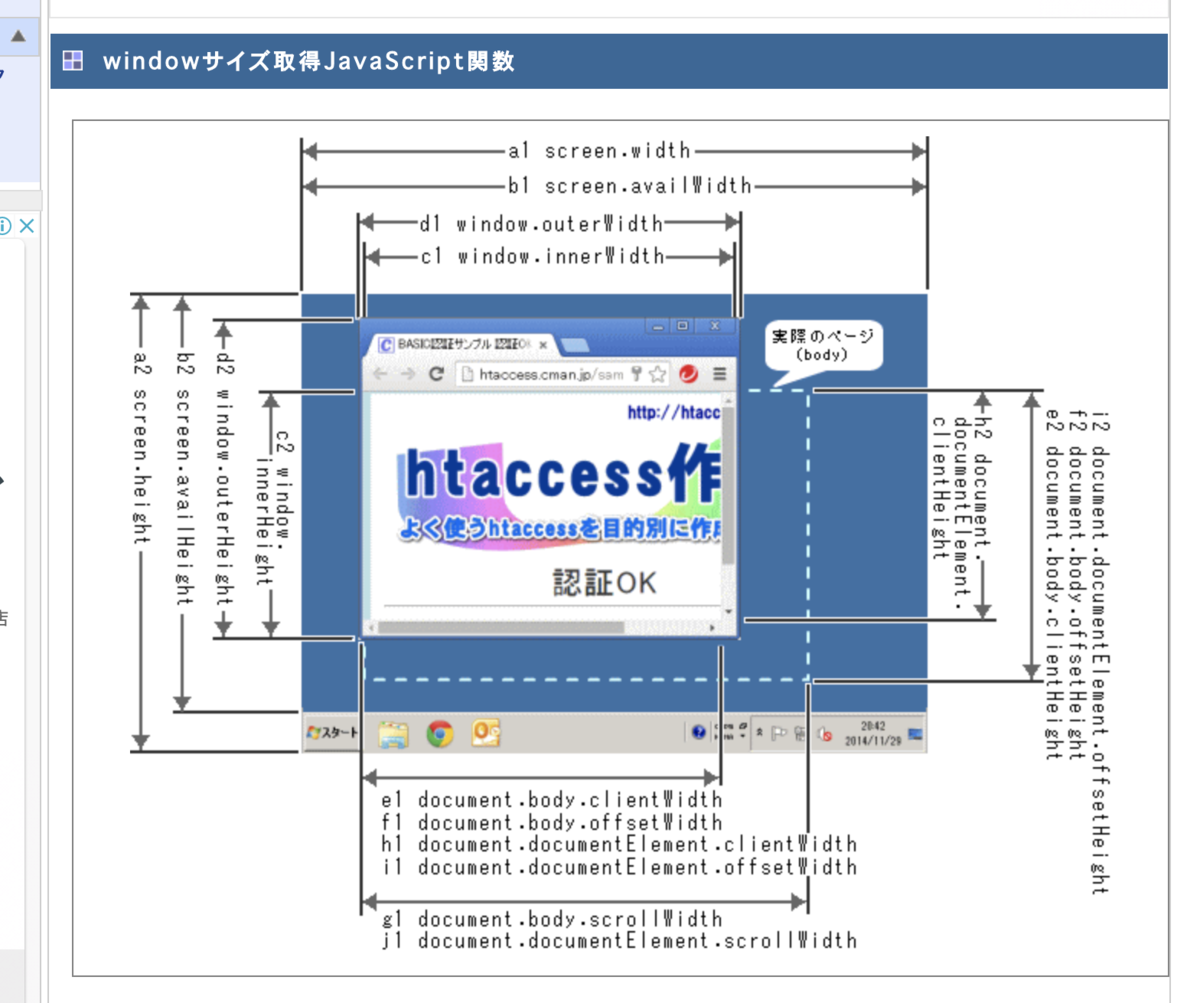 (Special thanks to ウインドウサイズを取得する 【JavaScript 動的サンプル】 !)
を参考に、画面の幅を取得してみる。
[2] pry(#<RSpec::ExampleGroups::PuppeteerElementHandle::BoundingBox::WithGridPage>)> page.evaluate("() => document.body.offsetWidth")
D, [2020-09-07T17:11:14.262008 #1] DEBUG -- : SEND >> {"sessionId":1,"method":"Runtime.callFunctionOn","params":{"functionDeclaration":"() => document.body.offsetWidth\n//# sourceURL=__puppeteer_evaluation_script__\n","executionContextId":7,"arguments":[],"returnByValue":true,"awaitPromise":true,"userGesture":true},"id":25}
D, [2020-09-07T17:11:14.275635 #1] DEBUG -- : RECV << {"sessionId"=>1, "id"=>25, "result"=>{"result"=>{"type"=>"number", "value"=>490, "description"=>"490"}}}
=> 490
[3] pry(#<RSpec::ExampleGroups::PuppeteerElementHandle::BoundingBox::WithGridPage>)> page.evaluate("() => window.innerWidth")
D, [2020-09-07T17:11:23.171738 #1] DEBUG -- : SEND >> {"sessionId":1,"method":"Runtime.callFunctionOn","params":{"functionDeclaration":"() => window.innerWidth\n//# sourceURL=__puppeteer_evaluation_script__\n","executionContextId":7,"arguments":[],"returnByValue":true,"awaitPromise":true,"userGesture":true},"id":26}
D, [2020-09-07T17:11:23.185157 #1] DEBUG -- : RECV << {"sessionId"=>1, "id"=>26, "result"=>{"result"=>{"type"=>"number", "value"=>500, "description"=>"500"}}}
=> 500
なんと、スクロールバーかなにかの分だけ10pxとられている!!!
そんなわけで、少し試行錯誤して
スクロールバーどっかいけ!!ってやったら、
スクロールバーを攻略して、やっとCI通った pic.twitter.com/vn7j82EyJv
— Yusuke Iwaki (@yi01imagination) 2020年9月7日
一件落着・・・
まとめ
puppeteer-rubyでも本家Puppeteerと同様にFirefoxを操作できるようにしました。
細かい苦労はいろいろあったものの、やはり本家のソースコードがTypeScript化されたことで、かなり効率よく読めてFirefox対応できました。可読性は正義。
