情報少ない。
対象環境
- Raspbierry pi 3 Model B+
- Raspbian stretch(9.0) 2018-06-27
- Mono 5.16.0
- MonoDevelop 7.6 build 711
- Eto.Forms 2.4.1 拡張機能, NuGetパッケージ
- .NET Core 2.2, MonoDevelop参照方法
参照
手順
対象環境を整えてから以下の手順を行う。
- プロジェクト作成
- .NET Standard バージョン指定
- NuGetでパッケージを追加
- ソースコード作成
- 実行
1. プロジェクト作成
事前にEto.Forms 2.4.1 拡張機能, NuGetパッケージを用意しておくこと。
- MonoDevelopを起動する
- メニュー→
ファイル→新しいソリューション

マルチプラットフォーム→アプリ→Eto Application
- 名前などを適当に入力し、
Codeを選択する

場所を入力する

- プロジェクトが作成される

2. .NET Standard バージョン指定
事前に.NET Core 2.2のインストールとMonoDevelopでの参照方法を設定しておくこと。
- ソリューションウインドウからプロジェクトを右クリックする
オプションをクリックする

ビルド→ターゲットフレームワークから.NET Standard 2.0を選ぶ
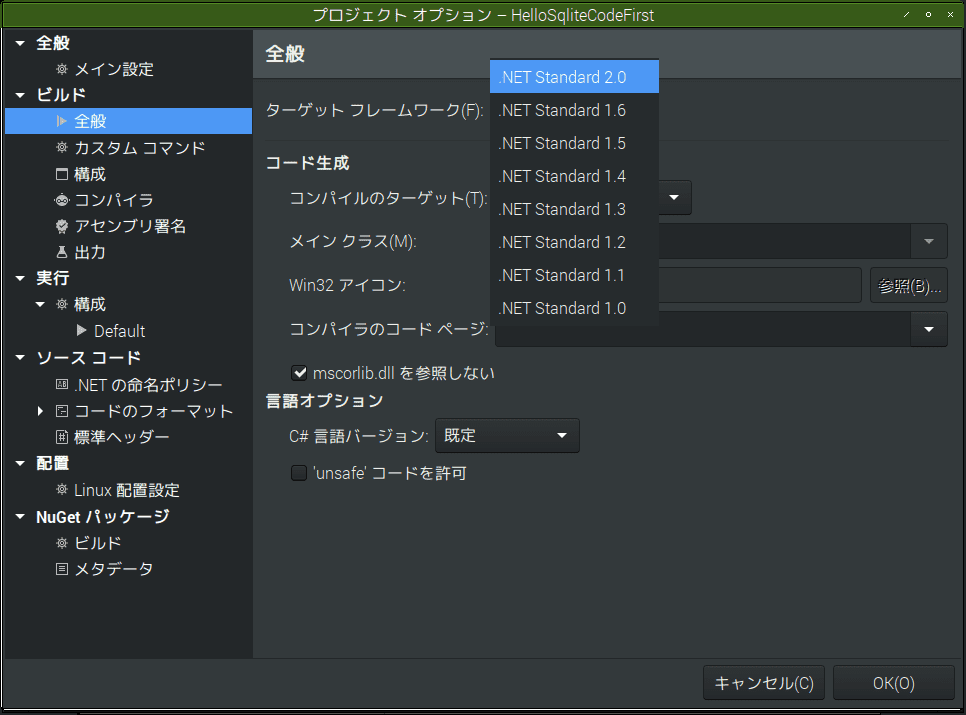
- ソリューションウインドウのSDKの
.NET Standardが、2.0.3になっているのを確認する

2. NuGetでパッケージを追加
- メニュー→
プロジェクト→NuGet パッケージの追加

パッケージを追加ダイアログから欲しいパッケージを探す
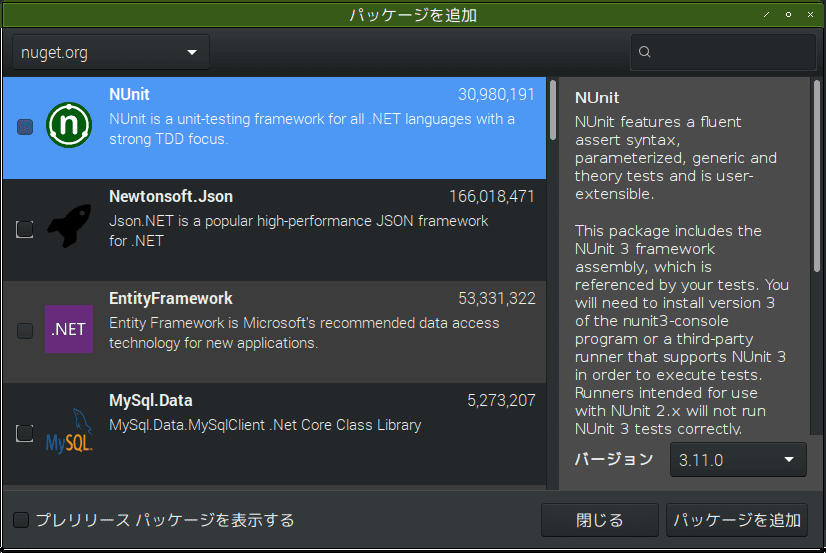
パッケージは以下。
- Microsoft.EntityFrameworkCore
- Microsoft.EntityFrameworkCore.Design
- Microsoft.EntityFrameworkCore.Tools
- Microsoft.EntityFrameworkCore.Sqlite
3. ソースコード作成
MainForm.cs
using System;
using Eto.Forms;
using Eto.Drawing;

namespace HelloEFCoreSqlite
{
    public partial class MainForm : Form
    {
        public MainForm()
        {
            Title = "Hello EFCore 2.2 SQLite";
            ClientSize = new Size(400, 350);
            CreateDb();
        }
        private void CreateDb() {
            var db = new AppDbContext();
            db.Accounts.Add(new Accounts() { Id=0, GitHubId=0, Username="user1", Password="pass1" });
            db.SaveChanges();
        }
    }
}
AppDbContext.cs
using System;
using System.Collections.Generic;
using System.Linq;
using System.Threading.Tasks;
using Microsoft.EntityFrameworkCore;

namespace HelloEFCoreSqlite
{
    public class AppDbContext : DbContext
    {
        protected override void OnConfiguring(DbContextOptionsBuilder optionsBuilder)
        {
            base.OnConfiguring(optionsBuilder);
            optionsBuilder.UseSqlite(@"Data Source='hello.db'");
        }
        public DbSet<Accounts> Accounts { get; set; }
    }
}
Accounts.cs
using System;
namespace HelloEFCoreSqlite
{
    public class Accounts
    {
        public int Id { get; set; }
        public int GitHubId { get; set; }
        public string Username { get; set; }
        public string Password { get; set; }
    }
}
HelloEFCoreSqlite.csproj
<Project Sdk="Microsoft.NET.Sdk">

  <PropertyGroup>
    <TargetFramework>netstandard2.0</TargetFramework>
    <RootNamespace>HelloEFCoreSqlite</RootNamespace>
    <PackageVersion>1.0</PackageVersion>
    <Title>HelloEFCoreSqlite</Title>
    <Copyright>Copyright © 2018</Copyright>
    <Description>Description of HelloEFCoreSqlite</Description>
  </PropertyGroup>

  <ItemGroup>
    <PackageReference Include="Eto.Forms" Version="2.4.1" />
    <PackageReference Include="Microsoft.EntityFrameworkCore" Version="2.2.0" />
    <PackageReference Include="Microsoft.EntityFrameworkCore.Design" Version="2.2.0" />
    <PackageReference Include="Microsoft.EntityFrameworkCore.Tools" Version="2.2.0" />
    <PackageReference Include="Microsoft.EntityFrameworkCore.Sqlite" Version="2.2.0" />
    <PackageReference Include="Microsoft.EntityFrameworkCore.Sqlite.Core" Version="2.2.0" />
    <PackageReference Include="Microsoft.EntityFrameworkCore.Relational" Version="2.2.0" />
    <PackageReference Include="Microsoft.Extensions.DependencyModel" Version="2.1.0" />
    <PackageReference Include="Microsoft.Data.Sqlite.Core" Version="2.2.0" />
    <PackageReference Include="SQLitePCLRaw.core" Version="1.1.11" />
    <PackageReference Include="SQLitePCLRaw.bundle_green" Version="1.1.11" />
    <PackageReference Include="SQLitePCLRaw.lib.e_sqlite3.linux" Version="1.1.11" />
  </ItemGroup>

</Project>
3. 実行
- Ctrl+F5で実行
- 怒られた

- ファイルパスを辿ってexeファイルを直接叩くと実行できるが異常終了する

エラーを見るため、ターミナルを起動して実行ファイルを叩く。
System.TypeInitializationException: The type initializer for 'Microsoft.Data.Sqlite.SqliteConnection' threw an exception. ---> System.Reflection.TargetInvocationException: Exception has been thrown by the target of an invocation. ---> System.DllNotFoundException: e_sqlite3
エラーの全文は以下。
$ /tmp/work/Projects/HelloEFCoreSqlite/HelloEFCoreSqlite/HelloEFCoreSqlite.Desktop/bin/Debug/net461/HelloEFCoreSqlite.Desktop.exe
[WARNING] Function not found: gtk_normalise_detailed_action_name

Unhandled Exception:
System.TypeInitializationException: The type initializer for 'Microsoft.Data.Sqlite.SqliteConnection' threw an exception. ---> System.Reflection.TargetInvocationException: Exception has been thrown by the target of an invocation. ---> System.DllNotFoundException: e_sqlite3
  at (wrapper managed-to-native) SQLitePCL.SQLite3Provider_e_sqlite3+NativeMethods.sqlite3_libversion_number()
  at SQLitePCL.SQLite3Provider_e_sqlite3.SQLitePCL.ISQLite3Provider.sqlite3_libversion_number () [0x00000] in <94e90f2e2a1e4f8983b76383f64574ce>:0
  at SQLitePCL.raw.SetProvider (SQLitePCL.ISQLite3Provider imp) [0x00008] in <724f9a22df504a05b4645fb690570b7a>:0
  at SQLitePCL.Batteries_V2.Init () [0x00005] in <a13ad878b60c48a5be8c61d809c413bc>:0
  at (wrapper managed-to-native) System.Reflection.MonoMethod.InternalInvoke(System.Reflection.MonoMethod,object,object[],System.Exception&)
  at System.Reflection.MonoMethod.Invoke (System.Object obj, System.Reflection.BindingFlags invokeAttr, System.Reflection.Binder binder, System.Object[] parameters, System.Globalization.CultureInfo culture) [0x0003b] in <d0a5e45894084fd7b6ea7e0fe6ac414c>:0
   --- End of inner exception stack trace ---
  at System.Reflection.MonoMethod.Invoke (System.Object obj, System.Reflection.BindingFlags invokeAttr, System.Reflection.Binder binder, System.Object[] parameters, System.Globalization.CultureInfo culture) [0x00051] in <d0a5e45894084fd7b6ea7e0fe6ac414c>:0
  at System.Reflection.MethodBase.Invoke (System.Object obj, System.Object[] parameters) [0x00000] in <d0a5e45894084fd7b6ea7e0fe6ac414c>:0
  at Microsoft.Data.Sqlite.Utilities.BundleInitializer.Initialize () [0x0002f] in <f47b6496a6464f90a1041f505ce3e6bc>:0
  at Microsoft.Data.Sqlite.SqliteConnection..cctor () [0x00000] in <f47b6496a6464f90a1041f505ce3e6bc>:0
   --- End of inner exception stack trace ---
  at (wrapper managed-to-native) System.Object.__icall_wrapper_mono_generic_class_init(intptr)
  at Microsoft.EntityFrameworkCore.Sqlite.Storage.Internal.SqliteRelationalConnection.CreateDbConnection () [0x00006] in <abab8e3bcaf9438797d0f28bf5240ca8>:0
  at Microsoft.EntityFrameworkCore.Internal.LazyRef`1[T].get_Value () [0x00008] in <2d506c52cf4b4bdbb89680b6e2c92982>:0
  at Microsoft.EntityFrameworkCore.Storage.RelationalConnection.get_DbConnection () [0x00000] in <47128462adfe4069bcc1c45fa48d8ceb>:0
  at Microsoft.EntityFrameworkCore.Storage.RelationalConnection.Open (System.Boolean errorsExpected) [0x00000] in <47128462adfe4069bcc1c45fa48d8ceb>:0
  at Microsoft.EntityFrameworkCore.Sqlite.Storage.Internal.SqliteRelationalConnection.Open (System.Boolean errorsExpected) [0x00000] in <abab8e3bcaf9438797d0f28bf5240ca8>:0
  at Microsoft.EntityFrameworkCore.Storage.RelationalConnection.BeginTransaction (System.Data.IsolationLevel isolationLevel) [0x00000] in <47128462adfe4069bcc1c45fa48d8ceb>:0
  at Microsoft.EntityFrameworkCore.Storage.RelationalConnection.BeginTransaction () [0x00000] in <47128462adfe4069bcc1c45fa48d8ceb>:0
  at Microsoft.EntityFrameworkCore.Update.Internal.BatchExecutor.Execute (Microsoft.EntityFrameworkCore.DbContext _, System.ValueTuple`2[T1,T2] parameters) [0x00058] in <47128462adfe4069bcc1c45fa48d8ceb>:0
  at Microsoft.EntityFrameworkCore.Storage.Internal.NoopExecutionStrategy.Execute[TState,TResult] (TState state, System.Func`3[T1,T2,TResult] operation, System.Func`3[T1,T2,TResult] verifySucceeded) [0x00011] in <2d506c52cf4b4bdbb89680b6e2c92982>:0
  at Microsoft.EntityFrameworkCore.Update.Internal.BatchExecutor.Execute (System.Collections.Generic.IEnumerable`1[T] commandBatches, Microsoft.EntityFrameworkCore.Storage.IRelationalConnection connection) [0x00042] in <47128462adfe4069bcc1c45fa48d8ceb>:0
  at Microsoft.EntityFrameworkCore.Storage.RelationalDatabase.SaveChanges (System.Collections.Generic.IReadOnlyList`1[T] entries) [0x00031] in <47128462adfe4069bcc1c45fa48d8ceb>:0
  at Microsoft.EntityFrameworkCore.ChangeTracking.Internal.StateManager.SaveChanges (System.Collections.Generic.IReadOnlyList`1[T] entriesToSave) [0x0000c] in <2d506c52cf4b4bdbb89680b6e2c92982>:0
  at Microsoft.EntityFrameworkCore.ChangeTracking.Internal.StateManager.SaveChanges (System.Boolean acceptAllChangesOnSuccess) [0x00058] in <2d506c52cf4b4bdbb89680b6e2c92982>:0
  at Microsoft.EntityFrameworkCore.DbContext.SaveChanges (System.Boolean acceptAllChangesOnSuccess) [0x0006d] in <2d506c52cf4b4bdbb89680b6e2c92982>:0
  at Microsoft.EntityFrameworkCore.DbContext.SaveChanges () [0x00000] in <2d506c52cf4b4bdbb89680b6e2c92982>:0
  at HelloEFCoreSqlite.MainForm.CreateDb () [0x00040] in <37bb3cc9913a40639b18d2614750ce7d>:0
  at HelloEFCoreSqlite.MainForm..ctor () [0x0002a] in <37bb3cc9913a40639b18d2614750ce7d>:0
  at HelloEFCoreSqlite.Desktop.Program.Main (System.String[] args) [0x0000b] in <04d939318bae4bc5b5d449e2319a3cfa>:0
[ERROR] FATAL UNHANDLED EXCEPTION: System.TypeInitializationException: The type initializer for 'Microsoft.Data.Sqlite.SqliteConnection' threw an exception. ---> System.Reflection.TargetInvocationException: Exception has been thrown by the target of an invocation. ---> System.DllNotFoundException: e_sqlite3
  at (wrapper managed-to-native) SQLitePCL.SQLite3Provider_e_sqlite3+NativeMethods.sqlite3_libversion_number()
  at SQLitePCL.SQLite3Provider_e_sqlite3.SQLitePCL.ISQLite3Provider.sqlite3_libversion_number () [0x00000] in <94e90f2e2a1e4f8983b76383f64574ce>:0
  at SQLitePCL.raw.SetProvider (SQLitePCL.ISQLite3Provider imp) [0x00008] in <724f9a22df504a05b4645fb690570b7a>:0
  at SQLitePCL.Batteries_V2.Init () [0x00005] in <a13ad878b60c48a5be8c61d809c413bc>:0
  at (wrapper managed-to-native) System.Reflection.MonoMethod.InternalInvoke(System.Reflection.MonoMethod,object,object[],System.Exception&)
  at System.Reflection.MonoMethod.Invoke (System.Object obj, System.Reflection.BindingFlags invokeAttr, System.Reflection.Binder binder, System.Object[] parameters, System.Globalization.CultureInfo culture) [0x0003b] in <d0a5e45894084fd7b6ea7e0fe6ac414c>:0
   --- End of inner exception stack trace ---
  at System.Reflection.MonoMethod.Invoke (System.Object obj, System.Reflection.BindingFlags invokeAttr, System.Reflection.Binder binder, System.Object[] parameters, System.Globalization.CultureInfo culture) [0x00051] in <d0a5e45894084fd7b6ea7e0fe6ac414c>:0
  at System.Reflection.MethodBase.Invoke (System.Object obj, System.Object[] parameters) [0x00000] in <d0a5e45894084fd7b6ea7e0fe6ac414c>:0
  at Microsoft.Data.Sqlite.Utilities.BundleInitializer.Initialize () [0x0002f] in <f47b6496a6464f90a1041f505ce3e6bc>:0
  at Microsoft.Data.Sqlite.SqliteConnection..cctor () [0x00000] in <f47b6496a6464f90a1041f505ce3e6bc>:0
   --- End of inner exception stack trace ---
  at (wrapper managed-to-native) System.Object.__icall_wrapper_mono_generic_class_init(intptr)
  at Microsoft.EntityFrameworkCore.Sqlite.Storage.Internal.SqliteRelationalConnection.CreateDbConnection () [0x00006] in <abab8e3bcaf9438797d0f28bf5240ca8>:0
  at Microsoft.EntityFrameworkCore.Internal.LazyRef`1[T].get_Value () [0x00008] in <2d506c52cf4b4bdbb89680b6e2c92982>:0
  at Microsoft.EntityFrameworkCore.Storage.RelationalConnection.get_DbConnection () [0x00000] in <47128462adfe4069bcc1c45fa48d8ceb>:0
  at Microsoft.EntityFrameworkCore.Storage.RelationalConnection.Open (System.Boolean errorsExpected) [0x00000] in <47128462adfe4069bcc1c45fa48d8ceb>:0
  at Microsoft.EntityFrameworkCore.Sqlite.Storage.Internal.SqliteRelationalConnection.Open (System.Boolean errorsExpected) [0x00000] in <abab8e3bcaf9438797d0f28bf5240ca8>:0
  at Microsoft.EntityFrameworkCore.Storage.RelationalConnection.BeginTransaction (System.Data.IsolationLevel isolationLevel) [0x00000] in <47128462adfe4069bcc1c45fa48d8ceb>:0
  at Microsoft.EntityFrameworkCore.Storage.RelationalConnection.BeginTransaction () [0x00000] in <47128462adfe4069bcc1c45fa48d8ceb>:0
  at Microsoft.EntityFrameworkCore.Update.Internal.BatchExecutor.Execute (Microsoft.EntityFrameworkCore.DbContext _, System.ValueTuple`2[T1,T2] parameters) [0x00058] in <47128462adfe4069bcc1c45fa48d8ceb>:0
  at Microsoft.EntityFrameworkCore.Storage.Internal.NoopExecutionStrategy.Execute[TState,TResult] (TState state, System.Func`3[T1,T2,TResult] operation, System.Func`3[T1,T2,TResult] verifySucceeded) [0x00011] in <2d506c52cf4b4bdbb89680b6e2c92982>:0
  at Microsoft.EntityFrameworkCore.Update.Internal.BatchExecutor.Execute (System.Collections.Generic.IEnumerable`1[T] commandBatches, Microsoft.EntityFrameworkCore.Storage.IRelationalConnection connection) [0x00042] in <47128462adfe4069bcc1c45fa48d8ceb>:0
  at Microsoft.EntityFrameworkCore.Storage.RelationalDatabase.SaveChanges (System.Collections.Generic.IReadOnlyList`1[T] entries) [0x00031] in <47128462adfe4069bcc1c45fa48d8ceb>:0
  at Microsoft.EntityFrameworkCore.ChangeTracking.Internal.StateManager.SaveChanges (System.Collections.Generic.IReadOnlyList`1[T] entriesToSave) [0x0000c] in <2d506c52cf4b4bdbb89680b6e2c92982>:0
  at Microsoft.EntityFrameworkCore.ChangeTracking.Internal.StateManager.SaveChanges (System.Boolean acceptAllChangesOnSuccess) [0x00058] in <2d506c52cf4b4bdbb89680b6e2c92982>:0
  at Microsoft.EntityFrameworkCore.DbContext.SaveChanges (System.Boolean acceptAllChangesOnSuccess) [0x0006d] in <2d506c52cf4b4bdbb89680b6e2c92982>:0
  at Microsoft.EntityFrameworkCore.DbContext.SaveChanges () [0x00000] in <2d506c52cf4b4bdbb89680b6e2c92982>:0
  at HelloEFCoreSqlite.MainForm.CreateDb () [0x00040] in <37bb3cc9913a40639b18d2614750ce7d>:0
  at HelloEFCoreSqlite.MainForm..ctor () [0x0002a] in <37bb3cc9913a40639b18d2614750ce7d>:0
  at HelloEFCoreSqlite.Desktop.Program.Main (System.String[] args) [0x0000b] in <04d939318bae4bc5b5d449e2319a3cfa>:0
調査するも解決できず
1. 依存パッケージ
パッケージの依存関係から情報を得て以下のパッケージをインストールしたが、解決せず。
- Microsoft.EntityFrameworkCore 2.2.0
- Microsoft.EntityFrameworkCore.Design 2.2.0
- Microsoft.EntityFrameworkCore.Tools 2.2.0
- Microsoft.EntityFrameworkCore.Sqlite 2.2.0
2. Microsoft.EntityFrameworkCore.Tools.DotNet
.NET環境のエラーで入手できず。
Package Microsoft.EntityFrameworkCore.Tools.DotNet 2.0.3 is not compatible with netstandard2.0 (.NETStandard,Version=v2.0). Package Microsoft.EntityFrameworkCore.Tools.DotNet 2.0.3 supports: netcoreapp2.0 (.NETCoreApp,Version=v2.0)
...
Package 'Microsoft.EntityFrameworkCore.Tools.DotNet 2.0.3' has a package type 'DotnetCliTool' that is not supported by project 'HelloEFCoreSqlite'.
3. SQLitePCLRaw.bundle_green
以下URLにてSQLitePCLRaw.bundle_greenパッケージ追加すれば解決しそうに読めたが、解決せず同様のエラー。
- https://github.com/aspnet/EntityFrameworkCore/issues/9505
- https://github.com/aspnet/EntityFrameworkCore/issues/10596
- https://github.com/ericsink/SQLitePCL.raw/issues/181
4. SQLitePCLRaw.lib.e_sqlite3.linux
パッケージ追加ダイアログにて「e_sqlite3」で検索して適当にSQLitePCLRaw.lib.e_sqlite3.linuxを追加してみたが同様のエラー。
対応するsqlite DLLはSQLitePCLRaw.lib.e_sqlite3.v140にあります。ARM dllが含まれています。
bundle_greenが問題の原因になっている可能性があります。
SQLitePCLRaw.lib.e_sqlite3.linuxバージョン1.1.8-pre20170717084758パッケージを追加
dotnet publish -r linux-armして、パブリッシュ出力ディレクトリにlibe_sqlite3.soファイルがあります。
問題はRaspberryPiのCPUがARM32であり、それ用のバイナリ(.dll)が存在しなかったことかな?
つまり以下のようなコマンドを打ってlibe_sqlite3.soファイルを作成すればいいのか?
$ dotnet add package SQLitePCLRaw.lib.e_sqlite3.linux
$ dotnet publish -r linux-arm
$ ls -l | grep libe_sqlite3.so
libe_sqlite3.so
参考サイトに以下のような.NET Coreのコマンドを使った操作があった。これが一体何なのかさっぱりわからないが、これを参考にすると、上記のようなコマンドになるのではと憶測した。
dotnet add package Microsoft.EntityFrameworkCore.Tools.DotNet
dotnet ef migrations add 適当な名前
dotnet ef migrations remove
dotnet ef database update
dotnet ef database drop
どうやらコマンドはプロジェクトファイルがあるディレクトリで実行するものらしい。実行ファイルがあるパスで実行したら以下のエラーが出た。
Could not find any project in `/tmp/work/Projects/HelloEFCoreSqlite/HelloEFCoreSqlite/HelloEFCoreSqlite.Desktop/bin/Debug/net461/`.
プロジェクトファイル.csprojがあるパスで実行すると成功。
$ cd /tmp/work/Projects/HelloEFCoreSqlite/HelloEFCoreSqlite/HelloEFCoreSqlite
$ dotnet add package SQLitePCLRaw.lib.e_sqlite3.linux
$ dotnet publish -r linux-arm
各コマンドは以下のような出力をした。
$ dotnet add package SQLitePCLRaw.lib.e_sqlite3.linux
  Writing /tmp/tmpVYqDwc.tmp
info : Adding PackageReference for package 'SQLitePCLRaw.lib.e_sqlite3.linux' into project '/tmp/work/Projects/HelloEFCoreSqlite/HelloEFCoreSqlite/HelloEFCoreSqlite/HelloEFCoreSqlite.csproj'.
log  : Restoring packages for /tmp/work/Projects/HelloEFCoreSqlite/HelloEFCoreSqlite/HelloEFCoreSqlite/HelloEFCoreSqlite.csproj...
info :   GET https://api.nuget.org/v3-flatcontainer/sqlitepclraw.lib.e_sqlite3.linux/index.json
info :   OK https://api.nuget.org/v3-flatcontainer/sqlitepclraw.lib.e_sqlite3.linux/index.json 701ms
info : Package 'SQLitePCLRaw.lib.e_sqlite3.linux' is compatible with all the specified frameworks in project '/tmp/work/Projects/HelloEFCoreSqlite/HelloEFCoreSqlite/HelloEFCoreSqlite/HelloEFCoreSqlite.csproj'.
info : PackageReference for package 'SQLitePCLRaw.lib.e_sqlite3.linux' version '1.1.11' updated in file '/tmp/work/Projects/HelloEFCoreSqlite/HelloEFCoreSqlite/HelloEFCoreSqlite/HelloEFCoreSqlite.csproj'.
info : Committing restore...
log  : Generating MSBuild file /tmp/work/Projects/HelloEFCoreSqlite/HelloEFCoreSqlite/HelloEFCoreSqlite/obj/HelloEFCoreSqlite.csproj.nuget.g.props.
info : Writing lock file to disk. Path: /tmp/work/Projects/HelloEFCoreSqlite/HelloEFCoreSqlite/HelloEFCoreSqlite/obj/project.assets.json
log  : Restore completed in 28.41 sec for /tmp/work/Projects/HelloEFCoreSqlite/HelloEFCoreSqlite/HelloEFCoreSqlite/HelloEFCoreSqlite.csproj.
$ dotnet publish -r linux-arm
Microsoft (R) Build Engine version 15.9.20+g88f5fadfbe for .NET Core
Copyright (C) Microsoft Corporation. All rights reserved.

  Restoring packages for /tmp/work/Projects/HelloEFCoreSqlite/HelloEFCoreSqlite/HelloEFCoreSqlite/HelloEFCoreSqlite.csproj...
  Restore completed in 6.17 sec for /tmp/work/Projects/HelloEFCoreSqlite/HelloEFCoreSqlite/HelloEFCoreSqlite/HelloEFCoreSqlite.csproj.
  HelloEFCoreSqlite -> /tmp/work/Projects/HelloEFCoreSqlite/HelloEFCoreSqlite/HelloEFCoreSqlite/bin/Debug/netstandard2.0/linux-arm/HelloEFCoreSqlite.dll
  HelloEFCoreSqlite -> /tmp/work/Projects/HelloEFCoreSqlite/HelloEFCoreSqlite/HelloEFCoreSqlite/bin/Debug/netstandard2.0/linux-arm/publish/
しばらくするとlibe_sqlite3.soが生成される。
- /tmp/work/Projects/HelloEFCoreSqlite/HelloEFCoreSqlite/HelloEFCoreSqlite/bin/Debug/netstandard2.0/linux-arm/publish/libe_sqlite3.so
これを.Desktop側の実行ファイルがあるディレクトリにコピーする。
そして実行ファイルをターミナルから叩くと、別のエラーになった! 以下抜粋。
Microsoft.EntityFrameworkCore.DbUpdateException: An error occurred while updating the entries. See the inner exception for details. ---> Microsoft.Data.Sqlite.SqliteException: SQLite Error 1: 'no such table: Accounts'.
所感
とりあえず「e_sqlite3」の問題は解決したっぽい。新たなエラーに関しては次回調べよう。EFCoreって超大変だね。いつ使えるの? 今じゃない。
