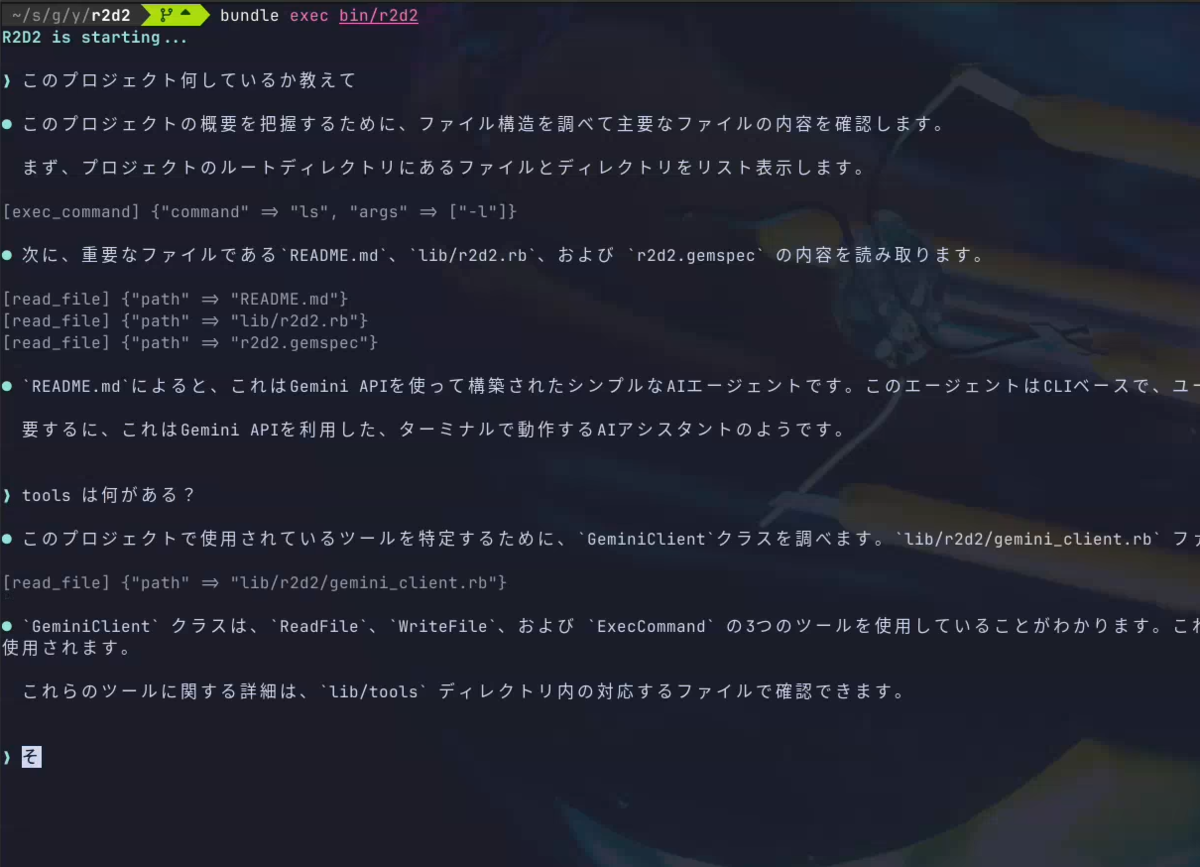
Coding Agent が簡単に作れるよってよく聞くので、理解のために自分でも実装してみました。
なんかググってもNode.jsとかPythonとかGoとかで書かれているのばかりなのでせっかくだし自分が大好きなRubyで!
リポジトリはここ: https://github.com/yoshiori/r2d2/
ModelとかはとりあえずGeminiつかってみる感じで、各セクションのその時のコミット貼って置きます。
最初のコード
https://github.com/yoshiori/r2d2/commit/7c6145961bd6b71696c4630f55c86a6f25ec3556
プロンプトのテキストとかは長いので雑にコードを書くと最初はこれだけ。
- ユーザーの入力受け取る
- Gemini に問い合わせ
- レスポンスを表示
を loop で無限にループするだけです。これがベースになるコード。
  def self.start(_args)
    puts "R2d2 is starting..."
    loop do
      input = gets.chomp
      response = gemini.stream_generate_content({
        contents: { role: "user", parts: { text: input } }
      })
      response.each do |message|
        message["candidates"].each do |candidate|
          candidate.dig("content", "parts").each do |part|
            puts "R2d2: #{part["text"]}"
          end
        end
      end
    end
  end
履歴を持つようにする
https://github.com/yoshiori/r2d2/commit/fa2ef21a3b6b8464cdf18e75e9e193c5416693c3
さっきの実装だけでも最低限動くんだけど会話履歴持ってないので毎回ボケ老人と会話しているみたいになる。
なので会話履歴持つようにする。
会話履歴と言っても簡単で話した内容を配列で持っておいて送るだけ。なので @history っていうインスタンス変数保持しておいてそこに追加して今までのtextのかわりにそれを送るだけ。受け取ったらそれも追加しておく。
role は user と model 交互にあることが期待されているのでそこだけ注意
  def chat(text)
    messages = []
    @history << { role: "user", parts: { text: text } }
    response = gemini.generate_content({
        contents: @history,
        system_instruction: { parts: { text: PROMPT } }
    })
    p response
    response["candidates"].each do |candidate|
      candidate.dig("content", "parts").each do |part|
        messages << part["text"]
        @history << { role: "model", parts: { text: part["text"] } }
      end
    end
    messages
  end
という感じ。
ツールを作る
https://github.com/yoshiori/r2d2/commit/dd32bd7009a27afabb7468d64ced40cc912e0876
ここまでだとチャットを実現しただけなので、このへんからコーディングエージェントっぽいことをやっていく。と言ってもあとはエージェントにツールをどんどん追加するだけ。
例えばファイルを読むツールは下記のように定義する
    @tools = {
      function_declarations: [
        {
          name: "read_file",
          description: "Read the contents of a file at the given path. " \
               "Use this to understand code, gather context, or inspect files " \
               "before answering questions or making decisions.",
          parameters: {
            type: "object",
            properties: {
              path: {
                type: "string",
                description: "The relative file path from the current working directory"
              }
            },
            required: ["path"]
          }
        }
      ]
    }
そう、MCP の定義と一緒。まぁ、そりゃそうか
このツールをリクエストに含めるようにします。
    response = gemini.generate_content({
        contents: contents,
        contents: @history,
        tools: @tools,
        system_instruction: { parts: { text: PROMPT } }
    })
そうするとレスポンスにfunctionCallというのが含まれるようになります。そこにどのツール使いたくて引数は何なのかとかが入っています。
なので、それを使ってて実行するようにする。たとえばさっきの read_file だと読みたいファイルのパスが入ってくるのでその中身をまたリクエストとして投げてあげれば良い。
これらもさっきの @history に全部入れて投げる。
 @history << { role: "model", parts: parts }

  function_response = []
  parts.each do |part|
    if part["functionCall"]
      name = part["functionCall"]["name"]
      args = part["functionCall"]["args"]

      result = ReadFile.new.execute(args["path"])
      function_response << { functionResponse: { name: name, response: { result: result } } }
    else
      messages << part["text"]
    end
  end

  unless function_response.empty?
    @history << { role: "user", parts: function_response }
    messages.concat(generate)
  end
ちなみに ReadFile の初期実装はこんなに簡単
class ReadFile

  def execute(file_path)
    File.read(file_path)
  end
end
一旦リファクタリング
https://github.com/yoshiori/r2d2/commit/61ab9c853a8afd37eb69e3dc353c9618e8acd53c
これでhistoryとtoolsという最低限のやりたいことは揃ったのでリファクタリング。今回はこのへんは趣旨に反するので省略する。
ツールを充実させる
https://github.com/yoshiori/r2d2/commit/7402cb84ef0f3c5bb8dc1f609d757277e5ffd6dd
こうやって1個づつツールを作っていくのもいいんだけど、もっと雑にコマンド実行出来るようにしておけば柔軟性が高いのでそれを作る。例えばファイル一覧ほしいときとかもAIが勝手に ls 叩いてくれれば良いので。
require "open3"

class ExecCommand
  def self.name
    "exec_command"
  end
  def self.description
    "Execute a shell command and return its output. " \
    "Supports any UNIX command (ls, grep, find, cat, curl, etc.)."
  end
  def self.parameters
    {
      type: "object",
      properties: {
        command: {
          type: "string",
          description: "The command to execute"
        },
        args: {
          type: "array",
          description: "Array of arguments for the command",
          items: {
            type: "string"
          }
        }
      },
      required: ["command"]
    }
  end
  def self.definition
    { name: name, description: description, parameters: parameters }
  end
  def execute(command:, args: [])
    output, status = Open3.capture2e(command, *args)
    output
  end
end
こんな感じのクラス作って追加するだけ。簡単なファイル書き込みもコマンドでやってくれるので最低限のコーディングエージェントとしての動きは出来た。
ファイル書き込みTool追加
https://github.com/yoshiori/r2d2/commit/2b3c45588c6de726454a447e1fe20ab0517b1246
上記のコマンド実行作成したらほぼ動いたんだけどファイルに書き込むのだけはたまにリダイレクトでは失敗することが合ったのでファイルに書き込むtoolを追加する。
class WriteFile
  def self.name
    "write_file"
  end

  def self.description
    "Write content to a file. If the file already exists, it will be overwritten."
  end

  def self.parameters
    {
      type: "object",
      properties: {
        path: {
          type: "string",
          description: "The relative file path from the current working directory"
        },
        content: {
          type: "string",
          description: "The content to write to the file"
        }
      },
      required: %w[path content]
    }
  end

  def self.definition
    { name: name, description: description, parameters: parameters }
  end

  def execute(path:, content:)
    FileUtils.mkdir_p(File.dirname(path))
    File.write(path, content)
    "Successfully wrote to #{path}"
  end
end
これで終わり。
テストの実装くらいは出来る
これくらい実装してあればある程度使えます。 テストを書いていなかったのでテスト書かせましょう。
実際に自分でテスト書かせてるデモはこちら ↓
Historyの圧縮
https://github.com/yoshiori/r2d2/commit/5365c589b4e84e1d541b5e46d378f26bbcafdcd5
結構対話を繰り返していると token が足りなくなることがあります。適度なタイミングで圧縮するとよいのでそれを実装します。
Responceには送信した内容(contents + system_instruction)のtoken数、つまりプロンプトと今までの会話のtoken数が入っています。なのでそれをみて閾値を超えそうだったら圧縮しましょう。
prompt_tokens = response.dig("usageMetadata", "promptTokenCount") || 0
compress_history! if prompt_tokens > TOKEN_LIMIT
感覚的には古い会話は圧縮したいので、直近の会話はそのままとっておきます。とりあえず僕は10個くらいはとっておくようにしています。
ここで注意点なのですが、無差別に10件で切っちゃうとツールを使った履歴が途中で切れておかしなことになってしまいます。
なので functionCall/functionResponse ペアが壊れない位置で分割します。そして最後がmodelになるようにします。
 def find_safe_split_index
    from = @history.size - RECENT_KEEP_COUNT

    index = @history[0...from].rindex do |msg|
      msg[:role] == "model" && msg[:parts].none? { |p| p["functionCall"] }
    end

    index ? index + 1 : 0
  end
これで分割位置は決まったので、これより前を圧縮します。それようのプロンプト作って投げればいいだけです。
  def compress_history!
    split_at = find_safe_split_index
    return if split_at <= 0

    old_history = @history[0...split_at]
    recent_history = @history[split_at..]

    summary_response = gemini.generate_content({
        contents: old_history + [{ role: "user",parts: { text: SUMMARIZE_PROMPT } }]
    })

    summary_text = summary_response.dig("candidates", 0, "content", "parts", 0, "text")

    @history = [
      { role: "user", parts: { text: "Summary of the conversation so far:\n#{summary_text}" } },
      { role: "model", parts: [{ text: "Understood. Let's continue." }] }
    ] + recent_history

    puts Reinbow("History compressed: #{old_history.size} messages summarized").faint
  end
終わり
自分で実装してみると思いの外簡単に実装できましたね。僕自信は色々な発見があって面白かったです。 あとは汎用的なAgentにしてもいいし、なにかに特化したエージェントにしたりしても面白いですね。Web検索するtoolつくったりも残っているので引き続き盆栽的に楽しもうと思います。
