今回から二回に渡り、vJunos-routerを使ってEVPN-MPLSによるL3VPNの検証をしたいと思います。
ネット上はEVPN-VXLANな記事ばかりなので、敢えてEVPN-MPLSの例をやってみます。
今回の「その1」はL2VPNなEVPN-MPLSまで設定して、(同一Network Addressである)拠点間の疎通を確認します。
次回の「その2」は疑似的なインターネットを構築して、各拠点からL3VPNで(疑似の)インターネットと通信できるようにしたいと思います。
主にJunosの設定と確認について書き記します。
例によって用語の詳しい説明は行いません。わからない用語は各自でググってください。
1. EVPN-MPLS L3VPN 構成
トポロジーは以下のとおりです。
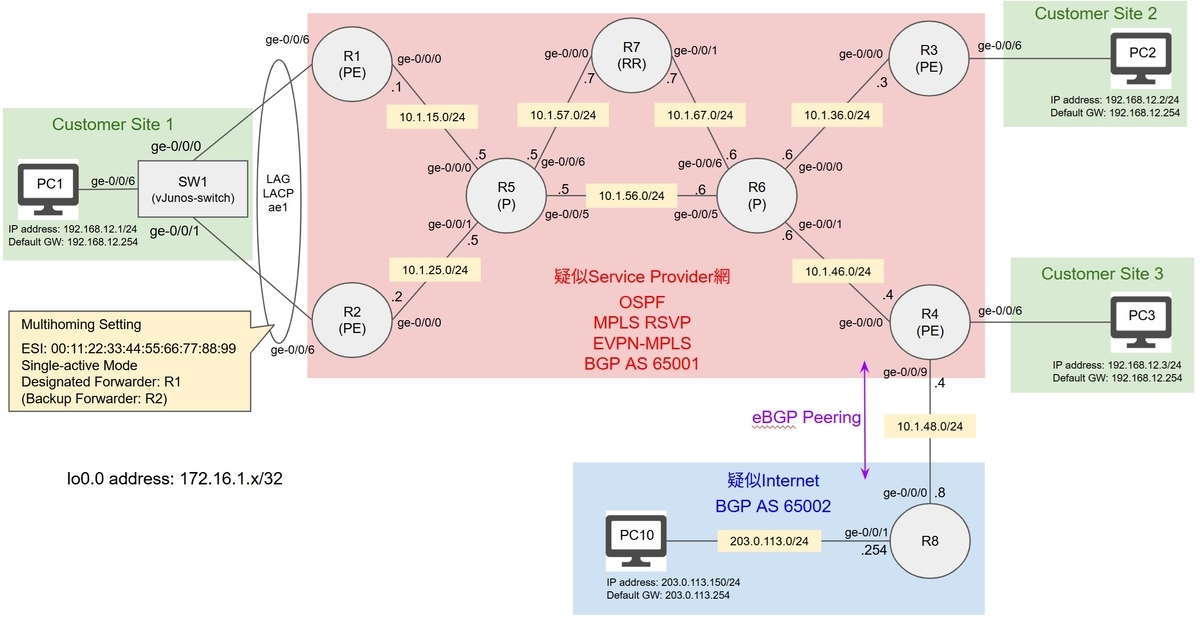
EVPN-MPLSを動かす疑似Service-Provider(疑似SP)網を中心に、Customer Siteを3つ用意します。
それぞれ同じNetwork(192.168.12.0/24)です。
Customer Site1はMultihomig構成としてます。
Customer SiteのPCとPE間はVlan Taggingは無しとしてます((ネット上にはVlan Taggingありの設定例ばかりで)あまり実例がない無しでやります)
また、疑似SP網内はRoute-Reflector(RR)によって(BGPによる)経路を広報します。
MPLSでのLabel配布Protocolは今回はRSVPを使用します。
(次回の話ですが)R4にて他ASなR8とeBGP Peeringし、疑似Internetから経路を受け取る設定をします。
各Customer SiteのPC1~3から疑似Internet上のHostであるPC10と通信できることをゴールとします。
上述のとおり、今回はCustomer SiteにあるPC1~3間のL2VPN通信まで検証したいと思います。
2-1. OSPF 設定・確認
それでは設定していきます。
R4のge-0/0/9以外のIP Addressの設定まで完了していることとします。
まず、疑似SP網内でUnderlayとなるOSPFを設定し、R1~R7のLoopback Addressをお互い広報します。
//R1
set routing-options router-id 172.16.1.1
set protocols ospf area 0.0.0.0 interface ge-0/0/0.0
set protocols ospf area 0.0.0.0 interface lo0.0 passive
//R2
set routing-options router-id 172.16.1.2
set protocols ospf area 0.0.0.0 interface ge-0/0/0.0
set protocols ospf area 0.0.0.0 interface lo0.0 passive
//R3
set routing-options router-id 172.16.1.3
set protocols ospf area 0.0.0.0 interface ge-0/0/0.0
set protocols ospf area 0.0.0.0 interface lo0.0 passive
//R4
set routing-options router-id 172.16.1.4
set protocols ospf area 0.0.0.0 interface ge-0/0/0.0
set protocols ospf area 0.0.0.0 interface lo0.0 passive
//R5
set routing-options router-id 172.16.1.5
set protocols ospf area 0.0.0.0 interface ge-0/0/0.0
set protocols ospf area 0.0.0.0 interface ge-0/0/1.0
set protocols ospf area 0.0.0.0 interface ge-0/0/5.0
set protocols ospf area 0.0.0.0 interface ge-0/0/6.0
set protocols ospf area 0.0.0.0 interface lo0.0 passive
//R6
set routing-options router-id 172.16.1.6
set protocols ospf area 0.0.0.0 interface ge-0/0/0.0
set protocols ospf area 0.0.0.0 interface ge-0/0/1.0
set protocols ospf area 0.0.0.0 interface ge-0/0/5.0
set protocols ospf area 0.0.0.0 interface ge-0/0/6.0
set protocols ospf area 0.0.0.0 interface lo0.0 passive
//R7
set routing-options router-id 172.16.1.7
set protocols ospf area 0.0.0.0 interface ge-0/0/0.0
set protocols ospf area 0.0.0.0 interface ge-0/0/1.0
set protocols ospf area 0.0.0.0 interface lo0.0 passive
OSPF設定で特筆すべき点としては、lo0.0はパッシブインターフェイスでよいのでpassive入れてます。以上!
R1~R7でお互いのLoopback Addressを学習できてるか確認します。
念のため、OSPFを動かしているインターフェイスでAdjacencyが確立してるかも見ましょう。
BlogではR7のみ確認します(実際はR1~R6でも確認してます)
//R7
lab@R7# run show route 172.16.1/24

inet.0: 17 destinations, 17 routes (17 active, 0 holddown, 0 hidden)
+ = Active Route, - = Last Active, * = Both

172.16.1.1/32      *[OSPF/10] 00:47:17, metric 2
                    >  to 10.1.57.5 via ge-0/0/0.0
172.16.1.2/32      *[OSPF/10] 00:19:36, metric 2
                    >  to 10.1.57.5 via ge-0/0/0.0
172.16.1.3/32      *[OSPF/10] 00:26:20, metric 2
                    >  to 10.1.67.6 via ge-0/0/1.0
172.16.1.4/32      *[OSPF/10] 00:21:25, metric 2
                    >  to 10.1.67.6 via ge-0/0/1.0
172.16.1.5/32      *[OSPF/10] 00:47:17, metric 1
                    >  to 10.1.57.5 via ge-0/0/0.0
172.16.1.6/32      *[OSPF/10] 00:26:59, metric 1
                    >  to 10.1.67.6 via ge-0/0/1.0
172.16.1.7/32      *[Direct/0] 00:47:57
                    >  via lo0.0

[edit]
lab@R7# run show ospf neighbor
Address          Interface              State           ID               Pri  Dead
10.1.57.5        ge-0/0/0.0             Full            172.16.1.5       128    32
10.1.67.6        ge-0/0/1.0             Full            172.16.1.6       128    35
neighbor Stateが「Full」となっており、かつR1~R6のLoopback Addressを学習していますね。
問題なさそうです。
OSPFの設定は以上です。
2-2. BGP 設定・確認
続いて、BGPの設定をしていきます。
R1~R6とR7とiBGP Peering、R7は文字通りRRの設定をします。
「cluster」をつけてるBGP groupでのPeerは全てRoute Reflector Clientになります。
//R1
set routing-options autonomous-system 65001
set protocols bgp group INTERNAL type internal
set protocols bgp group INTERNAL local-address 172.16.1.1
set protocols bgp group INTERNAL neighbor 172.16.1.7
//R2
set routing-options autonomous-system 65001
set protocols bgp group INTERNAL type internal
set protocols bgp group INTERNAL local-address 172.16.1.2
set protocols bgp group INTERNAL neighbor 172.16.1.7
//R3
set routing-options autonomous-system 65001
set protocols bgp group INTERNAL type internal
set protocols bgp group INTERNAL local-address 172.16.1.3
set protocols bgp group INTERNAL neighbor 172.16.1.7
//R4
set routing-options autonomous-system 65001
set protocols bgp group INTERNAL type internal
set protocols bgp group INTERNAL local-address 172.16.1.4
set protocols bgp group INTERNAL neighbor 172.16.1.7
//R5
set routing-options autonomous-system 65001
set protocols bgp group INTERNAL type internal
set protocols bgp group INTERNAL local-address 172.16.1.5
set protocols bgp group INTERNAL neighbor 172.16.1.7
//R6
set routing-options autonomous-system 65001
set protocols bgp group INTERNAL type internal
set protocols bgp group INTERNAL local-address 172.16.1.6
set protocols bgp group INTERNAL neighbor 172.16.1.7
//R7
set routing-options autonomous-system 65001
set protocols bgp group INTERNAL type internal
set protocols bgp group INTERNAL local-address 172.16.1.7
set protocols bgp group INTERNAL cluster 172.16.1.7
set protocols bgp group INTERNAL neighbor 172.16.1.1
set protocols bgp group INTERNAL neighbor 172.16.1.2
set protocols bgp group INTERNAL neighbor 172.16.1.3
set protocols bgp group INTERNAL neighbor 172.16.1.4
set protocols bgp group INTERNAL neighbor 172.16.1.5
set protocols bgp group INTERNAL neighbor 172.16.1.6
確認をします。
RRなR7で確認します。
//R7
lab@R7# run show bgp summary | no-more
Threading mode: BGP I/O
Default eBGP mode: advertise - accept, receive - accept
Groups: 1 Peers: 6 Down peers: 0
Table          Tot Paths  Act Paths Suppressed    History Damp State    Pending
inet.0
                       0          0          0          0          0          0
Peer                     AS      InPkt     OutPkt    OutQ   Flaps Last Up/Dwn State|#Active/Received/Accepted/Damped...
172.16.1.1            65001         11         10       0       0        4:06 Establ
  inet.0: 0/0/0/0
172.16.1.2            65001         11         10       0       0        4:02 Establ
  inet.0: 0/0/0/0
172.16.1.3            65001         11         10       0       0        3:58 Establ
  inet.0: 0/0/0/0
172.16.1.4            65001         11         10       0       0        3:54 Establ
  inet.0: 0/0/0/0
172.16.1.5            65001         11          9       0       0        3:50 Establ
  inet.0: 0/0/0/0
172.16.1.6            65001         11          9       0       0        3:53 Establ
  inet.0: 0/0/0/0
R1~R6とBGPネイバーが確立していますね。
BGPの設定は以上です。
2-3. MPLS - RSVP 設定・確認
MPLSを設定していきます。今回はRSVPなので各Ingress LERでPathを定義します。
また、Traffic Engineeringはしないのでオプションでno-cspfを付けます。
(no-cspfがないとOSPFにてTraffic Engineeringの設定が必須になります)
なお、R5-R7およびR6-R7間はMPLSを有効にする必要はありません。
//R1
set interfaces ge-0/0/0.0 family mpls
set protocols mpls interface ge-0/0/0.0
set protocols rsvp interface ge-0/0/0.0
set protocols mpls label-switched-path R1-to-R2 to 172.16.1.2
set protocols mpls label-switched-path R1-to-R2 no-cspf
set protocols mpls label-switched-path R1-to-R3 to 172.16.1.3
set protocols mpls label-switched-path R1-to-R3 no-cspf
set protocols mpls label-switched-path R1-to-R4 to 172.16.1.4
set protocols mpls label-switched-path R1-to-R4 no-cspf
//R2
set interfaces ge-0/0/0.0 family mpls
set protocols mpls interface ge-0/0/0.0
set protocols rsvp interface ge-0/0/0.0
set protocols mpls label-switched-path R2-to-R1 to 172.16.1.1
set protocols mpls label-switched-path R2-to-R1 no-cspf
set protocols mpls label-switched-path R2-to-R3 to 172.16.1.3
set protocols mpls label-switched-path R2-to-R3 no-cspf
set protocols mpls label-switched-path R2-to-R4 to 172.16.1.4
set protocols mpls label-switched-path R2-to-R4 no-cspf
//R3
set interfaces ge-0/0/0.0 family mpls
set protocols mpls interface ge-0/0/0.0
set protocols rsvp interface ge-0/0/0.0
set protocols mpls label-switched-path R3-to-R2 to 172.16.1.2
set protocols mpls label-switched-path R3-to-R2 no-cspf
set protocols mpls label-switched-path R3-to-R1 to 172.16.1.1
set protocols mpls label-switched-path R3-to-R1 no-cspf
set protocols mpls label-switched-path R3-to-R4 to 172.16.1.4
set protocols mpls label-switched-path R3-to-R4 no-cspf
//R4
set interfaces ge-0/0/0.0 family mpls
set protocols mpls interface ge-0/0/0.0
set protocols rsvp interface ge-0/0/0.0
set protocols mpls label-switched-path R4-to-R1 to 172.16.1.1
set protocols mpls label-switched-path R4-to-R1 no-cspf
set protocols mpls label-switched-path R4-to-R2 to 172.16.1.2
set protocols mpls label-switched-path R4-to-R2 no-cspf
set protocols mpls label-switched-path R4-to-R3 to 172.16.1.3
set protocols mpls label-switched-path R4-to-R3 no-cspf
//R5
set interfaces ge-0/0/0.0 family mpls
set interfaces ge-0/0/1.0 family mpls
set interfaces ge-0/0/5.0 family mpls
set protocols mpls interface ge-0/0/0.0
set protocols mpls interface ge-0/0/1.0
set protocols mpls interface ge-0/0/5.0
set protocols rsvp interface ge-0/0/0.0
set protocols rsvp interface ge-0/0/1.0
set protocols rsvp interface ge-0/0/5.0
//R6
set interfaces ge-0/0/0.0 family mpls
set interfaces ge-0/0/1.0 family mpls
set interfaces ge-0/0/5.0 family mpls
set protocols mpls interface ge-0/0/0.0
set protocols mpls interface ge-0/0/1.0
set protocols mpls interface ge-0/0/5.0
set protocols rsvp interface ge-0/0/0.0
set protocols rsvp interface ge-0/0/1.0
set protocols rsvp interface ge-0/0/5.0
確認をします。
まず、MPLSとRSVPのStatusを確認します。
今回は尺の都合でR1のみ確認します。
(実際はR2~R4も確認してます)
//R1
lab@R1# run show mpls interface
Interface        State       Administrative groups (x: extended)
ge-0/0/0.0       Up         <none>

lab@R1# run show rsvp session
Ingress RSVP: 3 sessions
To              From            State   Rt Style Labelin Labelout LSPname
172.16.1.2      172.16.1.1      Up       0  1 FF       -   299824 R1-to-R2
172.16.1.3      172.16.1.1      Up       0  1 FF       -   299952 R1-to-R3
172.16.1.4      172.16.1.1      Up       0  1 FF       -   299888 R1-to-R4
Total 3 displayed, Up 3, Down 0

Egress RSVP: 3 sessions
To              From            State   Rt Style Labelin Labelout LSPname
172.16.1.1      172.16.1.3      Up       0  1 FF       3        - R3-to-R1
172.16.1.1      172.16.1.4      Up       0  1 FF       3        - R4-to-R1
172.16.1.1      172.16.1.2      Up       0  1 FF       3        - R2-to-R1
Total 3 displayed, Up 3, Down 0

Transit RSVP: 0 sessions
Total 0 displayed, Up 0, Down 0
MPLS、RSVPのIngress RSVPともにUp表示されて問題なさそうですね。
併せてR1~R4でルーティングテーブルを確認します。
//R1
lab@R1# run show route protocol rsvp table inet.3

inet.3: 3 destinations, 3 routes (3 active, 0 holddown, 0 hidden)
+ = Active Route, - = Last Active, * = Both

172.16.1.2/32      *[RSVP/7/1] 00:14:57, metric 2
                    >  to 10.1.15.5 via ge-0/0/0.0, label-switched-path R1-to-R2
172.16.1.3/32      *[RSVP/7/1] 00:13:50, metric 3
                    >  to 10.1.15.5 via ge-0/0/0.0, label-switched-path R1-to-R3
172.16.1.4/32      *[RSVP/7/1] 00:14:05, metric 3
                    >  to 10.1.15.5 via ge-0/0/0.0, label-switched-path R1-to-R4
//R2
lab@R2# run show route protocol rsvp table inet.3
inet.3: 3 destinations, 3 routes (3 active, 0 holddown, 0 hidden)
+ = Active Route, - = Last Active, * = Both
172.16.1.1/32 *[RSVP/7/1] 00:15:33, metric 2
> to 10.1.25.5 via ge-0/0/0.0, label-switched-path R2-to-R1
172.16.1.3/32 *[RSVP/7/1] 00:14:19, metric 3
> to 10.1.25.5 via ge-0/0/0.0, label-switched-path R2-to-R3
172.16.1.4/32 *[RSVP/7/1] 00:14:46, metric 3
> to 10.1.25.5 via ge-0/0/0.0, label-switched-path R2-to-R4//R3
lab@R3# run show route protocol rsvp table inet.3
inet.3: 3 destinations, 3 routes (3 active, 0 holddown, 0 hidden)
+ = Active Route, - = Last Active, * = Both
172.16.1.1/32 *[RSVP/7/1] 00:14:56, metric 3
> to 10.1.35.6 via ge-0/0/0.0, label-switched-path R3-to-R1
172.16.1.2/32 *[RSVP/7/1] 00:14:33, metric 3
> to 10.1.35.6 via ge-0/0/0.0, label-switched-path R3-to-R2
172.16.1.4/32 *[RSVP/7/1] 00:14:29, metric 2
> to 10.1.35.6 via ge-0/0/0.0, label-switched-path R3-to-R4//R4
lab@R4# run show route protocol rsvp table inet.3
inet.3: 3 destinations, 3 routes (3 active, 0 holddown, 0 hidden)
+ = Active Route, - = Last Active, * = Both
172.16.1.1/32 *[RSVP/7/1] 00:14:50, metric 3
> to 10.1.46.6 via ge-0/0/0.0, label-switched-path R4-to-R1
172.16.1.2/32 *[RSVP/7/1] 00:15:18, metric 3
> to 10.1.46.6 via ge-0/0/0.0, label-switched-path R4-to-R2
172.16.1.3/32 *[RSVP/7/1] 00:14:59, metric 2
> to 10.1.46.6 via ge-0/0/0.0, label-switched-path R4-to-R3Label Switchingするためのinet.3テーブルに、設定した通りのPathがエントリーされてます。
これで各LER(のLoopback Address)間でLabel Switchingされます。
ちなみに、ちゃんとLabel SwitchingされるかはMPLS Pingをすることによって確認できます。
//R1
lab@R1# run ping mpls rsvp R1-to-R3
!!!!!
--- lsping statistics ---
5 packets transmitted, 5 packets received, 0% packet loss
//「R1-to-R3」のPathを使ってR1からR3へMPLS Pingして疎通できている。
2-4. EVPN 設定・確認
EVPNの設定をします。
R1とR2についてはMultihomingの設定を入れます。
トポロジー上でDesignated ForwarderをR1としているので、preference valueで明示的にR1を高優先にします。
//R1
set protocols bgp group INTERNAL family inet unicast
set protocols bgp group INTERNAL family evpn signaling
set chassis aggregated-devices ethernet device-count 1
set interfaces ae1 encapsulation ethernet-bridge
set interfaces ae1 esi 00:11:22:33:44:55:66:77:88:99
set interfaces ae1 esi single-active df-election-type preference value 100
set interfaces ae1 aggregated-ether-options lacp active
set interfaces ae1 aggregated-ether-options lacp system-id 00:00:00:00:00:12
set interfaces ae1 unit 0 family bridge
set interfaces ge-0/0/6 gigether-options 802.3ad ae1
set routing-instances EVPN-MPLS instance-type evpn
set routing-instances EVPN-MPLS protocols evpn interface ae1.0
set routing-instances EVPN-MPLS vlan-id 12
set routing-instances EVPN-MPLS interface ae1.0
set routing-instances EVPN-MPLS route-distinguisher 172.16.1.1:65001
set routing-instances EVPN-MPLS vrf-target target:65001:1
//R2
set protocols bgp group INTERNAL family inet unicast
set protocols bgp group INTERNAL family evpn signaling
set chassis aggregated-devices ethernet device-count 1
set interfaces ae1 encapsulation ethernet-bridge
set interfaces ae1 esi 00:11:22:33:44:55:66:77:88:99
set interfaces ae1 esi single-active df-election-type preference value 50
set interfaces ae1 aggregated-ether-options lacp active
set interfaces ae1 aggregated-ether-options lacp system-id 00:00:00:00:00:12
set interfaces ae1 unit 0 family bridge
set interfaces ge-0/0/6 gigether-options 802.3ad ae1
set routing-instances EVPN-MPLS instance-type evpn
set routing-instances EVPN-MPLS protocols evpn interface ae1.0
set routing-instances EVPN-MPLS vlan-id 12
set routing-instances EVPN-MPLS interface ae1.0
set routing-instances EVPN-MPLS route-distinguisher 172.16.1.2:65001
set routing-instances EVPN-MPLS vrf-target target:65001:1
//R3
set protocols bgp group INTERNAL family inet unicast
set protocols bgp group INTERNAL family evpn signaling
set interfaces ge-0/0/6 encapsulation ethernet-bridge
set interfaces ge-0/0/6 unit 0 family bridge
set routing-instances EVPN-MPLS instance-type evpn
set routing-instances EVPN-MPLS vlan-id 12
set routing-instances EVPN-MPLS interface ge-0/0/6.0
set routing-instances EVPN-MPLS vrf-target target:65001:1
set routing-instances EVPN-MPLS protocols evpn interface ge-0/0/6.0
set routing-instances EVPN-MPLS route-distinguisher 172.16.1.3:65001
//R4
set protocols bgp group INTERNAL family inet unicast
set protocols bgp group INTERNAL family evpn signaling
set interfaces ge-0/0/6 encapsulation ethernet-bridge
set interfaces ge-0/0/6 unit 0 family bridge
set routing-instances EVPN-MPLS instance-type evpn
set routing-instances EVPN-MPLS vlan-id 12
set routing-instances EVPN-MPLS interface ge-0/0/6.0
set routing-instances EVPN-MPLS vrf-target target:65001:1
set routing-instances EVPN-MPLS protocols evpn interface ge-0/0/6.0
set routing-instances EVPN-MPLS route-distinguisher 172.16.1.4:65001
//R7
set protocols bgp group INTERNAL family inet unicast
set protocols bgp group INTERNAL family evpn signaling
set routing-options resolution rib bgp.evpn.0 resolution-ribs inet.0
R7の最後の「set routing-options resolution rib bgp.evpn.0 resolution-ribs inet.0」コマンドですが今回のRRなR7には必須になります。
と言うのもEVPNで学習する経路情報はDefault動作として、inet.3テーブルをlookupしてBGP Protocol next-hopを解決しようとします。
つまりR7でMPLSを動かしてRSVPで各LERへのPathを定義しないとEVPNでの経路情報を学習できません。
そのために数十行もの設定を入れるのもダルいので、このコマンドが用意されてます。
このコマンドを入れることによってlookup対象をinet.3ではなくinet.0にします。
そうすることにより、BGP Protocol next-hopが解決されて経路情報がActiveになります。
Labが用意できる方は、ぜひこのコマンドの有無を試してみてください。
…ちなみに勘の良い方は「じゃあinet.3に直接Static Routeを書けば同様にProtocol next-hop解決されるんじゃないの?」と気づくかもしれません。
そのとおりです。ぜひその方法も試してみてください(わからなければ私にご連絡を…w)
あと、SW1の設定も入れます。単にVlan切ってLAG設定入れてるだけです。
//SW1
set chassis aggregated-devices ethernet device-count 1
set interfaces ge-0/0/0 gigether-options 802.3ad ae1
set interfaces ge-0/0/1 gigether-options 802.3ad ae1
set interfaces ge-0/0/6 unit 0 family ethernet-switching interface-mode access
set interfaces ge-0/0/6 unit 0 family ethernet-switching vlan members VLAN0012
set interfaces ae1 aggregated-ether-options lacp active
set interfaces ae1 unit 0 family ethernet-switching interface-mode access
set interfaces ae1 unit 0 family ethernet-switching vlan members VLAN0012
set vlans VLAN0012 vlan-id 12
設定は以上です。
確認をします。
まず、Customer Site 1のLAG部分を確認します。
//SW1
lab@SW1# run show lacp interfaces
Aggregated interface: ae1
    LACP state:       Role   Exp   Def  Dist  Col  Syn  Aggr  Timeout  Activity
      ge-0/0/0       Actor    No    No   Yes  Yes  Yes   Yes     Fast    Active
      ge-0/0/0     Partner    No    No   Yes  Yes  Yes   Yes     Fast    Active
      ge-0/0/1       Actor    No    No   Yes  Yes  Yes   Yes     Fast    Active
      ge-0/0/1     Partner    No    No   Yes  Yes  Yes   Yes     Fast    Active
    LACP protocol:        Receive State  Transmit State          Mux State
      ge-0/0/0                  Current   Fast periodic Collecting distributing
      ge-0/0/1                  Current   Fast periodic Collecting distributing
//R1
lab@R1# run show lacp interfaces
Aggregated interface: ae1
LACP state: Role Exp Def Dist Col Syn Aggr Timeout Activity
ge-0/0/6 Actor No No Yes Yes Yes Yes Fast Active
ge-0/0/6 Partner No No Yes Yes Yes Yes Fast Active
LACP protocol: Receive State Transmit State Mux State
ge-0/0/6 Current Fast periodic Collecting distributing//R2
lab@R2# run show lacp interfaces
Aggregated interface: ae1
LACP state: Role Exp Def Dist Col Syn Aggr Timeout Activity
ge-0/0/6 Actor No No Yes Yes Yes Yes Fast Active
ge-0/0/6 Partner No No Yes Yes Yes Yes Fast Active
LACP protocol: Receive State Transmit State Mux State
ge-0/0/6 Current Fast periodic Collecting distributingSW1、R1、R2で「Collecting distributing」となっているので問題なさそうです。
次にMP-BGPの状態を確認します。
尺の都合でR1のみ確認します。
//R1
lab@R1# run show bgp summary
Threading mode: BGP I/O
Default eBGP mode: advertise - accept, receive - accept
Groups: 1 Peers: 1 Down peers: 0
Table          Tot Paths  Act Paths Suppressed    History Damp State    Pending
inet.0
                       0          0          0          0          0          0
bgp.evpn.0
                       9          9          0          0          0          0
Peer                     AS      InPkt     OutPkt    OutQ   Flaps Last Up/Dwn State|#Active/Received/Accepted/Damped...
172.16.1.7            65001         87         81       0       0       33:01 Establ
  inet.0: 0/0/0/0
  bgp.evpn.0: 9/9/9/0
  EVPN-MPLS.evpn.0: 8/8/8/0
  __default_evpn__.evpn.0: 1/1/1/0
RRなR7と「Establ」となっており、かつbgp.evpn.0テーブルにて経路情報を受信しているので問題なさそうです。
bgp.evpn.0テーブルにて受信した経路情報を確認します。
各LERなRouterからEVPN Route Type 3情報を受信してるか確認します。
//R1
lab@R1# run show route match-prefix "3:172.16.1.*" table bgp.evpn.0

bgp.evpn.0: 9 destinations, 9 routes (9 active, 0 holddown, 0 hidden)
+ = Active Route, - = Last Active, * = Both

3:172.16.1.1:65001::12::172.16.1.1/248 IM
                   *[EVPN/170] 00:05:09
                       Indirect
3:172.16.1.2:65001::12::172.16.1.2/248 IM
                   *[BGP/170] 00:04:55, localpref 100, from 172.16.1.7
                      AS path: I, validation-state: unverified
                    >  to 10.1.15.5 via ge-0/0/0.0, label-switched-path R1-to-R2
3:172.16.1.3:65001::12::172.16.1.3/248 IM
                   *[BGP/170] 00:05:12, localpref 100, from 172.16.1.7
                      AS path: I, validation-state: unverified
                    >  to 10.1.15.5 via ge-0/0/0.0, label-switched-path R1-to-R3
3:172.16.1.4:65001::12::172.16.1.4/248 IM
                   *[BGP/170] 00:05:12, localpref 100, from 172.16.1.7
                      AS path: I, validation-state: unverified
                    >  to 10.1.15.5 via ge-0/0/0.0, label-switched-path R1-to-R4
(RRを経由して)R2~R4からのEVPN Route Type 3情報を受信してますね。
EVPN-MPLSによる経路情報の広報は問題なさそうです。
次に、Multihoming構成が問題ないか確認します。
まず、R1の状態を見ます。
//R1
lab@R1# run show evpn instance esi 00:11:22:33:44:55:66:77:88:99 extensive | no-more
Instance: EVPN-MPLS
<snip>
  Number of ethernet segments: 1
<snip>
      Local interface: ae1.0, Status: Up/Forwarding
      Number of remote PEs connected: 1
        Remote-PE        MAC-label  Aliasing-label  Mode
        172.16.1.2       0          0               single-active
      DF Election Algorithm: Preference based
      Designated forwarder: 172.16.1.1, Preference: 100
      Backup forwarder: 172.16.1.2, Preference: 50
<snip>トポロジー上の指定通り、single-active Modeとなっており、Designated forwarderがR1(172.16.1.1)となっています。
また、Statusが「Up/Forwarding」となっており、R1が高優先で動作してます。
R2も見ます。
//R2
lab@R2# run show evpn instance esi 00:11:22:33:44:55:66:77:88:99 extensive | no-more
Instance: EVPN-MPLS
<snip>
  Number of ethernet segments: 1
<snip>
      Local interface: ae1.0, Status: Up/Blocking
      Number of remote PEs connected: 1
        Remote-PE        MAC-label  Aliasing-label  Mode
        172.16.1.1       0          300000          single-active
      DF Election Algorithm: Preference based
      Designated forwarder: 172.16.1.1, Preference: 100
      Backup forwarder: 172.16.1.2, Preference: 50
<snip>
こちらもsingle-active Modeとなっており、Designated forwarderがR1(172.16.1.1)となっています。
また、Statusが「Up/Blocking」となっており、R1が高優先で動作してます。
Customer Site配下のPC間で通信してみます。
//PC1
VPC1> ping 192.168.12.2

84 bytes from 192.168.12.2 icmp_seq=1 ttl=64 time=4.805 ms
84 bytes from 192.168.12.2 icmp_seq=2 ttl=64 time=3.597 ms
84 bytes from 192.168.12.2 icmp_seq=3 ttl=64 time=3.700 ms
84 bytes from 192.168.12.2 icmp_seq=4 ttl=64 time=3.766 ms
84 bytes from 192.168.12.2 icmp_seq=5 ttl=64 time=5.345 ms

VPC1> ping 192.168.12.3

84 bytes from 192.168.12.3 icmp_seq=1 ttl=64 time=4.497 ms
84 bytes from 192.168.12.3 icmp_seq=2 ttl=64 time=7.456 ms
84 bytes from 192.168.12.3 icmp_seq=3 ttl=64 time=4.497 ms
84 bytes from 192.168.12.3 icmp_seq=4 ttl=64 time=3.491 ms
84 bytes from 192.168.12.3 icmp_seq=5 ttl=64 time=3.164 ms
今回のゴールである、拠点間でのPing疎通が無事できました!やったー!!
もうちょっと詳しく見ていきます。
まず、各PCのMAC Address情報は以下の通りです。
| ホスト名 | IP Address | MAC Address |
|---|---|---|
| PC 1 | 192.168.12.1 | 00:50:79:66:68:09 |
| PC 2 | 192.168.12.2 | 00:50:79:66:68:0c |
| PC 3 | 192.168.12.3 | 00:50:79:66:68:0b |
上記のMAC Address情報を踏まえて、R1のMAC Addressの学習情報を見ます。
//R1
lab@R1# run show evpn database
Instance: EVPN-MPLS
VLAN  DomainId  MAC address        Active source                  Timestamp        IP address
12              00:50:79:66:68:09  00:11:22:33:44:55:66:77:88:99  Feb 05 01:07:27  192.168.12.1
12              00:50:79:66:68:0b  172.16.1.4                     Feb 05 01:07:31  192.168.12.3
12              00:50:79:66:68:0c  172.16.1.3                     Feb 05 01:07:27  192.168.12.2
R1にて各PCのMAC Addressを学習していますね。
各エントリーにActive sourceにESIやPE情報が紐づいています。
また、bgp.evpn.0テーブル上には、EVPN Route Type 2にてPCのMAC/IP情報が広報されています。
//R1
lab@R1# run show route match-prefix "2:172.16.1.*" table bgp.evpn.0 | no-more

bgp.evpn.0: 15 destinations, 15 routes (15 active, 0 holddown, 0 hidden)
+ = Active Route, - = Last Active, * = Both

2:172.16.1.1:65001::12::00:50:79:66:68:09/304 MAC/IP
                   *[EVPN/170] 00:03:59
                       Indirect
2:172.16.1.3:65001::12::00:50:79:66:68:0c/304 MAC/IP
                   *[BGP/170] 00:03:59, localpref 100, from 172.16.1.7
                      AS path: I, validation-state: unverified
                    >  to 10.1.15.5 via ge-0/0/0.0, label-switched-path R1-to-R3
2:172.16.1.4:65001::12::00:50:79:66:68:0b/304 MAC/IP
                   *[BGP/170] 00:03:55, localpref 100, from 172.16.1.7
                      AS path: I, validation-state: unverified
                    >  to 10.1.15.5 via ge-0/0/0.0, label-switched-path R1-to-R4
2:172.16.1.1:65001::12::00:50:79:66:68:09::192.168.12.1/304 MAC/IP
                   *[EVPN/170] 00:03:59
                       Indirect
2:172.16.1.3:65001::12::00:50:79:66:68:0c::192.168.12.2/304 MAC/IP
                   *[BGP/170] 00:03:59, localpref 100, from 172.16.1.7
                      AS path: I, validation-state: unverified
                    >  to 10.1.15.5 via ge-0/0/0.0, label-switched-path R1-to-R3
2:172.16.1.4:65001::12::00:50:79:66:68:0b::192.168.12.3/304 MAC/IP
                   *[BGP/170] 00:03:55, localpref 100, from 172.16.1.7
                      AS path: I, validation-state: unverified
                    >  to 10.1.15.5 via ge-0/0/0.0, label-switched-path R1-to-R4
Customer Site間の疎通は無事できました。が、パケットは一体どうIPルーティングとLabel Switchingされて届いてるのでしょう?
せっかくなので、ルーティングテーブルとキャプチャーしたICMP Echo Requestパケットを詳しく見ていきます。
まずはPC1~R1間のパケットを見ます。

普通のL2ヘッダー+L3ヘッダーなパケットですね。
このパケットがR1に届いた際のパケット転送動作を見ます。
まず、EVPN-MPLSなので転送はMPLS、つまりLabel Switchingで転送されます(転送用のLabelをTransport Labelと言います)
該当するルーティングエントリーを見ます。
//R1
lab@R1# run show route table EVPN-MPLS.evpn.0 match-prefix "2:*192.168.12.2"

EVPN-MPLS.evpn.0: 10 destinations, 10 routes (10 active, 0 holddown, 0 hidden)
+ = Active Route, - = Last Active, * = Both

2:172.16.1.3:65001::12::00:50:79:66:68:0c::192.168.12.2/304 MAC/IP
                   *[BGP/170] 00:05:35, localpref 100, from 172.16.1.7
                      AS path: I, validation-state: unverified
                    >  to 10.1.15.5 via ge-0/0/0.0, label-switched-path R1-to-R3
「to 10.1.15.5 via ge-0/0/0.0, label-switched-path R1-to-R3」なので、RSVPのPathを使ってR5へ転送します。
具体的なLabelを確認します。
//R1
lab@R1# run show route table inet.3 label-switched-path R1-to-R3 extensive | grep "Label operation"
                Label operation: Push 299888
「299888」がStackされる動作となってますね。
また、EVPNはVPN Labelが付与されます。
上述の「Transport Label」「VPN Label(Service Label)」の関係性は、EVPN-MPLS(やL2VPNやL3VPN)を理解する上でかなり重要です。
この辺の説明を見るとわかりやすいです。
具体的なLabelを確認します。
該当エントリーの「Route Label」の値がStackされます。
//R1
lab@R1# run show route table EVPN-MPLS.evpn.0 match-prefix "2:*192.168.12.2" extensive | grep "Route Label"
                Route Label: 299776
以上より、R1にてTransport Labelは「299888」、VPN Labelは「299776」がStackされる動作となっています。
実際にR1の送出パケットを確認します。

ルーティングテーブルのとおり、L2フレームにLabel「299888」「299776」がStackされてパケットを送出しています。
続いてR5のパケット転送動作を見ます。
Lebel「299888」をlookupするので、該当エントリーを確認します。
//R5
lab@R5# run show route label 299888

mpls.0: 22 destinations, 22 routes (22 active, 0 holddown, 0 hidden)
+ = Active Route, - = Last Active, * = Both

299888             *[RSVP/7/1] 01:24:25, metric 1
                    >  to 10.1.56.6 via ge-0/0/5.0, label-switched-path R1-to-R3

[edit]
lab@R5# run show route label 299888 extensive | grep "Label operation"
                Label operation: Swap 299888
Label「299888」から「299888」へSwapして10.1.56.6(R6)へ転送する動作となっています。
ようするにほぼ変わらんですね(OuterなSrc/Dst MAC AddressとMPLS TTLだけ変わる)
実際にR5の送出パケットを確認します。
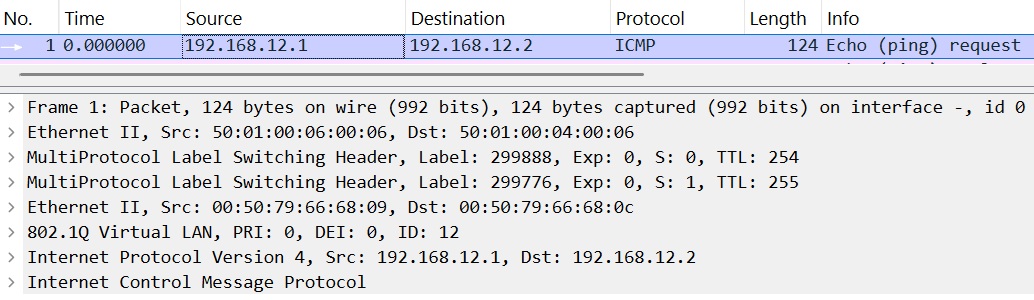
引き続き、Label「299888」「299776」がStackされてパケットを送出しています。
続いてR6のパケット転送動作を見ます。
Lebel「299888」をlookupするので、該当エントリーを確認します。
//R6
lab@R6# run show route label 299888

mpls.0: 22 destinations, 22 routes (22 active, 0 holddown, 0 hidden)
+ = Active Route, - = Last Active, * = Both

299888             *[RSVP/7/1] 01:27:08, metric 1
                    >  to 10.1.35.3 via ge-0/0/0.0, label-switched-path R1-to-R3
299888(S=0)        *[RSVP/7/1] 01:27:08, metric 1
                    >  to 10.1.35.3 via ge-0/0/0.0, label-switched-path R1-to-R3

[edit]
lab@R6# run show route label 299888 extensive | grep "Label operation"
                Label operation: Pop
                Label operation: Pop
エントリーが二つありますね。「299888」はOuter(一番上)なLabelなのでS=0の方になります。つまり下のエントリーです。
(どっちも同じですが)Popとなりますので、「299888」は外されて10.1.35.3(R3)へ転送する動作となります。
ちなみにこれはPHPの動作となります。詳しくはググってください。
実際にR6の送出パケットを確認します。
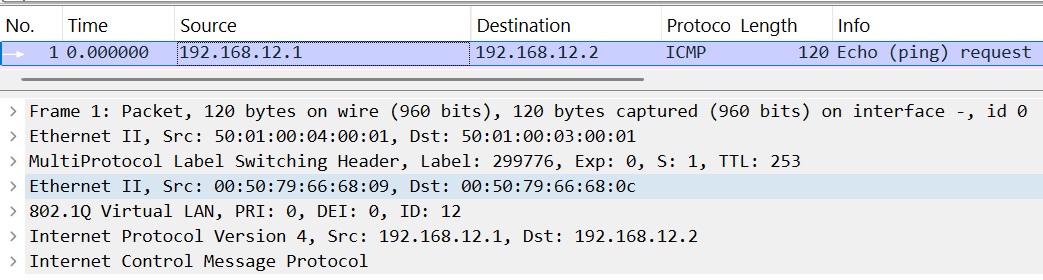
ちゃんとLabel「299888」が外されていますね。
そしてR3のパケット転送動作を見ます。
Label「299776」をLookupするので、該当エントリーを確認します。
//R3
lab@R3# run show route label 299776

mpls.0: 13 destinations, 13 routes (13 active, 0 holddown, 0 hidden)
+ = Active Route, - = Last Active, * = Both

299776             *[EVPN/7] 00:25:16, routing-instance EVPN-MPLS, route-type Ingress-MAC, vlan-id 12
to table EVPN-MPLS.evpn-mac.0「EVPN-MPLS.evpn-mac.0」を参照するような動作になっています。これは自身の対象のrouting-instanceを見るようです。
おそらく設定したrouting-instanceに紐づいてるインターフェイスからパケットが送出される動作となるでしょう(適当な推測)
R3~PC2間のパケットを確認します。

ちゃんとPC1からのICMP Echo Requestパケットが確認できました!
Lebelが外されて、PC1とPC2的には同一Networkな感じで通信できそうですね!!
という訳で今回はEVPN-MPLSによるSite間の通信までできました!!!
次回は異なるNetworkとの通信をしてみたいと思います!!!
ここまでお読みくださり、ありがとうございました!!!
3. 参考資料
Juniper Documentation - EVPN User Guide - EVPN-MPLS セクションwww.juniper.net
