こんにちは、AI・機械学習チームの苅野です。エムスリーに転職してそろそろ一ヶ月、今日も楽しくコードを書いています。
この記事では仕事の合間に作った Rust 製の CLI を紹介します。AWS Step Functions のステートマシンが途中で実行に失敗した時に何が原因で何回失敗したかを数えることができます。
とあるプロダクトでの Step Functions
私たちのチームでは定期的に ECS Task on Fargate Spot で処理を実行し、そのオーケストレーションに Step Functions を利用しているプロダクトを運用しています。オーケストレーションといってもただ Step Functions から ECS の Run Task を実行しているだけですが、Step Functions を用いることでリトライ処理を Step Functions に任せて ECS Task は処理の内容に集中することで責務を分けています。
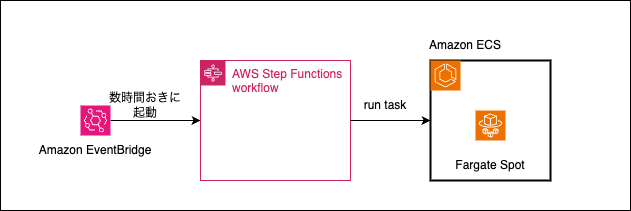
入社後のオンボーディング中に追加された Slack チャンネルの 1 つに AWS や Google Cloud で動いているワークロードで発生したエラーが通知されるチャンネルがあります。このチャンネルに入ってしばらくすると Step Functions の実行に失敗した通知がいくつか送られてきました。
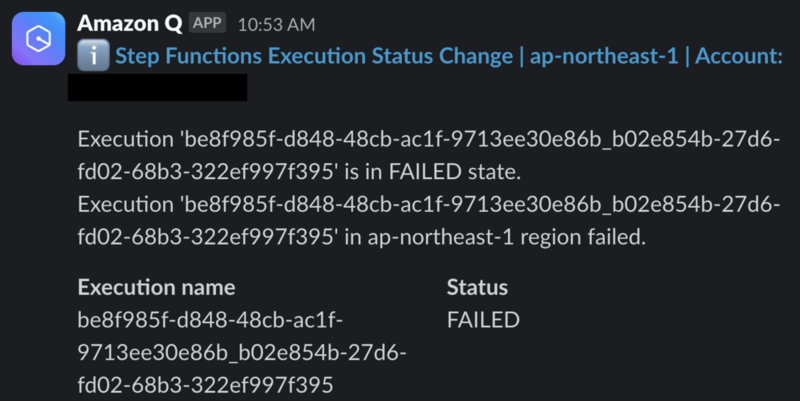
コンソールにログインして詳細を確認したところ、Task の起動に失敗したことや Task が途中で中断されたことが原因のようでした。
Run Task 失敗に対応する
Run Task が失敗する場合はベストプラクティスにあるように以下が推奨されます。
複数 AZ を指定する
複数の CPU とメモリの組み合わせを指定する
間隔をおいてリトライする
ステートマシンを定義している Terraform コードを確認したところリトライの間隔が短く回数も少なかったので、間隔を長く取り回数も増やすように修正しました。
ただこれで無事解決というわけではありません。複数 AZ を指定して何度もリトライすれば処理を完了できる可能性が高まるというだけで、仮に 5 回リトライしても 5 回とも Task 起動に失敗すれば処理は失敗です。リトライ回数をもっと大きな値、例えば 100 回まで増やせば大抵の処理は完了しそうですが、処理が途中まで完了していて中断されることが何度も起きていると最初から Fargate (not Fargate Spot) で起動しておけばよかったとなりかねません。あるいは定常的に数回リトライしているならもしかしたら前払い RI で確保した EC2 上で Task を起動してしまった方が単純なコスト面だけでいえば安いとなるかもしれません。
Step Functions が何でこけたか一目でわかる CLI を作る
このように考え始めると Step Functions の実行履歴を調べてステートマシンがどんな理由で何回失敗したか調べたくなります。しかしコンソールを開いて該当のステートマシンを開き、実行履歴を見て、どの状態で失敗したかとその原因を確認する、ということを繰り返しているとあっという間に時間が過ぎていきました。色々な画面を開く必要があって面倒です。
そこで AWS のコンソールの色々な画面を開く手間を省くためにステートマシンの実行履歴を調べて失敗した実行について原因が何で何回 Task が失敗したかを表示する CLI を作りました。個人的に興味がある Rust で実装しています*1。
まずこの CLI の使い方を紹介します。最初に CLI を実行するとまず実行履歴を調べるステートマシンを選びます。
State Machine を選択:
> calculate-scores-v2
  calculate-scores-workday-v2
  calculate-scores-not-workday-v2
そして選択したステートマシンの直近の実行履歴を見た上で失敗した実行について Spot 中断によって失敗した回数と Task 起動に失敗した回数を教えてくれます。
State Machine を選択: calculate-scores-workday-v2
選択した State Machine の成功は 98 回、失敗は 2 回
失敗した State Machie Execution: arn:aws:states:ap-northeast-1:012345678901:execution:calculate-scores-workday-v2:5fc789df-1a97-3819-448a-b15da23ad9a5_f483b343-f640-b2e9-2d63-80dd10c4b15c
実行失敗した Task は 6 回でそのうち Spot 中断は 5 回、Task 起動失敗は 1 回

失敗した State Machie Execution: arn:aws:states:ap-northeast-1:012345678901:execution:calculate-scores-workday-v2:7a5907fc-f7e0-c206-4eb4-e0f3d2a0f385_e90e49c0-ae1d-298d-caea-17664ea6a3fc
実行失敗した Task は 6 回でそのうち Spot 中断は 2 回、Task 起動失敗は 4 回
ここからはこの CLI を作る上で使ったクレートと AWS SDK for Rust の使い方(ユニットテストの仕方を含む)を紹介していきます。
その前に: Rust で書いてどうだったか
この CLI は外部の API を呼んでその結果をちょこっと整形するだけなので Rust 以外の言語で実装していいと思います*2。後述するように AWS SDK のモック定義が Builder pattern で書くため結構大変だったので、たとえば Go SDK でモックした方が楽かもしれません。
ただいざ作り始めてみると Rust で CLI を作るのは意外とスムーズにできました。難しいことをしていないからというのはありますが 1 時間くらいで動くものが作れました。
ターミナル上で選択するには dialoguer クレートを、AWS API を呼ぶには AWS SDK for Rust を使いましたがどちらも example を少し変えればやりたいことができました。Rust には Result 型や Option 型があるのでかっちり作れてよかったです。興味があるからという理由で Rust で実装しましたがそんなに悪くないかもと思いました。
dialoguer でターミナルからステートマシンを選ぶ
実行履歴を調べる対象のステートマシンをターミナル上で選ぶために dialoguer クレート を使いました。ドキュメントにあるようにスライスを渡すとターミナル上で選んだ要素のインデックスが返ってきます。次のようにステートマシンの一覧を渡しています。
let state_machine_names = vec!["state_machine_1", "state_machine_2"]
let selection = Select::new()
    .with_prompt("State Machine を選択")
    .items(&state_machine_names)
    .interact()
    .unwrap();
AWS SDK for Rust でステートマシンの一覧や実行履歴を取得する
AWS SDK for Rust はサービスごとにクレートが分かれていて、今回扱う Step Functions は aws_sdk_sfn クレートが公開されています。例えばステートマシンの一覧を取得するならこんな感じになります(次のサンプルでは簡略化のためエラーは unwrap() で潰していますが実際に作った CLI では thiserror を使ってエラー処理しています)。
use aws_sdk_sfn as sfn;

#[::tokio::main]
async fn main() -> Result<(), sfn::Error> {
    let config = aws_config::load_from_env().await;
    let client = aws_sdk_sfn::Client::new(&config);

   let state_machines = client.list_state_machines().send().await.unwrap();

    Ok(())
}
list_state_machines() でステートマシン一覧を、list_executions() であるステートマシンの実行一覧を、get_execution_history() でステートマシンのある実行のイベント履歴を取得して加工すれば失敗した実行の原因を数えることができます。
AWS SDK for Rust をテストする
公式ドキュメントに Rust SDK でユニットテストを実装する方法が書かれています。今回は automock を使うことにしました。また公式ドキュメントだと #[cfg(test)] や #[cfg(not(test))] をつけて挙動を制御していますが、この方法だと VSCode が混乱したので次のように trait を定義するようにしました。
#[cfg_attr(test, automock)]
pub trait SfnClient {
    async fn list_state_machines(
        &self,
    ) -> Result<ListStateMachinesOutput, sfn::error::SdkError<ListStateMachinesError>>;
    async fn list_executions(
        &self,
        state_machine_arn: Option<String>,
        max_results: Option<i32>,
    ) -> Result<ListExecutionsOutput, sfn::error::SdkError<ListExecutionsError>>;
    async fn get_execution_history(
        &self,
        execution_arn: Option<String>,
    ) -> Result<GetExecutionHistoryOutput, sfn::error::SdkError<GetExecutionHistoryError>>;
}
こうしておくとテストコードでは次のように Mock のクライアントを使うことができます。
#[cfg(test)]
mod test {
    use super::*;
    use mockall::predicate::eq;
    use sfn::primitives::DateTime;
    use sfn::types::{
        ExecutionListItem, ExecutionStatus, HistoryEvent, HistoryEventType, StateMachineListItem,
        StateMachineType, TaskFailedEventDetails,
    };

    fn setup_mock_client() -> MockSfnClient {
        let mut mock = MockSfnClient::default();
        // There are two state machines: stateMachine:1 and stateMachine:2
        mock.expect_list_state_machines().return_once(|| {
            Ok(ListStateMachinesOutput::builder()
                .set_state_machines(Some(vec![
                    StateMachineListItem::builder()
                        .set_state_machine_arn(Some(
                            "arn:aws:states:ap-northeast-1:012345678901:stateMachine:1".to_string(),
                        ))
                        .set_name(Some("1".to_string()))
                        .set_creation_date(Some(DateTime::from_secs(946_713_600)))
                        .set_type(Some(StateMachineType::Standard))
                        .build()
                        .unwrap(),
                    StateMachineListItem::builder()
                        .set_state_machine_arn(Some(
                            "arn:aws:states:ap-northeast-1:012345678901:stateMachine:2".to_string(),
                        ))
                        .set_name(Some("2".to_string()))
                        .set_creation_date(Some(DateTime::from_secs(946_713_600)))
                        .set_type(Some(StateMachineType::Standard))
                        .build()
                        .unwrap(),
                ]))
                .build()
                .unwrap())
        });
}
このように Mock のクライアントを定義して AWS API 呼び出しをテストしつつステートマシンの実行一覧から情報を抽出するコードを書くことで最終的に冒頭で紹介したような CLI を作りました。
AWS SDK for Rust の tips
- ログレベルに注意する
AWS SDK for Rust は tracing クレートを使っていてドキュメントにあるように環境変数 RUST_LOG で出力するログのレベルを調整できます。DEBUG だと多くのログが出てしまうので INFO くらいで出すか directiveを使って DEBUG でログを出す target を絞り込んでおくといいです。
# DEBUG で出てくるログ(これでもほんの一部)
2025-02-26T01:39:33.794696Z DEBUG aws_runtime::fs_util: loaded home directory src="HOME"
2025-02-26T01:39:33.795016Z DEBUG load_config_file{file=Default(Config)}: aws_runtime::env_config::source: performing home directory substitution home="/Users/hidekazu.karino" path="~/.aws/config"
2025-02-26T01:39:33.795073Z DEBUG load_config_file{file=Default(Config)}: aws_runtime::env_config::source: home directory expanded before="~/.aws/config" after="/Users/hidekazu.karino/.aws/config"
2025-02-26T01:39:33.795350Z DEBUG load_config_file{file=Default(Config)}: aws_runtime::env_config::source: config file loaded path=Some("/Users/hidekazu.karino/.aws/config") size=34
2025-02-26T01:39:33.795482Z DEBUG load_config_file{file=Default(Credentials)}: aws_runtime::env_config::source: performing home directory substitution home="/Users/hidekazu.karino" path="~/.aws/credentials"
2025-02-26T01:39:33.795499Z DEBUG load_config_file{file=Default(Credentials)}: aws_runtime::env_config::source: home directory expanded before="~/.aws/credentials" after="/Users/hidekazu.karino/.aws/credentials"
2025-02-26T01:39:33.795534Z DEBUG load_config_file{file=Default(Credentials)}: aws_runtime::env_config::source: config file not found path=~/.aws/credentials
2025-02-26T01:39:33.795563Z DEBUG load_config_file{file=Default(Credentials)}: aws_runtime::env_config::source: config file loaded path=Some("/Users/hidekazu.karino/.aws/credentials") size=0
2025-02-26T01:39:33.798279Z DEBUG aws_sdk_sts::endpoint_lib: loading default partitions
2025-02-26T01:39:33.962491Z DEBUG hyper_rustls::config: with_native_roots processed 161 valid and 0 invalid certs
2025-02-26T01:39:33.963139Z DEBUG aws_sdk_sfn::endpoint_lib: loading default partitions
2025-02-26T01:39:33.963565Z DEBUG invoke{service=sfn operation=ListStateMachines sdk_invocation_id=4509290}:apply_configuration: aws_smithy_runtime::client::orchestrator: timeout settings for this operation: TimeoutConfig { connect_timeout: Set(3.1s), read_timeout: Disabled, operation_timeout: Disabled, operation_attempt_timeout: Disabled }
2025-02-26T01:39:33.963653Z DEBUG invoke{service=sfn operation=ListStateMachines sdk_invocation_id=4509290}:try_op: aws_smithy_runtime_api::client::interceptors::context: entering 'serialization' phase
2025-02-26T01:39:33.963885Z DEBUG invoke{service=sfn operation=ListStateMachines sdk_invocation_id=4509290}:try_op: aws_smithy_runtime_api::client::interceptors::context: entering 'before transmit' phase
2025-02-26T01:39:33.963950Z DEBUG invoke{service=sfn operation=ListStateMachines sdk_invocation_id=4509290}:try_op: aws_smithy_runtime::client::retries::strategy::standard: no client rate limiter configured, so no token is required for the initial request.
2025-02-26T01:39:33.963960Z DEBUG invoke{service=sfn operation=ListStateMachines sdk_invocation_id=4509290}:try_op: aws_smithy_runtime::client::orchestrator: retry strategy has OKed initial request
2025-02-26T01:39:33.963983Z DEBUG invoke{service=sfn operation=ListStateMachines sdk_invocation_id=4509290}:try_op: aws_smithy_runtime::client::orchestrator: beginning attempt #1
2025-02-26T01:39:33.964026Z DEBUG invoke{service=sfn operation=ListStateMachines sdk_invocation_id=4509290}:try_op:try_attempt: aws_smithy_runtime::client::orchestrator::endpoints: resolving endpoint endpoint_params=EndpointResolverParams(TypeErasedBox[!Clone]:Params { region: Some("ap-northeast-1"), use_dual_stack: false, use_fips: false, endpoint: None }) endpoint_prefix=None
2025-02-26T01:39:33.964051Z DEBUG invoke{service=sfn operation=ListStateMachines sdk_invocation_id=4509290}:try_op:try_attempt: aws_smithy_runtime::client::orchestrator::endpoints: will use endpoint Endpoint { url: "https://states.ap-northeast-1.amazonaws.com", headers: {}, properties: {} }
2025-02-26T01:39:33.964221Z DEBUG invoke{service=sfn operation=ListStateMachines sdk_invocation_id=4509290}:try_op:try_attempt:lazy_load_identity:provide_credentials{provider=default_chain}: aws_config::meta::credentials::chain: loaded credentials provider=Environment
2025-02-26T01:39:33.964250Z DEBUG invoke{service=sfn operation=ListStateMachines sdk_invocation_id=4509290}:try_op:try_attempt:lazy_load_identity: aws_smithy_runtime::client::identity::cache::lazy: identity cache miss occurred; added new identity (took 53µs) new_expiration=2025-02-26T01:54:33.964184Z valid_for=899.999935s partition=IdentityCachePartition(7)
2025-02-26T01:39:33.964297Z DEBUG invoke{service=sfn operation=ListStateMachines sdk_invocation_id=4509290}:try_op:try_attempt: aws_smithy_runtime::client::identity::cache::lazy: loaded identity
2025-02-26T01:39:33.964598Z DEBUG invoke{service=sfn operation=ListStateMachines sdk_invocation_id=4509290}:try_op:try_attempt: aws_smithy_runtime_api::client::interceptors::context: entering 'transmit' phase
2025-02-26T01:39:33.964622Z DEBUG invoke{service=sfn operation=ListStateMachines sdk_invocation_id=4509290}:try_op:try_attempt: aws_smithy_runtime::client::http::hyper_014: new TCP connector created in 0ns
2025-02-26T01:39:33.964729Z DEBUG invoke{service=sfn operation=ListStateMachines sdk_invocation_id=4509290}:try_op:try_attempt: aws_smithy_runtime::client::http::body::minimum_throughput: applying minimum upload throughput check future options=MinimumThroughputBodyOptions { minimum_throughput: Throughput { bytes_read: 1, per_time_elapsed: 1s }, grace_period: 5s, check_window: 1s }
- Builder pattern に慣れる
Rust SDK でクライアントをモックする場合はます MockSfnClient を作成します。そしてモッククライアントに対して expect_list_state_machines() などを定義し、 MockSfnClient.list_state_machines() が呼ばれた時に返すものを定義する流れになります。例えば list_state_machines() は ListStateMachinesOutput構造体を返すのですがこの構造体は Builder pattern で定義していくことになります。
Builder pattern では構造体の field を埋めるのに set_<field 名> メソッドを呼んでいき最後に build() して構造体を作成します。次の例だと ListStateMachinesOutput 構造体が next_token, state_machines field を持ってます。そのためこの値を埋めるのにそれぞれ builder.set_next_token() と builder.set_state_machines() を呼んでいます。
struct ListStateMachinesOutput {
    pub next_token: ::std::option::Option<::std::string::String>,
    pub state_machines: ::std::vec::Vec<crate::types::StateMachineListItem>,
    _request_id: Option<String>,
}

let builder = ListStateMachinesOutput::builder();
let output = builder.set_next_token(Some("token")).set_state_machines(Some(vec![state_machine_list_item_1,state_machine_list_item_2])).build().unwrap();
先ほどの例だと省略しましたが set_state_machines() の引数の StateMachineListItem も Builder pattern で作成する必要があります。今回だとモックを定義するだけで 150 行ほどかかったので繰り返し定義する構造体はヘルパー関数を作って作成した方がいいかもしれません。
We are hiring!
AI・機械学習チームでは、手段は Rust に限らずともちょっとしたツールの自作も楽しめるようなエンジニアを募集しています。 次のリンクからご応募お待ちしています!
*1:Python でもいいかなと思いましたが boto3 をモックするライブラリの moto で Step Functions の API がいくつか対応していないので見送りました。
*2:処理時間は外部 API 呼び出しの結果まちが支配的なので速度面の優位性はあまりないですし、メモリ安全が活きる場面もあまりない
