はてなテーマ「Palette(パレット)」の着せ替えコードです
テーマのダウンロードはこちらからどうぞ♪♪
↓↓
Palette (パレット) - テーマ ストア
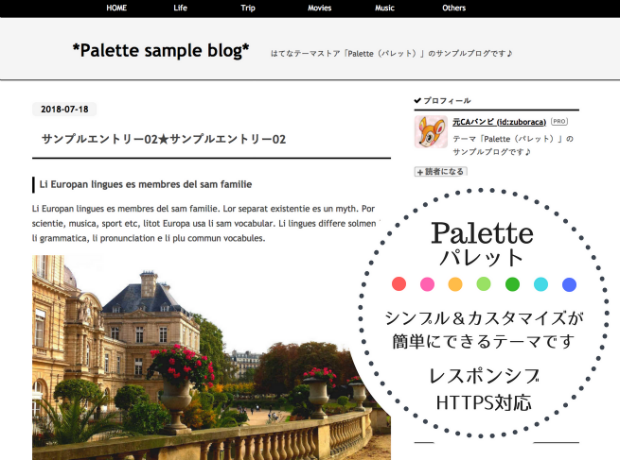
★初期設定はシンプルな白黒を基調にしたデザインです!
★コピペだけで様々なデザインに変更できる「着せ替えコード」も多数ご用意してます。
こちらのページでは...
お好きな3色を選ぶだけでイイ感じに仕上がります!
をお送りします。
試しにテキトーに選んだ3色でこんな感じになります♪


このページの説明
画面上でお好きな色にコードを書き換えられます。

出来上がったコードをそのままコピペするだけ!
コピペする場所
「ダッシュボード」(ブログ設定画面)の「デザイン」から
❶カスタマイズ(スパナマーク)→❷{}デザインCSS→❸変更を保存

色の説明
お好きな色に設定してくださいね(^0^)
そのままの色を使った場合はこのようになります。
color-1 = メインカラー
枠線やリンクの文字の色などメインになる色。濃い色がおすすめ。
color-2 = アクセントカラー
タイトルとマウスオーバーなどのちょっとしたアクセントの色。
color-3 = バックグラウンドカラー
背景色など。薄い色がおすすめ。
使い方
color1~color3の色を選んで【決定】ボタンをクリックするとコードが書き換えられます!
★ブラウザによってはご自身で色の番号を入れて頂く必要があります。
#から始まる6桁を入れて【決定】ボタンを押してください。(例:「#ff6694」など)
★色辞典をご参考にしてください。
WEB色見本 原色大辞典 - HTMLカラーコード
【決定】ボタンを押すとその後の色の書き換えができなくなります。
もう一度やり直すには【リセット】ボタンを押してページをリロードしてください。
★コードの取得★
==== ↓↓ ここからコピペどうぞ♡ ↓↓ ====
(最後まで全てコピーしてください)
/*===================
 favorite 3 colors
===================*/

#title a:hover,#blog-description,
.date a:hover,a:hover,.categories a,
.hatena-module-profile .id a,
.hatena-urllist .urllist-date-link a,
:not(.permalink)>.pager-next a,
.hatena-urllist .urllist-category-link a,
.categories a,
ul.navi-top a,ul.navi-top a:hover,
.leave-comment-title,
:not(.permalink)>.pager-next a,
#globalheader-container,
#footer, #footer a,
.bottom-menu li a,
ul.menu-second-level li a,
.bottom-menu li a:hover,
h1,h2,h3,h1 a,h2 a,h3 a
{color:					#008b8b;}

.entry-content pre .code:before,
ul.menu-second-level li a:hover
{background-color:			#008b8b;}

/*=== border ===*/
.entry-content hr,.urllist-item,
.page-archive .archive-entry,
ul.table-of-contents:before,
.comment-box .entry-comment,
#globalheader-container,
ul.navi-top
{border-bottom: 1px solid		#008b8b;}
.entry-header,
.hatena-module-title,
.entry-content h3,ul.bottom-menu
{border-bottom: 2px solid 		#008b8b;}
.entry-content h3,ul.bottom-menu
{border-top: 2px solid 			#008b8b;}
.comment-box .entry-comment:first-child,
ul.menu-second-level li a
{border-top: 1px solid 			#008b8b;}
.categories a,
.leave-comment-title,
:not(.permalink)>.pager-next a
{border: 1px solid 			#008b8b;}
.entry-content h2,
.entry-content h4
{border-left: 7px solid 		#008b8b;}
#blog-title,.entry-content h1
{border-bottom:5px solid 		#008b8b;}
.entry-content blockquote
{border-left:35px solid 		#008b8b;}

/*== icon ==*/
ul.navi-top li a::before,
ul.table-of-contents li:before,
.hatena-module-title::before
{font-family:"blogicon";
/*=== check ===*/
content:"\f029";
color: 					#008b8b;}

a,#title a,.date a,
.hatena-module-profile .id a:hover,
.hatena-urllist .urllist-date-link a:hover,
.hatena-urllist .urllist-category-link a:hover,
.entry-title a:hover,.categories a:hover,
:not(.permalink)>.pager-next a:hover,
.leave-comment-title:hover,
ul.table-of-contents li a:hover,
h1 a:hover, h2 a:hover, h3 a:hover,
h4 a:hover, h5 a:hover, h6 a:hover
{color: 				#ff7f50;}
ul.navi-top a:hover{
color:                               #ffffe0;
background-color:		#ff7f50;}

.date a,
.hatena-urllist .urllist-date-link a,
.hatena-urllist .urllist-category-link a,
.entry-content blockquote,html,body,
.entry-content pre.code,
ul.table-of-contents,
.entry-content h1,
.entry-content h2,
.entry-content h3,
#globalheader-container,
ul.navi-top,ul.navi-top a,
ul.bottom-menu,
ul.bottom-menu li,
ul.menu-second-level li a,
#footer, #footer a
{background-color:			#ffffe0;}

/*=== navi-top ===*/
ul.navi-top li a::before
{letter-spacing: 0.5em;}
/*=== bottom-menu ===*/
ul.menu-second-level li a:hover
{color:white;}
/*=== title ===*/
#title{font-size:2rem}
以上です。お疲れ様でした♡
★その他のカスタマイズに関しては↓↓
「Palette」インストール手順&カスタマイズをご覧ください♪♪
★単純にコピペするだけで、おしゃれ&かっこいいデザインにできる着せ替えコードも用意しています。
着せ替えコードはこちらからコピペできます。
