React Nativeのプロジェクトで、iPhone シミュレーターを実行しようとしたところ、以下のエラーで iOS のビルドが失敗しました。
warning: no rule to process file '/Users/xxx/Projects/ReactNativeRealm/ios/Pods/Flipper-RSocket/rsocket/README.md' of type 'net.daringfireball.markdown' for architecture 'x86_64' (in target 'Flipper-RSocket' from project 'Pods')
warning: no rule to process file '/Users/xxx/Projects/ReactNativeRealm/ios/Pods/Flipper-RSocket/rsocket/benchmarks/CMakeLists.txt' of type 'text' for architecture 'x86_64' (in target 'Flipper-RSocket' from project 'Pods')
warning: no rule to process file '/Users/xxx/Projects/ReactNativeRealm/ios/Pods/Flipper-RSocket/rsocket/benchmarks/README.md' of type 'net.daringfireball.markdown' for architecture 'x86_64' (in target 'Flipper-RSocket' from project 'Pods')
どうも、Flipper-RSocket に Xcode でビルド対象でないファイルが含まれているのが原因のようです。
対処は以下のようになります。
Xcode で ios¥Pods¥Pods.xcodeproj を開きます。
Xcode の左ペインで Pods を選択し、TARGETS の Flipper-RSocket を選択します。
Build Phases タブの Compile Souce の中から、該当ファイルを選択し、メニューの Edit > Delete でファイルを削除します。
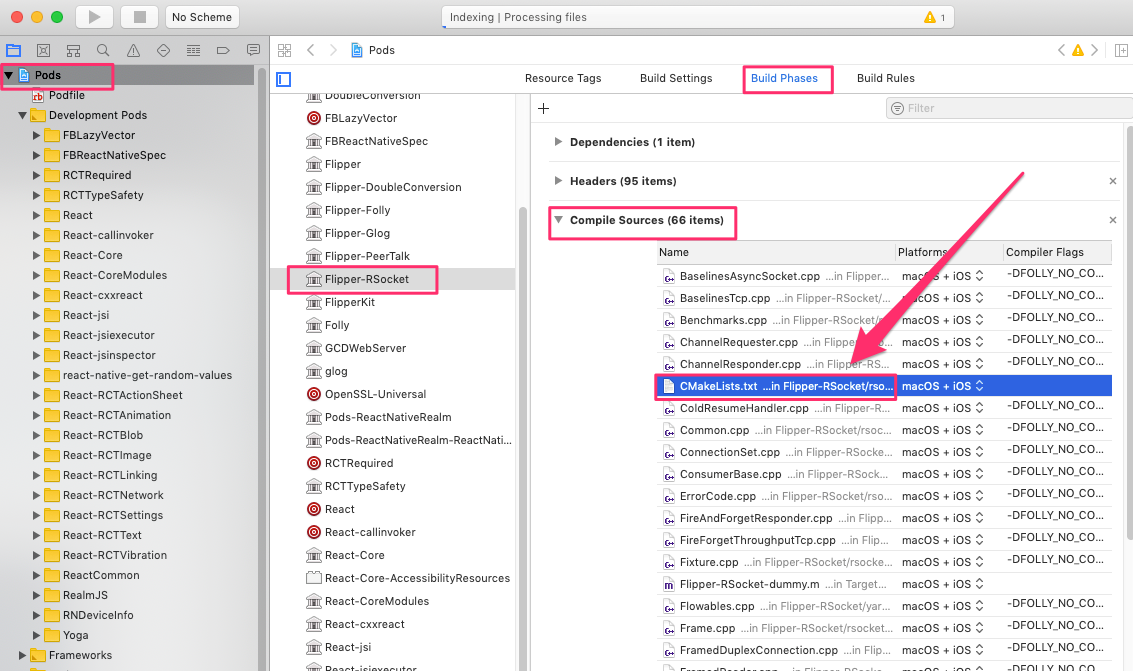
これでビルドが通るようになりました!
・参考サイト
