ripgrep-all
ripgrep-all(コマンドはrga)を使うとzip, tar.gz, pdf, sqlite3などもripgrep(コマンドはrg)で検索できるようになる。
インストール
README.mdのインストール方法によるとバイナリのダウンロードやcargoでインストールできる。
$ cargo install ripgrep_all
検索自体はripgrepを使うのでripgrepのインストールが必要。
その他、検索対象によってpandocなどをインストールする必要がある。
$ sudo yum install ripgrep pandoc poppler-utils ffmpeg cargo
ヘルプメッセージ。
$ rga --help
ripgrep_all 0.9.5
https, //github.com/phiresky/ripgrep-all

USAGE:
    rga [FLAGS] [OPTIONS]

FLAGS:
        --rga-accurate
            Use more accurate but slower matching by mime type

            By default, rga will match files using file extensions. Some programs, such as sqlite3, don't care about the file extension at all, so users sometimes use any or no
            extension at all. With this flag, rga will try to detect the mime type of input files using the magic bytes (similar to the `file` utility), and use that to choose the
            adapter. Detection is only done on the first 8KiB of the file, since we can't always seek on the input (in archives).
    -h, --help
            Prints help information

        --rga-list-adapters
            List all known adapters

        --rga-no-cache
            Disable caching of results

            By default, rga caches the extracted text, if it is small enough, to a database in ~/Library/Caches/rga on macOS, ~/.cache/rga on other Unixes, or
            C:\Users\username\AppData\Local\rga` on Windows. This way, repeated searches on the same set of files will be much faster. If you pass this flag, all caching will be
            disabled.
        --rg-help
            Show help for ripgrep itself

        --rg-version
            Show version of ripgrep itself

    -V, --version
            Prints version information


OPTIONS:
        --rga-adapters=<adapters>...
            Change which adapters to use and in which priority order (descending)

            "foo,bar" means use only adapters foo and bar. "-bar,baz" means use all default adapters except for bar and baz. "+bar,baz" means use all default adapters and also bar and
            baz.
        --rga-cache-compression-level=<cache-compression-level>
             [default: 12]

        --rga-cache-max-blob-len <cache-max-blob-len>
            Max compressed size to cache

            Longest byte length (after compression) to store in cache. Longer adapter outputs will not be cached and recomputed every time. [default: 2000000]
        --rga-max-archive-recursion=<max-archive-recursion>
            Maximum nestedness of archives to recurse into [default: 4]


-h shows a concise overview, --help shows more detail and advanced options.

All other options not shown here are passed directly to rg, especially [PATTERN] and [PATH ...]
使い方
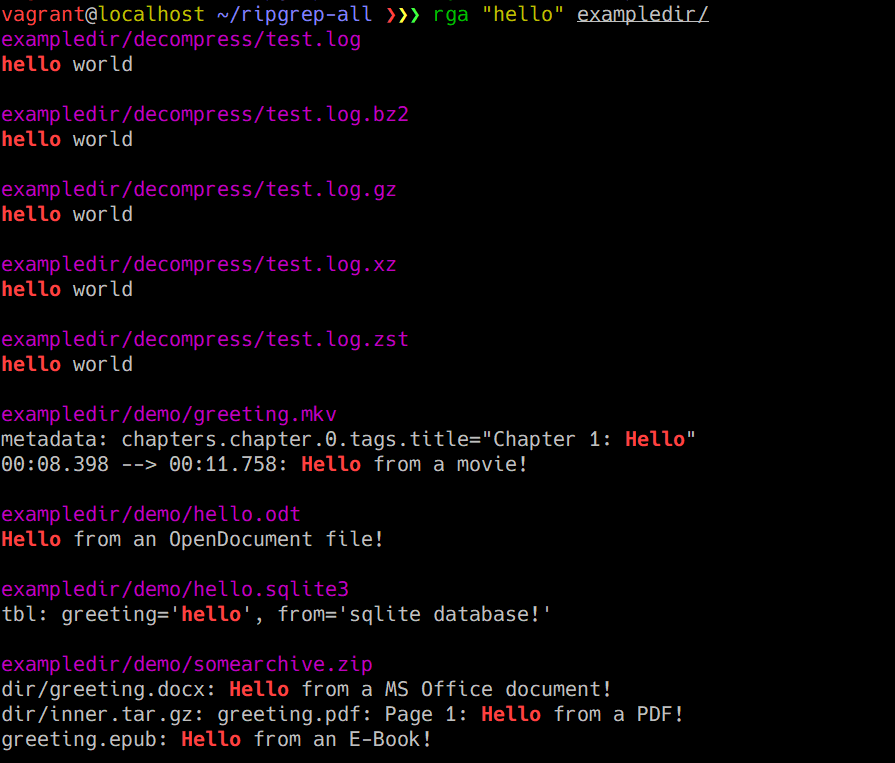
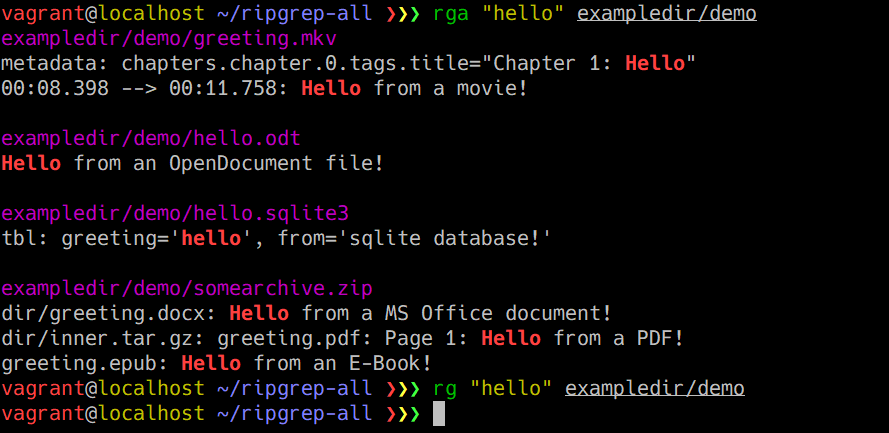
rgの代わりにrgaコマンドを使って検索すればよい。
rgでは検索できないファイルに対してrgaだと検索できている。
ripgrepがインストールされていない場合は下記メッセージが表示される。
Error: Could not find executable "rg". Please make sure you have ripgrep installed.
その他、検索に必要なパッケージがインストールされていない場合は以下のようなメッセージが表示される。
Error: Could not find executable "pdftotext".
Error: Could not find executable "pandoc".
Error: Could not find executable "ffprobe". Make sure you have ffmpeg installed.
検索可能なファイルタイプ
検索可能なファイルタイプは--rga-list-adaptersオプションで確認可能。
$ rga --rga-list-adapters
Adapters:

 - ffmpeg
     Uses ffmpeg to extract video metadata/chapters and subtitles
     Extensions: .mkv, .mp4, .avi


 - pandoc
     Uses pandoc to convert binary/unreadable text documents to plain markdown-like text
     Extensions: .epub, .odt, .docx, .fb2, .ipynb


 - poppler
     Uses pdftotext (from poppler-utils) to extract plain text from PDF files
     Extensions: .pdf
     Mime Types: application/pdf

 - zip
     Reads a zip file as a stream and recurses down into its contents
     Extensions: .zip
     Mime Types: application/zip

 - decompress
     Reads compressed file as a stream and runs a different extractor on the contents.
     Extensions: .tgz, .tbz, .tbz2, .gz, .bz2, .xz, .zst
     Mime Types: application/gzip, application/x-bzip, application/x-xz, application/zstd

 - tar
     Reads a tar file as a stream and recurses down into its contents
     Extensions: .tar


 - sqlite
     Uses sqlite bindings to convert sqlite databases into a simple plain text format
     Extensions: .db, .db3, .sqlite, .sqlite3
     Mime Types: application/x-sqlite3

The following adapters are disabled by default, and can be enabled using '--rga-adapters=+pdfpages,tesseract':

 - pdfpages
     Converts a pdf to its individual pages as png files. Only useful in combination with tesseract
     Extensions: .pdf
     Mime Types: application/pdf

 - tesseract
     Uses tesseract to run OCR on images to make them searchable. May need -j1 to prevent overloading the system. Make sure you have tesseract installed.
     Extensions: .jpg, .png
