概要
ContainerLabで構築したSRLinuxでBGPを設定しエンドエンドで通信ができることを確認します。 今回は思い切ってgNMIで設定をしてみました。
1. gNMIcのインストール
gNMIで設定するため、まずgNMI CLI clientをインストールします。
コマンド一発でインストールが完了します。
$ bash -c "$(curl -sL https://get-gnmic.openconfig.net)"
Downloading https://github.com/openconfig/gnmic/releases/download/v0.40.0/gnmic_0.40.0_linux_x86_64.tar.gz
Preparing to install gnmic 0.40.0 into /usr/local/bin
gnmic installed into /usr/local/bin/gnmic
version : 0.40.0
 commit : 3f13e44d
   date : 2025-01-27T22:03:58Z
 gitURL : https://github.com/openconfig/gnmic
   docs : https://gnmic.openconfig.net
2. ラボの起動
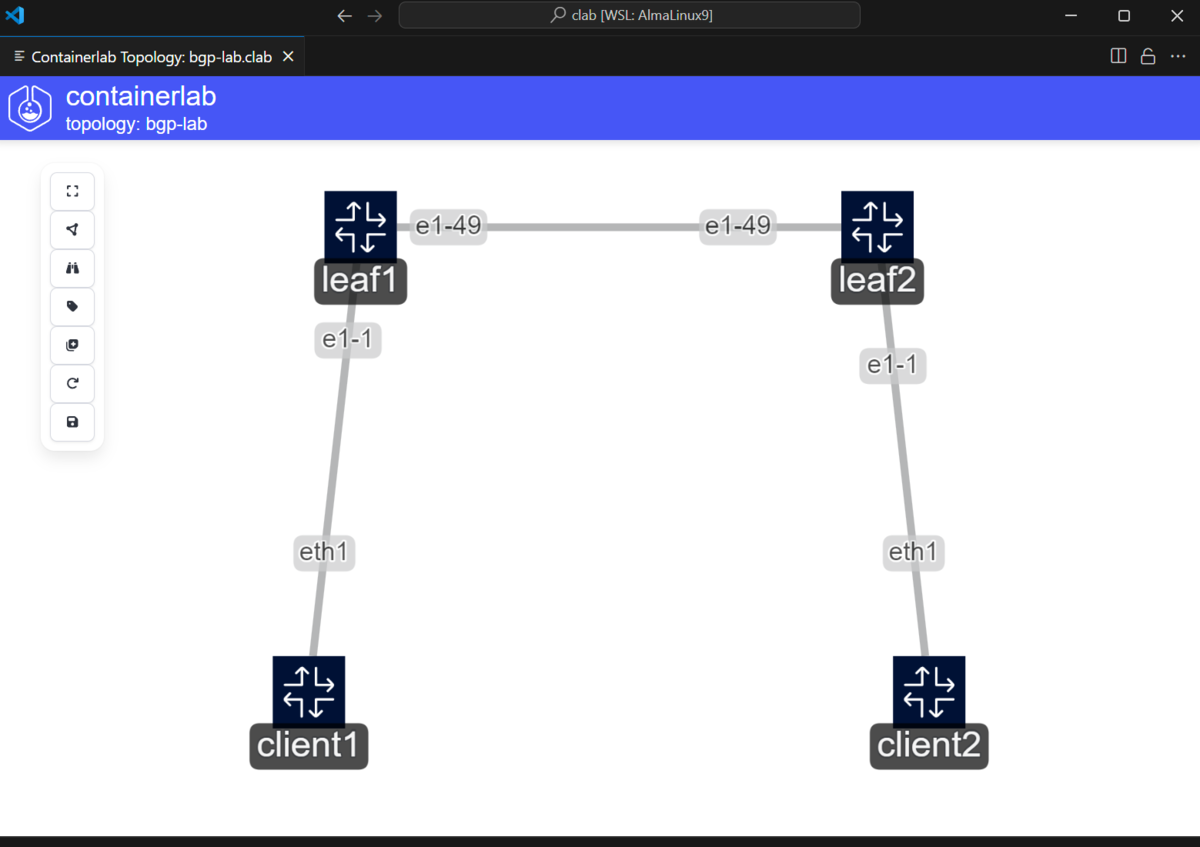
SRLinuxを起動するトポロジーファイルを作成します。
clientとしてnetwork-multitoolコンテナを利用します。
network-multitoolは
- tcpdump
- gobgp
- nc
- iperf
など、ネットワークテストで利用するものがもともと入っていたりするので便利です。
bgp-lab.clab.yml
---
name: bgp-lab
mgmt:
  network: podman_clab_mgmt
  ipv4-subnet: 172.20.1.0/24
  ipv4-gw: 172.20.1.254

topology:
  kinds:
    nokia_srlinux:
      image: ghcr.io/nokia/srlinux:25.3.1
    linux:
      image: ghcr.io/srl-labs/network-multitool
  nodes:
    leaf1:
      kind: nokia_srlinux
      type: ixrd2l
      mgmt-ipv4: 172.20.1.11
    leaf2:
      kind: nokia_srlinux
      type: ixrd2l
      mgmt-ipv4: 172.20.1.12
    client1:
      kind: linux
      exec:
        - ip route del default
        - ip addr add 192.168.0.1/24 dev eth1
        - ip route add 192.168.1.0/24 via 192.168.0.254 dev eth1
      mgmt-ipv4: 172.20.1.101
    client2:
      kind: linux
      exec:
        - ip route del default
        - ip addr add 192.168.1.1/24 dev eth1
        - ip route add 192.168.0.0/24 via 192.168.1.254 dev eth1
      mgmt-ipv4: 172.20.1.102
  links:
    - endpoints: ["leaf1:e1-49","leaf2:e1-49"]
    - endpoints: ["leaf1:e1-1","client1:eth1"]
    - endpoints: ["leaf2:e1-1","client2:eth1"]
clientはdefaultルートがマネジメント(172.20.1.0/24)側に向いてしまうので、削除しています。
作成したトポロジーから起動します
$ clab deploy -r podman
(省略)

$ clab inspect -r podman
16:30:12 INFO Parsing & checking topology file=bgp-lab.clab.yml
╭──────────────────────┬───────────────────────────────────────────┬─────────┬────────────────╮
│         Name         │                 Kind/Image                │  State  │ IPv4/6 Address │
├──────────────────────┼───────────────────────────────────────────┼─────────┼────────────────┤
│ clab-bgp-lab-client1 │ linux                                     │ running │ 172.20.1.101   │
│                      │ ghcr.io/srl-labs/network-multitool:latest │         │ N/A            │
├──────────────────────┼───────────────────────────────────────────┼─────────┼────────────────┤
│ clab-bgp-lab-client2 │ linux                                     │ running │ 172.20.1.102   │
│                      │ ghcr.io/srl-labs/network-multitool:latest │         │ N/A            │
├──────────────────────┼───────────────────────────────────────────┼─────────┼────────────────┤
│ clab-bgp-lab-leaf1   │ nokia_srlinux                             │ running │ 172.20.1.11    │
│                      │ ghcr.io/nokia/srlinux:25.3.1              │         │ N/A            │
├──────────────────────┼───────────────────────────────────────────┼─────────┼────────────────┤
│ clab-bgp-lab-leaf2   │ nokia_srlinux                             │ running │ 172.20.1.12    │
│                      │ ghcr.io/nokia/srlinux:25.3.1              │         │ N/A            │
╰──────────────────────┴───────────────────────────────────────────┴─────────┴────────────────╯
3. gNMIcのコンフィグ設定
gNMIcで接続する前に、コンフィグを作成します。
認証情報はなどを書いておくと便利です。
files/config.yml
#File output
username: admin
password: NokiaSrl1!
skip-verify: false
insecure: true
encoding: json_ietf
insecure: tlsを使わないで通信する
skip-verify: 証明書確認をスキップする
encoding: エンコーディングを指定(proto/json_ietf)
今回は利用しませんが、Subscriptionや対象ごとの認証情報、アウトプットをファイルに出力する設定なども定義が可能です。
4. BGPの設定
投入するファイル作成します。
一つのファイルにインターフェイス、ネットワークインスタンス、ルーティングポリシーの設定をして、gNMIで一気に投入をします
YANGモデルは、Web上に公開がされています。
yang.srlinux.dev
Leaf1
files/leaf1.yml
---
bfd:
  subinterface:
    - id: "ethernet-1/49.0"
interface:
  - name: "ethernet-1/1"
    subinterface:
      - index: 0
        ipv4:
          admin-state: "enable"
          address:
            - ip-prefix: "192.168.0.254/24"
  - name: "ethernet-1/49"
    subinterface:
      - index: 0
        ipv4:
          admin-state: "enable"
          address:
            - ip-prefix: "172.31.0.0/31"
  - name: "system0"
    subinterface:
      - index: 0
        ipv4:
          admin-state: "enable"
          address:
            - ip-prefix: "10.0.0.1/32"

network-instance:
  - name: "default"
    admin-state: "enable"
    interface:
      - name: "ethernet-1/1.0"
      - name: "ethernet-1/49.0"
    protocols:
      bgp:
        admin-state: "enable"
        router-id: "10.0.0.1"
        autonomous-system: 4200000001
        import-policy:
          - "bgp-import-policy"
        export-policy:
          - "bgp-export-policy"
        failure-detection:
          enable-bfd: true
        afi-safi:
          - afi-safi-name: "ipv4-unicast"
            admin-state: "enable"
        neighbor:
          - peer-address: "172.31.0.1"
            admin-state: "enable"
            local-as:
              as-number: 4200000001
            peer-as: 4200000002
            peer-group: "leaf-group"
            timers:
              hold-time: 15
              keepalive-interval: 5
            failure-detection:
              enable-bfd: true
        group:
          - group-name: "leaf-group"
            admin-state: "enable"
            failure-detection:
              enable-bfd: true
routing-policy:
  policy:
    - name: "bgp-export-policy"
      statement:
        - name: "1"
          action:
            policy-result: "accept"
          match:
            prefix:
              prefix-set: "lan1"
        - name: drop-others
          action:
            policy-result: reject
    - name: "bgp-import-policy"
      statement:
        - name: "1"
          action:
            policy-result: "accept"
          match:
            prefix:
              prefix-set: "lan2"
        - name: drop-others
          action:
            policy-result: reject
    - name: "bgp-accept-policy"
      default-action:
        policy-result: "accept"
  prefix-set:
    - name: "lan1"
      prefix:
        - ip-prefix: "192.168.0.0/24"
          mask-length-range: "exact"
    - name: "lan2"
      prefix:
        - ip-prefix: "192.168.1.0/24"
          mask-length-range: "exact"
Leaf2
files/leaf2.yml
---
interface:
  - name: "ethernet-1/1"
    subinterface:
      - index: 0
        ipv4:
          admin-state: enable
          address:
            - ip-prefix: 192.168.1.254/24
  - name: "ethernet-1/49"
    subinterface:
      - index: 0
        ipv4:
          admin-state: enable
          address:
            - ip-prefix: 172.31.0.1/31
  - name: "system0"
    subinterface:
      - index: 0
        ipv4:
          admin-state: "enable"
          address:
            - ip-prefix: "10.0.0.2/32"

network-instance:
  - name: default
    admin-state: enable
    interface:
      - name: "ethernet-1/1.0"
      - name: "ethernet-1/49.0"
    protocols:
      bgp:
        admin-state: enable
        router-id: 10.0.0.2
        autonomous-system: 4200000002
        import-policy:
          - bgp-import-policy
        export-policy:
          - bgp-export-policy
        afi-safi:
          - afi-safi-name: ipv4-unicast
            admin-state: enable
        neighbor:
          - peer-address: 172.31.0.0
            admin-state: enable
            local-as:
              as-number: 4200000002
            peer-as: 4200000001
            peer-group: leaf-group
            timers:
              hold-time: 15
              keepalive-interval: 5
        group:
          - group-name: leaf-group
            admin-state: enable

routing-policy:
  policy:
    - name: bgp-export-policy
      statement:
        - name: 1
          action:
            policy-result: accept
          match:
            prefix:
              prefix-set: lan2
        - name: drop-others
          action:
            policy-result: reject
    - name: bgp-import-policy
      statement:
        - name: 1
          action:
            policy-result: accept
          match:
            prefix:
              prefix-set: lan1
        - name: drop-others
          action:
            policy-result: reject
    - name: bgp-accept-policy
      default-action:
        policy-result: accept
  prefix-set:
    - name: lan1
      prefix:
        - ip-prefix: 192.168.0.0/24
          mask-length-range: exact
    - name: lan2
      prefix:
        - ip-prefix: 192.168.1.0/24
          mask-length-range: exact
設定を実施します。
gnmicをsetで起動します。
今回は設定を更新updateする形で投入します。
gnmic --config <コンフィグファイル> set --update-path / --update-file <設定ファイル> -a <対象機器(ip or host):ポート>
insecureで接続するため、port 57401を指定しています。
ポート番号はSRLinuxの設定から確認しました
info /system grpc-server insecure-mgmt
    (省略)
    port 57401
leaf1の設定
gnmic --config files/config.yml set --update-path / --update-file files/leaf1.yml -a clab-bgp-lab-leaf1:57401

{
  "source": "clab-bgp-lab-leaf1:57401",
  "timestamp": 1743924372349233575,
  "time": "2025-04-06T16:26:12.349233575+09:00",
  "results": [
    {
      "operation": "UPDATE"
    }
  ]
}
leaf2の設定
gnmic --config files/config.yml set --update-path / --update-file files/leaf2.yml -a clab-bgp-lab-leaf2:57401

{
  "source": "clab-bgp-lab-leaf1:57401",
  "timestamp": 1743924372349233575,
  "time": "2025-04-06T16:26:12.349233575+09:00",
  "results": [
    {
      "operation": "UPDATE"
    }
  ]
}
設定は爆速です
設定内容などに間違いがあるとすべての内容がはじかれます(一部のみ投入などはされない)
5. 設定確認
実機にアクセスし、BGPネイバーが貼れていることを確認します
leaf1# show network-instance default protocols bgp neighbor
----------------------------------------------------------------------------------------------------------------------------------------------------------------
BGP neighbor summary for network-instance "default"
Flags: S static, D dynamic, L discovered by LLDP, B BFD enabled, - disabled, * slow
----------------------------------------------------------------------------------------------------------------------------------------------------------------
----------------------------------------------------------------------------------------------------------------------------------------------------------------
+------------------+--------------------------+------------------+------+----------+--------------+--------------+-------------+--------------------------+
|     Net-Inst     |           Peer           |      Group       | Flag | Peer-AS  |    State     |    Uptime    |  AFI/SAFI   |      [Rx/Active/Tx]      |
|                  |                          |                  |  s   |          |              |              |             |                          |
+==================+==========================+==================+======+==========+==============+==============+=============+==========================+
| default          | 172.31.0.1               | leaf-group       | SB   | 42000000 | established  | 0d:0h:54m:42 | ipv4-       | [1/1/1]                  |
|                  |                          |                  |      | 02       |              | s            | unicast     |                          |
+------------------+--------------------------+------------------+------+----------+--------------+--------------+-------------+--------------------------+
----------------------------------------------------------------------------------------------------------------------------------------------------------------
Summary:
1 configured neighbors, 1 configured sessions are established, 0 disabled peers
0 dynamic peers

# show network-instance default protocols bgp routes ipv4 summary
----------------------------------------------------------------------------------------------------------------------------------------------------------------
Show report for the BGP route table of network-instance "default"
----------------------------------------------------------------------------------------------------------------------------------------------------------------
Status codes: u=used, *=valid, >=best, x=stale, b=backup
Origin codes: i=IGP, e=EGP, ?=incomplete
----------------------------------------------------------------------------------------------------------------------------------------------------------------
+---------+-------------------------------------+-------------------------------------+---------+---------+---------------------------------------------------+
| Status  |               Network               |              Next Hop               |   MED   | LocPref |                     Path Val                      |
+=========+=====================================+=====================================+=========+=========+===================================================+
| u*>     | 172.31.0.0/31                       | 0.0.0.0                             |         |         |  i                                                |
| u*>     | 192.168.0.0/24                      | 0.0.0.0                             |         |         |  i                                                |
| u*>     | 192.168.1.0/24                      | 172.31.0.1                          |         |         |  i[4200000002]                                    |
+---------+-------------------------------------+-------------------------------------+---------+---------+---------------------------------------------------+
----------------------------------------------------------------------------------------------------------------------------------------------------------------
3 received BGP routes: 3 used, 3 valid, 0 stale
3 available destinations: 0 with ECMP multipaths
----------------------------------------------------------------------------------------------------------------------------------------------------------------
問題なく貼れました。経路ももらえています。
gNMIcでネイバーのステートを確認
$ gnmic --config files/config.yml get --path /network-instance[name=default]/protocols/bgp/neighbor[peer-address=*]/session-state/ -e json_ietf -a clab-bgp-lab-leaf1:57401
[
  {
    "source": "clab-bgp-lab-leaf1:57401",
    "timestamp": 1743925804499305635,
    "time": "2025-04-06T16:50:04.499305635+09:00",
    "updates": [
      {
        "Path": "srl_nokia-network-instance:network-instance[name=default]/protocols/srl_nokia-bgp:bgp",
        "values": {
          "srl_nokia-network-instance:network-instance/protocols/srl_nokia-bgp:bgp": {
            "neighbor": [
              {
                "peer-address": "172.31.0.1",
                "session-state": "established"
              }
            ]
          }
        }
      }
    ]
  }
]
jqと組み合わせると見やすくなる
$ gnmic --config files/config.yml get --path /network-instance[name=default]/protocols/bgp/neighbor[peer-address=*]/session-state/ -e json_ietf -a clab-bgp-lab-leaf1:57401 | jq ".[0].updates[0].values"
{
  "srl_nokia-network-instance:network-instance/protocols/srl_nokia-bgp:bgp": {
    "neighbor": [
      {
        "peer-address": "172.31.0.1",
        "session-state": "established"
      }
    ]
  }
}
6.通信確認
client1にアクセスしてclient2にTraceとPingを実施します
(SSHでアクセスする場合はuser/multit00lでアクセスできます)
[*]─[client1]─[/]
└──> traceroute -n 192.168.1.1
traceroute to 192.168.1.1 (192.168.1.1), 30 hops max, 46 byte packets
 1  192.168.0.254  0.431 ms  0.831 ms  1.004 ms
 2  *  *  *
 3  192.168.1.1  0.441 ms  0.286 ms  0.257 ms

[*]─[client1]─[/]
└──> ping 192.168.1.1
PING 192.168.1.1 (192.168.1.1) 56(84) bytes of data.
64 bytes from 192.168.1.1: icmp_seq=1 ttl=62 time=0.351 ms
64 bytes from 192.168.1.1: icmp_seq=2 ttl=62 time=0.289 ms
^C
--- 192.168.1.1 ping statistics ---
2 packets transmitted, 2 received, 0% packet loss, time 1045ms
rtt min/avg/max/mdev = 0.289/0.320/0.351/0.031 ms
疎通成功しました。
TracerouteでHopが応答しなかったのはclient1からleaf2へ通信経路がなかったからかな。
おまけ
- SRLinuxは、OpenConfigとNokiaYangModleを使えます。
どちらを使うかはsystem grpc-serverで定義します。デフォルトはNokiaYangModleです。
まとめ
gNMIを使ってのBGPの設定ができました。
update以外に、replaceも選択ができ宣言的な運用を目指すこともできそうです。
私は検証中にインターフェイスの設定をreplaceしたら管理用インターフェイスも情報が吹き飛びラボを立ち上げなおしました。
運用には注意ですね。
set以外のgetやsubscribeも触ってみようと思います。
