Plots.jlで絵文字を使う方法はPlots.jlのGRバックエンド(@ubuntu)で絵文字を表示するで紹介したが, 日本語と絵文字を同時に使うには,GRバックエンドの特性上,一つのフォントの中に日本語と絵文字のグリフの両方が必要である。
で,JuiseeとNoto Emojiのフォントを合成すれば…とか思っていると,どうやらCica FontはNoto Emojiを含んだものが デフォルトらしい。で,それなら合成フォントも作らんでええわ,ということで実際に試そうということになった。
でついでということで,Cica FontのRegularフォントだけをユーザーフォントにむりやりインストールするスクリプトを作ってみた。 ただし,手持ちの環境がlinuxとwindowsしかないので,それらの環境用だ。
# setup_cica_font.jl
begin
    # Cica font install script for Linux and Windows
    using ZipFile

    is_exist_fc_list() = try run(`fc-list -V`); true catch; false end

    function user_fontdir()
        Sys.iswindows() ?
            joinpath(ENV["LOCALAPPDATA"], "Microsoft", "Windows", "Fonts") :
            Sys.isunix() ?
            joinpath(get(ENV, "XDG_DATA_HOME",
                         joinpath(ENV["HOME"], ".local", "share")),
                     "fonts") :
                         error("Not Supported OS")
    end

    function check_user_fontdir()
        _fontdir = user_fontdir()
        if !isdir(_fontdir)
            mkpath(_fontdir,
                mode=Sys.iswindows() ? 0o750 : 0o775)
            @info "User's fontdir created."
        end
        true
    end

    is_installed_font_in_unix(fontfilename) = is_exist_fc_list() &&
        fontfilename in map(x -> basename(split(x, ":")[1]),
                            split(chomp(read(`fc-list`, String))
                                  , "\n"))

    is_installed_font_in_windows(fontfilename) =
        fontfilename in [
            readdir(joinpath(ENV["LOCALAPPDATA"], "Microsoft", "Windows", "Fonts"));
            readdir(joinpath(ENV["SYSTEMROOT"], "Fonts"))]

    function install_cica_regular(destpath)
        ttf_url = "https://github.com/miiton/Cica/releases/download/v5.0.3/Cica_v5.0.3.zip"
        local font_ttf = "Cica-Regular.ttf"
        tmpzip = download(ttf_url)
        open(tmpzip, "r") do io
            r = ZipFile.Reader(io)
            for k in eachindex(r.files)
                basename(r.files[k].name) == font_ttf &&
                    write(joinpath(destpath, font_ttf), r.files[k])
            end
        end
    end

    if Sys.isunix()
        if is_exist_fc_list()
            if is_installed_font_in_unix("Cica-Regular.ttf")
                @info "'Cica-Regular.ttf' is already installed."
            else
                check_user_fontdir()
                install_cica_regular(user_fontdir())
                run(`fc-cache`)
                @info "'Cica-Regular.ttf' is installed, now."
            end
        else
            @info "Can't install Cica Font."
        end
    elseif Sys.iswindows()
        if is_installed_font_in_windows("Cica-Regular.ttf")
            @info "'Cica-Regular.ttf' is already installed."
        else
            check_user_fontdir()
            install_cica_regular(user_fontdir())
            @info "'Cica-Regular.ttf' is installed, now."
        end
    else
        @info "Not support OS."
    end
    nothing
end
まぁ何というかむりやり感が漂うソースではある。
上のスクリプトをsetup_cica_font.jlとして保存し,include("setup_cica_font.jl")
と実行すればインストールされるはず…ですが保証はいたしません。
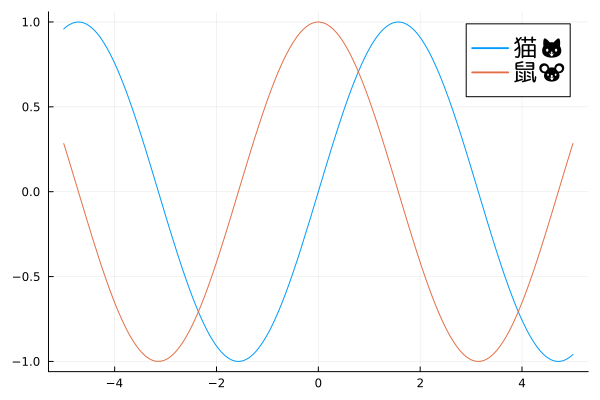
実際にplots.jlのGRバックエンドでの使い方は次のような感じ。
using Plots
import GR

const FONT_JA_EMOJI = "Cica-Regular"
gr()

plot([sin, cos]; label=["猫🐱" "鼠🐭"], legend_font_family=FONT_JA_EMOJI,
     legend_font_pointsize=15)

savefig("plots_gr_ja_emoji.png")
注意点
Cica Fontのライセンスはリンク先の方を参照して下さい。
まとめ
という訳でPlots.jlのGRバックエンドで絵文字が使えない問題は これで大体OKという感じとなるではないかと思う今日この頃。
