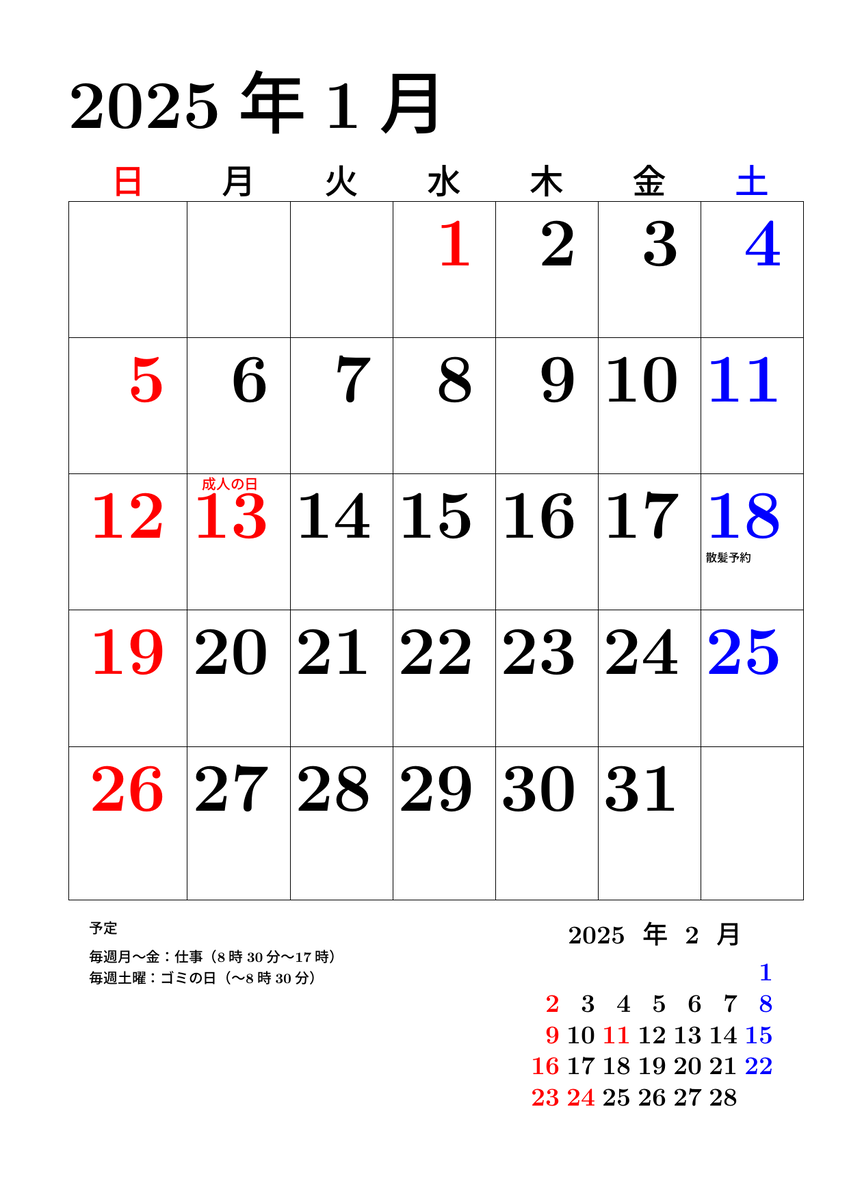
昨年末お店とかでもらっていたカレンダーが全然もらえなかったので,とりあえずやっつけでTikZで今月のカレンダーを作成してみた。
次のような感じ。
\documentclass[uplatex, fontsize=48pt, line_length=11zw,gutter=0zw,
head_space=1zw, baselineskip=1zw, paper=a4, number_of_lines=24]{jlreq}

\usepackage[dvipdfmx]{graphicx}
\usepackage[dvipdfmx]{xcolor}
\usepackage{pgf,tikz}
\usepackage[noalphabet, haranoaji]{pxchfon}
\pagestyle{empty}

\usetikzlibrary{calendar}

% https://texample.net/changing-the-default-calendar-layout/
\makeatletter
% This way you can define your own conditions, for example, you
% could make something as `full moon', `even week', `odd week',
% et cetera. In principle. The math in TeX could be hard.
\pgfkeys{/pgf/calendar/start of year/.code={%
    \ifnum\pgfcalendarifdateday=1\relax%
        \ifnum\pgfcalendarifdatemonth=1\relax\pgfcalendarmatchestrue\fi%
    \fi%
}}%

% Define our own style
\tikzstyle{week list sunday}=[
    % Note that we cannot extend from week list,
    % the execute before day scope is cumulative
    execute before day scope={%
           \ifdate{day of month=1}{\ifdate{equals=\pgfcalendarbeginiso}{}{
           % On first of month, except when first date in calendar.
               \pgfmathsetlength{\pgf@y}{\tikz@lib@cal@month@yshift}%
               \pgftransformyshift{-\pgf@y}
           }}{}%
    },
    execute at begin day scope={%
        % Because for TikZ Monday is 0 and Sunday is 6,
        % we can't directly use \pgfcalendercurrentweekday,
        % but instead we define \c@pgf@counta (basically) as:
        % (\pgfcalendercurrentweekday + 1) % 7
        \pgfmathsetlength\pgf@x{\tikz@lib@cal@xshift}%
        \ifnum\pgfcalendarcurrentweekday=6
            \c@pgf@counta=0
        \else
            \c@pgf@counta=\pgfcalendarcurrentweekday
            \advance\c@pgf@counta by 1
        \fi
        \pgf@x=\c@pgf@counta\pgf@x
        % Shift to the right position for the day.
        \pgftransformxshift{\pgf@x}
    },
    execute after day scope={
        % Week is done, shift to the next line.
        \ifdate{Saturday}{
            \pgfmathsetlength{\pgf@y}{\tikz@lib@cal@yshift}%
            \pgftransformyshift{-\pgf@y}
        }{}%
    },
    % This should be defined, glancing from the source code.
    tikz@lib@cal@width=7
]
\makeatother

\begin{document}
 \textbf{2025年1月}

 \begin{tikzpicture}
  \calendar(cal)[dates=2025-01-01 to 2025-01-31,
  week list sunday, if={(Sunday) [red]}, if={(Saturday) [blue]}, font=\bfseries,
  day yshift=2zw, if={(equals=2025-01-13) [red]}, if={(equals=2025-01-01) [red]}];

  \coordinate (t0) at (cal-2025-01-01.north -| cal-2025-01-12.west);
  \coordinate (b0) at ([yshift=-1zw]cal-2025-01-31.south -| cal-2025-01-12.west);

  \foreach \x/\d in {1/cal-2025-01-12, 2/cal-2025-01-13, 3/cal-2025-01-14, 4/cal-2025-01-15,
  5/cal-2025-01-16, 6/cal-2025-01-17, 7/cal-2025-01-18}
  {\coordinate (t\x) at (cal-2025-01-01.north -| \d.east);
  \coordinate (b\x) at ([yshift=-1zw]cal-2025-01-31.south -| \d.east);}

  \foreach \x/\d in {1/cal-2025-01-05,2/cal-2025-01-12,3/cal-2025-01-19,4/cal-2025-01-26}
  {\coordinate (l\x) at (\d.north -| t0); \coordinate (r\x) at (\d.north -| t7);}

  \foreach \t in {t0,t1,t2,t3,t4,t5,t6,t7} {\draw (\t) -- (\t |- b3);}
  \foreach \l in {l1,l2,l3,l4} {\draw (\l) -- (\l -| t7);}
  \draw (t0) -- (t7) (b0) -- (b7);

  \foreach \l/\r/\t/\c in {t0/t1/日/red, t1/t2/月/black, t2/t3/火/black,
  t3/t4/水/black, t4/t5/木/black, t5/t6/金/black, t6/t7/土/blue}
  {\path (\l) -- node[\c, font=\tiny] {\textbf{\t}} ([yshift=1cm]\r);}

  \node[red, font=\fontsize{10}{10}\selectfont,yshift=-7pt] at (cal-2025-01-13.north) {\textbf{成人の日}};

  \calendar[anchor=north east, dates=2025-02-01 to 2025-02-28,
  week list sunday, if={(Sunday) [red]}, if={(Saturday) [blue]}, font=\bfseries\fontsize{18}{18}\selectfont,
  day yshift=22pt,day xshift=25pt, if={(equals=2025-02-11) [red]}, if={(equals=2025-02-24) [red]}] at ([xshift=-5.5cm, yshift=-2cm]b7);
  \node[anchor=north east, font=\fontsize{18}{18}\selectfont] at ([xshift=-1cm]b7) {\textbf{2025年2月}} ;

  % 予定とか
  \node[font=\fontsize{8}{8}\selectfont, anchor=north west, yshift=20pt] at (cal-2025-01-18.south west) {\textbf{散髪予約}};

  \node[font=\bfseries\fontsize{10}{10}\selectfont, anchor=north west, text width=10cm] at (b0) {
  予定 \\[10pt]
  毎週月~金:仕事(8時30分~17時)\\[5pt]
  毎週土曜:ゴミの日(~8時30分)\\[5pt]
  };

 \end{tikzpicture}

\end{document}

%#!uplatex -shell-escape -synctex=1 2025-01-sample.tex