お詫び
最初に断わっておきますが,完全に元ネタは算額(その1004)のパクりです。つつしんでお詫び申し上げます。
※ 追記[2025-07-11] 上記リンク切れを修正しました。
目的
とは言うものの個人的な目的もあって,
ということで,Pythonに依存しない(というかPythonのことよく分からないので)環境で解くにはどうしたらいいか?, そこでJuMPを使って試行錯誤してみたというのがこの記事の内容です。
問題
算額(その1004)を参照ください。
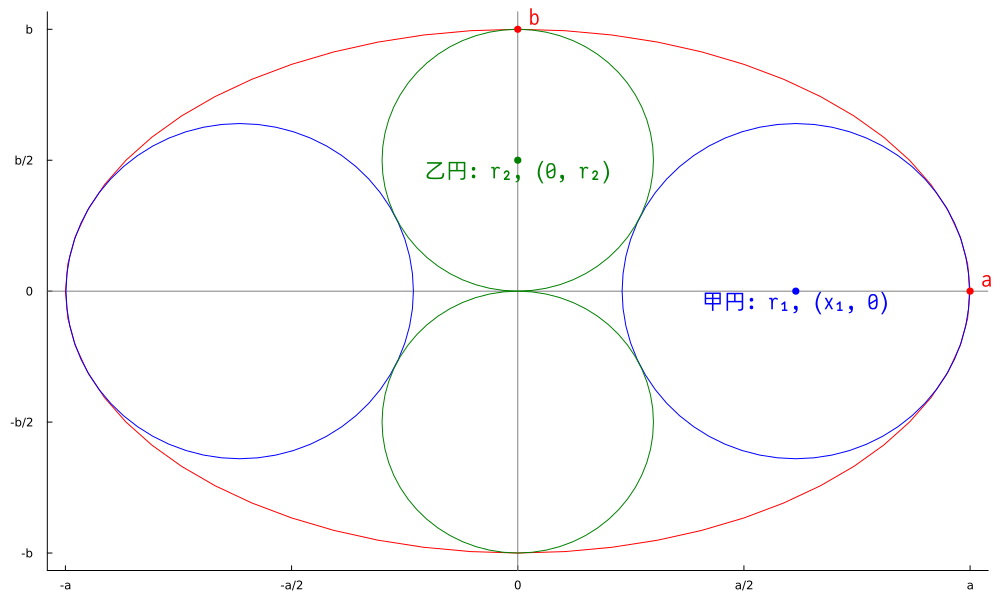
解いた例
JuMPの場合は,モデル化だけで実際のSolverは他のバイナリを利用するようです。が詳しいことは分かりません。 今回はIpoptのラッパー,Ipopt.jlを利用します。
なので,厳密にはpure Juliaかどうかは微妙なのですが,Pythonには依存しない感じです。
using JuMP, Ipopt, Latexify, LaTeXStrings

model = begin
    _model = Model(Ipopt.Optimizer)

    # 変数
    @variables(_model, begin
                   a == 25 / 2
                   b == 15 / 2
                   x₁ ≥ 0
                   r₁ ≥ 0
                   r₂
               end)

    # 制限条件
    @constraint(_model, r₂ == b / 2)
    @constraint(_model, 条件₁, (a^2 - b^2) * (b^2 - r₁^2) / b^2 == x₁^2)
    @constraint(_model, 条件₂, x₁^2 + r₂^2 == (r₁ +r₂)^2)

    # @objectiveを指定せず最適化
    optimize!(_model)

    println("a=$(value(a))")
    println("b=$(value(b))")
    println("x₁=$(value(x₁))")
    println("r₁=$(value(r₁))")
    println("r₂=$(value(r₂))")

    _model
end

render( model |> latex_formulation |> string |> LaTeXString,
        MIME("image/png"); name="算額1004")
解が一つしかないので,@objective抜きでも解けるようです。
実行結果は次のような感じです。
julia> include("sangaku_1004.jl")
  Activating project at `~/blog/test`
This is Ipopt version 3.14.14, running with linear solver MUMPS 5.6.2.

Number of nonzeros in equality constraint Jacobian...:        7
Number of nonzeros in inequality constraint Jacobian.:        0
Number of nonzeros in Lagrangian Hessian.............:        5

Total number of variables............................:        3
                     variables with only lower bounds:        2
                variables with lower and upper bounds:        0
                     variables with only upper bounds:        0
Total number of equality constraints.................:        3
Total number of inequality constraints...............:        0
        inequality constraints with only lower bounds:        0
   inequality constraints with lower and upper bounds:        0
        inequality constraints with only upper bounds:        0

iter    objective    inf_pr   inf_du lg(mu)  ||d||  lg(rg) alpha_du alpha_pr  ls
   0  0.0000000e+00 1.00e+02 1.00e+00  -1.0 0.00e+00    -  0.00e+00 0.00e+00   0
   1  0.0000000e+00 5.62e+05 2.03e+09  -1.0 1.80e+03    -  5.49e-06 2.50e-01f  3
   2  0.0000000e+00 1.41e+05 5.08e+08  -1.0 2.26e+02    -  1.00e+00 1.00e+00h  1
   3  0.0000000e+00 3.51e+04 1.27e+08  -1.0 1.12e+02    -  1.00e+00 1.00e+00h  1
   4  0.0000000e+00 8.76e+03 3.17e+07  -1.0 5.62e+01    -  1.00e+00 1.00e+00h  1
   5  0.0000000e+00 2.17e+03 7.92e+06  -1.0 2.80e+01    -  1.00e+00 1.00e+00h  1
   6  0.0000000e+00 5.19e+02 2.00e+06  -1.0 1.38e+01    -  1.00e+00 1.00e+00h  1
   7  0.0000000e+00 1.10e+02 5.09e+05  -1.0 6.43e+00    -  1.00e+00 1.00e+00h  1
   8  0.0000000e+00 1.46e+01 1.10e+05  -1.0 2.44e+00    -  1.00e+00 1.00e+00h  1
   9  0.0000000e+00 4.72e-01 7.09e+03  -1.0 4.75e-01    -  1.00e+00 1.00e+00h  1
iter    objective    inf_pr   inf_du lg(mu)  ||d||  lg(rg) alpha_du alpha_pr  ls
  10  0.0000000e+00 5.53e-04 1.54e+01  -1.0 1.81e-02    -  1.00e+00 1.00e+00h  1
  11  0.0000000e+00 7.92e-10 0.00e+00  -1.0 2.46e-05    -  1.00e+00 1.00e+00h  1

Number of Iterations....: 11

                                   (scaled)                 (unscaled)
Objective...............:   0.0000000000000000e+00    0.0000000000000000e+00
Dual infeasibility......:   0.0000000000000000e+00    0.0000000000000000e+00
Constraint violation....:   7.9246120776588214e-10    7.9246120776588214e-10
Variable bound violation:   0.0000000000000000e+00    0.0000000000000000e+00
Complementarity.........:   0.0000000000000000e+00    0.0000000000000000e+00
Overall NLP error.......:   7.9246120776588214e-10    7.9246120776588214e-10


Number of objective function evaluations             = 13
Number of objective gradient evaluations             = 12
Number of equality constraint evaluations            = 16
Number of inequality constraint evaluations          = 0
Number of equality constraint Jacobian evaluations   = 12
Number of inequality constraint Jacobian evaluations = 0
Number of Lagrangian Hessian evaluations             = 11
Total seconds in IPOPT                               = 0.007

EXIT: Optimal Solution Found.
a=12.5
b=7.5
x₁=7.683749084961452
r₁=4.800000000008585
r₂=3.75
一つの利点は,プログラムの最後のようにモデルをlatexの数式に出力できるところでしょうか? レンダリングしたものは次の通りです。

SymPyと比較しての欠点はa, bが不定の時には解けないとか,それぞれの変数の関係性は
分からないというところでしょうか?
解だけ必要な時は特に問題ないかもしれません。
図の描画
一応次のようなコードで描画しました。
myplot_ellipseの中身については,scale,makeshape関数の定義位置がバージョン1,バージョン2で違うので,
仕方なく場合分けしています。
かなり手を入れていますが,それなりに元の図を再現できていると思います。(自画自賛)
Plots.jlのGRバックエンドはあまりドキュメント化されていませんが,
使いこなすと色々な表現が可能だということは何となく分かってきたような気がする今日この頃です。
# 先ほどのモデルの変数
a, b, x₁, r₁, r₂ = map(x -> value(x), JuMP.all_variables(model))

using Plots
import GR
gr()

function myplot_ellipse!(plt, x0, y0, a, b, linecolor=:black)
    _scale, _makeshape = if isdefined(Plots, :PlotsBase)
        (PlotsBase.Shapes.scale, PlotsBase.Shapes.makeshape)
    else
        (Plots.scale, Plots.makeshape)
    end
    plot!(plt,
          Plots.translate(_scale(_makeshape(60), a, b), x0, y0),
          fillcolor=nothing, linecolor=linecolor, label="")
end

myplot_circle!(plt, x0, y0, r, linecolor=:black) = myplot_ellipse!(plt, x0, y0, r, r, linecolor)

function mypoint!(plt, text, x, y, mycolor=:black, valign=:vcenter, halign=:hcenter, family="JuiseeHWSZ-Regular")
    plot!(plt; annotations=(x, y, text), annotationfontfamily=family,
          annotationvalign=valign, annotationhalign=halign,
          annotationcolor=mycolor)
    scatter!(plt, (x, y); label="", markerstrokecolor=mycolor, markercolor=mycolor)
end

plt = plot(; xlims=(-13, 13), ylims=(-8, 8),
           xticks=((-2:2).* (a*2/4), ["-a","-a/2", "0", "a/2", "a"]),
           yticks=((-2:2).* (b*2/4), ["-b", "-b/2", "0", "b/2", "b"]),
           grid=nothing, size=(1000, 600), aspect_ratio=1)

vline!(plt, [0], linecolor=:gray, label="")
hline!(plt, [0], linecolor=:gray, label="")

myplot_ellipse!(plt, 0, 0, a, b, :red)
myplot_circle!(plt, x₁, 0, r₁, :blue)
myplot_circle!(plt, -x₁, 0, r₁, :blue)
myplot_circle!(plt, 0, r₂, r₂, :green)
myplot_circle!(plt, 0, -r₂, r₂, :green)

mypoint!(plt, " b", 0, b, :red, :bottom, :left)
mypoint!(plt, " a", a, 0, :red, :bottom, :left)

mypoint!(plt, "乙円: r₂, (0, r₂)", 0, r₂, :green, :top)
mypoint!(plt, "甲円: r₁, (x₁, 0)", x₁, 0, :blue, :top)

savefig(plt, "算額1004図.png")
※ 指定が誤っていたため(誤: aspect →正: aspect_ratio),図は縦横比が若干狂っていると思います。
さいごに
実はかなり試行錯誤を繰り返していて,何故解けているのかよく分かっていないところがあります。 そのうちエラい方々が色々解説してくれるでしょう。
このように,よく分からないうちに問題が解けてしまうのはJuMPの利点かもしれません。
よく分からないけど解だけ欲しい,頭を使うより腕力を使いたガールな方には JuMPも一つの方法かもしれません。
