以前の記事はこちら。
touch-sp.hatenablog.com
MXNetやGluonCVを使っています。懐かしいです。
今回はこちらを使わせてもらいました。
github.com
結果
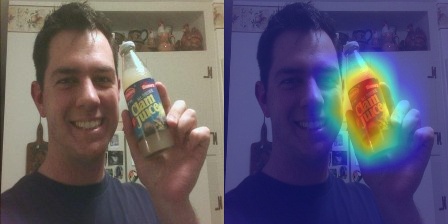
=== Top 5 予測(ラベル付き) ===
Rank 1: water bottle (0.9660)
Rank 2: pop bottle (0.0174)
Rank 3: refrigerator (0.0013)
Rank 4: beer bottle (0.0011)
Rank 5: bottlecap (0.0007)
Pythonスクリプト
'''
pip install torch==2.6.0+cu126 torchvision==0.21.0+cu126 --index-url https://download.pytorch.org/whl/cu126
pip install ttach
pip install matplotlib
pip install opencv-python
pip install tqdm
pip install scikit-learn
pip install requests
'''

from pytorch_grad_cam import GradCAM
from pytorch_grad_cam import GuidedBackpropReLUModel
from pytorch_grad_cam.utils.image import show_cam_on_image, preprocess_image, deprocess_image
from torchvision.models import resnet50, ResNet50_Weights
from torchvision.datasets.utils import download_url
import numpy as np
import cv2
import torch
import torch.nn.functional as F
import requests

def get_imagenet_labels():
    """ImageNetのクラスラベルを取得"""
    try:
        # ImageNetのクラスラベルをダウンロード
        url = "https://raw.githubusercontent.com/pytorch/hub/master/imagenet_classes.txt"
        response = requests.get(url)
        labels = response.text.strip().split('\n')
        return labels
    except:
        # ダウンロードに失敗した場合はダミーラベル
        return [f"class_{i}" for i in range(1000)]

# <class 'torchvision.models.resnet.ResNet'>
#model = resnet50(weights=ResNet50_Weights.IMAGENET1K_V1).to("cuda").eval()

# モデルを作成(重みなしで)
model = resnet50(weights=None).to("cuda").eval()

# 重みのダウンロード
url = 'https://github.com/rwightman/pytorch-image-models/releases/download/v0.1-rsb-weights/resnet50_a1_0-14fe96d1.pth'
download_url(url, root = '.', filename = "weight.pth")

# 重みを手動で読み込み
state_dict = torch.load("weight.pth", map_location="cuda")
model.load_state_dict(state_dict)

target_layers = [model.layer4[-1]]

image_path="1.jpg"

rgb_img = cv2.imread(image_path, cv2.IMREAD_COLOR)[:, :, ::-1]
rgb_img = cv2.resize(rgb_img, (224, 224))
rgb_img = np.float32(rgb_img) / 255
input_tensor = preprocess_image(
    rgb_img,
    mean=[0.485, 0.456, 0.406],
    std=[0.229, 0.224, 0.225]
).to("cuda")

targets = None

with GradCAM(model=model, target_layers=target_layers) as cam:
  # You can also pass aug_smooth=True and eigen_smooth=True, to apply smoothing.
    grayscale_cam = cam(
        input_tensor=input_tensor,
        targets=targets,
        aug_smooth=True,
        eigen_smooth=True
    )
    # In this example grayscale_cam has only one image in the batch:
    grayscale_cam = grayscale_cam[0, :]
    cam_image = show_cam_on_image(rgb_img, grayscale_cam, use_rgb=True)
    cam_image = cv2.cvtColor(cam_image, cv2.COLOR_RGB2BGR)
    # You can also get the model outputs without having to redo inference
    model_outputs = cam.outputs

probabilities = F.softmax(model_outputs, dim=1)

# 2. 上位5つの予測を取得
top5_prob, top5_idx = torch.topk(probabilities, 5)

# ラベルを取得してTop5を表示
labels = get_imagenet_labels()
print("\n=== Top 5 予測(ラベル付き) ===")
for i in range(5):
    class_idx = top5_idx[0][i].item()
    prob = top5_prob[0][i].item()
    label = labels[class_idx] if class_idx < len(labels) else f"class_{class_idx}"
    print(f"Rank {i+1}: {label} ({prob:.4f})")

gb_model = GuidedBackpropReLUModel(model=model, device="cuda")
gb = gb_model(input_tensor, target_category=None)

cam_mask = cv2.merge([grayscale_cam, grayscale_cam, grayscale_cam])
cam_gb = deprocess_image(cam_mask * gb)
gb = deprocess_image(gb)

cv2.imwrite("gradcam_cam.jpg", cam_image)
cv2.imwrite("gradcam_gb.jpg", gb)
cv2.imwrite("gradcam_cam_gb.jpg", cam_gb)
