はじめに
Wan2.1は以前に試しました。touch-sp.hatenablog.com
新たに「Wan2.1-VACE」というのが公開されていたので試してみました。
VACEは「All-in-One Video Creation and Editing」だそうです。様々な入力を受け付けることが出き、編集もコントロールしやすいのが特徴のようです。
PC環境
Windows 11
CUDA 12.6
Python 3.13
Python環境構築
pip install torch==2.7.1+cu126 --index-url https://download.pytorch.org/whl/cu126
pip install git+https://github.com/huggingface/diffusers
pip install accelerate transformers
pip install ftfy imageio-ffmpeg imageio
Pythonスクリプト
最初と最後のフレームを指定して動画を作成してみました。import torch import PIL.Image from diffusers import AutoencoderKLWan, WanVACEPipeline from diffusers.schedulers.scheduling_unipc_multistep import UniPCMultistepScheduler from diffusers.utils import export_to_video, load_image def prepare_video_and_mask(first_img: PIL.Image.Image, last_img: PIL.Image.Image, height: int, width: int, num_frames: int): first_img = first_img.resize((width, height)) last_img = last_img.resize((width, height)) frames = [] frames.append(first_img) # Ideally, this should be 127.5 to match original code, but they perform computation on numpy arrays # whereas we are passing PIL images. If you choose to pass numpy arrays, you can set it to 127.5 to # match the original code. frames.extend([PIL.Image.new("RGB", (width, height), (128, 128, 128))] * (num_frames - 2)) frames.append(last_img) mask_black = PIL.Image.new("L", (width, height), 0) mask_white = PIL.Image.new("L", (width, height), 255) mask = [mask_black, *[mask_white] * (num_frames - 2), mask_black] return frames, mask # Available checkpoints: Wan-AI/Wan2.1-VACE-1.3B-diffusers, Wan-AI/Wan2.1-VACE-14B-diffusers model_id = "Wan-AI/Wan2.1-VACE-1.3B-diffusers" vae = AutoencoderKLWan.from_pretrained( model_id, subfolder="vae", torch_dtype=torch.float32 ) pipe = WanVACEPipeline.from_pretrained( model_id, vae=vae, torch_dtype=torch.bfloat16 ) flow_shift = 3.0 # 5.0 for 720P, 3.0 for 480P pipe.scheduler = UniPCMultistepScheduler.from_config( pipe.scheduler.config, flow_shift=flow_shift ) pipe.to("cuda") pipe.enable_model_cpu_offload() prompt = "CG animation style, a small blue bird takes off from the ground, flapping its wings. The bird's feathers are delicate, with a unique pattern on its chest. The background shows a blue sky with white clouds under bright sunshine. The camera follows the bird upward, capturing its flight and the vastness of the sky from a close-up, low-angle perspective." negative_prompt = "Bright tones, overexposed, static, blurred details, subtitles, style, works, paintings, images, static, overall gray, worst quality, low quality, JPEG compression residue, ugly, incomplete, extra fingers, poorly drawn hands, poorly drawn faces, deformed, disfigured, misshapen limbs, fused fingers, still picture, messy background, three legs, many people in the background, walking backwards" first_frame = load_image("first_frame.png") last_frame = load_image("last_frame.png") height = 512 width = 512 num_frames = 81 video, mask = prepare_video_and_mask(first_frame, last_frame, height, width, num_frames) output = pipe( video=video, mask=mask, prompt=prompt, negative_prompt=negative_prompt, height=height, width=width, num_frames=num_frames, num_inference_steps=30, guidance_scale=5.0, generator=torch.Generator().manual_seed(42), ).frames[0] export_to_video(output, f"flf2v.mp4", fps=16)
最初のフレーム(左)と最後のフレーム(右)を指定して動画を生成しました。
結果
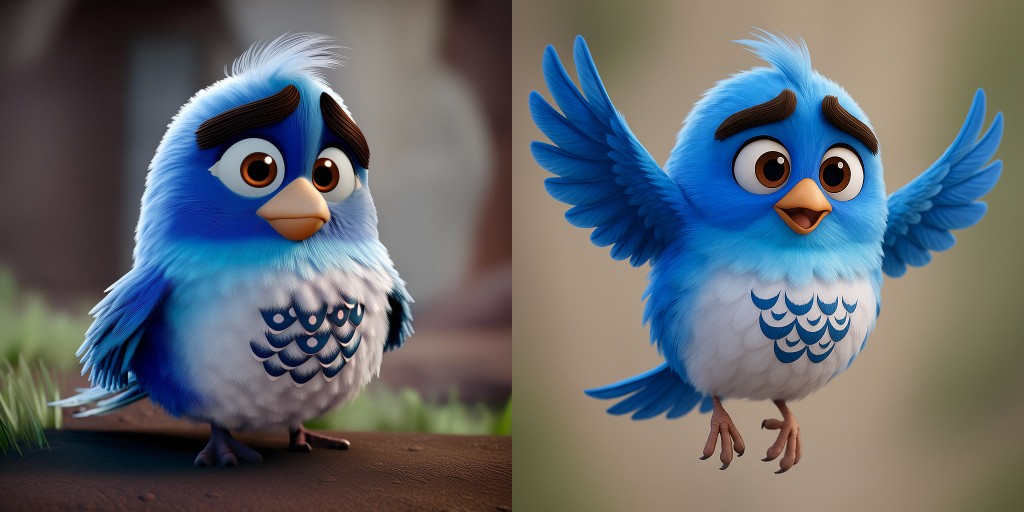
結果はGoogle Bloggerに載せておきます。
support-touchsp.blogspot.com

