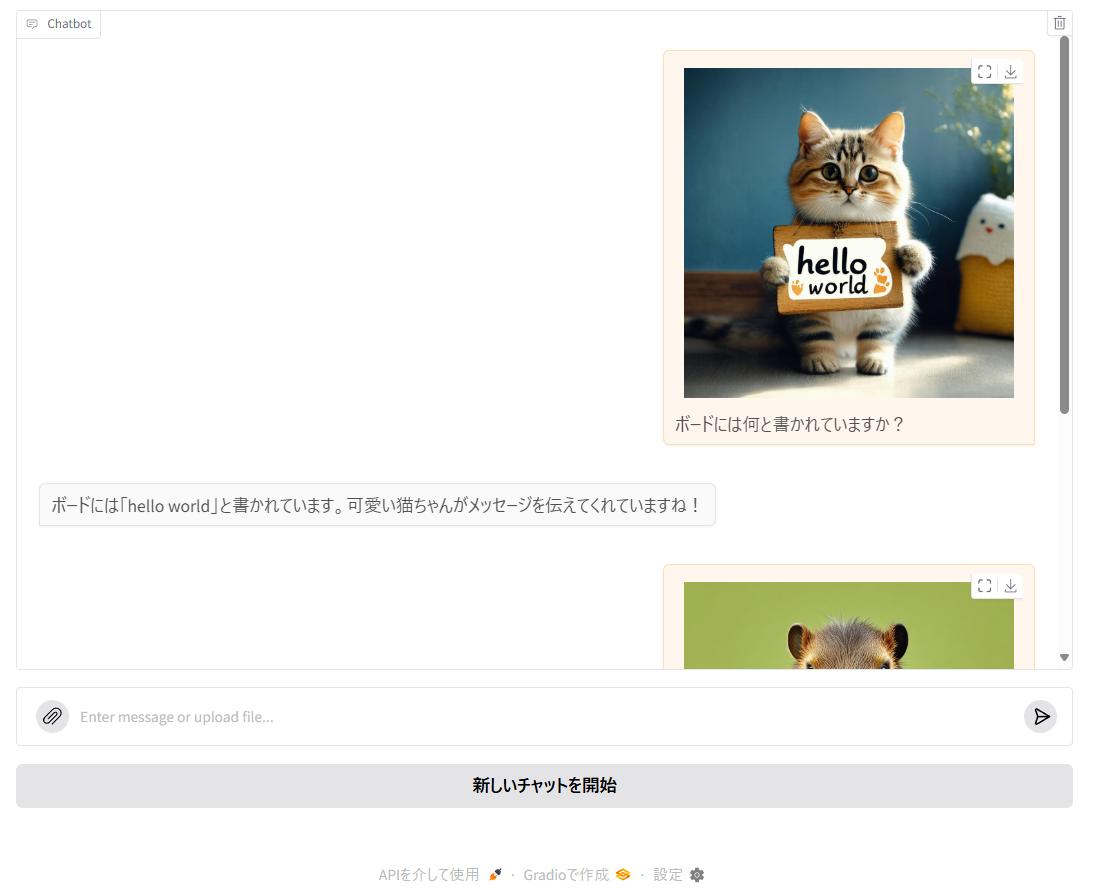
マルチモーダルモデルということで画像を扱ってみました。
使用したPC
VRAM 24GBのRTX 4090を使用しました。さらにbitsandbytesで量子化も行っています。プロセッサ Intel(R) Core(TM) i7-14700K 実装 RAM 96.0 GB GPU RTX 4090 (VRAM 24GB)
vLLMを実行
ここはWSL上のUbuntu 24.04を使っています。vllm serve google/gemma-3-27b-it --quantization bitsandbytes --load-format bitsandbytes --max-model-len 2048 --limit-mm-per-prompt image=2
「--limit-mm-per-prompt」で一回のチャットで許容される画像の枚数を指定しています。
Gradioを実行
こちらはWindows 11を使っています。import gradio as gr import base64 from openai import OpenAI # APIの設定 openai_api_key = "EMPTY" openai_api_base = "http://localhost:8000/v1" client = OpenAI( api_key=openai_api_key, base_url=openai_api_base, ) system_prompt_text = "あなたは誠実で優秀な日本人のアシスタントです。" init = { "role": "system", "content": system_prompt_text, } def encode_image_to_base64(image_path): """画像ファイルをbase64エンコードする""" with open(image_path, "rb") as image_file: return base64.b64encode(image_file.read()).decode('utf-8') def make_message( message, # 入力されたデータ bot_history, # チャットボットに表示される履歴 chat_history, # Modelに送るための実際の履歴 ): # messageが空の場合は何もしない if message["text"] == "" and len(message["files"]) == 0: return "", bot_history, chat_history if len(bot_history) == 0: bot_history.insert(0, init) chat_history.insert(0, init) current_content = [] # 画像ファイルがある場合は処理 for x in message["files"]: # 画像を扱う if x.lower().endswith(('.png', '.jpg', '.jpeg', '.gif', '.webp')): # base64エンコード base64_image = encode_image_to_base64(x) # chat_history用 current_content.append({ "type": "image_url", "image_url": { "url": f"data:image/jpeg;base64,{base64_image}" } }) # bot_historyに画像を追加 bot_history.append({ "role": "user", "content": {"path": x} }) # メッセージを扱う if not message["text"] == "": # chat_history用 current_content.append({"type": "text", "text": message["text"]}) # bot_historyに文字列を追加 bot_history.append({"role": "user", "content": message["text"]}) # マルチモーダルの時 if len(current_content) > 0: chat_history.append({"role": "user", "content": current_content}) # テキストのみの時 elif not message["text"] == "": chat_history.append({"role": "user", "content": message["text"]}) return "", bot_history, chat_history def process_chat( bot_history, # チャットボットに表示される履歴 chat_history, # Modelに送るための実際の履歴 ): # OpenAI APIを呼び出す stream = client.chat.completions.create( model="google/gemma-3-27b-it", # 使用するモデル messages=chat_history, stream=True ) # チャット履歴を更新 bot_history.append({"role": "assistant", "content": ""}) chat_history.append({"role": "assistant", "content": ""}) for chunk in stream: bot_history[-1]["content"] += chunk.choices[0].delta.content chat_history[-1]["content"] += chunk.choices[0].delta.content yield bot_history, chat_history # Gradioインターフェースの作成 with gr.Blocks() as demo: chatbot = gr.Chatbot(type="messages", height=600) chat_input = gr.MultimodalTextbox( interactive=True, placeholder="Enter message or upload file...", show_label=False, file_count="single", # default: "single", ['single', 'multiple', 'directory'] file_types=["image"], # default: None, e.g. ["image", "audio", "video", "text", ".json", ".mp4"] sources=["upload"], # (create button) default: ["upload"], ["upload", "microphone"] ) # 状態変数 chat_history = gr.State([]) # イベントハンドラの設定 chat_input.submit( fn=make_message, inputs=[chat_input, chatbot, chat_history], outputs=[chat_input, chatbot, chat_history] ).then( fn=process_chat, inputs=[chatbot, chat_history], outputs=[chatbot, chat_history] ) # クリアボタン clear = gr.ClearButton([chat_input, chatbot, chat_history], value="新しいチャットを開始") if __name__ == "__main__": demo.launch()

