使用したPC
32Bモデル(パラメーター数320億)なのでVRAM 24GBのRTX 4090を使用しました。プロセッサ Intel(R) Core(TM) i7-14700K 実装 RAM 96.0 GB GPU RTX 4090 (VRAM 24GB)
実行中の表示
INFO 02-18 22:06:19 model_runner.py:1115] Loading model weights took 18.1467 GB
INFO 02-18 22:06:21 worker.py:266] Memory profiling takes 2.04 seconds
INFO 02-18 22:06:21 worker.py:266] the current vLLM instance can use total_gpu_memory (23.99GiB) x gpu_memory_utilization (0.90) = 21.59GiB
INFO 02-18 22:06:21 worker.py:266] model weights take 18.15GiB; non_torch_memory takes 0.15GiB; PyTorch activation peak memory takes 1.43GiB; the rest of the memory reserved for KV Cache is 1.86GiB.
INFO 02-18 22:06:21 executor_base.py:108] # CUDA blocks: 476, # CPU blocks: 1024
INFO 02-18 22:06:21 executor_base.py:113] Maximum concurrency for 4096 tokens per request: 1.86x
方法
vLLMの導入と量子化のためのスクリプトはこちらを見て下さい。touch-sp.hatenablog.com
今回もAutoAWQを使った量子化を行っています。
量子化
こちらでモデルのダウンロードと量子化が行われます。結果は「qwen2.5-bakeneko-32b-instruct-awq」として保存されます。
python awq_quant.py -M rinna/qwen2.5-bakeneko-32b-instruct
実行
vllm serve qwen2.5-bakeneko-32b-instruct-awq --max-model-len 4096
「--max-model-len 8192」は実行できませんでした。
Pythonスクリプト
クライアント側はGradioを使いました。from openai import OpenAI import gradio as gr openai_api_key = "EMPTY" openai_api_base = "http://localhost:8000/v1" client = OpenAI( api_key=openai_api_key, base_url=openai_api_base, ) system_prompt_text = "あなたは誠実で優秀な日本人のアシスタントです。" init = { "role": "system", "content": system_prompt_text, } def make_message( message: str, history: list[dict] ): if len(history) == 0: history.insert(0, init) history.append( { "role": "user", "content": message } ) return "", history def bot( history: list[dict] ): stream = client.chat.completions.create( model="qwen2.5-bakeneko-32b-instruct-awq", messages=history, temperature=0.5, max_tokens=4000, #frequency_penalty=1.1, stream=True ) history.append({"role": "assistant","content": ""}) for chunk in stream: history[-1]["content"] += chunk.choices[0].delta.content yield history with gr.Blocks() as demo: chatbot = gr.Chatbot(type="messages") msg = gr.Textbox() clear = gr.ClearButton([msg, chatbot], value="新しいチャットを開始") msg.submit(make_message, [msg, chatbot], [msg, chatbot], queue=False).then( bot, chatbot, chatbot ) demo.launch()
実行画面

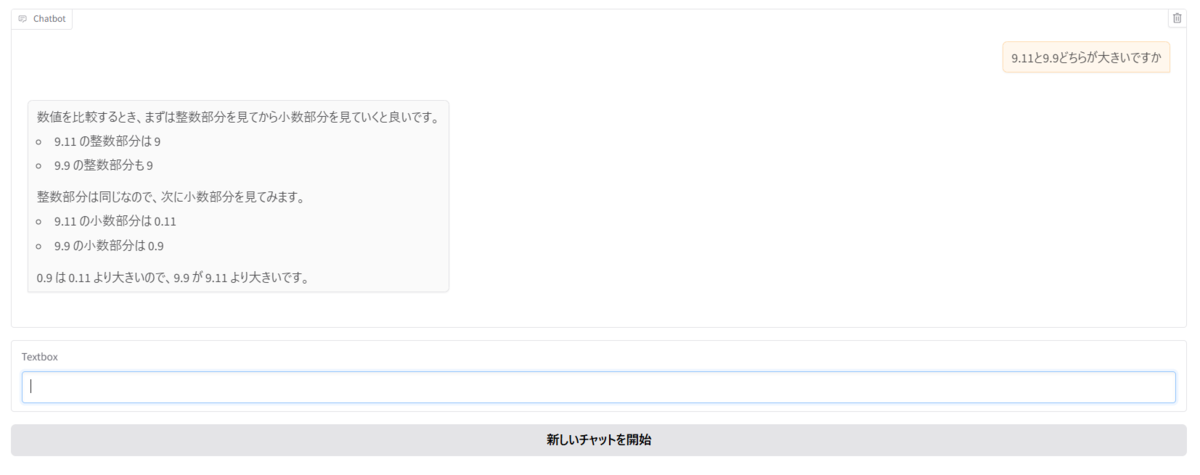
この問題はClaude 3.5 SonnetやMicrosoft Copilotも間違えた問題です。(詳細はこちら)
今回のモデルは2回実行したら2回とも正解しました。

