使用したPC
プロセッサ	Intel(R) Core(TM) i7-12700H
実装 RAM	32.0 GB
GPU		RTX 3080 Laptop (VRAM 16GB)
はじめに
日本語の追加学習が加えられたDeepSeek-R1関連のモデルで現状一番良いと思うのがサイバーエージェントが公開してくれている「DeepSeek-R1-Distill-Qwen-14B-Japanese」です。あくまで私個人の調査ですが・・・。今回はそちらを使います。上記PCで140億パラメーターのモデルを動かすのは無理なので4bit量子化を用いました。vLLMがLinuxでしか使用できないのでサーバーサイドはWSL2を使用しています。クライアント側は同じPCのWindowsです。もちろん他のPCからサーバーにアクセスすることも可能です。サーバー側
環境
Ubuntu 24.04 on WSL2
Python 3.12
CUDA 12.4
vLLMのインストール
venvでPython仮想環境を作成した後に以下のようにしました。git clone https://github.com/vllm-project/vllm.git cd vllm VLLM_USE_PRECOMPILED=1 pip install --editable . pip install bitsandbytes
実行
モデルのダウンロードと量子化が自動で行われます。量子化したモデルを保存するのではなく、読み込む時に量子化します。
vllm serve cyberagent/DeepSeek-R1-Distill-Qwen-14B-Japanese --quantization bitsandbytes --load-format bitsandbytes --max-model-len 8192
補足1
「--max-model-len」に指定する数字が大きすぎるとエラーが出ます。PC環境(おそらくVRAM用量)によって指定できる数字は変わってくると思います。
ValueError: The model's max seq len (16384) is larger than the maximum number of tokens that can be stored in KV cache (14320). Try increasing `gpu_memory_utilization` or decreasing `max_model_len` when initializing the engine.
クライアント側
環境
Windows 11
Python 3.12
Python環境構築
「openai」と「gradio」をインストールしただけです。gradio==5.16.0 openai==1.63.0
Pythonスクリプト
以下を実行するだけです。IP Addressは「localhost」でWindows側からWSL2へアクセスできます。
from openai import OpenAI
import gradio as gr

openai_api_key = "EMPTY"
openai_api_base = "http://localhost:8000/v1"

client = OpenAI(
    api_key=openai_api_key,
    base_url=openai_api_base,
)

def make_message(
    message: str,
    history: list[dict]
):
    history.append({"role": "user","content": message})
    return "", history

def bot(
    history: list[dict]
):
    stream = client.chat.completions.create(
        model="cyberagent/DeepSeek-R1-Distill-Qwen-14B-Japanese",
        messages=history,
        temperature=0.5,
        max_tokens=4000,
        #frequency_penalty=1.1,
        stream=True
    )
    history.append({"role": "assistant","content": ""})
    for chunk in stream:
        history[-1]["content"] += chunk.choices[0].delta.content
        yield history

with gr.Blocks() as demo:
    chatbot = gr.Chatbot(type="messages", allow_tags=["think"])
    msg = gr.Textbox()
    clear = gr.ClearButton([msg, chatbot], value="新しいチャットを開始")

    msg.submit(make_message, [msg, chatbot], [msg, chatbot], queue=False).then(
        bot, chatbot, chatbot
    )

demo.launch()
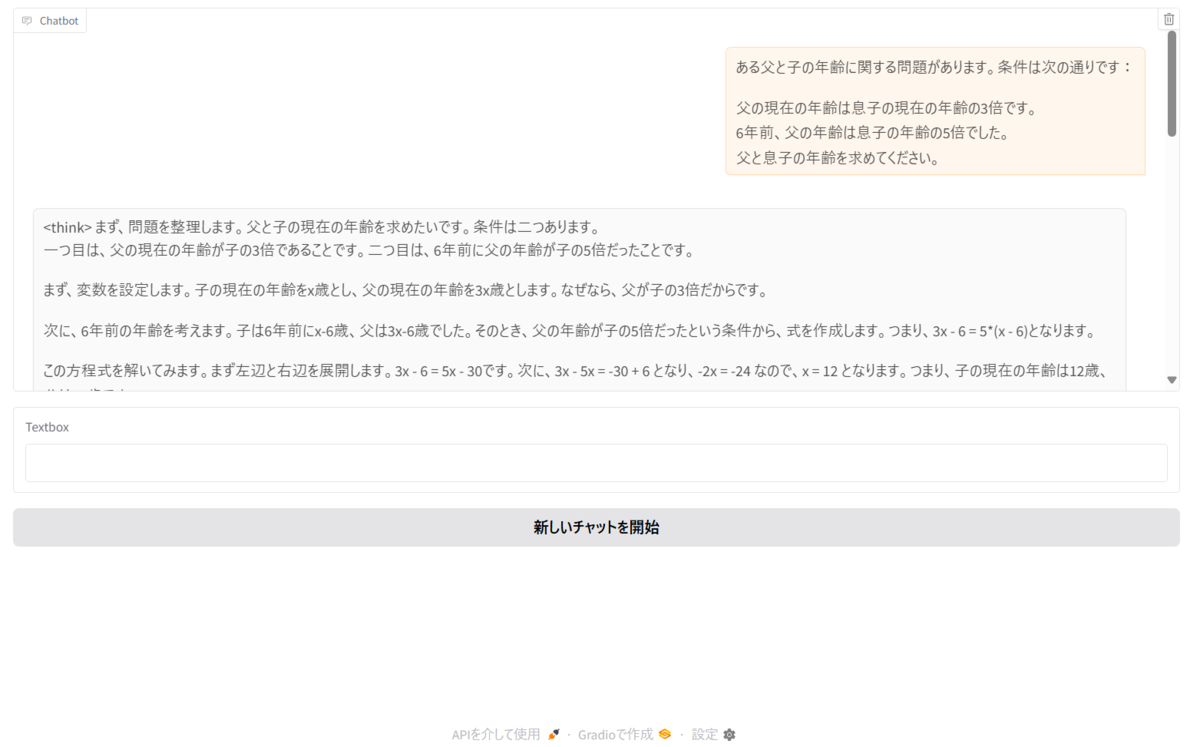
実行画面