以前のもの
touch-sp.hatenablog.com新たに作成したもの
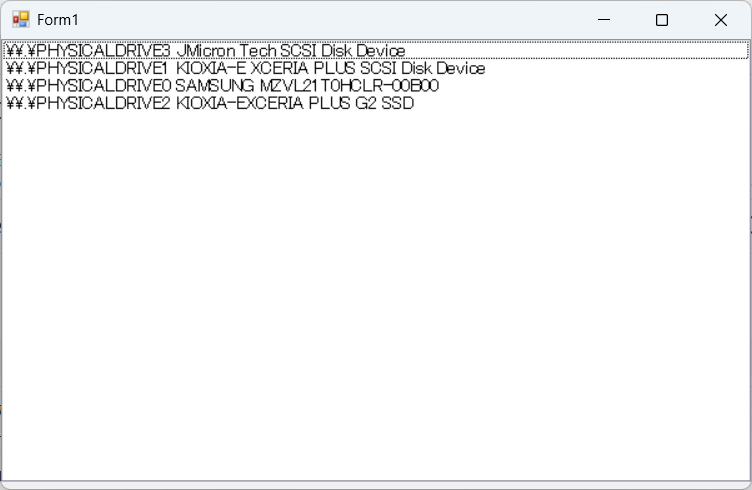
PowerShellを使うように書き換えました。
using System;
using System.Diagnostics;
using System.Windows.Forms;

namespace mountDisk_20250214
{
    public partial class Form1: Form
    {
        public Form1()
        {
            InitializeComponent();
        }

        private void Form1_Load(object sender, EventArgs e)
        {
            var proc = new Process();
            proc.StartInfo.FileName = "powershell.exe";
            proc.StartInfo.CreateNoWindow = true;
            proc.StartInfo.UseShellExecute = false;
            proc.StartInfo.RedirectStandardOutput = true;
            proc.StartInfo.Arguments = "-Command \"Get-CimInstance Win32_DiskDrive | Select DeviceID, Caption\"";
            proc.Start();

            string txtResult = proc.StandardOutput.ReadToEnd();
            proc.WaitForExit();

            string[] _kugiri = { "\r\n" };
            string[] arr = txtResult.Split(_kugiri, StringSplitOptions.RemoveEmptyEntries);

            if(arr.Length > 3)
            {
                for (int i = 2; i < arr.Length; i++)
                {
                    listBox1.Items.Add(arr[i]);
                }
            }
        }

        private void listBox1_KeyDown(object sender, KeyEventArgs e)
        {
            // エンターキーが押された時のみ処理を実行
            if (e.KeyCode == Keys.Enter)
            {
                mount_disk();
                Close();
            }
        }

        private void listBox1_MouseDoubleClick(object sender, MouseEventArgs e)
        {
            mount_disk();
            Close();
        }
        private void mount_disk()
        {
            // 選択チェック
            if (listBox1.SelectedItem == null)
            {
                MessageBox.Show("ディスクを選択してください。", "エラー", MessageBoxButtons.OK, MessageBoxIcon.Warning);
                return;
            }

            string select_string = listBox1.SelectedItem.ToString().Trim();
            string[] select_array = select_string.Split(' ');
            string result = select_array[0];

            var proc = new Process();
            proc.StartInfo.FileName = @"c:\Windows\System32/cmd.exe";
            proc.StartInfo.Verb = "RunAs";
            proc.StartInfo.UseShellExecute = true;
            proc.StartInfo.Arguments = $"/C wsl --mount {result} --partition 1";
            proc.Start();
        }
    }
}
解説
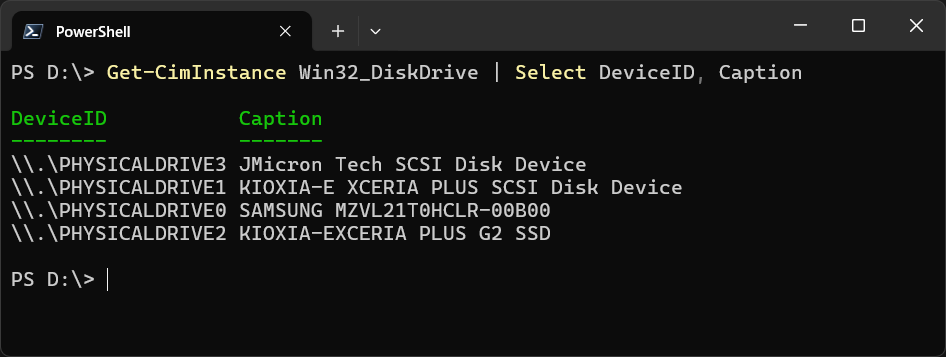
Get-CimInstance Win32_DiskDrive | Select DeviceID, Caption
PowerShellで上記を実行すると以下のような結果が返って来ます。
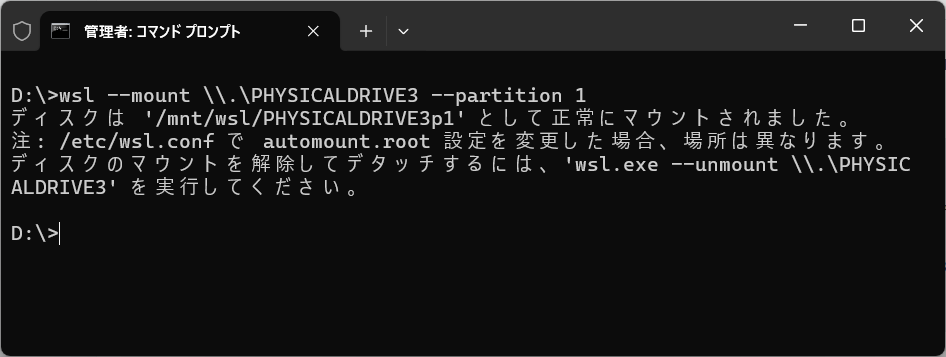
接続したいDeviceIDを選択して管理者として実行したコマンドプロンプトで以下を実行します。
wsl --mount \\.\PHYSICALDRIVE3 --partition 1
これでマウント完了です。
今回、DeviceIDのリストから一つを選択すると自動でマウントするようなGUIを作りました。

