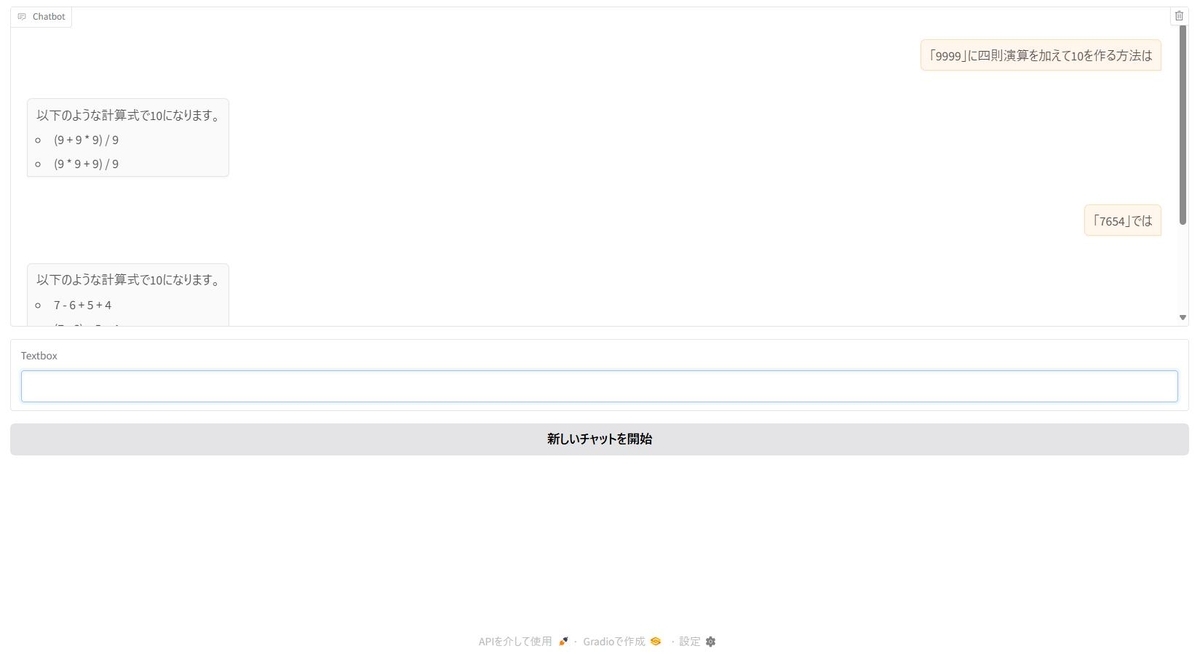
はじめに
前回のスクリプトをGradioで実行できるようにしました。touch-sp.hatenablog.com
使用したPC
プロセッサ	Intel(R) Core(TM) i7-12700H
実装 RAM	32.0 GB
GPU		RTX 3080 Laptop (VRAM 16GB)
Python 3.12
CUDA 12.4
Python環境
gradio==5.14.0
langchain==0.3.17
langchain-core==0.3.33
langchain-ollama==0.2.3
ollama==0.4.7
Pythonスクリプト
import gradio as gr
from langchain_core.messages import HumanMessage, SystemMessage, AIMessage, ToolMessage
from langchain_core.output_parsers import StrOutputParser
from langchain_ollama import ChatOllama
from langchain.tools import tool
from itertools import product

model = ChatOllama(model="mistral-small:latest", temperature=0)

output_parser = StrOutputParser()

# ツールとしての関数を定義
@tool
def solve_puzzle(numbers: list[int]) -> list[str]:
    """4桁の数字の間に四則演算を加えて10を作るパズルを解く関数。

    Args:
        numbers (list[int]): 4つの数字のリスト

    Returns:
        list[str]: 10になる数式のリスト
    """
    operators = ['+', '-', '*', '/']
    expressions = []

    # すべての演算子の組み合わせを試す
    for ops in product(operators, repeat=3):

        patterns = [
            f"{numbers[0]} {ops[0]} {numbers[1]} {ops[1]} {numbers[2]} {ops[2]} {numbers[3]}",
            f"({numbers[0]} {ops[0]} {numbers[1]}) {ops[1]} {numbers[2]} {ops[2]} {numbers[3]}",
            f"({numbers[0]} {ops[0]} {numbers[1]} {ops[1]} {numbers[2]}) {ops[2]} {numbers[3]}",
            f"({numbers[0]} {ops[0]} {numbers[1]}) {ops[1]} ({numbers[2]} {ops[2]} {numbers[3]})",
            f"{numbers[0]} {ops[0]} ({numbers[1]} {ops[1]} {numbers[2]}) {ops[2]} {numbers[3]}",
            f"{numbers[0]} {ops[0]} ({numbers[1]} {ops[1]} {numbers[2]} {ops[2]} {numbers[3]})",
            f"{numbers[0]} {ops[0]} {numbers[1]}) {ops[1]} ({numbers[2]} {ops[2]} {numbers[3]})"
        ]

        for exp in patterns:
            try:
                if eval(exp) == 10:
                    expressions.append(exp)
            except:
                continue

    return expressions

tools_list = [solve_puzzle]

model_with_tools = model.bind_tools(tools_list)

init = {
    "role": "system",
    "content": "あなたは優秀なAIアシスタントです。日本語で回答して下さい。",
}

def prompt(
    message: str,
    history: list[dict]
):
    if len(history) == 0:
        history.insert(0, init)
    history.append(
        {
            "role": "user",
            "content": message
        }
    )
    return "", history

def bot(
    history: list[dict]
):
    prompt_template = []

    for message in history:
        match message.get("role"):
            case "role":
                prompt_template.appned(SystemMessage(content=message["content"]))
            case "user":
                prompt_template.append(HumanMessage(content=message["content"]))
            case "assistant":
                prompt_template.append(AIMessage(content=message["content"]))

    ai_message = model_with_tools.invoke(prompt_template)

    if len(ai_message.tool_calls) != 0:
        for tool_call in ai_message.tool_calls:
            selected_tool = {"solve_puzzle": solve_puzzle}[tool_call["name"].lower()]
            tool_msg = selected_tool.invoke(tool_call)
            prompt_template.append(ToolMessage(content=str(tool_msg.content), tool_call_id=tool_call['id']))

    history.append({"role": "assistant", "content": ""})

    for chunk in model_with_tools.stream(prompt_template):
        history[-1]["content"] += output_parser.invoke(chunk)
        yield history

with gr.Blocks() as demo:
    chatbot = gr.Chatbot(type="messages")
    msg = gr.Textbox()
    clear = gr.ClearButton([msg, chatbot], value="新しいチャットを開始")

    msg.submit(prompt, [msg, chatbot], [msg, chatbot], queue=False).then(
        bot, chatbot, chatbot
    )

demo.launch()
結果