はじめに
今回はGradioとTransformersを使って「Llama-3.2-11B-Vision-Instruct」を動かしてみました。使ったのは量子化されたこちらです。huggingface.co
動作画面
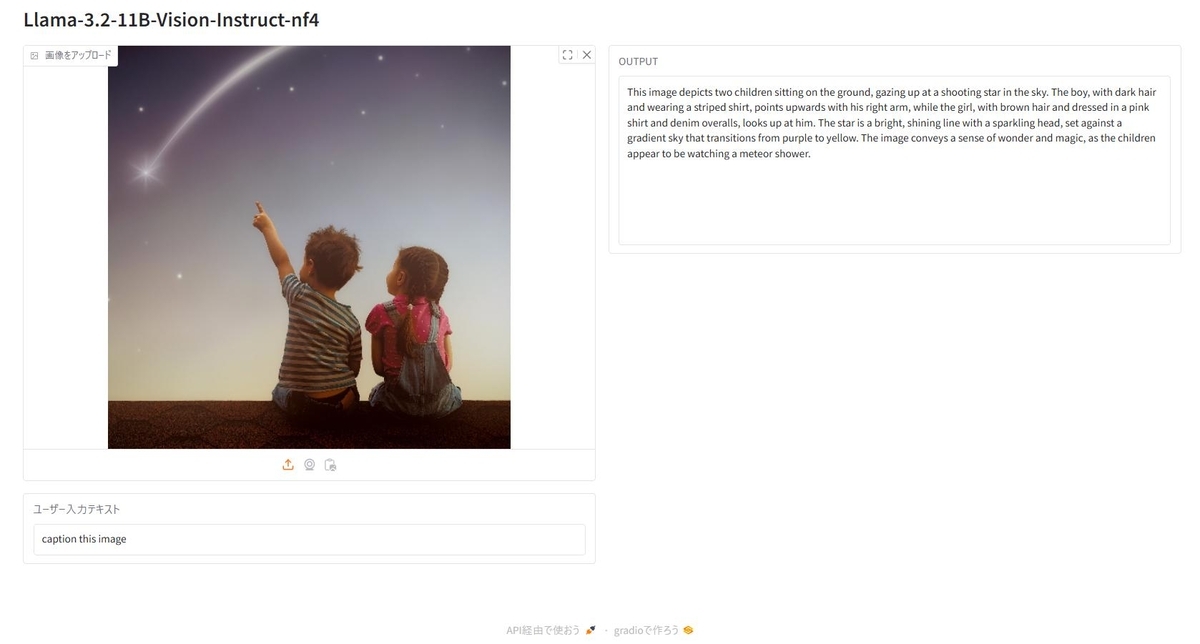
結果
This image depicts two children sitting on the ground, gazing up at a shooting star in the sky. The boy, with dark hair and wearing a striped shirt, points upwards with his right arm, while the girl, with brown hair and dressed in a pink shirt and denim overalls, looks up at him. The star is a bright, shining line with a sparkling head, set against a gradient sky that transitions from purple to yellow. The image conveys a sense of wonder and magic, as the children appear to be watching a meteor shower.
DeepLでの翻訳結果
二人の子供が地面に座り、流れ星を見上げている。黒髪でストライプのシャツを着た男の子は右腕で上を指し、茶髪でピンクのシャツとデニムのオーバーオールを着た女の子は彼を見上げている。紫から黄色へと移り変わるグラデーションの空を背景に、星は明るく輝く線で、頭はキラキラと輝いている。子供たちが流星群を見ているように見えることから、このイメージは驚きと魔法の感覚を伝えている。
右腕と左腕を間違えています。
python環境
accelerate==1.2.1
bitsandbytes==0.45.0
gradio==5.9.1
torch==2.5.1+cu124
transformers==4.47.1
Pythonスクリプト
from transformers import MllamaForConditionalGeneration, AutoProcessor
import gradio as gr

# downloaded from https://huggingface.co/SeanScripts/Llama-3.2-11B-Vision-Instruct-nf4
model_id = "Llama-3.2-11B-Vision-Instruct-nf4"
model = MllamaForConditionalGeneration.from_pretrained(
    model_id,
).to("cuda")
tokenizer = AutoProcessor.from_pretrained(model_id)

def generation(image, user_text):
    if image is None:
        return "画像をアップロードしてください。"

    messages = [
        {"role": "user", "content": [
            {"type": "image"},
            {"type": "text", "text": user_text}
        ]}
    ]

    input_text = tokenizer.apply_chat_template(
        messages,
        add_generation_prompt=True
    )

    inputs = tokenizer(
        image,
        input_text,
        return_tensors="pt"
    ).to(model.device)

    generate_ids = model.generate(**inputs, max_new_tokens=512)

    output = tokenizer.decode(
        generate_ids[0][len(inputs['input_ids'][0]):],
        skip_special_tokens=True
    )

    return output

with gr.Blocks() as demo:
    gr.Markdown(f"# {model_id}")

    with gr.Row():
        with gr.Column():
            image_input = gr.Image(
                type="pil",
                label="画像をアップロード",
                scale=1
            )
            text_input = gr.Textbox(label="ユーザー入力テキスト")

        with gr.Column():
            output_text = gr.Textbox(
                label="OUTPUT",
                interactive=False,
                lines=10
            )

    text_input.submit(
        fn=generation,
        inputs=[image_input, text_input],
        outputs=output_text
    )

demo.launch()

