はじめに
以前PySide6を使って同様のことをしました。touch-sp.hatenablog.com
今度はVBAでチャレンジしました。
システムプロンプト
システムプロンプトに例を記述しておきます。以下はVBAでユーザーフォームにボタンを6個(縦3行、横2列)追加するためのサンプルコードです。これを参考にユーザーの質問に答えて下さい。
'''
Private WithEvents btn1 As CommandButton
Private WithEvents btn2 As CommandButton
Private WithEvents btn3 As CommandButton
Private WithEvents btn4 As CommandButton
Private WithEvents btn5 As CommandButton
Private WithEvents btn6 As CommandButton
Private Sub UserForm_Initialize()
Dim row As Integer
Dim col As Integer
Dim button_height As Integer
Dim button_width As Integer
Dim margin As Integer
button_height = 50 ' ボタンの高さ
button_width = 100 ' ボタンの幅
margin = 5 ' ユーザーフォームとボタン間のマージン
row = 1
col = 1
Set btn1 = Me.Controls.Add("Forms.CommandButton.1", "button1")
With btn1
.Height = button_height
.Width = button_width
.Top = button_height * (row - 1) + margin
.Left = button_width * (col - 1) + margin
End With
row = 1
col = 2
Set btn2 = Me.Controls.Add("Forms.CommandButton.1", "button2")
With btn2
.Height = button_height
.Width = button_width
.Top = button_height * (row - 1) + margin
.Left = button_width * (col - 1) + margin
End With
row = 2
col = 1
Set btn3 = Me.Controls.Add("Forms.CommandButton.1", "button3")
With btn3
.Height = button_height
.Width = button_width
.Top = button_height * (row - 1) + margin
.Left = button_width * (col - 1) + margin
End With
row = 2
col = 2
Set btn4 = Me.Controls.Add("Forms.CommandButton.1", "button4")
With btn4
.Height = button_height
.Width = button_width
.Top = button_height * (row - 1) + margin
.Left = button_width * (col - 1) + margin
End With
row = 3
col = 1
Set btn5 = Me.Controls.Add("Forms.CommandButton.1", "button5")
With btn5
.Height = button_height
.Width = button_width
.Top = button_height * (row - 1) + margin
.Left = button_width * (col - 1) + margin
End With
row = 3
col = 2
Set btn6 = Me.Controls.Add("Forms.CommandButton.1", "button6")
With btn6
.Height = button_height
.Width = button_width
.Top = button_height * (row - 1) + margin
.Left = button_width * (col - 1) + margin
End With
Me.Height = button_height * 3 + margin * 2 + 29
Me.Width = button_width * 2 + margin * 2 + 12
End Sub
Private Sub btn1_Click()
End Sub
Private Sub btn2_Click()
End Sub
Private Sub btn3_Click()
End Sub
Private Sub btn4_Click()
End Sub
Private Sub btn5_Click()
End Sub
Private Sub btn6_Click()
End Sub
'''
実行
プロンプトは以下のようにしました。VBAでユーザーフォームにボタンを2x2で並べたい
回答
返ってきたコードを実行すると以下のようになりました。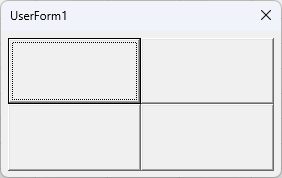
完璧です!
テキストボックスやラベルなども含む複雑なGUIにも今後チャレンジしたいと思います。
HTMLなら画像(簡単なスケッチなど)からコードを書いてくれるようですが・・・。

