はじめに
Shisa.AIは日本の会社です。
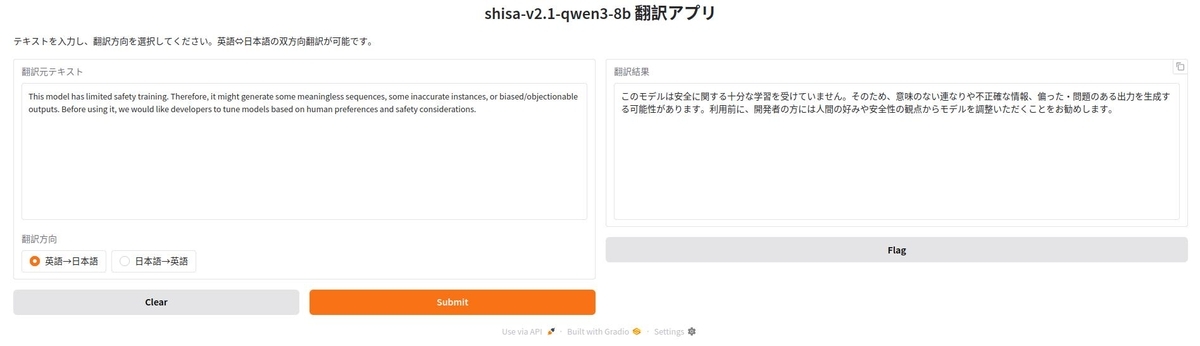
Shisa-v2.1が日英バイリンガルモデルという事で翻訳アプリを作ってみました。
画面
Pythonスクリプト
from threading import Thread
import gradio as gr
from transformers import (
    AutoModelForCausalLM,
    AutoProcessor,
    TextIteratorStreamer,
    BitsAndBytesConfig
)

quantization_config = BitsAndBytesConfig(load_in_8bit=True)

model = AutoModelForCausalLM.from_pretrained(
    "shisa-ai/shisa-v2.1-qwen3-8b",
    dtype="bfloat16",
    quantization_config=quantization_config,
    device_map="auto",
)

tokenizer = AutoProcessor.from_pretrained("shisa-ai/shisa-v2.1-qwen3-8b")


def translate_text(text, direction):
    """テキスト翻訳(双方向対応)"""
    if not text.strip():
        return ""

    # 翻訳方向に応じてシステムプロンプトとユーザープロンプトを設定
    if direction == "英語→日本語":
        system_content = "あなたは英語から日本語への翻訳に特化した優秀なAIアシスタントです。回答は翻訳文にとどめ、日本語に翻訳するだけです。"
        user_content = f"次の英語を日本語に翻訳して下さい。\n{text}"
    else:  # "日本語→英語"
        system_content = "あなたは日本語から英語への翻訳に特化した優秀なAIアシスタントです。回答は翻訳文にとどめ、英語に翻訳するだけです。"
        user_content = f"次の日本語を英語に翻訳して下さい。\n{text}"

    prompt = [
        {
            "role": "system",
            "content": system_content,
        },
        {
            "role": "user",
            "content": user_content,
        },
    ]

    inputs = tokenizer.apply_chat_template(
        prompt,
        add_generation_prompt=True,
        tokenize=True,
        return_dict=True,
        return_tensors="pt",
    ).to(model.device)

    streamer = TextIteratorStreamer(
        tokenizer, skip_prompt=True, skip_special_tokens=True
    )

    generation_kwargs = dict(**inputs, max_new_tokens=1024, streamer=streamer)

    thread = Thread(target=model.generate, kwargs=generation_kwargs)
    thread.start()

    result = ""
    for new_text in streamer:
        result += new_text
        yield result


# Gradioインターフェースの構築
demo = gr.Interface(
    fn=translate_text,
    inputs=[
        gr.Textbox(lines=10, max_lines=40, label="翻訳元テキスト"),
        gr.Radio(
            choices=["英語→日本語", "日本語→英語"],
            value="英語→日本語",
            label="翻訳方向",
        ),
    ],
    outputs=gr.Textbox(lines=10, max_lines=40, buttons=["copy"], label="翻訳結果"),
    title="shisa-v2.1-qwen3-8b 翻訳アプリ",
    description="テキストを入力し、翻訳方向を選択してください。英語⇔日本語の双方向翻訳が可能です。",
)

# アプリケーションの起動
if __name__ == "__main__":
    demo.launch()
環境構築
pyproject.tomlを載せておきます。(ライブラリのバージョンはあえて固定しています)
uvを使うとuv syncだけで環境構築できると思います。
[project]
name = "shisa"
version = "0.1.0"
description = "Add your description here"
readme = "README.md"
requires-python = ">=3.13"
dependencies = [
    "accelerate==1.12.0",
    "bitsandbytes==0.49.2",
    "einops==0.8.1",
    "gradio==6.6.0",
    "hf-xet==1.2.0",
    "torch==2.10.0+xpu",
    "transformers==4.57.3",
    "triton-xpu==3.6.0",
]

[[tool.uv.index]]
name = "torch-xpu"
url = "https://download.pytorch.org/whl/xpu"
explicit = true

[tool.uv.sources]
torch = [{ index = "torch-xpu" }]
triton-xpu = [{ index = "torch-xpu" }]

