先日開催された日本MySQLユーザ会会(MyNA会) 2026年02月の発表では、MySQL 9.7 (LTS)ではEnterprise版でしか提供されていない機能がCommunity版にも入るかも!という話があった。
まだ確定情報ではないとのことで、9.7がリリースされるまで2ヶ月ほどは待つしかないが、話題に上がったOpenTeremetry機能がどれくらい使えそうか試してみた。
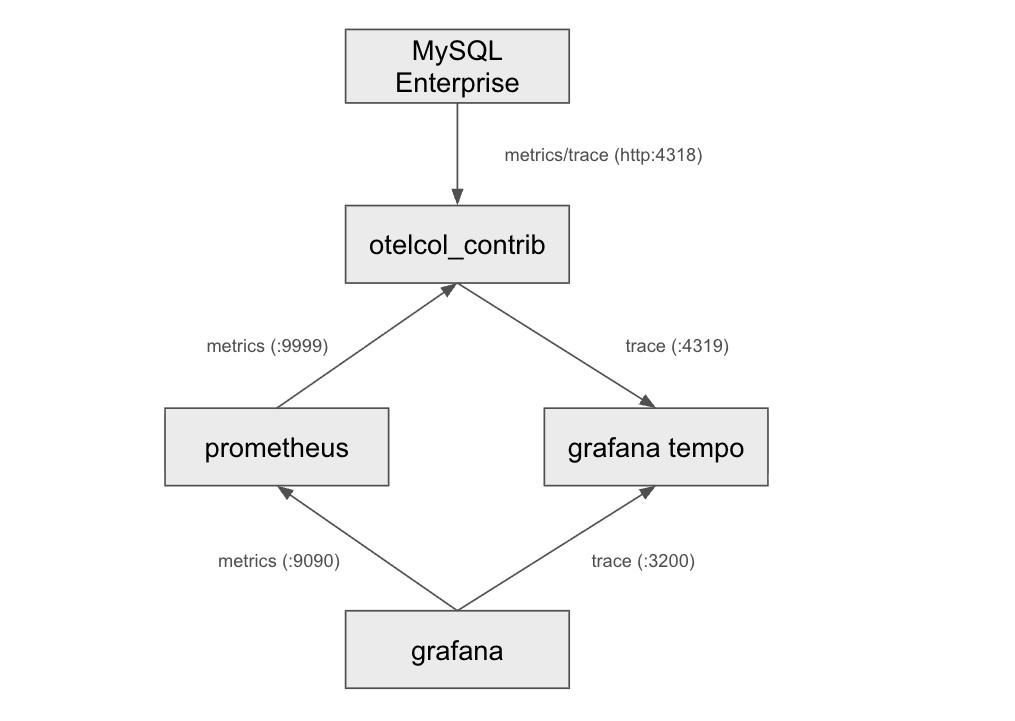
今回はMySQL Enterprise 8.4.8にcomponent_telemetryコンポーネントをインストールし、OpenTelemetry Collectorで収集、メトリクスはprometheus、traceはgrafana tempoで収集し、それぞれをData sourceにしてGrafanaでグラフにする構成とした。
OSはUbuntu 24.04。
構成図
インストール
各コンポーネントのインストール方法をメモしておく。
MySQL Enterprise Edition
下記のサイトの"ダウンロードはこちら"から手順に従ってdebファイルを落としてきてローカルインストールした。
GUIが分かりづらいけど、頑張って必要なパッケージを落とす。
スクショ等は取っていないので割愛...
インストールできたらログインして、コンポーネントもインストールする
# mysql
Welcome to the MySQL monitor.  Commands end with ; or \g.
Your MySQL connection id is 8
Server version: 8.4.8-commercial MySQL Enterprise Server - Commercial

Copyright (c) 2000, 2026, Oracle and/or its affiliates.

Oracle is a registered trademark of Oracle Corporation and/or its
affiliates. Other names may be trademarks of their respective
owners.

Type 'help;' or '\h' for help. Type '\c' to clear the current input statement.

mysql> install component 'file://component_telemetry';
Query OK, 0 rows affected (0.02 sec)
デフォルトでmetricsとtraceはenabledになっているが、telemetry.log_enabledがない。
これは9.x(少なくとも9.6)で追加された模様
- 9.6のドキュメント: https://dev.mysql.com/doc/refman/9.6/en/telemetry-logging.html
- 8.4のドキュメント: https://dev.mysql.com/doc/refman/8.4/en/telemetry.html
mysql> show variables like '%telemetry%enabled';
+------------------------------+-------+
| Variable_name                | Value |
+------------------------------+-------+
| telemetry.metrics_enabled    | ON    |
| telemetry.query_text_enabled | ON    |
| telemetry.trace_enabled      | ON    |
+------------------------------+-------+
3 rows in set (0.00 sec)

mysql> show variables like '%telemetry%endpoint';
+-----------------------------------------------+----------------------------------+
| Variable_name                                 | Value                            |
+-----------------------------------------------+----------------------------------+
| telemetry.otel_exporter_otlp_metrics_endpoint | http://localhost:4318/v1/metrics |
| telemetry.otel_exporter_otlp_traces_endpoint  | http://localhost:4318/v1/traces  |
+-----------------------------------------------+----------------------------------+
2 rows in set (0.00 sec)
OpenTelemetryのインストール
最新バージョンの0.146.0を入れる
OTEL_VERSION="0.146.0"
wget https://github.com/open-telemetry/opentelemetry-collector-releases/releases/download/v${OTEL_VERSION}/otelcol-contrib_${OTEL_VERSION}_linux_amd64.deb
# インストール
sudo apt install -y ./otelcol-contrib_${OTEL_VERSION}_linux_amd64.deb
prometheus, grafana
cf) https://grafana.com/docs/grafana/latest/setup-grafana/installation/debian/ に従う
sudo apt install -y wget apt-transport-https ca-certificates software-properties-common gnupg

sudo mkdir -p /etc/apt/keyrings
sudo wget -O /etc/apt/keyrings/grafana.asc https://apt.grafana.com/gpg-full.key
sudo chmod 644 /etc/apt/keyrings/grafana.asc

echo "deb [signed-by=/etc/apt/keyrings/grafana.asc] https://apt.grafana.com stable main" | sudo tee -a /etc/apt/sources.list.d/grafana.list

sudo apt-get update

sudo apt install -y grafana prometheus
grafana tempo
最新の2.10.1をインストール
TEMPO_VERSION="2.10.1"
wget https://github.com/grafana/tempo/releases/download/v${TEMPO_VERSION}/tempo_${TEMPO_VERSION}_linux_amd64.deb
sudo dpkg -i tempo_${TEMPO_VERSION}_linux_amd64.deb
セットアップ
冒頭で説明した構成になるように設定したメモ。
基本的にはデフォルトのコンフィグのまま、必要な設定だけ追加しているだけ。
otelcol-contrib
デフォルトでotelcolが4317, 4318ポートを使うので、tempoのポートは4319とした。 (8888は別のプロセスが利用していたので、9999に変更した)
また、portをあわせてもtempoにメトリクスが送れず、chatgptによるとtempoはtlsに対応していらしいので、tlsの設定をinsecure: trueにした。 ドキュメントを見ると対応しているようなので、本番環境で使うときには適切に設定したら良さそう。
/etc/otelcol-contrib/config.yaml
cat config.yaml
# To limit exposure to denial of service attacks, change the host in endpoints below from 0.0.0.0 to a specific network interface.
# See https://github.com/open-telemetry/opentelemetry-collector/blob/main/docs/security-best-practices.md#safeguards-against-denial-of-service-attacks

extensions:
  health_check:
  pprof:
    endpoint: 0.0.0.0:1777
  zpages:
    endpoint: 0.0.0.0:55679

receivers:
  otlp:
    protocols:
      grpc:
        endpoint: 0.0.0.0:4317
      http:
        endpoint: 0.0.0.0:4318

  # Collect own metrics
  prometheus:
    config:
      scrape_configs:
      - job_name: 'otel-collector'
        scrape_interval: 10s
        static_configs:
        - targets: ['0.0.0.0:9999']

processors:
  batch:

exporters:
  prometheus:
    endpoint: "0.0.0.0:9999"
  otlp/tempo:
    endpoint: "127.0.0.1:4319"
    tls:
      insecure: true
  debug:
    verbosity: detailed

service:
  pipelines:
    traces:
      receivers: [otlp]
      processors: [batch]
      exporters: [debug, otlp/tempo]

    metrics:
      receivers: [otlp]
      processors: [batch]
      exporters: [prometheus]

    logs:
      receivers: [otlp]
      processors: [batch]
      exporters: [debug]

  extensions: [health_check, pprof, zpages]
prometheus
otel-collectorからメトリクスを取得する
/etc/prometheus/prometheus.yml
scrape_configs:
  #
  # 省略
  #

  - job_name: "otel-collector"
    static_configs:
      - targets: ["localhost:9999"]
tempo
distributerに
/etc/tempo/config.yml
distributor:
  receivers:
    otlp:
      protocols:
        grpc:
          endpoint: "0.0.0.0:4319"
どこかで設定がうまく言っていないときはjournalctl -xeuでログを見ればOK
Grafanaからデータを見る
うまく設定できていればData sourceから選択すればviewが作れるようになっているはず。
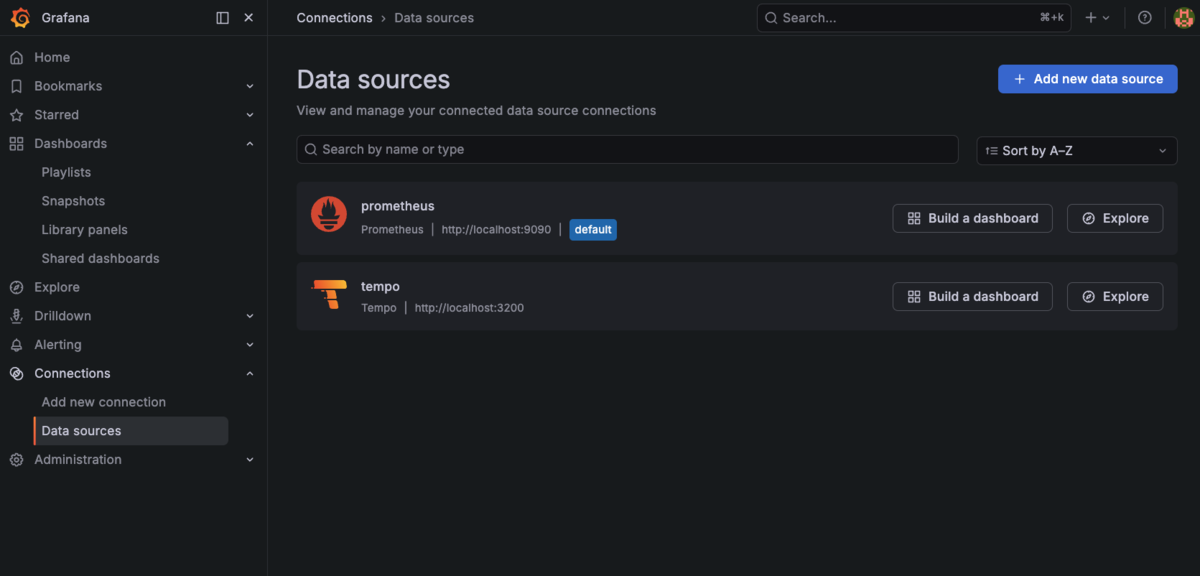
あとはData sourceを指定して追加していくだけ。
metrics
メトリクスとして指定できるのは以下。
MySQL :: MySQL 8.4 Reference Manual :: 35.4.3 Server Metrics
あまり特別なな値はなく、performance_schema.global_statusから取れる値に見える
trace
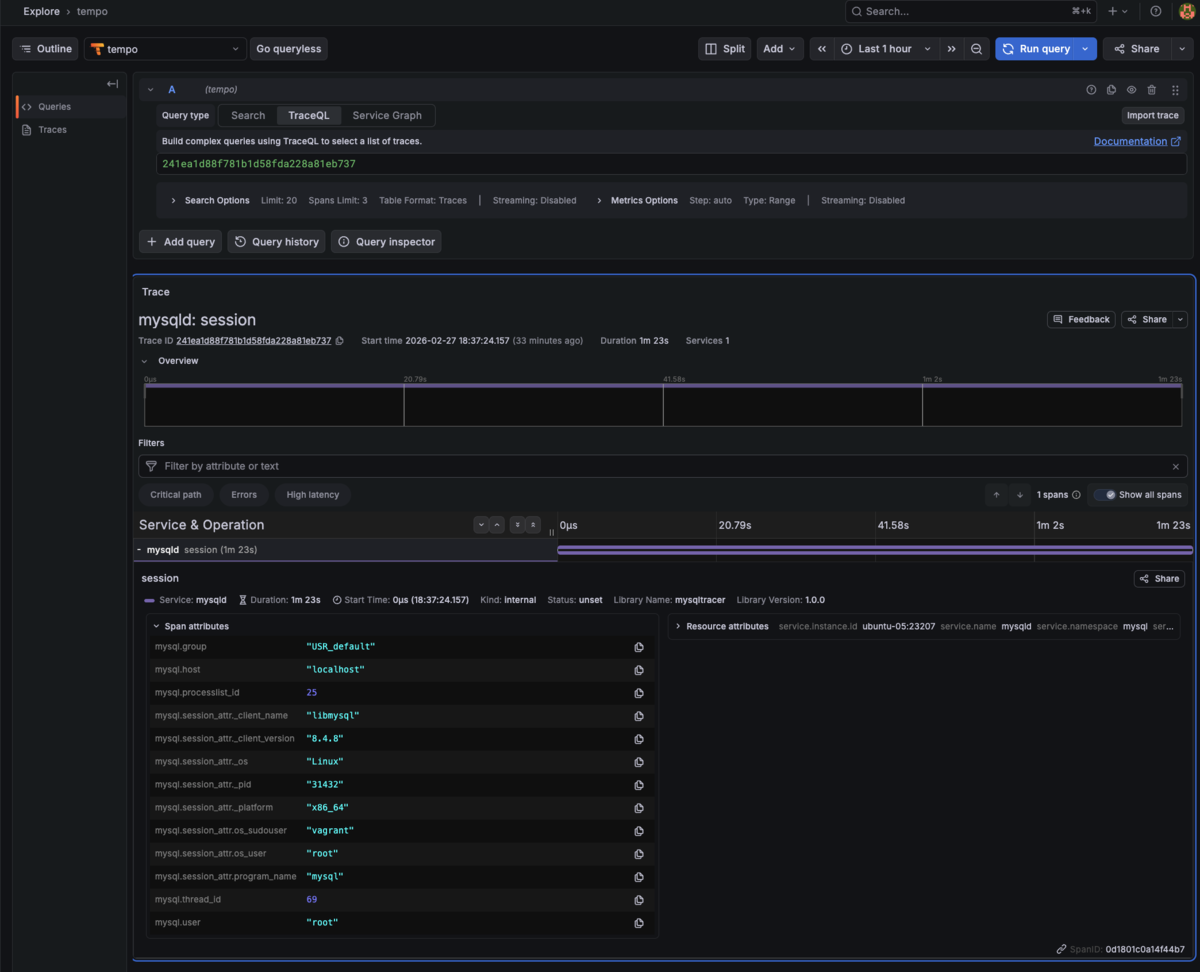
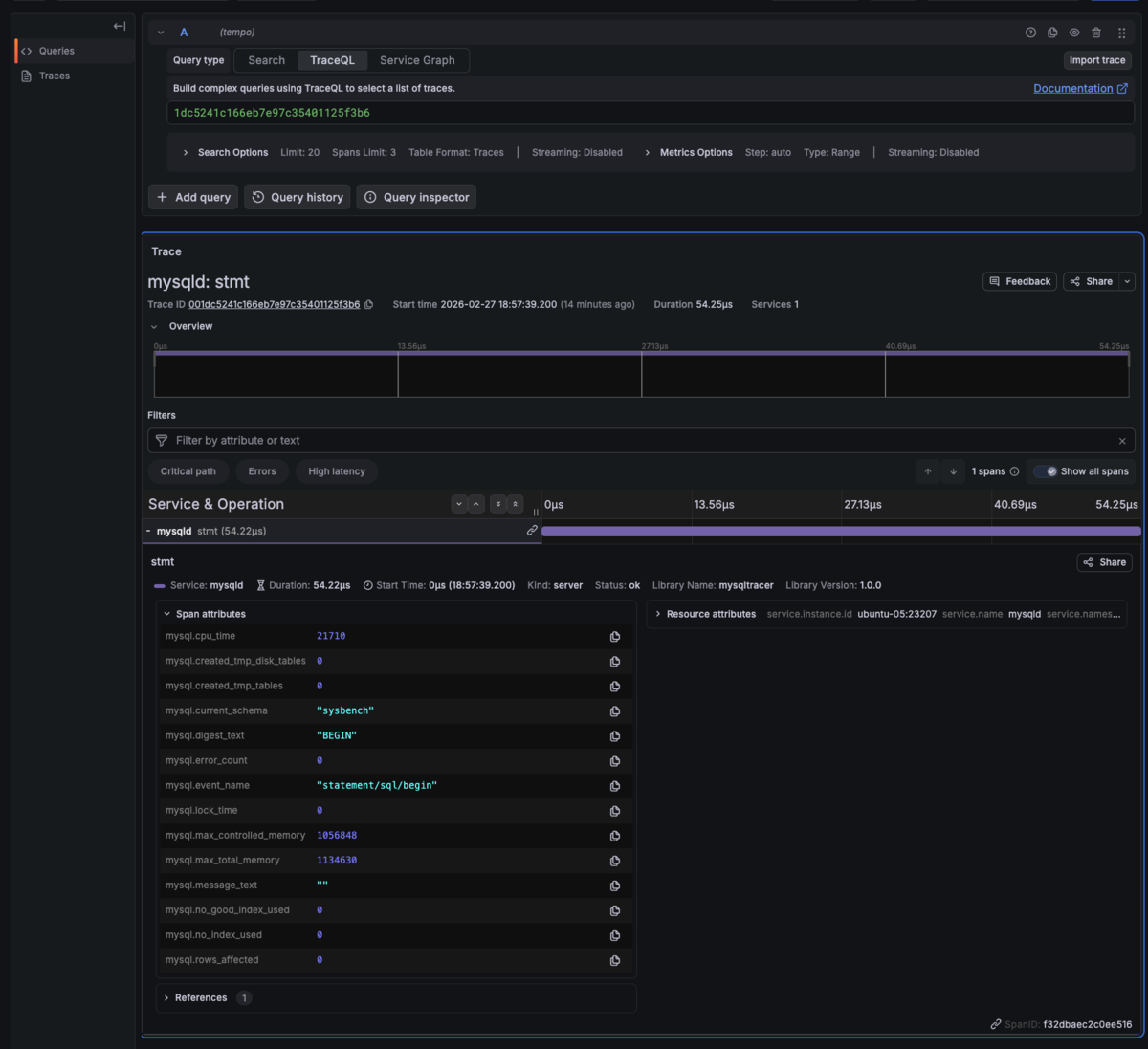
traceで出力されるspanのは3つで、単純にクエリを実行したときに出されるspanはSession(session)とStatement(stmt)の2つ。
- Control Span
- Session Span
- Statement Span
出力される情報はあまり多くないのと、Spanの親子関係が設定されないので、sessionとstmtは単独のtraceとして出てしまい、紐づけができない様子。
( 出力フォーマットはこちら: https://dev.mysql.com/doc/refman/8.4/en/telemetry-trace-format.html
(session spanの例)
(stmt spanの例)
今後、traceの情報が拡張されて、トランザクションやDDL中ステートやロックに関するのSpanが追加されて、内部状態がよりわかりやすくなることに期待...!
