こんな感じでグラフィカルに表示されていい感じです!

~/.gitconfigまたはリポジトリの.git/configの設定
[merge]
        tool = vscode
[mergetool]
        prompt = false
        keepBackup = false
[mergetool "vscode"]
        # cmd = 'VSCodeのパス' \"$MERGED\"
        # 例:Macの場合
        cmd = '/Applications/Visual Studio Code.app/Contents/Resources/app/bin/code' \"$MERGED\"
        trustExitCode = false
使い方
コンフリクトが発生したときに、git mergetoolでVSCodeが立ち上がります
$ git merge master
Auto-merging index.js
CONFLICT (content): Merge conflict in index.js
Automatic merge failed; fix conflicts and then commit the result.
$ git mergetool
初期状態
現在の変更を取り込む --ours
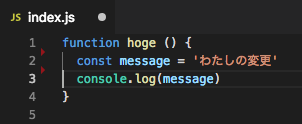
入力側の変更を取り込む --theirs

両方の変更を取り込む
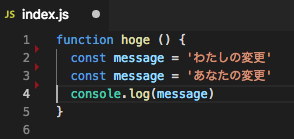
※コード的にはNGなので例が悪かった…
変更の比較

