前々回、前回と、Redisクラスターを使ったセッションストア設定などを試してきました。
- Rails8.1系で、Redisクラスターをセッションストアとして設定してみた - メモ的な思考的な
- Rails8.1系で、Redisクラスターをセッションストアとキャッシュストアに設定してみた - メモ的な思考的な
これらの記事ではRedisにはレプリカはありませんでした。
そこで今回は、レプリカのあるRedis(スタンドアロンやクラスター)をセッションストアに設定してみたことから、メモを残します。
目次
環境
- mac
- RubyMine 2025.3.2
- docker compose
- Ruby 3.4.8
- Rails 8.1.2
- redis 5.4.1
- redis-actionpack 5.5.0
- redis-clustering 5.4.1
なお、今回のRedisはいずれも --protected-mode no としているため、開発用途であることに注意してください。
レプリカありのスタンドアロンRedisをセッションストアにする
まずは、docker composeでレプリカありのスタンドアロンRedisを用意します。
services:
  redis-master:
    image: redis:8.4.0-bookworm
    container_name: redis-master
    ports:
      - "17000:6379"
    command: ["redis-server", "--save", "", "--appendonly", "no", "--protected-mode", "no"]
    restart: unless-stopped
    networks:
      - redis-network

  redis-replica:
    image: redis:8.4.0-bookworm
    container_name: redis-replica
    depends_on:
      - redis-master
    ports:
      - "17001:6379"
    command:
      - "redis-server"
      - "--save"
      - ""
      - "--appendonly"
      - "no"
      - "--protected-mode"
      - "no"
      - "--replicaof"
      - "redis-master"
      - "6379"
    restart: unless-stopped
    networks:
      - redis-network

networks:
  redis-network:
    name: redis-network
スタンドアロンRedisを config.session_store へ設定する方法としては、次の2つがあります。
redis+redis-actionpackによる:redis_storeredisgemによる:cache_store
それぞれ見ていきます。
redis gem + redis-actionpack gemによる :redis_store
まずは、以前見た通り、 redis-rails で紹介されていた redis-actionpack を使います。
bundle add します。
% bundle add redis-actionpack
...
Installing redis-client 0.26.4
Installing redis 5.4.1
Installing redis-store 1.11.0
Installing redis-rack 3.0.0
Installing redis-actionpack 5.5.0
config.session_store に :redis_store を指定します。セッションへの書き込みはマスターが担うため、 host にはマスターのみ記載します。
Rails.application.config.session_store :redis_store,
                                       servers: [
                                         {
                                           host: "redis-master",
                                           port: 6379,
                                           db: 0,
                                           namespace: "session"
                                         }
                                       ],
                                       expire_after: 90.minutes,
                                       key: "_redis_session"
セッションストアの準備ができたため、 curl で動作確認します。
% curl -X POST http://localhost:3000/hellos -c cookies.txt

% curl -b cookies.txt http://localhost:3000/hellos
{
"current_timestamp":"2026/02/01 09:09:41",
"session_timestamp":"session -> 2026/02/01 09:09:18"
}
RubyMineでRedisを確認します。マスターとレプリカの両方にデータが保存されていました。
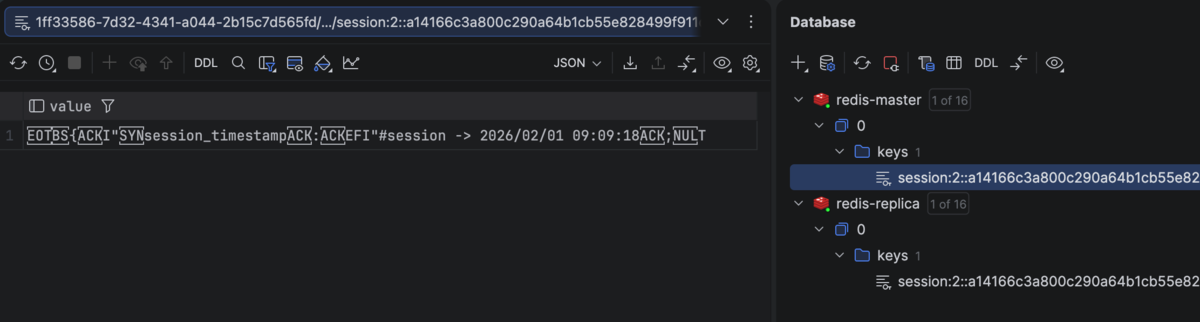
続いて、Redis CLIで確認します。まずはマスターから。
$ redis-cli -c -h redis-master -p 6379 --scan
"session:2::a14166c3a800c290a64b1cb55e828499f911cf51e87e9d7c8f187909ba101131"

$ redis-cli -c -h redis-master -p 6379 get "session:2::a14166c3a800c290a64b1cb55e828499f911cf51e87e9d7c8f187909ba101131"
"\x04\b{\x06I\"\x16session_timestamp\x06:\x06EFI\"#session -> 2026/02/01 09:09:18\x06;\x00T"
続いてレプリカを確認します。マスターとレプリカとも、同じ値が保存されていました。
$ redis-cli -c -h redis-replica -p 6379 --scan
"session:2::a14166c3a800c290a64b1cb55e828499f911cf51e87e9d7c8f187909ba101131"

$ redis-cli -c -h redis-replica -p 6379 get "session:2::a14166c3a800c290a64b1cb55e828499f911cf51e87e9d7c8f187909ba101131"
"\x04\b{\x06I\"\x16session_timestamp\x06:\x06EFI\"#session -> 2026/02/01 09:09:18\x06;\x00T"
redis gemによる :cache_store
以前の記事で、セッションストアに :cache_store を指定してRedisクラスターへ接続しました。
Rails8.1系で、Redisクラスターをセッションストアとして設定してみた - メモ的な思考的な
しかし、Redisクラスターでなくても :cache_store を使えそうな気がしたので、今回試してみます。
まず、 redis-actionpack の影響を受けないよう、Gemfileから redis-actionpack を削除します。
次に、 config.session_store で :cache_store を使うように設定します。 redis-actionpack の時と同様の内容として、ポート 6379 、DB番号 0 としたURLを url へ設定します。
Rails.application.config.session_store :cache_store,
                                       cache: ActiveSupport::Cache::RedisCacheStore.new(
                                         url: "redis://redis-master:6379/0",
                                       ),
                                       expire_after: 90.minutes,
                                       key: "_redis_session"
この状態で起動しようとしたところ、次のエラーになり、Railsが起動できませんでした。
The Redis cache store requires the redis gem, version 4.0.1 or later. Please add it to your Gemfile: `gem "redis", ">= 4.0.1"`
/home/vscode/.local/share/mise/installs/ruby/3.4.8/lib/ruby/3.4.0/bundler/rubygems_integration.rb:215:in 'block (2 levels) in Kernel#replace_gem': redis is not part of the bundle. Add it to your Gemfile. (Gem::LoadError)
エラーメッセージにある通り、 redis gemを追加します。
$ bundle add redis
続いて bin/rails s によりRailsを起動できたことから、動作を確認します。セッションへ保存できたようです。
% curl -X POST http://localhost:3000/hellos -c cookies.txt

% curl -b cookies.txt http://localhost:3000/hellos
{
"current_timestamp":"2026/02/01 12:55:24",
"session_timestamp":"session -> 2026/02/01 12:55:19"
}
この時のCookieの中身である cookies.txt は次のようになっていました。 key で指定した _redis_session が存在します。
# Netscape HTTP Cookie File
# https://curl.se/docs/http-cookies.html
# This file was generated by libcurl! Edit at your own risk.

#HttpOnly_localhost FALSE   /   FALSE   1769955919  _redis_session  0672f5df97a0ad2a01ba341fc40408cc
保存できたデータを確認します。
RubyMineで確認したところ、マスターとレプリカ両方に同じデータが保存されていました。
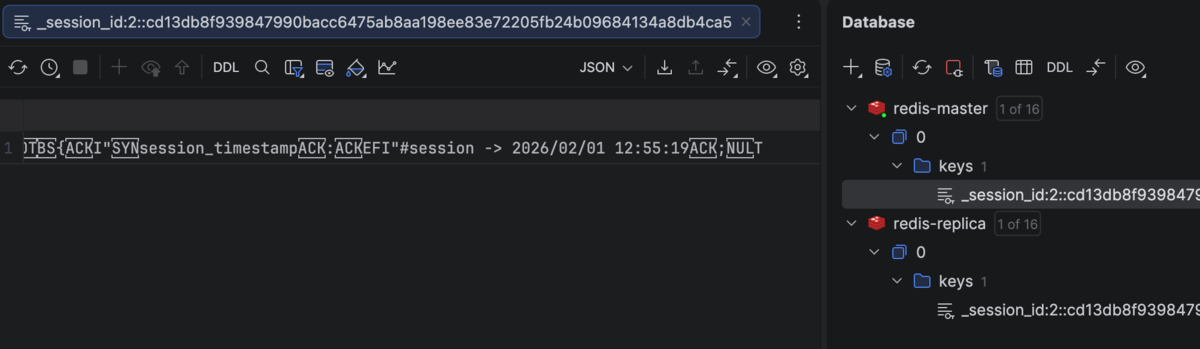
続いて、Redis CLIでも確認します。まずはマスター。
$ redis-cli -c -h redis-master -p 6379 --scan
"_session_id:2::cd13db8f939847990bacc6475ab8aa198ee83e72205fb24b09684134a8db4ca5"

$ redis-cli -c -h redis-master -p 6379 get "_session_id:2::cd13db8f939847990bacc6475ab8aa198ee83e72205fb24b09684134a8db4ca5"
"\x00\x11\x01AT\x06\x95\xd8_\xdaA\xff\xff\xff\xff\x04\b{\x06I\"\x16session_timestamp\x06:\x06EFI\"#session -> 2026/02/01 12:55:19\x06;\x00T"
続いてレプリカです。マスターと同じ値でした。
$ redis-cli -c -h redis-replica -p 6379 --scan
"_session_id:2::cd13db8f939847990bacc6475ab8aa198ee83e72205fb24b09684134a8db4ca5"

$ redis-cli -c -h redis-replica -p 6379 get "_session_id:2::cd13db8f939847990bacc6475ab8aa198ee83e72205fb24b09684134a8db4ca5"
"\x00\x11\x01AT\x06\x95\xd8_\xdaA\xff\xff\xff\xff\x04\b{\x06I\"\x16session_timestamp\x06:\x06EFI\"#session -> 2026/02/01 12:55:19\x06;\x00T"
これより、 config.session_store に :cache_store を設定するのであれば、必要なgemは redis だけにできそうです。
レプリカありのRedisクラスターをセッションストアにする
続いて、レプリカのあるRedisクラスターをセッションストアにしてみます。
マスターノードが1つだけではRedisクラスターを構成できない
Redisクラスターを構成するためには、最低いくつのノードを用意すればよいか調べたところ、公式ドキュメントに次の記述がありました。
Note that the minimal cluster that works as expected must contain at least three master nodes. For deployment, we strongly recommend a six-node cluster, with three masters and three replicas.
Requirements to create a Redis Cluster | Scale with Redis Cluster | Docs
では、実際にマスターノードが1つしかない場合、どのような挙動になるのか試してみます。
まずは compose-one-node.yml ファイルを用意します。
services:
  redis-cluster-master:
    image: redis:8.4.0-bookworm
    container_name: redis-cluster-master
    ports:
      - "17010:6379"
    command:
      - "redis-server"
      - "--save"
      - ""
      - "--appendonly"
      - "no"
      - "--protected-mode"
      - "no"
      - "--cluster-enabled"
      - "yes"
      - "--cluster-config-file"
      - "nodes.conf"
      - "--cluster-node-timeout"
      - "5000"
    restart: unless-stopped
    networks:
      - redis-network

  redis-cluster-replica:
    image: redis:8.4.0-bookworm
    container_name: redis-cluster-replica
    ports:
      - "17011:6379"
    command:
      - "redis-server"
      - "--save"
      - ""
      - "--appendonly"
      - "no"
      - "--protected-mode"
      - "no"
      - "--cluster-enabled"
      - "yes"
      - "--cluster-config-file"
      - "nodes.conf"
      - "--cluster-node-timeout"
      - "5000"
    restart: unless-stopped
    networks:
      - redis-network

  redis-cluster-init:
    image: redis:8.4.0-bookworm
    container_name: redis-cluster-init
    depends_on:
      - redis-cluster-master
      - redis-cluster-replica
    command:
      - "sh"
      - "-c"
      - |
        until redis-cli -h redis-cluster-master ping; do sleep 1; done
        until redis-cli -h redis-cluster-replica ping; do sleep 1; done
        redis-cli --cluster create \
          redis-cluster-master:6379 \
          redis-cluster-replica:6379 \
          --cluster-replicas 1 --cluster-yes
    restart: "no"
    networks:
      - redis-network

networks:
  redis-network:
    name: redis-network
これを docker compose -f compose-one-node.yml up -d で起動します。
Redis CLIで確認したところ、cluster_stateが fail していました。クラスターが適切に作成できなかったようです。
$ redis-cli -c -h redis-cluster-master -p 6379 cluster info
cluster_state:fail
cluster_slots_assigned:0
cluster_slots_ok:0
cluster_slots_pfail:0
cluster_slots_fail:0
cluster_known_nodes:1
cluster_size:0
cluster_current_epoch:0
cluster_my_epoch:0
cluster_stats_messages_sent:0
cluster_stats_messages_received:0
total_cluster_links_buffer_limit_exceeded:0
cluster_slot_migration_active_tasks:0
cluster_slot_migration_active_trim_running:0
cluster_slot_migration_active_trim_current_job_keys:0
cluster_slot_migration_active_trim_current_job_trimmed:0
cluster_slot_migration_stats_active_trim_started:0
cluster_slot_migration_stats_active_trim_completed:0
cluster_slot_migration_stats_active_trim_cancelled:0
マスターノード3つ(ノードごとにレプリカ1つ)でRedisクラスターを構成する
docker composeによるRedisクラスター構築
次に、最低限のマスターノードでRedisクラスターを構成してみます。
まずは compose-cluster.yml ファイルを用意します。なお、マスターとレプリカで共通する部分は x-redis-cluster-common として切り出しています。
x-redis-cluster-common: &redis_cluster_common
  image: redis:8.4.0-bookworm
  command: &redis_cluster_command
    - "redis-server"
    - "--save"
    - ""
    - "--appendonly"
    - "no"
    - "--protected-mode"
    - "no"
    - "--cluster-enabled"
    - "yes"
    - "--cluster-config-file"
    - "nodes.conf"
    - "--cluster-node-timeout"
    - "5000"
  restart: unless-stopped
  networks:
    - redis-network

services:
  redis-cluster-master-1:
    <<: *redis_cluster_common
    container_name: redis-cluster-master-1
    ports:
      - "17020:6379"

  redis-cluster-master-2:
    <<: *redis_cluster_common
    container_name: redis-cluster-master-2
    ports:
      - "17021:6379"

  redis-cluster-master-3:
    <<: *redis_cluster_common
    container_name: redis-cluster-master-3
    ports:
      - "17022:6379"

  redis-cluster-replica-1:
    <<: *redis_cluster_common
    container_name: redis-cluster-replica-1
    ports:
      - "17023:6379"

  redis-cluster-replica-2:
    <<: *redis_cluster_common
    container_name: redis-cluster-replica-2
    ports:
      - "17024:6379"

  redis-cluster-replica-3:
    <<: *redis_cluster_common
    container_name: redis-cluster-replica-3
    ports:
      - "17025:6379"

  redis-cluster-init:
    image: redis:8.4.0-bookworm
    container_name: redis-cluster-init
    depends_on:
      - redis-cluster-master-1
      - redis-cluster-master-2
      - redis-cluster-master-3
      - redis-cluster-replica-1
      - redis-cluster-replica-2
      - redis-cluster-replica-3
    command:
      - "sh"
      - "-c"
      - |
        until redis-cli -h redis-cluster-master-1 ping; do sleep 1; done
        until redis-cli -h redis-cluster-master-2 ping; do sleep 1; done
        until redis-cli -h redis-cluster-master-3 ping; do sleep 1; done
        until redis-cli -h redis-cluster-replica-1 ping; do sleep 1; done
        until redis-cli -h redis-cluster-replica-2 ping; do sleep 1; done
        until redis-cli -h redis-cluster-replica-3 ping; do sleep 1; done
        redis-cli --cluster create \
          redis-cluster-master-1:6379 \
          redis-cluster-master-2:6379 \
          redis-cluster-master-3:6379 \
          redis-cluster-replica-1:6379 \
          redis-cluster-replica-2:6379 \
          redis-cluster-replica-3:6379 \
          --cluster-replicas 1 --cluster-yes
    restart: "no"
    networks:
      - redis-network

networks:
  redis-network:
    name: redis-network
docker composeでRedisクラスターを起動します。
% docker compose -f compose-cluster.yml up -d
 ✔ Container redis-cluster-replica-3  Started
 ✔ Container redis-cluster-master-2   Started
 ✔ Container redis-cluster-master-1   Started
 ✔ Container redis-cluster-replica-2  Started
 ✔ Container redis-cluster-master-3   Started
 ✔ Container redis-cluster-replica-1  Started
 ✔ Container redis-cluster-init       Started
Redis CLIで状態を確認します。 cluster_state:ok となっており、Redisクラスターとして動作してそうです。
$ redis-cli -c -h redis-cluster-master-1 -p 6379 cluster info
cluster_state:ok
cluster_slots_assigned:16384
cluster_slots_ok:16384
cluster_slots_pfail:0
cluster_slots_fail:0
cluster_known_nodes:6
cluster_size:3
cluster_current_epoch:6
cluster_my_epoch:1
cluster_stats_messages_ping_sent:315
cluster_stats_messages_pong_sent:317
cluster_stats_messages_sent:632
cluster_stats_messages_ping_received:312
cluster_stats_messages_pong_received:315
cluster_stats_messages_meet_received:5
cluster_stats_messages_received:632
total_cluster_links_buffer_limit_exceeded:0
cluster_slot_migration_active_tasks:0
cluster_slot_migration_active_trim_running:0
cluster_slot_migration_active_trim_current_job_keys:0
cluster_slot_migration_active_trim_current_job_trimmed:0
cluster_slot_migration_stats_active_trim_started:0
cluster_slot_migration_stats_active_trim_completed:0
cluster_slot_migration_stats_active_trim_cancelled:0
redis gemによる :cache_store
RailsからRedisクラスターへ接続するには redis-clusteringが必要なため、bundle add します。
$ bundle add redis-clustering
...
Installing redis-cluster-client 0.13.7
Installing redis-clustering 5.4.1
Redisクラスター向けにsession_store.rbを修正します。
なお、 nodes へ指定するのはマスターノードのみで良いです。Redisクラスターへの書き込みはマスターノードのみ行うためです。
Rails.application.config.session_store :cache_store,
                                       cache: ActiveSupport::Cache::RedisCacheStore.new(
                                         redis: Redis::Cluster.new(nodes: %w[
                                           redis://redis-cluster-master-1:6379
                                           redis://redis-cluster-master-2:6379
                                           redis://redis-cluster-master-3:6379
                                         ]),
                                         namespace: "my_namespace"
                                       ),
                                       expire_after: 90.minutes,
                                       key: "_redis_cluster_session"
動作確認します。セッションへデータが保存されてそうです。
% curl -X POST http://localhost:3000/hellos -c cookies.txt

% curl -b cookies.txt http://localhost:3000/hellos
{
"current_timestamp":"2026/02/01 23:59:11",
"session_timestamp":"session -> 2026/02/01 23:59:07"
}
RubyMineでRedisクラスターを確認すると、マスター・レプリカそれぞれに同じデータが保存されていました。
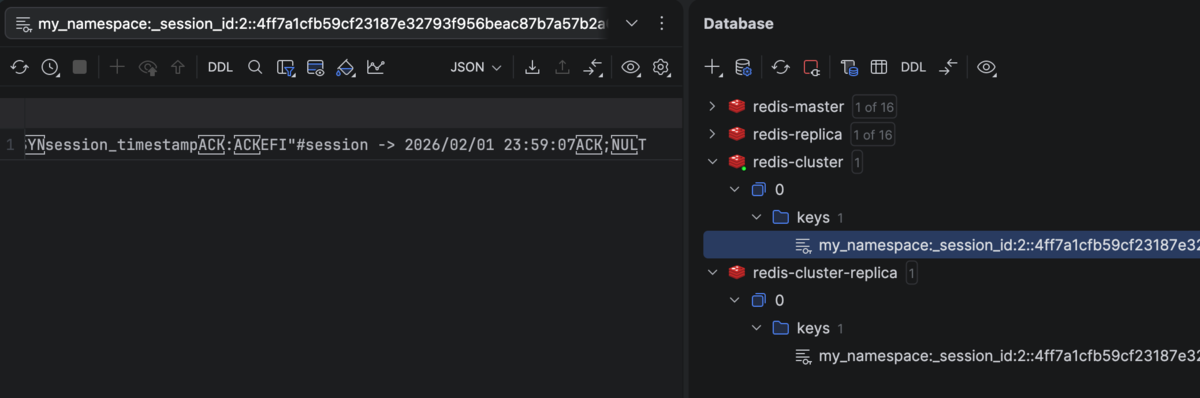
Redis CLIで確認します。redis-cluster-master-1 と redis-cluster-replica-2 にキーが保存されていました。
# マスター系
$ redis-cli -c -h redis-cluster-master-1 -p 6379 --scan
"my_namespace:_session_id:2::4ff7a1cfb59cf23187e32793f956beac87b7a57b2a6c8c8e03ab2030805182e0"

$ redis-cli -c -h redis-cluster-master-2 -p 6379 --scan
# (キーがないので空行)

$ redis-cli -c -h redis-cluster-master-3 -p 6379 --scan
# (キーがないので空行)


# レプリカ系
$ redis-cli -c -h redis-cluster-replica-1 -p 6379 --scan
# (キーがないので空行)

$ redis-cli -c -h redis-cluster-replica-2 -p 6379 --scan
"my_namespace:_session_id:2::4ff7a1cfb59cf23187e32793f956beac87b7a57b2a6c8c8e03ab2030805182e0"

$ redis-cli -c -h redis-cluster-replica-3 -p 6379 --scan
# (キーがないので空行)
redis-cluster-master-1 と redis-cluster-replica-2 の中身を確認すると、同じものが保存されていました。良さそうです。
# マスター
$ redis-cli -c -h redis-cluster-master-1 -p 6379 get "my_namespace:_session_id:2::4ff7a1cfb59cf23187e32793f956beac87b7a57b2a6c8c8e03ab2030805182e0"
"\x00\x11\x01o\xbb\xfay\xff_\xdaA\xff\xff\xff\xff\x04\b{\x06I\"\x16session_timestamp\x06:\x06EFI\"#session -> 2026/02/01 23:59:07\x06;\x00T"


# レプリカ
$ redis-cli -c -h redis-cluster-replica-2 -p 6379 get "my_namespace:_session_id:2::4ff7a1cfb59cf23187e32793f956beac87b7a57b2a6c8c8e03ab2030805182e0"
"\x00\x11\x01o\xbb\xfay\xff_\xdaA\xff\xff\xff\xff\x04\b{\x06I\"\x16session_timestamp\x06:\x06EFI\"#session -> 2026/02/01 23:59:07\x06;\x00T"
ソースコード
GitHubに上げました。
https://github.com/thinkAmi-sandbox/rails_session_with_redis_replication-example
スタンドアロンRedisで redis gemだけを使っているプルリクはこちら。
https://github.com/thinkAmi-sandbox/rails_session_with_redis_replication-example/pull/1
なお、スタンドアロンRedisで redis gem + redis-actionpack gemの場合は、こちらのコミットです。
https://github.com/thinkAmi-sandbox/rails_session_with_redis_replication-example/commit/7557bc6c51915c0385dfb7fd342d4bd54f140bce
Redisクラスターのプルリクはこちら。
https://github.com/thinkAmi-sandbox/rails_session_with_redis_replication-example/pull/2
