以前、SOAP with Attachments (SwA) にて、SOAPでファイルを送信してみました。
Python + Zeep にて、SOAP with Attachment (SwA) でファイルを送信する - メモ的な思考的な
今回は、SwAに似た swaRefという仕様でファイルを送信してみます。
仕様書:SOAP Messages with Attachments
なお、今回扱うswaRefについてですが、SOAPエンベロープは、
<soap-env:Envelope xmlns:soap-env="http://schemas.xmlsoap.org/soap/envelope/">
  <soap-env:Body>
    <ns0:RequestInterface xmlns:ns0="http://example.com/HelloWorld">
      <ns0:image href="cid:spam"/>
    </ns0:RequestInterface>
  </soap-env:Body>
</soap-env:Envelope>
のように <ns0:image href="cid:spam"/> と、 href 属性を持っているため、WSI:swaRefとは異なります*1。
また、動作確認は SOAP UI を使っているため、もしかしたらそれ以外の環境では動作しないかもしれません。
目次
環境
実装するもの
です。
Transportについては、SwAの実装を流用できますので、今回は省略します。
後述のGitHubにはTransportも実装してありますので、そちらを参照してください。
WSDLの実装
今回は image elementに href 属性を追加します。
そのため、
- 名前空間の追加
- ref属性を使って、要素に href 属性を追加
をします。
<!-- myという名前空間を追加 -->
<wsdl:definitions
...
        xmlns:my="http://example.com/HelloWorld"
        targetNamespace="http://example.com/HelloWorld">

    <wsdl:types>
        <xsd:schema elementFormDefault="qualified" targetNamespace="http://example.com/HelloWorld">
            <xsd:element name="RequestInterface">
                <xsd:complexType>
                    <xsd:sequence>
                        <!-- swaRef用の引数を用意:実体は別のところで定義 -->
                        <xsd:element ref="my:image"/>
                    </xsd:sequence>
                </xsd:complexType>
            </xsd:element>

            <!-- href属性を持つimage elementを用意 -->
            <xsd:element name="image">
                <xsd:complexType>
                    <xsd:attribute name="href" type="xsd:string" />
                </xsd:complexType>
            </xsd:element>
Zeepを実行するスクリプト
こちらも SwA のものを流用します。
変更は1点で、
response = client.service.requestMessage(image={'href': f'cid:{attachment_content_id}'})
と、imageタグの href 属性に値を設定するようにしています。
動作確認
SwAと同様、SOAP UIを使って動作を確認します。
SOAP UIをセットアップ後に実行すると、以下の結果となりました。 (量が多いため、バイナリのまま送信したもののみ記載)
$ python swa_ref_runner.py
----------------------------------------
添付ファイルはバイナリのまま送信
----------------------------------------
b'--boundary_1a4cde05b2ab465a8b838ea3e15614d3\r\n
Content-Type: text/xml; charset=utf-8\r\n
Content-Transfer-Encoding: 8bit\r\n
Content-ID: start_237f3846a0214dc4ac767e5722f31eaa\r\n\r\n

<?xml version=\'1.0\' encoding=\'utf-8\'?>\n
<soap-env:Envelope xmlns:soap-env="http://schemas.xmlsoap.org/soap/envelope/">
  <soap-env:Body>
    <ns0:RequestInterface xmlns:ns0="http://example.com/HelloWorld">
      <ns0:image href="cid:ham"/>
    </ns0:RequestInterface>
  </soap-env:Body>
</soap-env:Envelope>\r\n
--boundary_1a4cde05b2ab465a8b838ea3e15614d3\r\n
Content-Transfer-Encoding: binary\r\n
Content-Type: image/png; name="shinanogold.png"\r\n
Content-ID: <ham>\r\n
Content-Disposition: attachment; name="shinanogold.png"; filename="shinanogold.png"\r\n\r\n

\x89PNG\r\n\...\x00\x00IEND\xaeB`\x82\r\n
--boundary_1a4cde05b2ab465a8b838ea3e15614d3--'
--- history ---
{'envelope': <Element {http://schemas.xmlsoap.org/soap/envelope/}Envelope at 0x10ad2cc88>,
 'http_headers': {
   'SOAPAction': '"http://example.com/HelloWorld/requestMessage"',
   'Content-Type': 'multipart/related; boundary="boundary_1a4cde05b2ab465a8b838ea3e15614d3";
                   type="text/xml"; start="start_237f3846a0214dc4ac767e5722f31eaa"; charset=utf-8',
   'Content-Length': '6321'}}
?
--- envelope ---
<soap-env:Envelope xmlns:soap-env="http://schemas.xmlsoap.org/soap/envelope/">
  <soap-env:Body>
    <ns0:RequestInterface xmlns:ns0="http://example.com/HelloWorld">
      <ns0:image href="cid:ham"/>
    </ns0:RequestInterface>
  </soap-env:Body>
</soap-env:Envelope>
SOAP UIのログを見ると、2エントリが追加されていました。
内容は以下の通りです。
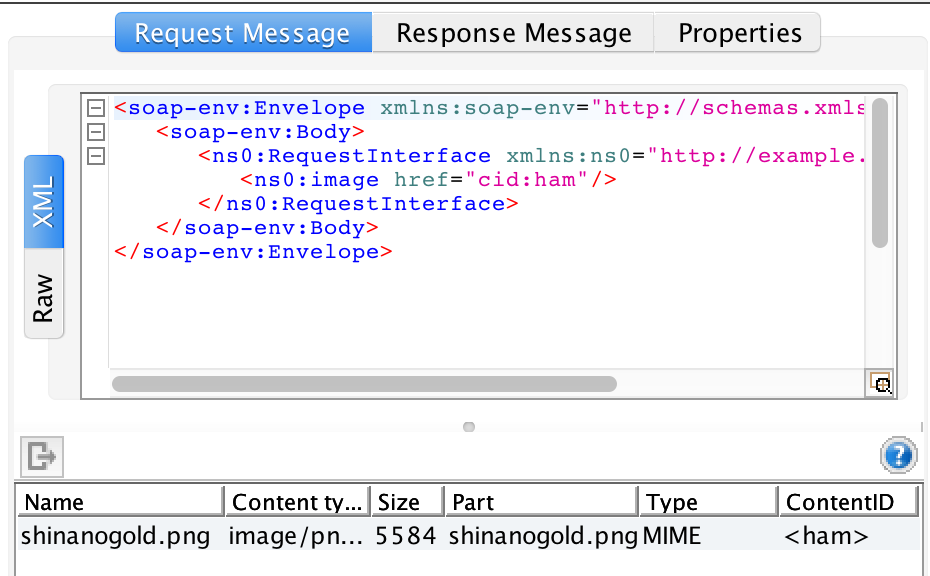
また、ファイルをエクスポートしても、送信したファイル shinanogold.png を取得できました。
参考
ソースコード
GitHubに上げました。 file_attachments/swa_ref/ ディレクトリの中が今回のファイルです。
https://github.com/thinkAmi-sandbox/python_zeep-sample
*1:SwA系についてはいろいろな種類があり、正直良く分かってないので、どこかに一覧でまとまっているサイト/本があれば、教えていただけるとありがたいです
