はじめに
先日、ansible-navigator 2.0.0 がリリースされました。
ansible-navigator は、Playbook 実行や実行環境の管理などの機能を持つ TUI ツールです。
2.0.0 では、実行環境のビルドや ansible-lint を呼び出す機能などの追加や、設定ファイル(ansible-navigator.yml)の書式変更、Python 3.6 と 3.7 のサポート停止がされました。
この記事ですが、追加されたサブコマンド(機能)について取り上げます。
(詳細はリリースノート、changelogを参照してください)
※その他の機能追加や、変更点については後日別の記事にする予定です。 [2022/04/19 追記] その他編として投稿しました。
[Ansible] ansible-navigator 2.0.0 新機能ピックアップ Part 2: その他編 - てくなべ (tekunabe)
- はじめに
- ■ 1. settings サブコマンド追加 (設定内容の確認)
- ■ 2. builder サブコマンド追加 (ansible-builder 呼び出し)
- ■ 3. exec サブコマンド追加(実行環境コンテナ内のコマンド実行)
- ■ 4. lint サブコマンド追加 (ansible-lintの呼び出し)
- おわりに
■ 1. settings サブコマンド追加 (設定内容の確認)
ansible-navigator は ansible-navigator サブコマンド という形で実行します。サブコマンドによって挙動が大きく変わります(サブコマンド一覧はこちら)。
ansible-navigator 2.0.0 ではいくつかのサブコマンドが追加されました。stettings もその一つです。
settings サブコマンドは ansible-navigator 自身の設定の状態確認できます。
changelog より
Added new subcommand :settings to output all current ansible-navigator settings to the menu or to standard output.
設定は ansible-navigator.yml や環境変数などによって決まります。
ansible-navigator settings実行結果
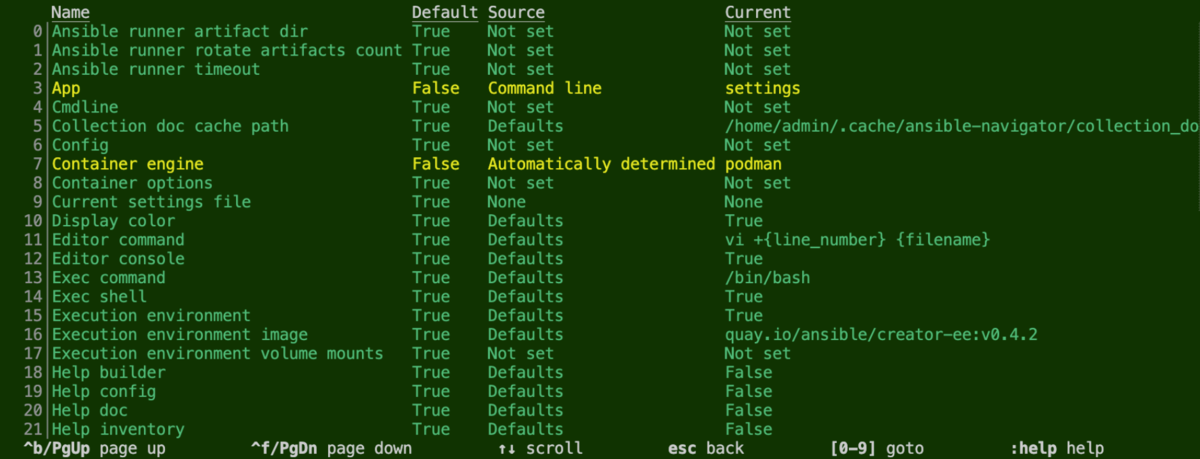
設定の状態確認だけでなく、設定項目の番号は 数字1桁 または :数字1桁以上 エンター で指定すると、各設定のヘルプドキュメントも確認できます。

設定項目はそれなりの数があるため、覚えるのも難しいです。そのため、公式ドキュメントのページを参照しますが、ansible-navigator setting からターミナル上で各設定項目の意味や指定できる値を選択できるのは便利だと思います。
なお、setting サブコマンドは、interactive (TUI)モードだけでなく stdout モードでの表示にも対応しています。コマンドの引数で指定する場合、-m stdout を追加で指定します。
$ ansible-navigator settings -m stdout
---
- choices: []
  cli_parameters:
    long: --ansible-runner-artifact-dir
    short: --rad
  current_settings_file: None
  current_value: Not set
  default: true
  default_value: Not set
  description: The directory path to store artifacts generated by ansible-runner
  env_var: ANSIBLE_NAVIGATOR_ANSIBLE_RUNNER_ARTIFACT_DIR
  name: Ansible runner artifact dir
  settings_file_sample:
    ansible-navigator:
      ansible-runner:
        artifact-dir: <------
  source: Not set
  subcommands:
# ...(略)...
参考: settings サブコマンドのヘルプ
▼
ansible-navigator settings --help の結果(クリックして開く)
$ ansible-navigator settings --help
Usage: ansible-navigator settings [options]

settings: Review the current ansible-navigator settings

Options (global):
 -h     --help                                   Show this help message and exit
 --version                                       Show the application version and exit
 --rad  --ansible-runner-artifact-dir            The directory path to store artifacts generated by ansible-runner
 --rac  --ansible-runner-rotate-artifacts-count  Keep ansible-runner artifact directories, for last n runs, if set to 0 artifact directories won't be deleted
 --rt   --ansible-runner-timeout                 The timeout value after which ansible-runner will forcefully stop the execution
 --cdcp --collection-doc-cache-path              The path to collection doc cache (default: /home/admin/.cache/ansible-navigator/collection_doc_cache.db)
 --ce   --container-engine                       Specify the container engine (auto=podman then docker) (auto|podman|docker) (default: auto)
 --co   --container-options                      Extra parameters passed to the container engine command
 --dc   --display-color                          Enable the use of color for mode interactive and stdout (true|false) (default: true)
 --ecmd --editor-command                         Specify the editor command (default: vi +{line_number} {filename})
 --econ --editor-console                         Specify if the editor is console based (true|false) (default: true)
 --ee   --execution-environment                  Enable or disable the use of an execution environment (true|false) (default: true)
 --eei  --execution-environment-image            Specify the name of the execution environment image (default: quay.io/ansible/creator-ee:v0.4.2)
 --eev  --execution-environment-volume-mounts    Specify volume to be bind mounted within an execution environment (--eev /home/user/test:/home/user/test:Z)
 --la   --log-append                             Specify if log messages should be appended to an existing log file, otherwise a new log file will be created per
                                                 session (true|false) (default: true)
 --lf   --log-file                               Specify the full path for the ansible-navigator log file (default: /home/admin/git/general/ansible-
                                                 navigator.log)
 --ll   --log-level                              Specify the ansible-navigator log level (debug|info|warning|error|critical) (default: warning)
 -m     --mode                                   Specify the user-interface mode (stdout|interactive) (default: interactive)
 --osc4 --osc4                                   Enable or disable terminal color changing support with OSC 4 (true|false) (default: true)
 --penv --pass-environment-variable              Specify an existing environment variable to be passed through to and set within the execution environment
                                                 (--penv MY_VAR)
 --pa   --pull-arguments                         Specify any additional parameters that should be added to the pull command when pulling an execution environment
                                                 from a container registry. e.g. --pa='--tls-verify=false'
 --pp   --pull-policy                            Specify the image pull policy always:Always pull the image, missing:Pull if not locally available, never:Never
                                                 pull the image, tag:if the image tag is 'latest', always pull the image, otherwise pull if not locally available
                                                 (always|missing|never|tag) (default: tag)
 --senv --set-environment-variable               Specify an environment variable and a value to be set within the execution environment (--senv MY_VAR=42)
 --tz   --time-zone                              Specify the IANA time zone to use or 'local' to use the system time zone (default: utc)

Options (settings subcommand):
 --se   --effective                              Show the effective settings. Defaults, CLI parameters, environment variables, and the settings file will be
                                                 combined
 --gs   --sample                                 Generate a sample settings file
 --ss   --schema                                 Generate a schema for the settings file ('json'= draft-07 JSON Schema) (json) (default: json)
 --so   --sources                                Show the source of each current settings entry
■ 2. builder サブコマンド追加 (ansible-builder 呼び出し)
実行環境のイメージをビルドするツールとして ansible-builder があります。
ansible-navigator builder コマンド経由で、ansible-builder を呼べるようになりました。ansible-navigator をインストールすると、ansible-builder も一緒にインストールされます。
例えば、ansible-builder build に相当するコマンドは ansible-navigator builder build です。
対応の一覧は以下の通りです。
ansible-builder 直のコマンド |
ansible-navigator 経由のコマンド |
|---|---|
ansible-builder create オプション |
ansible-navigator builder create オプション |
ansible-builder build オプション |
ansible-navigator builder build オプション |
ansible-builder introspect オプション |
ansible-navigator builder introspect オプション |
create、build、introspec の意味は ansible-navigator builder コマンド用のヘルプで確認できます。
$ ansible-navigator builder --help-builder
usage: ansible-builder [-h] [--version] {create,build,introspect} ...

Tooling to help build container images for running Ansible content. Get started by looking at the help text for one of the subcommands.

positional arguments:
  {create,build,introspect}
                        The command to invoke.
    create              Creates a build context, which can be used by podman to build an image.
    build               Builds a container image.
    introspect          Introspects collections in folder.

optional arguments:
  -h, --help            show this help message and exit
  --version             Print ansible-builder version and exit.
参考: builder サブコマンドのヘルプ
指定できるオプションは ansible-navigator builder --help を実行するといろいろ確認できます。
▼
ansible-navigator builder --help の結果(クリックして開く)
$ ansible-navigator builder --help
Usage: ansible-navigator builder [options]

builder: Build execution environment (container image)

Options (global):
 -h     --help                                   Show this help message and exit
 --version                                       Show the application version and exit
 --rad  --ansible-runner-artifact-dir            The directory path to store artifacts generated by ansible-runner
 --rac  --ansible-runner-rotate-artifacts-count  Keep ansible-runner artifact directories, for last n runs, if set to 0 artifact directories won't be deleted
 --rt   --ansible-runner-timeout                 The timeout value after which ansible-runner will forcefully stop the execution
 --cdcp --collection-doc-cache-path              The path to collection doc cache (default: /home/admin/.cache/ansible-navigator/collection_doc_cache.db)
 --ce   --container-engine                       Specify the container engine (auto=podman then docker) (auto|podman|docker) (default: auto)
 --co   --container-options                      Extra parameters passed to the container engine command
 --dc   --display-color                          Enable the use of color for mode interactive and stdout (true|false) (default: true)
 --ecmd --editor-command                         Specify the editor command (default: vi +{line_number} {filename})
 --econ --editor-console                         Specify if the editor is console based (true|false) (default: true)
 --ee   --execution-environment                  Enable or disable the use of an execution environment (true|false) (default: true)
 --eei  --execution-environment-image            Specify the name of the execution environment image (default: quay.io/ansible/creator-ee:v0.4.2)
 --eev  --execution-environment-volume-mounts    Specify volume to be bind mounted within an execution environment (--eev /home/user/test:/home/user/test:Z)
 --la   --log-append                             Specify if log messages should be appended to an existing log file, otherwise a new log file will be created per
                                                 session (true|false) (default: true)
 --lf   --log-file                               Specify the full path for the ansible-navigator log file (default: /home/admin/git/general/ansible-
                                                 navigator.log)
 --ll   --log-level                              Specify the ansible-navigator log level (debug|info|warning|error|critical) (default: warning)
 -m     --mode                                   Specify the user-interface mode (stdout|interactive) (default: interactive)
 --osc4 --osc4                                   Enable or disable terminal color changing support with OSC 4 (true|false) (default: true)
 --penv --pass-environment-variable              Specify an existing environment variable to be passed through to and set within the execution environment
                                                 (--penv MY_VAR)
 --pa   --pull-arguments                         Specify any additional parameters that should be added to the pull command when pulling an execution environment
                                                 from a container registry. e.g. --pa='--tls-verify=false'
 --pp   --pull-policy                            Specify the image pull policy always:Always pull the image, missing:Pull if not locally available, never:Never
                                                 pull the image, tag:if the image tag is 'latest', always pull the image, otherwise pull if not locally available
                                                 (always|missing|never|tag) (default: tag)
 --senv --set-environment-variable               Specify an environment variable and a value to be set within the execution environment (--senv MY_VAR=42)
 --tz   --time-zone                              Specify the IANA time zone to use or 'local' to use the system time zone (default: utc)

Options (builder subcommand):
 --hb   --help-builder                           Help options for ansible-builder command in stdout mode (true|false)
 --bwd  --workdir                                Specify the path that contains ansible-builder manifest files (default: /home/admin/git/general)

Note: 'ansible-navigator builder' additionally supports the same parameters as the 'ansible-builder' command. For more information about these, try 'ansible-
navigator builder --help-builder --mode stdout'
最後の行に、
Note: 'ansible-navigator builder' additionally supports the same parameters as the 'ansible-builder' command.
とあるように、ansible-builder で指定できるオプションはそのまま ansible-navigator builder でも指定できるようです。ansible-builder のオプションの詳細は ansible-builder 側の公式ドキュメントを参照してください。
■ 3. exec サブコマンド追加(実行環境コンテナ内のコマンド実行)
ansible-navigator exec 実行したいコマンド で、実行環境コンテナ内に対してコマンドを実行できるようになりました。ちょっとした調べごとなどに便利かも知れません。
exec の後に指定するコマンドのデフォルトは /bin/bash です。単に ansible-navigator exec を実行すると、シェルに入れます。
$ ansible-navigator exec
bash-4.4# uname -a   # 適当に実行してみる
Linux 6a66a85e44f7 4.18.0-305.el8.x86_64 #1 SMP Thu Apr 29 08:54:30 EDT 2021 x86_64 x86_64 x86_64 GNU/Linux
bash-4.4# whoami
root
bash-4.4# ansible --version
ansible [core 2.12.4.post0]
...(略)...
実行したいコマンドも合わせて指定すると、そのコマンドの実行結果だけが返ってきます。
$ ansible-navigator exec whoami
root
コマンド書式上、コマンドにスペースを含む場合はクォーテーションで囲う必要があります。
$ ansible-navigator exec "ansible --version | grep core"
ansible [core 2.12.4.post0
別途、-- で区切る方法もあります。
$ ansible-navigator exec -- ansible --version | grep core
ansible [core 2.12.4.post0]
ただのラッパーではない
exec サブコマンドは、ただの podman run、docker run のラッパーというわけではないようで、ansible-navigator の仕様に基づいてマウントなどもしてくれます。
podman inspect で詳細を確認すると、Mounts 配下の情報からバインドマウントしてる様子が確認できました。(抜粋部分はSSH キーのマウントの仕様によるもの)
// ...(略)...
        "Mounts": [
            {
                "Type": "bind",
                "Source": "/home/admin/.ssh",
                "Destination": "/home/runner/.ssh",
                "Driver": "",
                "Mode": "",
                "Options": [
                    "rbind"
                ],
                "RW": true,
                "Propagation": "rprivate"
            },
            {
                "Type": "bind",
                "Source": "/home/admin/.ssh",
                "Destination": "/root/.ssh",
                "Driver": "",
                "Mode": "",
                "Options": [
                    "rbind"
                ],
                "RW": true,
                "Propagation": "rprivate"
            },
// ...(略)...
参考: exec サブコマンドのヘルプ
▼
ansible-navigator exec --help 結果(クリックして開く)
$ ansible-navigator exec --help
Usage: ansible-navigator exec [options]

exec: Run a command within an execution environment

Options (global):
 -h     --help                                   Show this help message and exit
 --version                                       Show the application version and exit
 --rad  --ansible-runner-artifact-dir            The directory path to store artifacts generated by ansible-runner
 --rac  --ansible-runner-rotate-artifacts-count  Keep ansible-runner artifact directories, for last n runs, if set to 0 artifact directories won't be deleted
 --rt   --ansible-runner-timeout                 The timeout value after which ansible-runner will forcefully stop the execution
 --cdcp --collection-doc-cache-path              The path to collection doc cache (default: /home/admin/.cache/ansible-navigator/collection_doc_cache.db)
 --ce   --container-engine                       Specify the container engine (auto=podman then docker) (auto|podman|docker) (default: auto)
 --co   --container-options                      Extra parameters passed to the container engine command
 --dc   --display-color                          Enable the use of color for mode interactive and stdout (true|false) (default: true)
 --ecmd --editor-command                         Specify the editor command (default: vi +{line_number} {filename})
 --econ --editor-console                         Specify if the editor is console based (true|false) (default: true)
 --ee   --execution-environment                  Enable or disable the use of an execution environment (true|false) (default: true)
 --eei  --execution-environment-image            Specify the name of the execution environment image (default: quay.io/ansible/creator-ee:v0.4.2)
 --eev  --execution-environment-volume-mounts    Specify volume to be bind mounted within an execution environment (--eev /home/user/test:/home/user/test:Z)
 --la   --log-append                             Specify if log messages should be appended to an existing log file, otherwise a new log file will be created per
                                                 session (true|false) (default: true)
 --lf   --log-file                               Specify the full path for the ansible-navigator log file (default: /home/admin/git/general/ansible-
                                                 navigator.log)
 --ll   --log-level                              Specify the ansible-navigator log level (debug|info|warning|error|critical) (default: warning)
 -m     --mode                                   Specify the user-interface mode (stdout|interactive) (default: interactive)
 --osc4 --osc4                                   Enable or disable terminal color changing support with OSC 4 (true|false) (default: true)
 --penv --pass-environment-variable              Specify an existing environment variable to be passed through to and set within the execution environment
                                                 (--penv MY_VAR)
 --pa   --pull-arguments                         Specify any additional parameters that should be added to the pull command when pulling an execution environment
                                                 from a container registry. e.g. --pa='--tls-verify=false'
 --pp   --pull-policy                            Specify the image pull policy always:Always pull the image, missing:Pull if not locally available, never:Never
                                                 pull the image, tag:if the image tag is 'latest', always pull the image, otherwise pull if not locally available
                                                 (always|missing|never|tag) (default: tag)
 --senv --set-environment-variable               Specify an environment variable and a value to be set within the execution environment (--senv MY_VAR=42)
 --tz   --time-zone                              Specify the IANA time zone to use or 'local' to use the system time zone (default: utc)

Options (exec subcommand):
 exec_command                                    Specify the command to run within the execution environment (default: /bin/bash)
 --exshell --exec-shell                          Specify the exec command should be run in a shell (true|false) (default: true)

Note: During development, it may become necessary to interact directly with the execution environment to review and confirm its build and behavior. All navigator
settings will be applied when starting the execution environment.
■ 4. lint サブコマンド追加 (ansible-lintの呼び出し)
ansible-navigator lint で、ansible-lint を呼び出せるようになりました。
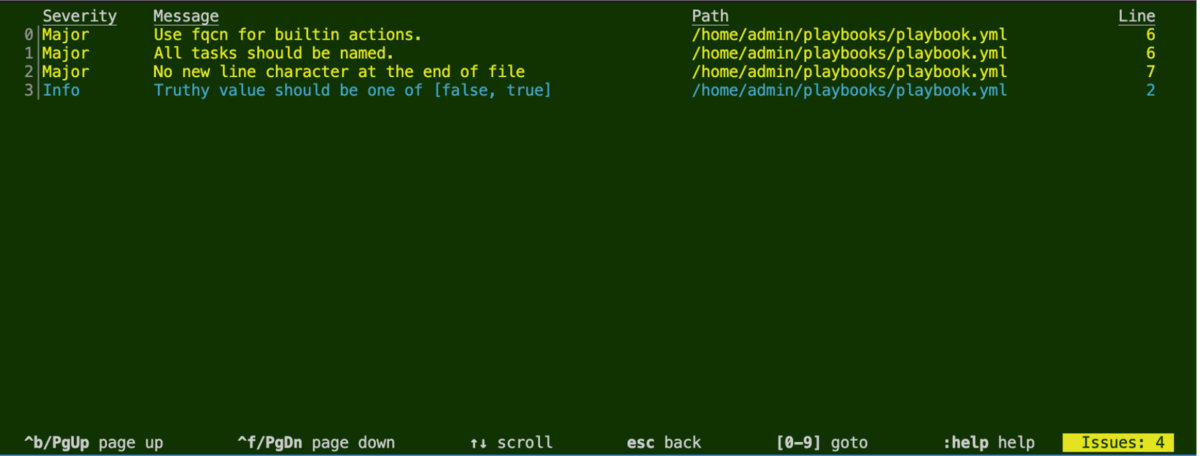
行頭の番号を数字1桁 または :数字1桁以上 エンター で指定すると、詳細が表示されます。

実行環境の利用が有効(デフォルト)の場合は、実行環境内の ansible-lint が呼び出されます。今回の場合は、デフォルトの実行環境のイメージ quay.io/ansible/creator-ee:v0.4.2 内の ansible-lint 6.0.2 と yamllint 1.26.3 が利用されました。
逆に、実行環境の利用が無効(--ee false 等による指定)の場合は、ホスト側(ansible-navigator 自身を実行している側)の ansible-lint を呼び出します。ただし、ansible-navigator インストール時には ansible-lint はセットでインストールされないため、別途インストールする必要があります。
stdout モードによる実行にも対応しています。こちらのほうが馴染み深いでしょうか。
$ ansible-navigator lint -m stdout
WARNING: PATH altered to include /usr/bin
yaml: truthy value should be one of [false, true] (truthy)
playbook.yml:2

fqcn-builtins: Use FQCN for builtin actions.
playbook.yml:6 Task/Handler: debug msg=hello

unnamed-task: All tasks should be named.
playbook.yml:6 Task/Handler: debug msg=hello

yaml: no new line character at the end of file (new-line-at-end-of-file)
playbook.yml:7
参考: lint サブコマンドのヘルプ
▼
ansible-navigator lint --help 結果(クリックして開く)
$ ansible-navigator lint --help
Usage: ansible-navigator lint [options]

lint: Lint a file or directory for common errors and issues

Options (global):
 -h     --help                                   Show this help message and exit
 --version                                       Show the application version and exit
 --rad  --ansible-runner-artifact-dir            The directory path to store artifacts generated by ansible-runner
 --rac  --ansible-runner-rotate-artifacts-count  Keep ansible-runner artifact directories, for last n runs, if set to 0 artifact directories won't be deleted
 --rt   --ansible-runner-timeout                 The timeout value after which ansible-runner will forcefully stop the execution
 --cdcp --collection-doc-cache-path              The path to collection doc cache (default: /home/admin/.cache/ansible-navigator/collection_doc_cache.db)
 --ce   --container-engine                       Specify the container engine (auto=podman then docker) (auto|podman|docker) (default: auto)
 --co   --container-options                      Extra parameters passed to the container engine command
 --dc   --display-color                          Enable the use of color for mode interactive and stdout (true|false) (default: true)
 --ecmd --editor-command                         Specify the editor command (default: vi +{line_number} {filename})
 --econ --editor-console                         Specify if the editor is console based (true|false) (default: true)
 --ee   --execution-environment                  Enable or disable the use of an execution environment (true|false) (default: true)
 --eei  --execution-environment-image            Specify the name of the execution environment image (default: quay.io/ansible/creator-ee:v0.4.2)
 --eev  --execution-environment-volume-mounts    Specify volume to be bind mounted within an execution environment (--eev /home/user/test:/home/user/test:Z)
 --la   --log-append                             Specify if log messages should be appended to an existing log file, otherwise a new log file will be created per session (true|false)
                                                 (default: true)
 --lf   --log-file                               Specify the full path for the ansible-navigator log file (default: /home/admin/git/general/ansible-navigator.log)
 --ll   --log-level                              Specify the ansible-navigator log level (debug|info|warning|error|critical) (default: warning)
 -m     --mode                                   Specify the user-interface mode (stdout|interactive) (default: interactive)
 --osc4 --osc4                                   Enable or disable terminal color changing support with OSC 4 (true|false) (default: true)
 --penv --pass-environment-variable              Specify an existing environment variable to be passed through to and set within the execution environment (--penv MY_VAR)
 --pa   --pull-arguments                         Specify any additional parameters that should be added to the pull command when pulling an execution environment from a container registry.
                                                 e.g. --pa='--tls-verify=false'
 --pp   --pull-policy                            Specify the image pull policy always:Always pull the image, missing:Pull if not locally available, never:Never pull the image, tag:if the
                                                 image tag is 'latest', always pull the image, otherwise pull if not locally available (always|missing|never|tag) (default: tag)
 --senv --set-environment-variable               Specify an environment variable and a value to be set within the execution environment (--senv MY_VAR=42)
 --tz   --time-zone                              Specify the IANA time zone to use or 'local' to use the system time zone (default: utc)

Options (lint subcommand):
 --lic  --lint-config                            Specify the path to the ansible-lint configuration file
 lintables                                       Path to files on which to run ansible-lint

Note: Defaults to the current working directory. If using an execution environment, ansible-lint must be installed in it. If not using an execution environment, ansible-lint must be installed
on your system.
おわりに
ansible-navigator 2.0.0 では、サブコマンドが追加されて、 ansible-lint も ansible-builder も ansible-navigator コマンド経由で呼べるようになりました。
もしかしたら手癖でとりあえず、ansible-navigator と入力するようになるかもしれません。
その他の機能追加や、仕様変更は別の記事にする予定です。 [2022/04/19 追記] その他編として投稿しました。
参考
リリースノート
