Motivation
ConstraintLayoutがリッチなRelativeLayoutと聞いて、RelativeLayoutの置き換えに使いたいけれど、癖でGUIエディターが受け入れられないので練習がてら置き換えのサンプルを書いてみたよ
サンプルのView構造
こんな感じのViewを置き換える。
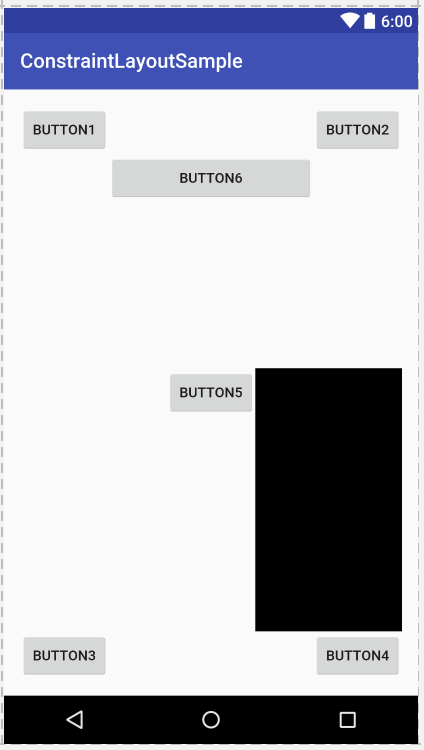
RelativeLayoutバージョン
<?xml version="1.0" encoding="utf-8"?>
<RelativeLayout xmlns:android="http://schemas.android.com/apk/res/android"
    xmlns:tools="http://schemas.android.com/tools"
    android:id="@+id/activity_main"
    android:layout_width="match_parent"
    android:layout_height="match_parent"
    android:paddingBottom="@dimen/activity_vertical_margin"
    android:paddingLeft="@dimen/activity_horizontal_margin"
    android:paddingRight="@dimen/activity_horizontal_margin"
    android:paddingTop="@dimen/activity_vertical_margin"
    tools:context="com.kobashin.constraintlayoutsample.MainActivity">

    <Button
        android:id="@+id/button1"
        android:layout_width="wrap_content"
        android:layout_height="wrap_content"
        android:layout_alignParentStart="true"
        android:layout_alignParentTop="true"
        android:text="button1" />

    <Button
        android:id="@+id/button2"
        android:layout_width="wrap_content"
        android:layout_height="wrap_content"
        android:layout_alignParentEnd="true"
        android:layout_alignParentTop="true"
        android:text="button2" />
    <Button
        android:layout_width="wrap_content"
        android:layout_height="wrap_content"
        android:layout_alignParentBottom="true"
        android:layout_alignParentStart="true"
        android:text="button3" />
    <Button
        android:id="@+id/button4"
        android:layout_width="wrap_content"
        android:layout_height="wrap_content"
        android:layout_alignParentBottom="true"
        android:layout_alignParentEnd="true"
        android:text="button4" />
    <Button
        android:id="@+id/button5"
        android:layout_width="wrap_content"
        android:layout_height="wrap_content"
        android:layout_centerInParent="true"
        android:text="button5" />
    <Button
        android:layout_width="wrap_content"
        android:layout_height="wrap_content"
        android:layout_below="@+id/button1"
        android:layout_toEndOf="@+id/button1"
        android:layout_toStartOf="@+id/button2"
        android:text="button6" />

    <TextView
        android:layout_width="wrap_content"
        android:layout_height="wrap_content"
        android:background="@android:color/background_dark"
        android:layout_toEndOf="@+id/button5"
        android:layout_alignTop="@+id/button5"
        android:layout_above="@+id/button4"
        android:layout_alignParentEnd="true"/>

</RelativeLayout>
ConstraintLayoutバージョン
<?xml version="1.0" encoding="utf-8"?>
<android.support.constraint.ConstraintLayout
    xmlns:android="http://schemas.android.com/apk/res/android"
    xmlns:app="http://schemas.android.com/apk/res-auto"
    xmlns:tools="http://schemas.android.com/tools"
    android:layout_width="match_parent"
    android:layout_height="match_parent">

    <Button
        android:text="Button"
        android:layout_width="wrap_content"
        android:layout_height="wrap_content"
        android:id="@+id/button"
        android:layout_marginTop="16dp"
        android:layout_marginStart="16dp"
        app:layout_constraintTop_toTopOf="parent"
        app:layout_constraintLeft_toLeftOf="parent" />

    <Button
        android:text="Button"
        android:layout_width="wrap_content"
        android:layout_height="wrap_content"
        android:id="@+id/button2"
        android:layout_marginTop="16dp"
        android:layout_marginEnd="16dp"
        app:layout_constraintTop_toTopOf="parent"
        app:layout_constraintRight_toRightOf="parent" />

    <Button
        android:text="Button"
        android:layout_width="wrap_content"
        android:layout_height="wrap_content"
        android:id="@+id/button3"
        app:layout_constraintBottom_toBottomOf="parent"
        android:layout_marginBottom="16dp"
        android:layout_marginStart="16dp"
        app:layout_constraintLeft_toLeftOf="parent" />

    <Button
        android:text="Button"
        android:layout_width="wrap_content"
        android:layout_height="wrap_content"
        android:id="@+id/button4"
        android:layout_marginBottom="16dp"
        android:layout_marginEnd="16dp"
        app:layout_constraintBottom_toBottomOf="parent"
        app:layout_constraintRight_toRightOf="parent" />

    <Button
        android:text="Button"
        android:layout_width="wrap_content"
        android:layout_height="wrap_content"
        android:id="@+id/button5"
        android:layout_marginTop="16dp"
        android:layout_marginStart="16dp"
        android:layout_marginBottom="16dp"
        android:layout_marginEnd="16dp"
        app:layout_constraintRight_toRightOf="parent"
        app:layout_constraintTop_toTopOf="parent"
        app:layout_constraintBottom_toBottomOf="parent"
        app:layout_constraintLeft_toLeftOf="parent" />

    <Button
        android:text="Button"
        android:layout_width="0dp"
        android:layout_height="wrap_content"
        android:id="@+id/button6"
        app:layout_constraintRight_toLeftOf="@+id/button2"
        android:layout_marginEnd="8dp"
        android:layout_marginStart="8dp"
        app:layout_constraintLeft_toRightOf="@+id/button"
        android:layout_marginTop="8dp"
        app:layout_constraintTop_toBottomOf="@+id/button" />

    <TextView
        android:text="TextView"
        android:layout_width="0dp"
        android:layout_height="0dp"
        android:background="@android:color/background_dark"
        android:id="@+id/textView2"
        app:layout_constraintBottom_toTopOf="@+id/button4"
        android:layout_marginBottom="8dp"
        android:layout_marginStart="8dp"
        app:layout_constraintLeft_toRightOf="@+id/button5"
        app:layout_constraintTop_toTopOf="@+id/button5"
        android:layout_marginEnd="16dp"
        app:layout_constraintRight_toRightOf="parent" />
</android.support.constraint.ConstraintLayout>
まとめ的なめも書き
使ってみて、新規に作成する画面であればGUIで作っていって細かなところはXML触るとかでよいと感じた。
RelativeLayoutをごそっと置き換えた場合、左上にViewがよってしまってGUIで操作するには辛い感じになったので、置き換えるならXMLでやるのが良さそう。
以下、サンプル書いてて気づいたメモ書き
Constraint指定
layout_constraint(Top|Bottom|Start|End)_to(Top|Bottom|Start|End)Ofによって、紐つける先のViewを指定できる。前側が自Viewのどこを紐つけるのか、後ろ側が指定した場Viewのどこに紐つけるのかを指定する。
RelativeLayoutのEndOfとalign指定を同時に設定するイメージでよさそう。
親のViewに対して指定する場合はparentが利用できる。
上下左右の相対する指定(TopとBottomとか)を指定した場合、下記のBiasを指定可能となる
Bias指定
相対するConstraintを持つ場合に、どの割合の位置にViewを配置するかを指定できる。
標準では50%(真ん中配置)になるが、layout_constraint(Horizontal|Vertical)_biasを利用して割合指定が可能になる。
上or左が0%に当たる。これはRelativeLayoutに無いし、超強力。Center指定もこれを利用する。
AnySize指定
width/hightを0dp指定するとAnySize指定となる。Constraintに指定しているView間を埋めるようにサイズ指定できる。 toStartOfとtoEndOfを使ってサイズ指定するのと同義だと理解した。
