こんにちは、newmo の伊藤です。
この記事では、筆者が取り入れている「Claude Code を Deep Research の用途で使うための工夫」について、自作している Skill や端末間での共有方法、Entire の活用事例などを交えて紹介します。
既存のプロダクトが提供する Deep Research 機能に感じていた課題
筆者はこれまで様々なリサーチの用途に ChatGPT や Gemini が提供する Deep Research 機能を利用してきました。これらのプロダクトが提供する Deep Research 機能はとても便利なのですが、以下のような課題も感じていました:
- 個々のプロダクトが提供しているインターフェース(ウェブやモバイルアプリ)を介するのではなく、普段利用しているターミナルやエディターでリサーチを完結させたい
- モバイル端末では普段利用している Markdown ビューワー(Obsidian)でリサーチの結果を確認したい
- リサーチした結果をローカル環境の Markdown ファイルとして直接扱って Git で管理したい
- Agentic Coding ツールのセッションを管理するために自作しているツールをリサーチの用途でも活用したい
特に、Claude Code をはじめとした Agentic Coding ツールを活用するにつれ、リサーチも Agentic Coding ツールで完結させたいという思いが強くなってきました。
そこで、Claude Code を Deep Research の用途で活用するための環境を整えることにしました。
Claude Code の Deep Research 用 Skill
Claude Code を Deep Research の用途で使うために、「必要に応じて Claude Code をリサーチモードに切り替える」ための /mode-researcher という Skill を自作しています。筆者はこのような「必要に応じて Claude Code を特定のモードに切り替えるための Skill」を複数作って活用しており、リサーチの用途以外にも例えば「実装する前にモジュール間のインターフェースやテストを設計するためのモードに切り替える」ための /mode-architect のような Skill も作っています。これらの Skill は、実際になんらかのアクションを起こすための Task content ではなく、Claude Code にナレッジを提供するための Reference content に近い形で定義しています。
実際に /mode-researcher Skill を利用してリサーチを行っている様子は以下のキャプチャのようになっています:
/mode-researcher Skill を起動した後、リサーチしたいトピックを入力すると、Claude Code がリサーチのためにいくつかの質問を選択形式で利用者に投げかけてきます。これらの質問に答えると、Claude Code がリサーチを開始して、リサーチしたいトピックにも依りますが概ね 10 分前後でリサーチの結果を Markdown ファイルとして出力してくれます。
/mode-researcher Skill は引数として「リサーチ結果を書き出すための Markdown ファイル」のパスを受け取るようにしています。この引数は、筆者が自身でリサーチ結果を保存するファイル名やディレクトリを指定したいので設けていますが、引数を設けずに Claude Code に自律的にファイル名やディレクトリを決めさせるようにしても良いと思います。
この Skill は Claude Code の利用者側で明示的に起動するためのもので、Claude Code 側で自律的に起動することを想定していません。そのため、SKILL.md の Frontmatter で disable-model-invocation: true を指定して、Claude Code が自律的にこの Skill を起動することを防いでいます。
また、筆者は Claude Code を利用するときは基本的に Plan Mode を利用していますが、この /mode-researcher Skill を利用するときはリサーチ内容を利用者の確認を介することなく Markdown ファイルに出力してほしいので、Plan Mode はあえて利用しないようにしています。
実際の SKILL.md の内容は以下のようになっています:
---
name: mode-researcher
description: Deep research agent that autonomously searches, analyzes, and synthesizes information into a structured report with citations.
disable-model-invocation: true
---

This guide defines the workflow for conducting deep, multi-pass research and producing a structured, well-cited report.

## Phase 1: Wait for User Input

- Wait for the user to provide the research topic or question right after this skill is invoked.
  - Do not skip this phase by inferring the topics from the given arguments or filename, instead, must explicitly wait for the user to provide the research topic or question as input.

## Phase 2: Clarify Scope

- Use the `AskUserQuestion` tool to ask the user about:
  - The research topic or question.
  - Scope, depth, and constraints (time period, domains, perspectives).
  - Expected output format (length, structure).

## Phase 3: Research Plan

- Decompose the topic into 3–8 sub-questions.
- ...

## Phase 4: Iterative Search and Analysis

- For each sub-question, perform multiple `WebSearch` queries with varied phrasing.
- Use `WebFetch` to read full pages, not just search snippets.
- Aim for 20–50 search queries total across the session.
- Cross-validate claims across multiple independent sources; flag contradictions.
- Refine the search strategy as knowledge gaps emerge.
- Track every source URL and the claims it supports.
- For code-related research, also use GitHub MCP tools (`search_code`, `search_repositories`, `get_file_contents`).
- ...

## Phase 5: Synthesis and Report

- The output file path should be `$ARGUMENTS`.
- Write the report to the specified file with the following structure:
  - Title
  - Executive Summary
  - Table of Contents
  - Main Sections (with inline citations as HTML anchor tags, e.g. `<a href="URL" target="_blank">source title</a>`)
  - Conclusions
  - Sources (list of all referenced URLs with their titles)
- Present a brief summary inline after writing the report.
- ...

## Principles

- Prioritize primary sources over secondary summaries.
- Distinguish facts, expert opinions, and speculation.
- When sources conflict, present both sides.
- Never fabricate sources — every citation must correspond to a real URL that was fetched.
- Prefer recent sources unless historical context is relevant.
- Use parallel `WebSearch` / `WebFetch` calls for efficiency.
- Do not stop after finding one answer — seek corroboration and alternatives.
- ...

### Editorial Guidelines

- Use HTML anchor tags with target="_blank" for all links (e.g. <a href="URL" target="_blank">text</a>) so they open in a new tab in web browsers.
- ...
まずは Phase 1: Wait for User Input で、利用者がリサーチしたいトピックを入力する前に Claude Code がリサーチを開始してしまうのを抑制しています。
次に Phase 2: Clarify Scope で AskUserQuestion ツールを利用して、リサーチに関するスコープや深さ、制約条件(時間軸やドメイン、視点など)、期待するアウトプットの形式(長さや構成など)などについて、Claude Code がリサーチを開始する前に利用者に質問するように指定しています。
AskUserQuestion ツールは Claude Code が内包するツールのひとつで、Claude Code が利用者に質問を投げかけて、利用者が選択肢の中から回答を選ぶ形式で入力を受け取るためのツールです。このツールを利用することで、Claude Code が自律的にリサーチの意図を汲んで選択形式で質問を投げかけてくれるため、利用者側の入力の手間を軽減することができています。
Phase 3・4・5 ではリサーチ手順や MCP の活用、アウトプットの形式などを指定しています。
Principles では、「一次情報を尊重する」といったようなリサーチの原則や方針、及び Markdown の書き方に関する細かなガイドラインなどを指定しています。
これらの内容、特に Phase 3・4・5 の内容は、現在も調整を重ねながら運用していますが、概ね筆者が求める使用感・リサーチ内容に近づいてきていると感じています。
端末間でのリサーチの共有
Claude Code は PC 端末で起動していますが、リサーチ結果は外出中にモバイル端末で確認したいことも多いです。筆者はモバイル端末で Markdown ファイルを扱うために Obsidian を利用しているため、リサーチ結果のファイルは Obsidian がアクセスできるクラウドストレージ(筆者の場合は iCloud)上に共有されるように設定しています。
また、筆者は開発環境用に Linux サーバーを構築し、ノート PC などから Tailscale と SSH 経由で Linux サーバーにアクセスして作業する開発スタイルを取っており、Claude Code もこのサーバー上で利用しています。この Linux サーバーにモバイル端末からもアクセスできるように設定して、外出先でもモバイル端末から Linux サーバーにアクセスして Claude Code を用いたリサーチを開始できるようにしています。
モバイル端末(iPhone)から Linux サーバーを操作するためのターミナルアプリは Termius や libghostty ベースで最近話題になっている Echo をはじめとしていろいろなアプリを試していますが、「Control キーを押下したまま他のキーを用いた操作が行いやすい」という観点で Blink Shell というソースが公開されているターミナルアプリを利用しています。
Entire の活用
リサーチ結果について、リサーチ内容を更新するときなど稀に「どのような入力(プロンプト)によってこのリサーチが出力されたのか」という観点も含めて反芻したくなることがあります。
これを実現するために、先日公開された Entire というプラットフォームを試験的に導入しています。
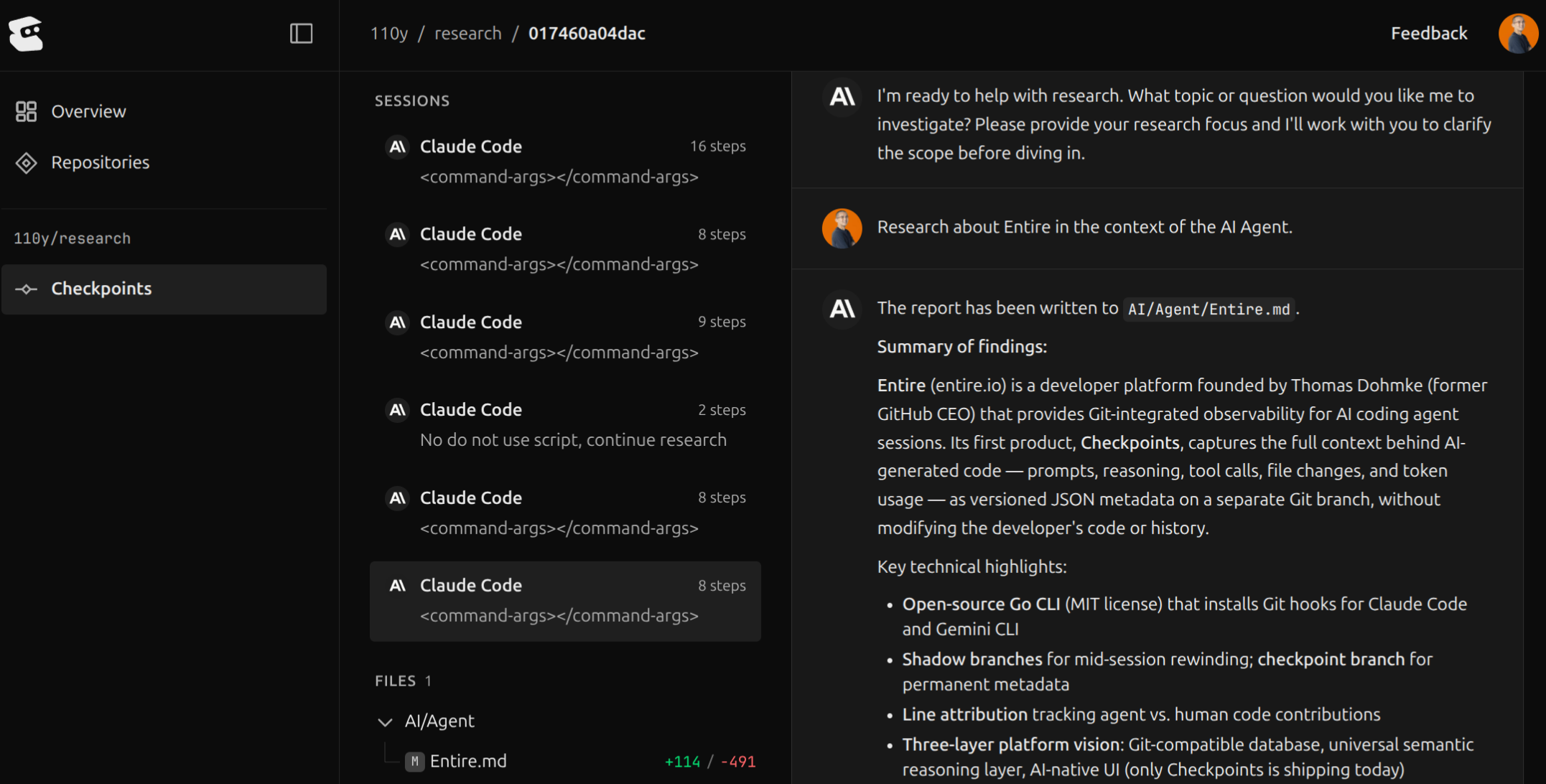
Entire は Agent と人間が協調して開発を進めるためのプラットフォームを目指しており、現在は CLI を用いて Agent とのやりとり(セッション)を記録して、記録したやりとりを可視化するためのウェブサービスを提供しています。
Entire の画面は以下のようになっています:
おわりに
この記事では、筆者が Claude Code を Deep Research の用途で使うための工夫について実例を交えて紹介しました。紹介した Claude Code の Skill はみなさんのお手元でもすぐに利用できるので、ぜひ試してみてください。
この記事で紹介した内容が、Claude Code を活用するための一助になれば幸いです。
