AI開発ツールDevinが作成したPull Requestに対して、セキュリティと品質を確保するために2人の承認を必要とする実装方法について解説します。
2025/05/21 追記
- レビューコメントが30件以上あったときに正しく動かない問題を修正しました
- 開発者が書いたPull RequestをDevinにApproveしてもらってマージするパターンも防ぎたい場合は、ifの条件を少し変える必要があります。
背景
newmoでも少し前からDevinを利用して開発を行っています。 Devinを利用するフローは、以下のような感じになります。
- エンジニアがSlackやDevinのWeb UIからタスクを依頼
- DevinがGitHubにPull Requestを作成
- エンジニアは必要に応じてSlackやPull Request上でコメント
- Devinがコードを修正
- 問題なければ承認してマージ
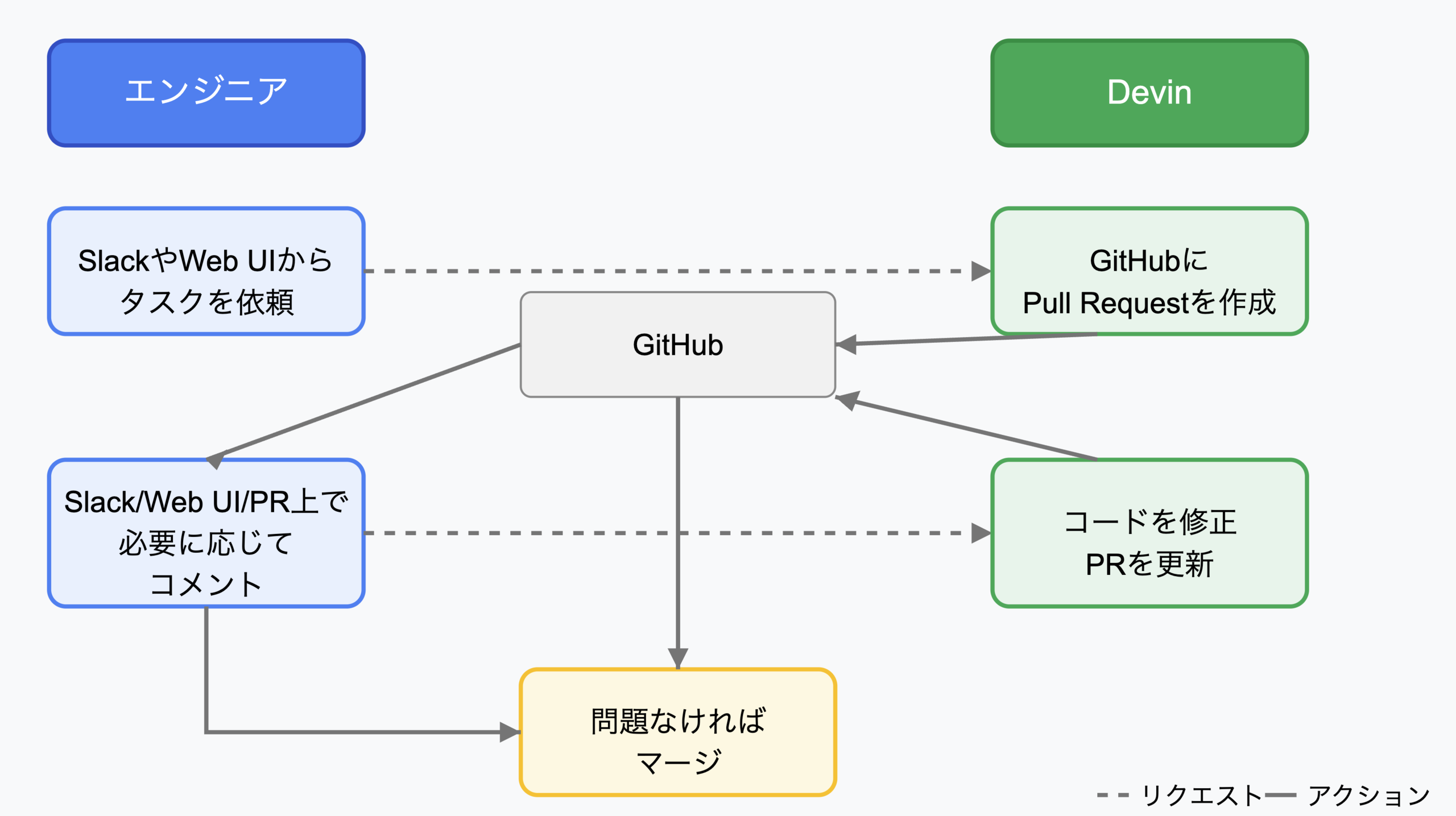
このフローには、エンジニア一人が指示して書かれたコードをそのエンジニア自身が承認してマージできてしまうという課題があります。 自分のPCでコーディングのためのAIエージェントを使う場合には、Pull Requestはエンジニアのアカウントで作られるため自分で承認してマージすることはできませんが、Devinを利用する場合はDevinのGitHub AppがPull Requestを作るため、指示したエンジニアが承認してマージすることができてしまいます。
newmoではmainブランチへのマージには1人以上の承認が必要なルールを設定しています。 これはコード品質やセキュリティの確保のためということももちろんありますが、チーム内での知識の共有やチームとしてコードに責任を持つためにも重要なことです。そのため、Devinなどのエージェントを利用してエンジニア一人がPull Requestを作成した場合にも、同じ人が承認してマージしてしまうような状況は防ぎたいです。
解決方法
Devinが作成したPull Requestだけには、2人以上の承認がないとマージできないようにします。 GitHubの設定でも必要レビューワー数を設定できるのですが、すべてのPull Requestで2人の承認が必要になると不便なので、特定のAppが作ったPull Requestだけ2人の承認を必要にしたいと思います。
GitHub Actionsでは、Pull RequestにReviewがついたときにトリガーするpull_request_review というイベントを利用することができます。以下のGitHub Actionsワークフローは、AI(Devin)が作成したPull Requestに対して、pull_request_review イベントを利用して2人以上の人間によるレビュー承認を必要とする機能を実装します。ワークフローの動作は次のとおりです:
- Pull Requestが開かれた時点で、「ai-generated」ラベルを自動的に付与し、2人の承認が必要であることを知らせるコメントを投稿します。
- レビューが提出されるたびに、有効な承認数をカウントします。このとき、AI自身からのレビューや単なるコメントは承認としてカウントしません。
- 承認数に基づいてコミットステータスを更新します。2人未満の承認の場合は「failure」状態となり、Branch Protectionのルールと組み合わせることでマージがブロックされます。2人以上の承認があれば「success」状態となり、マージが可能になります。
name: AI PR Protection

on:
  pull_request:
    types: [opened, reopened, synchronize, ready_for_review]
     branches: [main]
  pull_request_review:
    types: [submitted]

jobs:
  verify-ai-pr-approvals:
    # AuthorがDevinで、main branch向けのPRだけを対象にする
    # GitHub ActionsのVariablesで AI_USER_DEVIN に 'devin-ai-integration[bot]' を入れておく
    if: >
      github.event.pull_request.user.login == vars.AI_USER_DEVIN

    permissions:
      pull-requests: write
      statuses: write

    steps:
      # 初回はPull Requestにラベルとコメントをつける
      - name: Label and Comment
        if: github.event_name == 'pull_request' && (github.event.action == 'opened' || github.event.action == 'reopened')
        uses: actions/github-script@60a0d83039c74a4aee543508d2ffcb1c3799cdea # v7.0.1
        with:
          github-token: ${{ secrets.GITHUB_TOKEN }}
          script: |
            # PRに、承認が2つ以上必要だよとコメントする
            await github.rest.issues.createComment({
              owner: context.repo.owner,
              repo: context.repo.repo,
              issue_number: context.issue.number,
              body: '⚠️ **Security Notice**: This PR was created by an AI tool and requires at least 2 human approvals before it can be merged. Please review the changes carefully.'
            });

            # PRにラベルをつける
            await github.rest.issues.addLabels({
              owner: context.repo.owner,
              repo: context.repo.repo,
              issue_number: context.issue.number,
              labels: ['ai-generated']
            });

      # 承認数のチェックとステータス更新
      - name: Check Approval Count and Update Status
        uses: actions/github-script@60a0d83039c74a4aee543508d2ffcb1c3799cdea # v7.0.1
        with:
          github-token: ${{ secrets.GITHUB_TOKEN }}
          script: |
            # PullRequestの情報を取得
            const prNumber = context.payload.pull_request
              ? context.payload.pull_request.number
              : context.payload.pull_request_review.pull_request.number;

            const sha = context.payload.pull_request
              ? context.payload.pull_request.head.sha
              : context.payload.pull_request_review.pull_request.head.sha;

            # レビューの取得
            const reviews = await github.paginate(
              github.rest.pulls.listReviews,
              {
                owner: context.repo.owner,
                repo: context.repo.repo,
                pull_number: prNumber,
                per_page: 100,
              }
            );

            # AI userのリスト。ここではDevinだけ追加する
            const aiUsers = [
              '${{ vars.AI_USER_DEVIN }}',
              // Add more AI users when needed
            ];

            # AIが作成したPRは承認数が2つ必要
            const requiredApprovals = aiUsers.includes(author) ? 2 : 1;

            const latestReviews = new Map();
            for (const review of reviews) {
              const submittedAt = new Date(review.submitted_at);
              const reviewer = review.user.login;

              # AIからのreviewは無視する
              if (aiUsers.includes(reviewer)) {
                continue;
              }

              # approve後にcommentすることもあるので、COMMENTEDのstatusは無視する
              if (review.state === 'COMMENTED') {
                continue;
              }

              # reviewerの最新のreview statusを残す
              if (
                !latestReviews.get(reviewer) ||
                new Date(latestReviews.get(reviewer).submitted_at) < submittedAt
              ) {
                latestReviews.set(reviewer, review);
              }
            }

            # Approveした人の数をカウント
            let approvalCount = 0;
            for (const r of latestReviews.values()) {
              console.log(`${r.user.login}: ${r.state} at ${r.submitted_at}`);
              if (r.state === 'APPROVED') {
                approvalCount++;
              }
            }

            # Pull Requestイベントと、Pull Request Reviewイベントで同じcontext名を使用してステータスを更新
            const statusContext = 'AI PR Approval Check';
            # 承認が2以上ならsuccess、それ以外はfailureにする
            await github.rest.repos.createCommitStatus({
              owner: context.repo.owner,
              repo: context.repo.repo,
              sha: sha,
              state: approvalCount >= 2 ? 'success' : 'pending',
              context: statusContext,
              description: approvalCount >= 2
                ? 'Required approvals received'
                : `Needs ${2 - approvalCount} more approval(s)`,
              target_url: `https://github.com/${context.repo.owner}/${context.repo.repo}/pull/${prNumber}`
            });

            console.log(`PR: ${prNumber}, Approval Count: ${approvalCount}`);
この仕組みにより、通常のPull Requestには1人の承認でOKという既存のルールを維持しながら、AIが作成したPull Requestに対してのみ2つ以上の承認を必須にすることができます。 もっと簡単にできる方法があったら知りたいので、教えてください。
書いた人: tjun
