
本稿はJCB Advent Calendar 2023の12月5日の記事です。
DXテックG SREチームの鳩貝です。
本日は弊社基盤で活用中のOSSのサービスメッシュプラットフォームであるIstio(※)について、簡単な検証を交えつつ紹介します。
なお、本稿はKubernetesに関する基本的な知識(Deployment、Service等)を保持していることを前提としています。あらかじめご承知おきください。
※正確には平松の記事の通り、弊社基盤"JDEP"ではGoogle CloudマネージドIstioであるAnthos Service Mesh(ASM)を利用しています。よって以下本稿記載の各種ログはすべてASMにおける確認結果となっています。
※本稿に記載された内容は執筆時点での参考情報であり、かならずしも正確性を保証するものではありません。
検証1:Destination Rule/VirtualServiceによるReviews表示の制御
Istioが提供するテストアプリ”bookinfo”を利用し、Destination Rule/VirtualServiceを利用した通信制御が行えることを確認します。テストアプリの詳細構成については公式サイト を参照ください。
環境構成
- namespace”pf-dummy”に以下資材をデプロイ
- Deployment
- productpage
- reviews-v1
- reviews-v2
- reviews-v3
- details
- ratings
- Service
- productpage
- reviews
- details
- ratings
- VirtualService…Istioのコンポーネント。外部接続にあたり事前設定が必要な箇所のみ設定。
- pf-dummy-productpage-external
- Deployment
- Gatewayは構成の都合上、別namespaceにて設定
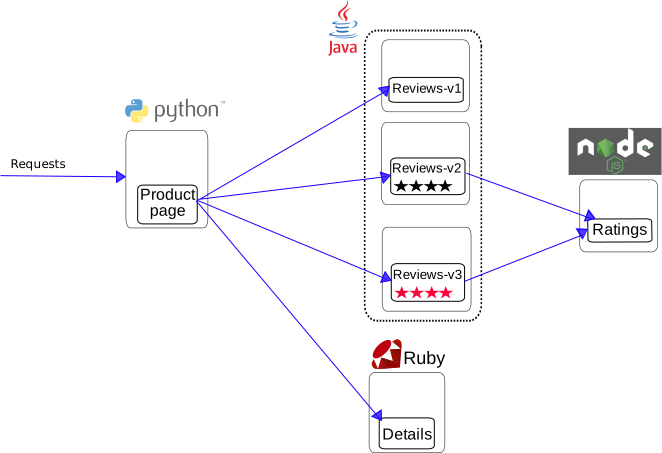
※Bookinfoの構成図はIstio公式サイトより抜粋
検証事項
前述の詳細ページの記載の通り、BookinfoのReviews Podは3バージョンに分かれており、それぞれ画面上の表現が異なります。
- v1の場合は評価を示す★が出力されない

- v2の場合は評価を示す★が黒く表示される
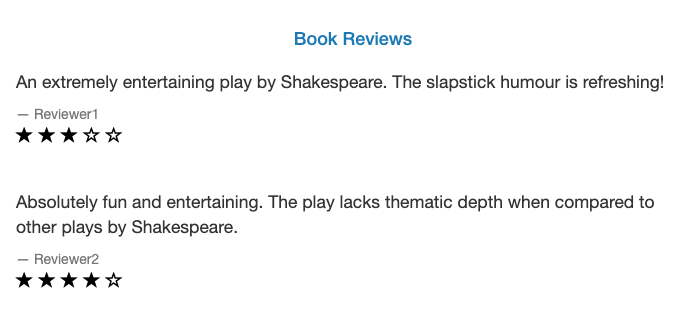
- v3の場合は評価を示す★が赤く表示される

Kubernetes標準のロードバランシング機能であるServiceを用いた場合、Reviewsへの通信はラウンドロビンで負荷分散されるため画面更新の度に表示が切り替わります。ここに対しDestination Ruleでバージョンを定義し、Virtual Serviceでルーティング対象を設定することで柔軟な通信制御を実現可能となることを確認します。
手順
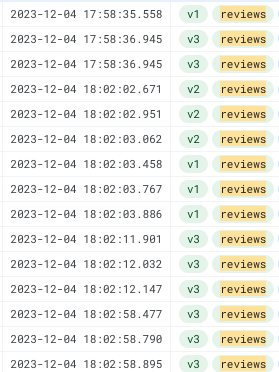
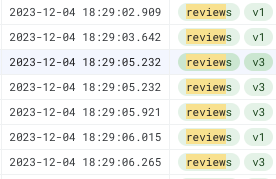
(1)事前にBookinfoのフロントページへ複数回アクセスし、アクセスの度に各DeploymentにラウンドロビンでアクセスされることをCloudloggingで確認。
※緑文字v1,v2,v3の箇所がアクセスされたPodのバージョン
(2)Destination Ruleを設定。設定ファイル”destination-rule-all.yaml”はテストアプリ提供のものを利用。
> kubectl apply -f destination-rule-all.yaml -n pf-dummy
destinationrule.networking.istio.io/productpage created
destinationrule.networking.istio.io/reviews created
destinationrule.networking.istio.io/ratings created
destinationrule.networking.istio.io/details created

 > kubectl get DestinationRule -n pf-dummy
NAME          HOST          AGE
details       details       2m10s
productpage   productpage   2m10s
ratings       ratings       2m10s
reviews       reviews       2m10s
(3)reviewsに対しVirtualServiceを設定。今回はv1を指定。
> cat virtualservice-reviews.yaml
apiVersion: networking.istio.io/v1alpha3
kind: VirtualService
metadata:
  name: reviews
spec:
  hosts:
  - reviews
  http:
  - route:
    - destination:
        host: reviews
        subset: v1

> kubectl apply -f virtualservice-reviews.yaml -n pf-dummy
virtualservice.networking.istio.io/reviews created

> kubectl get virtualservice -n pf-dummy
NAME      GATEWAYS   HOSTS         AGE
reviews              ["reviews"]   19s
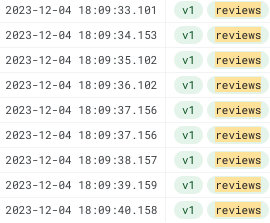
(4)Bookinfoのフロントページに複数回アクセスし、アクセス対象のPodがv1で固定されたことを確認。
(5)reviewsに対し設定したVirtualServiceのweightをv1とv3で50ずつ設定 。
> cat virtualservice-reviews.yaml
apiVersion: networking.istio.io/v1alpha3
kind: VirtualService
metadata:
  name: reviews
spec:
  hosts:
  - reviews
  http:
  - route:
    - destination:
        host: reviews
        subset: v1
      weight: 50
    - destination:
        host: reviews
        subset: v3
      weight: 50

> kubectl apply -f virtualservice-reviews.yaml -n pf-dummy
virtualservice.networking.istio.io/reviews configured
(6)Bookinfoのフロントページに複数回アクセスし、アクセス対象のPodがv1,v3でアクセス頻度がおおよそ半々になっていることを確認。
検証2:Direct Responseによるレスポンス制御
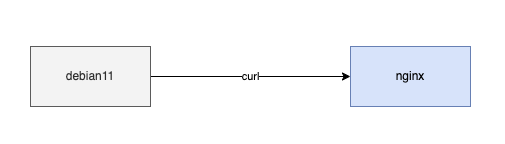
サーバとしてのnginxと、クライアントとしてのdebian11 Podをデプロイします。以下のシンプルな構成下にてIstioのDirect Response機能を利用し、nginxへのレスポンス到達前にIstioからレスポンスを返却できることを確認します。
環境構成
- namespace”pf-dummy”に以下資材をデプロイ
- pod
- debian11
- nginx
- Service
- nginx-service
- pod
検証事項
通常debian11からnginxのトップページに対しcurlを実施した場合、nginxのデフォルトindex.htmlが表示されます。こちらに対しnginxに紐付くVirtualServiceへDirect Responseを設定することで、nginxへのリクエスト到達前にIstio側でレスポンスを返却できることを確認します。
これによりIstioの持つHTTPヘッダやソースIPによる識別機能と合わせて活用することで、特定条件下においてPodへのトラフィック到達前にレスポンスを返却するなどの実装が追加開発なしに実現可能となります。
手順
(1)事前にdebian11からnginxにcurlし、想定通りnginxのデフォルトindex.htmlが表示されることを確認。
$ curl -v http://nginx
*   Trying 172.19.194.187:80...
* Connected to nginx (172.19.194.187) port 80 (#0)
> GET / HTTP/1.1
> Host: nginx
> User-Agent: curl/7.74.0
> Accept: */*
>
* Mark bundle as not supporting multiuse
< HTTP/1.1 200 OK
< server: envoy
< date: Mon, 04 Dec 2023 11:30:53 GMT
< content-type: text/html
< content-length: 615
< last-modified: Tue, 24 Oct 2023 13:46:47 GMT
< etag: "6537cac7-267"
< accept-ranges: bytes
< x-envoy-upstream-service-time: 4
<
<!DOCTYPE html>
<html>
<head>
<title>Welcome to nginx!</title>
<style>
html { color-scheme: light dark; }
body { width: 35em; margin: 0 auto;
font-family: Tahoma, Verdana, Arial, sans-serif; }
</style>
</head>
<body>
<h1>Welcome to nginx!</h1>
<p>If you see this page, the nginx web server is successfully installed and
working. Further configuration is required.</p>

<p>For online documentation and support please refer to
<a href="http://nginx.org/">nginx.org</a>.<br/>
Commercial support is available at
<a href="http://nginx.com/">nginx.com</a>.</p>

<p><em>Thank you for using nginx.</em></p>
</body>
</html>
* Connection #0 to host nginx left intact
(2)Direct Responseを設定したVirtualServiceをデプロイ。
 > cat virtualservice-nginx.yaml
apiVersion: networking.istio.io/v1alpha3
kind: VirtualService
metadata:
  name: nginx
spec:
  hosts:
  - nginx
  http:
  - match:
    - uri:
        prefix: /
    directResponse:
      status: 200
      body:
        string: "Direct Response Test"

> kubectl apply -f virtualservice-nginx.yaml
virtualservice.networking.istio.io/nginx configured
(3)再度debian11からnginxにcurlし、レスポンスとしてDirectResponseに設定した文字列"Direct Response Test"がHTTPステータスコード200で返却されることを確認。
$ curl -v http://nginx
*   Trying 172.19.194.187:80...
* Connected to nginx (172.19.194.187) port 80 (#0)
> GET / HTTP/1.1
> Host: nginx
> User-Agent: curl/7.74.0
> Accept: */*
>
* Mark bundle as not supporting multiuse
< HTTP/1.1 200 OK
< content-length: 20
< content-type: text/plain
< date: Mon, 04 Dec 2023 11:30:08 GMT
< server: envoy
<
* Connection #0 to host nginx left intact
Direct Response Test
まとめ
Istioを利用することでアプリ実装に頼ることなくNWの柔軟なコントロールができることを確認しました。今回はテストアプリによる検証でしたが、JDEP上で商用稼働するアプリケーションにおいても、Istio(ASM)を最大限活用し開発の効率化・セキュア化を実現しています。
最後になりますが、JCBでは我々と一緒に働きたいという人材を募集しています。 詳しい募集要項等については採用ページをご覧下さい。
本文および図表中では、「™」、「®」を明記しておりません。 Google Cloud, GCPならびにすべてのGoogleの商標およびロゴはGoogle LLCの商標または登録商標です。 記載されているロゴ、システム名、製品名は各社及び商標権者の登録商標あるいは商標です。
