この記事は、Pulumi dotnet Advent Calendar 2019の5日目です。
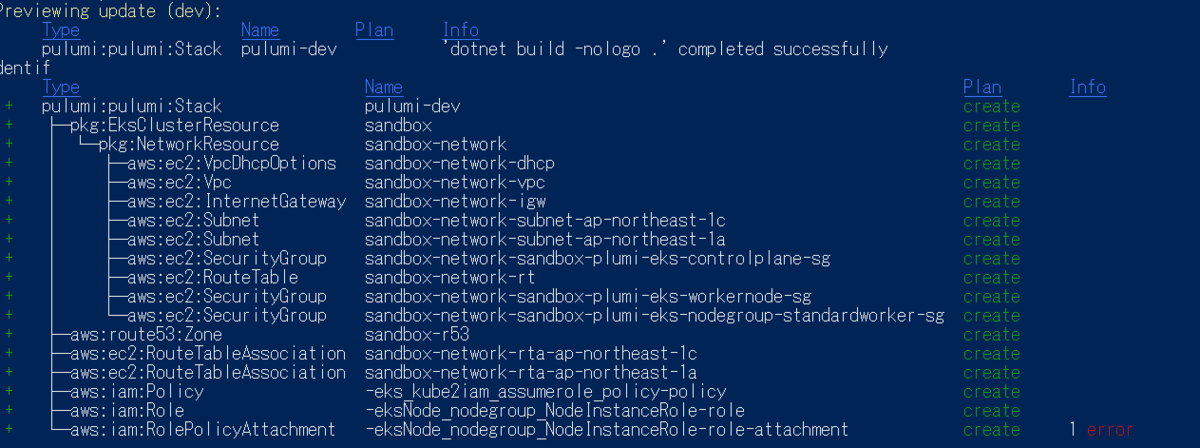
リソースの親子関係を持たせることで、preview表示、グラフ表示したときに入れ子状態が格段と見やすく把握しやすくなります。 ではどうやって親子関係を持たせればいいのでしょうか。
概要
ResourceOptionsではなくCustomResourceOptionsを使いましょう。
Summary
入れ子にできるとコンポーネントの中にリソースがまとまるので、Web UI的にもPreview的にわかりやすくなる。 入れ子にしたいがどうやるのか。
Problem
- 無指定だとStackが親になって入れ子にならない
new ResourceOptions { Parent = this }でParent = thisを指定しても入れ子にはならない
Components の入れ子
new ResourceOptions { Parent = this }でParent = thisを指定してもXxxxxResourceはImParentResourceの入れ子にはならない。
class ImParentResource : Pulumi.ComponentResource
{
    public ImParentResource(string name, ResourceOptions opts) : base("pkg:ImParentResource", name, opts)
    {
        new XxxxxResource($"{type}:xxxx", $"{name}-Xxxxx", new ResourceOptions { Parent = this })
        {
        }
    }
}
CustomResourceOptions { Parent = this }を使うことで入れ子にできる。
class ImParentResource : Pulumi.ComponentResource
{
    public ImParentResource(string name, ResourceOptions opts) : base("pkg:ImParentResource", name, opts)
    {
        new XxxxxResource($"{type}:xxxx", $"{name}-Xxxxx", new CustomResourceOptions { Parent = this })
        {
        }
    }
}
リソースの入れ子
リソースを作成するときに、CustomResourceOptionsで親ComponentResourceを指すことで入れ子ができる。
指定しない場合は、Stack = Rootが親になってしまうので、コンポーネントの子にしたい場合は、常にnew CustomResourceOptions { Parent = this }を指定する必要がありそう。
CustomResourceOptionsない場合、リソースを持っているコンポーネントリソースが親にならない。
var vpc = new Vpc($"{name}-vpc", new VpcArgs
{
    CidrBlock = "10.0.0.0/16",
    EnableDnsHostnames = true,
    EnableDnsSupport = true,
    Tags = new Dictionary<string, object>(parameter.Tags)
    {
        { $"Name", $"MyVpc"}
    },
});
new CustomResourceOptions { Parent = this }を指定することで、親子にできる。
var vpc = new Vpc($"{name}-vpc", new VpcArgs
{
    CidrBlock = "10.0.0.0/16",
    EnableDnsHostnames = true,
    EnableDnsSupport = true,
    Tags = new Dictionary<string, object>(parameter.Tags)
    {
        { $"Name", $"MyVpc"}
    },
}, new CustomResourceOptions { Parent = this });
