CTO室の岩本 (iwamot) です。
AWSでChatOpsしたく先行事例を調べたら、Lambdaを使う例がヒットしました。
しかし今なら、Amazon Q Developer in chat applications(旧称:AWS Chatbot)のカスタムアクションでLambdaをなくせそうな気がします。2023年11月に発表された機能です。
実際に試したところ、おおむね実用的な仕組みができました。
そこで今回は、AWSのChatOpsがLambdaなしで組めた話をご紹介します。
Lambdaを避ける理由
本題に入る前に、Lambdaを避ける理由に触れておきます。
ひとことで言うと「運用が楽になるから」です。Lambdaを使わなければ、ランタイムのEOLを気にせずに済みます。ChatOpsの対象が増えるほど、EOL対応の有無が作業コストに響いてくるはずです。
使用したサービスと全体構成
さて、今回実装した仕組みをご説明します。
使用した主なサービスは以下の3つです。
- Amazon EventBridge:イベント検出とルーティング
- Amazon SNS:通知の配信
- Amazon Q Developer in chat applications:Slack通知とカスタムアクション実行
全体構成は以下のようになります。
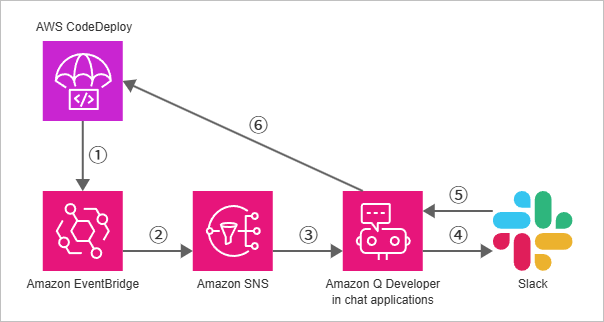
- CodeDeployのデプロイ状態変更イベントをEventBridgeルールで検出
- 入力トランスフォーマーでイベントを変換し、SNSトピックにルーティング
- Amazon Q Developer in chat applicationsのSlackチャンネルに配信
- メッセージとカスタムアクションボタンをSlackに表示
- カスタムアクションを選択
- CodeDeployのコマンドを実行(例:トラフィックの再ルーティング、デプロイを停止してロールバック、タスクセット終了)
カスタムアクションの作成・紐づけ
Slackなどのチャットアプリケーションにカスタムアクションボタンを表示するには、カスタムアクションを作成する必要があります。
方法は以下の2つです。
ぼくは、IaCで管理したかったのでAPIを選びました。チャットアプリケーション上でカスタムアクションを作ると、AWS所有のリソースとなってしまうようです(ユーザー側のAWSアカウントには作られない)。
APIで作る場合は、カスタムアクションをチャットチャンネルに関連づける必要があります。
具体的には以下の通りです。
- CreateCustomAction API でカスタムアクションを作成
- AssociateToConfiguration API でチャットチャンネルに紐づけ
今回はTerraformで以下のように実装しました(長いので折りたたんでいます)。
カスタムアクションの定義
locals {
  custom_actions = {
    SwitchTasks = {
      button_text = "🔁 タスク入れ替え"
      criteria = [
        {
          operator      = "EQUALS"
          value         = "blue-green-deployment"
          variable_name = "ActionGroup"
        },
      ]
      variables = {
        "ActionGroup"  = "event.metadata.additionalContext.ActionGroup"
        "DeploymentId" = "event.metadata.additionalContext.DeploymentId"
        "Region"       = "event.metadata.additionalContext.Region"
      }
      command_text = "codedeploy continue-deployment --deployment-id $DeploymentId --region $Region --deployment-wait-type READY_WAIT"
    }

    RollbackDeployment = {
      button_text = "🔙 ロールバック"
      criteria = [
        {
          operator      = "EQUALS"
          value         = "blue-green-deployment"
          variable_name = "ActionGroup"
        },
      ]
      variables = {
        "ActionGroup"  = "event.metadata.additionalContext.ActionGroup"
        "DeploymentId" = "event.metadata.additionalContext.DeploymentId"
        "Region"       = "event.metadata.additionalContext.Region"
      }
      command_text = "codedeploy stop-deployment --deployment-id $DeploymentId --region $Region --auto-rollback-enabled true"
    }

    TerminateOldTask = {
      button_text = "🧹 元タスク終了"
      criteria = [
        {
          operator      = "EQUALS"
          value         = "blue-green-deployment"
          variable_name = "ActionGroup"
        },
      ]
      variables = {
        "ActionGroup"  = "event.metadata.additionalContext.ActionGroup"
        "DeploymentId" = "event.metadata.additionalContext.DeploymentId"
        "Region"       = "event.metadata.additionalContext.Region"
      }
      command_text = "codedeploy continue-deployment --deployment-id $DeploymentId --region $Region --deployment-wait-type TERMINATION_WAIT"
    }
  }
}

resource "awscc_chatbot_custom_action" "this" {
  for_each = local.custom_actions

  action_name = each.key
  attachments = [
    {
      button_text       = each.value.button_text
      criteria          = each.value.criteria
      notification_type = "Custom"
      variables         = each.value.variables
    },
  ]
  definition = {
    command_text = each.value.command_text
  }
  tags = [
    for key, value in merge(data.aws_default_tags.this.tags, { "Name" = each.key }) : {
      key   = key
      value = value
    }
  ]
}
チャットチャンネルへの紐づけ(null_resourceで実装)
# 今回は custom_action_groups = ["blue-green-deployment"] とする
variable "custom_action_groups" {
  description = "A list of custom action group names to associate specific AWS Chatbot actions with the specified Slack channel configuration."
  type        = list(string)
  default     = []
}

locals {
  action_group_map = {
    "blue-green-deployment" = ["SwitchTasks", "RollbackDeployment", "TerminateOldTask"]
  }

  selected_actions = distinct(flatten([
    for group in var.custom_action_groups :
    lookup(local.action_group_map, group, [])
  ]))

  action_arns = {
    for k, v in {
      for action in local.selected_actions :
      action => try(
        one([
          for id in data.awscc_chatbot_custom_actions.this.ids : id
          if endswith(id, "/${action}")
        ]),
        null
      )
    } : k => v if v != null
  }
}

resource "null_resource" "associate_actions" {
  for_each = local.action_arns

  triggers = {
    action_arn  = each.value
    chatbot_arn = aws_chatbot_slack_channel_configuration.this.chat_configuration_arn
  }

  provisioner "local-exec" {
    command = "aws chatbot associate-to-configuration --resource ${self.triggers.action_arn} --chat-configuration ${self.triggers.chatbot_arn} --region us-west-2"
  }

  provisioner "local-exec" {
    when    = destroy
    command = "aws chatbot disassociate-from-configuration --resource ${self.triggers.action_arn} --chat-configuration ${self.triggers.chatbot_arn} --region us-west-2"
  }
}
EventBridgeルール
variable "sns_topic_arn" {
  description = "The SNS topic to notify when the blue/green deployment is ready for validation."
  type        = string
  nullable    = false
}

variable "deployment_group_name" {
  description = "The name of the deployment group targeted by ChatOps."
  type        = string
  nullable    = false
}

variable "green_url" {
  description = "The URL for validating the green environment."
  type        = string
  nullable    = false
}

resource "aws_cloudwatch_event_rule" "this" {
  description    = null
  event_bus_name = "default"
  event_pattern = jsonencode(
    {
      detail = {
        deploymentGroup = [
          var.deployment_group_name,
        ]
        state = [
          "READY",
        ]
      }
      detail-type = [
        "CodeDeploy Deployment State-change Notification",
      ]
      source = [
        "aws.codedeploy",
      ]
    }
  )
  force_destroy       = false
  name                = "${var.deployment_group_name}-deployment-ready"
  name_prefix         = null
  role_arn            = null
  schedule_expression = null
  state               = "ENABLED"
  tags = {
    "Name" = "${var.deployment_group_name}-deployment-ready"
  }
}

resource "aws_cloudwatch_event_target" "this" {
  arn            = var.sns_topic_arn
  event_bus_name = "default"
  force_destroy  = false
  input          = null
  input_path     = null
  role_arn       = aws_iam_role.this.arn
  rule           = aws_cloudwatch_event_rule.this.name
  target_id      = "sns"

  input_transformer {
    input_paths = {
      "account"         = "$.account"
      "deploymentGroup" = "$.detail.deploymentGroup"
      "deploymentId"    = "$.detail.deploymentId"
      "region"          = "$.region"
      "time"            = "$.time"
    }
    input_template = replace(replace(
      jsonencode(
        {
          content = {
            description = trimspace( # diffが出るのを避ける
              <<-EOT
              *Deployment group:* <deploymentGroup>
              *Deployment ID:* <deploymentId>
              *Account:* <account>
              *Region:* <region>
              *Time:* <time>
            EOT
            )
            nextSteps = [
              "${var.green_url} で動作を確認します",
              "問題なければタスク入れ替えを、問題があればロールバックを実行します",
              "必要に応じて、元のタスクセットを終了します",
            ]
            textType = "client-markdown"
            title    = ":large_blue_circle::large_green_circle: デプロイの動作確認が可能になりました"
          }
          metadata = {
            additionalContext = {
              ActionGroup  = "blue-green-deployment"
              DeploymentId = "<deploymentId>"
              Region       = "<region>"
            }
            enableCustomActions = true
          }
          source  = "custom"
          version = "1.0"
        }
      ),
    "\\u003c", "<"), "\\u003e", ">") # 余計なエスケープを戻す
  }
}
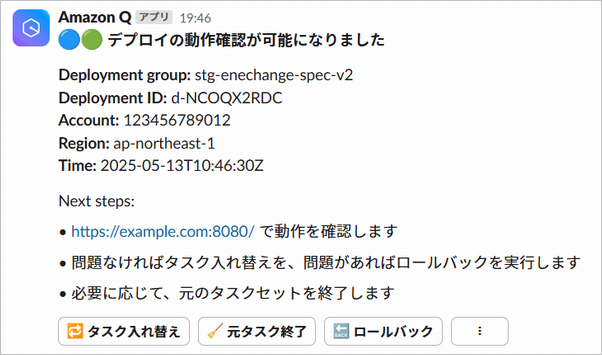
これで、Slackに以下のような通知が表示されるようになりました。Slack上のカスタムアクションボタンだけで、Blue/Greenデプロイの操作が完結します。
残っている課題
ということで結構いい感じのソリューションなのですが、カスタムアクションボタンの並び順が制御できない点が課題です。
「🧹 元タスク終了」「🔙 ロールバック」「🔁 タスク入れ替え」のような微妙な表示順になるケースもあります。前掲のスクリーンショットは、たまたま狙いどおりに並んでいたのでした。
並び順さえ制御できれば、この方法はChatOpsの定番パターンとして十分に通用しそうです。AWSサポートには機能追加要望として伝えました。対応を期待しています。
まとめ:LambdaなしでもChatOpsが組めた
以上、Amazon Q Developer in chat applicationsのカスタムアクションを使ったChatOpsの例をご紹介しました。
Lambdaなしで組むと、運用が楽になります。ボタンの並び順が制御できない課題は残っていますが、許容できるなら実用に足るはずです。
この方法を活用し、ChatOpsの対象を増やしていきたいと考えています。みなさまも是非お試しください。
