
Git で commit 以外のGitオブジェクトにタグをはってみます。
特に価値があるものは得られない記事です。
Gitオブジェクト? アノテートタグ? なんぞそれ?という方は先に以下の記事を参照ください。
タグの type
アノテートタグを作成したとき、 tag オブジェクトに type があります。
通常、ここには commit が設定されています。
大抵のユースケースでは特定のコミットに目印をつけるのがタグの目的になっているからです。
commit 以外にアノテートタグを付けた場合、
tag オブジェクトの type がどうなるか確認してみます。
タグxオブジェクト種別 対応表
各オブジェクトにタグをつけると tag オブジェクトの type の設定が何になるか表にしました。
| Case | object | type | memo |
|---|---|---|---|
| 1 | commit | commit | commit オブジェクトへの参照になる。最も標準的なユースケース |
| 2 | blob | blob | blob オブジェクトへの参照になる |
| 3 | tree | tree | tree オブジェクトへの参照になる |
| 4 | lightweight tag | commit | 軽量タグが参照している commit オブジェクトへの参照になる |
| 5 | annotate tag | annotate tag | tag オブジェクトへの参照になる |
※case は以下のサンプルケースの見出し番号に対応しています
サンプル
以降は上記の対応表の動作確認サンプルです。
軽量タグのケースは省略していますが、blog・tree・tagの軽量タグを作成することも可能です。
0. 準備
以降の動作確認に必要となる下準備。
$ git init
$ echo hoge > hoge.txt
$ mkdir dir
$ echo in_dir > dir/in_dir.txt
$ git add -A
$ git commit -m "test"

# 軽量タグを作成
$ git tag lightweight

# 軽量タグを show コマンドで確認
$ git show lightweight
commit 79c896336d7f3f77a1a8e64495977ccfc10c0db8
Author: name <email>
Date:   Fri Oct 7 21:11:19 2016 +0900

    test

diff --git a/dir/in_dir.txt b/dir/in_dir.txt
new file mode 100644
index 0000000..3d2a2db
--- /dev/null
+++ b/dir/in_dir.txt
@@ -0,0 +1 @@
+in_dir
diff --git a/hoge.txt b/hoge.txt
new file mode 100644
index 0000000..2262de0
--- /dev/null
+++ b/hoge.txt
@@ -0,0 +1 @@
+hoge
1. 1件コミットを追加してからアノテートタグを作成
$ echo hige > hige.txt
$ git add -A
$ git commit -m "commit 2"

# アノテートタグを作成
$ git tag -a annotate -m "annotate tag"

# tag オブジェクトを確認
$ git cat-file -t 03a0cbbc7df64019ec207df68820e03758ed7a18
tag
$ git cat-file -p 03a0cbbc7df64019ec207df68820e03758ed7a18
object 7aa7a1387ffbdc6ec90a73c299528da5635b320d
type commit
tag annotate
tagger name <email> 1475813611 +0900

annotate tag

# アノテートタグを show コマンドで確認
$ git show annotate
tag annotate
Tagger: name <email>
Date:   Fri Oct 7 21:13:31 2016 +0900

annotate tag

commit 7aa7a1387ffbdc6ec90a73c299528da5635b320d
Author: name <email>
Date:   Fri Oct 7 21:12:51 2016 +0900

    commit 2

diff --git a/hige.txt b/hige.txt
new file mode 100644
index 0000000..9e4f510
--- /dev/null
+++ b/hige.txt
@@ -0,0 +1 @@
+hige
2. blob のアノテートタグを作成
# blog にアノテートタグを付ける
$ git tag -a annotate_blob 2262de0c121f22df8e78f5a37d6e114fd322c0b0 -m "annotate blob"

# 作成されたタグを確認する。typeがblobになりました
$ git cat-file -t 2693a9aa4d2da7c51bfc45945b7fa67854ff9f4e
tag
$ git cat-file -p 2693a9aa4d2da7c51bfc45945b7fa67854ff9f4e
object 2262de0c121f22df8e78f5a37d6e114fd322c0b0
type blob
tag annotate_blob
tagger name <email> 1475819361 +0900

annotate blob

# アノテートタグを show コマンドで確認
$  git show annotate_blob
tag annotate_blob
Tagger: name <email>
Date:   Fri Oct 7 21:49:21 2016 +0900

annotate blob
hoge
3. tree のアノテートタグを作成
# .git/objects にあるtreeオブジェクトのSHA1を一括確認
$ find .git/objects -type f | xargs ruby -e "ARGV.map{|e|e.split('/')[2..3].join}.each{|e|print \"#{e},\";system(\"git cat-file -t #{e}\")}" | grep tree
34cfd122c532d9c704f94d2445b76f1ec5e65f1a,tree
62a8ac5b69c8a18c8401fc65422279368b66a7b7,tree
ade01feddd9b8ec82b0e84bf6975ea0d8adcc5b5,tree

# tree にアノテートタグを付ける
$ git tag -a tree 62a8ac5b69c8a18c8401fc65422279368b66a7b7 -m "tree annotate tag"

# 作成されたタグを確認する。typeがtreeになりました
$ git cat-file -t c5440d95dcb814c0c8c6fa9716d1777e9822721d
tag
$ git cat-file -p c5440d95dcb814c0c8c6fa9716d1777e9822721d
object 62a8ac5b69c8a18c8401fc65422279368b66a7b7
type tree
tag tree
tagger name <email> 1475814310 +0900

tree annotate tag

# アノテートタグを show コマンドで確認
$ git show tree
tag tree
Tagger: name <email>
Date:   Fri Oct 7 21:25:10 2016 +0900

tree annotate tag

tree tree

in_dir.txt
4.軽量tag にアノテートタグを付ける
軽量タグはGitオブジェクトを作らない。
.git/refs/tags/lightweight の中身が commit オブジェクトの SHA1 なので
tag の type は commit になったようだ。
# 軽量タグにアノテートタグを設定
$ git tag -a annotate_lightweight lightweight -m "new annotatetag for lightweight tag"

# .git/objects にあるtagオブジェクトのSHA1を一括確認
$ find .git/objects -type f | xargs ruby -e "ARGV.map{|e|e.split('/')[2..3].join}.each{|e|print \"#{e},\";system(\"git cat-file -t #{e}\")}" | grep tag
03a0cbbc7df64019ec207df68820e03758ed7a18,tag
3e34fa09c71006b92eeaac78ee7ada019ffdf149,tag
4d413d564c3da7c9b621e048054373a116ec0597,tag
c5440d95dcb814c0c8c6fa9716d1777e9822721d,tag
eb239bf2fe1ed62174172229462fca525dd8aa85,tag

# 作成されたタグを確認する。typeがcommitになりました
$ git cat-file -t 4d413d564c3da7c9b621e048054373a116ec0597
tag
$ git cat-file -p 4d413d564c3da7c9b621e048054373a116ec0597
object 79c896336d7f3f77a1a8e64495977ccfc10c0db8
type commit
tag annotate_lightweight
tagger name <email> 1475817251 +0900

new annotatetag for lightweight tag

## 軽量タグのアノテートタグを show コマンドで確認
$ git show annotate_lightweight
tag annotate_lightweight
Tagger: name <email>
Date:   Fri Oct 7 21:14:11 2016 +0900

new annotatetag for lightweight tag

commit 79c896336d7f3f77a1a8e64495977ccfc10c0db8
Author: name <email>
Date:   Fri Oct 7 21:11:19 2016 +0900

    test

diff --git a/dir/in_dir.txt b/dir/in_dir.txt
new file mode 100644
index 0000000..3d2a2db
--- /dev/null
+++ b/dir/in_dir.txt
@@ -0,0 +1 @@
+in_dir
diff --git a/hoge.txt b/hoge.txt
new file mode 100644
index 0000000..2262de0
--- /dev/null
+++ b/hoge.txt
@@ -0,0 +1 @@
+hoge
5.アノテートtag にアノテートタグを付ける
$ git tag -a annotate_tag annotate -m "annotate tag message"

$ find .git/objects -type f | xargs ruby -e "ARGV.map{|e|e.split('/')[2..3].join}.each{|e|print \"#{e},\";system(\"git cat-file -t #{e}\")}" | grep tag
03a0cbbc7df64019ec207df68820e03758ed7a18,tag
2693a9aa4d2da7c51bfc45945b7fa67854ff9f4e,tag
34aaa7941089a8516c0c7f9ed61714b6ea0d511c,tag
362bca02a4b2e5e6b89bb7398397ceaf9b71a97f,tag
3e34fa09c71006b92eeaac78ee7ada019ffdf149,tag
4d413d564c3da7c9b621e048054373a116ec0597,tag
c5440d95dcb814c0c8c6fa9716d1777e9822721d,tag
eb239bf2fe1ed62174172229462fca525dd8aa85,tag

# 作成されたタグを確認する。typeがtagになりました
$ git cat-file -t 362bca02a4b2e5e6b89bb7398397ceaf9b71a97f
tag
$ git cat-file -p 362bca02a4b2e5e6b89bb7398397ceaf9b71a97f
object 03a0cbbc7df64019ec207df68820e03758ed7a18
type tag
tag annotate_tag
tagger name <email> 1475820273 +0900

annotate tag message

# アノテートタグのアノテートタグを show コマンドで確認
$ git show 362bca02a4b2e5e6b89bb7398397ceaf9b71a97f
tag annotate_tag
Tagger: name <email>
Date:   Fri Oct 7 21:04:33 2016 +0900

annotate tag message

tag annotate
Tagger: name <email>
Date:   Fri Oct 7 21:13:31 2016 +0900

annotate tag

commit 7aa7a1387ffbdc6ec90a73c299528da5635b320d
Author: name <email>
Date:   Fri Oct 7 21:12:51 2016 +0900

    commit 2

diff --git a/hige.txt b/hige.txt
new file mode 100644
index 0000000..9e4f510
--- /dev/null
+++ b/hige.txt
@@ -0,0 +1 @@
+hige
応用
一応こんなこともできるよ、程度の内容で役にはたたない。
参考までに Stackoverflow における関連の会話
- Q: Why git tag a blob or a tree (or a tag)?
- Q: What are the common usages of tagging something else than a commit?
名前をつけた blob と diff を取る
タグを付けた blob の diff をとってみます。
通常のファイル比較と同様に動作します。
$ git cat-file -p 2693a9aa4d2da7c51bfc45945b7fa67854ff9f4e
object 2262de0c121f22df8e78f5a37d6e114fd322c0b0
type blob
tag annotate_blob
tagger name <email> 1475819361 +0900

annotate blob

# annotate_blob は hoge.txt の blob を参照しているため、 hoge.txt の中身を取得します
$ git show annotate_blob
hoge
$ cat hoge.txt
hoge
$ git diff annotate_blob hoge.txt
$ cat hige.txt
hige
$ git diff annotate_blob hige.txt
diff --git a/hige.txt b/hige.txt
index 2262de0..9e4f510 100644
--- a/hige.txt
+++ b/hige.txt
@@ -1 +1 @@
-hoge
名前をつけた tree と任意の tree の diff を取る
タグを付けた tree の diff をとってみます。
通常のツリー比較と同様に動作します。
$ git cat-file -p c5440d95dcb814c0c8c6fa9716d1777e9822721d
object 62a8ac5b69c8a18c8401fc65422279368b66a7b7
type tree
tag tree
tagger name <email> 1475814310 +0900

tree annotate tag

# tree タグを確認
$ git show tree
tag tree
Tagger: name <email>
Date:   Fri Oct 7 21:25:10 2016 +0900

tree annotate tag

tree tree

in_dir.txt

# tree タグが参照する tree オブジェクトを確認
$ git cat-file -p 62a8ac5b69c8a18c8401fc65422279368b66a7b7
100644 blob 3d2a2dbf2845e04e2f5c87792f6b8b0ebec54846   in_dir.txt

# dir/in_dir2.txt を追加
$ echo in_dir2 > dir/in_dir2.txt
$ git add -A
$ git commit -m "commit 3"
[master 50f03b4] commit 3
 1 file changed, 1 insertion(+)
 create mode 100644 dir/in_dir2.txt

# 追加後の dir の tree オブジェクトを確認
$ git cat-file -p 921834fe1845c38e3e295e4167709579b700bfe8
100644 blob 3d2a2dbf2845e04e2f5c87792f6b8b0ebec54846   in_dir.txt
100644 blob 1117287229538e6451f0fd3bcddbfb138cb16184   in_dir2.txt

# 追加前後の dir の tree オブジェクトを比較
$ git diff tree 921834fe1845c38e3e295e4167709579b700bfe8
diff --git a/in_dir2.txt b/in_dir2.txt
new file mode 100644
index 0000000..1117287
--- /dev/null
+++ b/in_dir2.txt
@@ -0,0 +1 @@
+in_dir2
blob につけたタグをGitHubにpushするとどうなるか?
# 作成されたタグを確認する。typeがblobになりました
$ git cat-file -t 2693a9aa4d2da7c51bfc45945b7fa67854ff9f4e
tag
$ git cat-file -p 2693a9aa4d2da7c51bfc45945b7fa67854ff9f4e
object 2262de0c121f22df8e78f5a37d6e114fd322c0b0
type blob
tag annotate_blob
tagger name <email> 1475819361 +0900

annotate blob

# pushする
$ git push origin blob
Counting objects: 1, done.
Writing objects: 100% (1/1), 46 bytes | 0 bytes/s, done.
Total 1 (delta 0), reused 0 (delta 0)
To git@github.com:user/repo.git
 * [new tag]         blob -> blob
- GitHub のタグの一覧に表示されました
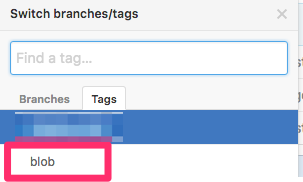
- タグをクリックしてみたら404になりました

そんな変なユースケースには対応してませんよね。わかります。
