ダブルクリックでデスクトップに解凍してほしい。
zip ファイルを中身を見て、必要ファイルを取り出すとか面倒くさい。
ダブルクリックで解凍して、エクスプローラーで表示してほしい。
特に、USBメモリやSambaのフォルダを開くときに、ダブルクリックでデスクトップへ展開が重要なのである。
レジストリで操作する。
前に、試したことで、レジストリをイジれれば、好きな箇所にフォルダを作成し展開できることはわかった。
解凍後にエクスプローラーで開けてほしい。
今度の欲求は、解凍後にフォルダが見えないという点だ。
解凍(展開・伸長)後に、エクスプローラーでフォルダを開いてほしい。
レジストリの登録を次のようにしたい。
7-Zip.desktop というProgIdを作り、zipの関連付けを変更する。
Windows Registry Editor Version 5.00

[HKEY_CURRENT_USER\SOFTWARE\Classes\7-Zip.desktop]

[HKEY_CURRENT_USER\SOFTWARE\Classes\7-Zip.desktop\DefaultIcon]
@="\"C:\\Program Files (x86)\\Lhaplus\\LplsIcon.dll\",101"

[HKEY_CURRENT_USER\SOFTWARE\Classes\7-Zip.desktop\shell]

[HKEY_CURRENT_USER\SOFTWARE\Classes\7-Zip.desktop\shell\open]

[HKEY_CURRENT_USER\SOFTWARE\Classes\7-Zip.desktop\shell\open\command]
@="\"C:\\Users\\takuya\\.app\\7zipToDesktop.exe\" %1"

[HKEY_CURRENT_USER\SOFTWARE\Classes\.zip]
@="7-Zip.desktop"
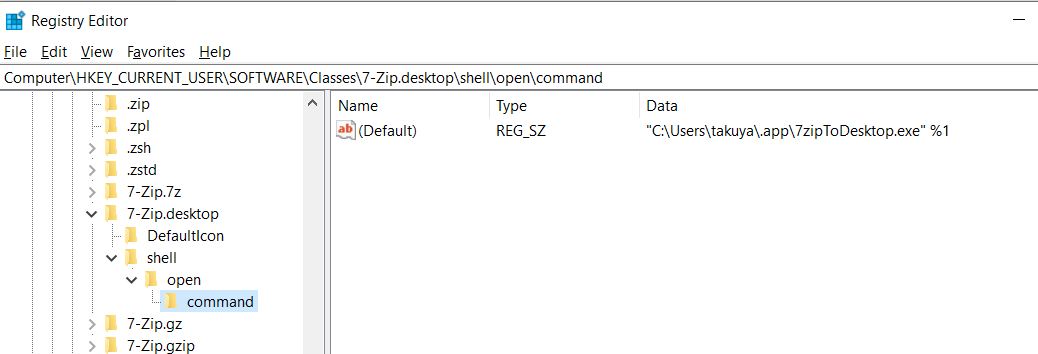
個々に必要なExeかスクリプトを作る
WSHやPSで書いても良かったんだけど。WindowsだしExe作ってやろうと思って、Windowsアプリケーションを書き始めた。
だいたい、書けた。
展開先の設定画面とかはコンパイルすればいいので、要らない。
ソースコード
シェルスクリプトで頑張ろうと思ったけど、WSHはVBScript/JScript の未来が不透明だし、Powershellは面倒くさいし、いまさらcmd.exeを書く気になれなかった。
VisualStudioのC++なら、現代ではMicrosoftが無償で使わせてくれるので、超久しぶり書いたわ。
https://github.com/takuya/win-7zip-onclick/blob/master/7zipToDesktop/7zipToDesktop.cpp
// 7zipToDesktop.cpp : Defines the entry point for the application.
//
// License: GPLv3
// author : github.com/takuya
// modified : 2024-05-29
//
#include<iostream>
#include <Windows.h>
#include <filesystem>
#include <regex>

namespace fs = std::filesystem;
using string = std::string;
using wstring = std::wstring;

fs::path get_desktop() {
    char* env_var = nullptr;
    size_t size;
    _dupenv_s(&env_var, &size, "USERPROFILE");
    if (env_var == nullptr) {
        return "";
    }
    std::string UserProfile(env_var);
    return fs::path(UserProfile) / "Desktop";
}
wstring get_output_path(wstring src) {

    std::string dstDir = get_desktop().string();

    fs::path src_path(src);
    fs::path basename = src_path.stem();
    std::regex extensionRegex("\\.\\w+$");
    std::string basename_noext = std::regex_replace(basename.string(), extensionRegex, "");
    fs::path dstPath = fs::path(dstDir) / basename_noext;
    return dstPath.wstring();
}
void openExplorer(wstring path) {
    wstring application(L"explorer.exe");
    wstring out_dir = get_output_path(path);
    if (!fs::exists(out_dir)) {
        return;
    }
    HINSTANCE result = ShellExecute(nullptr, nullptr,
        application.c_str(),
        out_dir.c_str(),
        NULL,
        SW_SHOWNORMAL
    );
}


int extractToDesktop(wstring archivePath) {
    fs::path desktopPath = get_desktop();
    if (desktopPath.empty()) {
        return 1;
    }
    wstring args = archivePath;
    args = L" x " + args + L" -aos -o" + desktopPath.wstring() + L"\\*";
    wstring p7zip = L"\"C:\\Program Files\\7-Zip\\7zG.exe\"";
    wstring cmd = p7zip + args;
    //
    //wstring cmdW(cmd.begin(), cmd.end());
    //wstring cmdW = stringToWString(cmd);
    LPCWSTR lpwargs = cmd.c_str();
    LPWSTR  lpargs = const_cast<LPWSTR>(lpwargs);

    STARTUPINFO si = {};
    PROCESS_INFORMATION pi = {};
    if (CreateProcessW(NULL, lpargs, NULL, NULL, FALSE, 0, NULL, NULL, &si, &pi)) {
        WaitForSingleObject(pi.hProcess, INFINITE);
        CloseHandle(pi.hProcess);
        CloseHandle(pi.hThread);

    }
    else {
        std::cerr << "Failed to execute command." << std::endl;
        return 2;
    }
    return 0;
}


int WINAPI wWinMain(_In_ HINSTANCE hInstance, _In_opt_  HINSTANCE hPrevInstance, _In_ LPWSTR lpCmdLine, _In_ int nShowCmd) {

    if (lpCmdLine == NULL) {
        return 1;
    }
    //
    wstring args = lpCmdLine;
    extractToDesktop(args);
    openExplorer(args);
    return 0;


}
書くときに調べたメモ
Win32なんて超久しぶりなので、一つずつ調べて書いた。
- シェルコマンドの実行方法
- CreateProcess
- std::system
- ShellExecuteA / ShellExecute
- 環境変数の取得
- ファイルパスの扱い
- basename / stem
- extname / replace extension
- join / path
- WinMainを使って画面なしExe
- namespace
- using
- include
- string
- wstring と LPCWSTR
- Raw 書式
- LPCWSTR と LPCSTR の変換
特に、Windowsアプリケーションは文字列型キャストが本当に面倒くさい。c++で書いても、Cへキャストしないといけない。
文字列型の備忘録( 参考資料 )
| Item | 8-bit(ANSI) 16-bit ( | Wide) | Varies |
|---|---|---|---|
| character | CHAR | WCHAR | TCHAR |
| string | LPSTR | LPWSTR | LPTSTR |
| string | (const) LPCSTR | LPCWSTR | LPCTSTR |
略称がややこしいが、ConstとWideだけ覚えておけばいい。
- LPCSTR は Long Pointer Const String
- LPCWSTR は Long Pointer Wide Const String
- LPSTR は Long Pointer String
CreateProcess の第1引数をいれると、第二引数が無視される仕様なのが、ハマりどころだった。
エクスプローラーの起動
#include<windows.h>
#include<iostream>

int main()
{
    LPCSTR application = "explorer.exe";
    LPCSTR parameters = "C:\\Users\\takuya\\Desktop";
    HINSTANCE result = ShellExecuteA(nullptr,nullptr,
        application, // アプリケーション
        parameters, // 引数
        NULL, // ディレクトリ
        SW_SHOWNORMAL // ウィンドウの表示状態
    );
    if ((int)result <= 32) {
        MessageBoxA(NULL, "explorer.exeの実行に失敗しました。", "エラー", MB_OK | MB_ICONERROR);
    }
    else {
        MessageBoxA(NULL, "explorer.exeは成功しました。", "成功", MB_OK | MB_ICONASTERISK);

    }
}
curl.exe の実行
#include<windows.h>
#include<iostream>

int main()
{
    //
    LPCSTR application = "C:\\Windows\\System32\\curl.exe";
    LPCSTR parameters = " -v https://g.co -o C:\\Users\\takuya\\Desktop\\out.html";
    //
    HINSTANCE result = ShellExecuteA(nullptr,nullptr,
        application, // アプリケーション
        parameters, // 引数
        NULL, // ディレクトリ
        SW_SHOWNORMAL // ウィンドウの表示状態
    );
    return (int)result;

}
ファイル(フルパス)から、拡張子を除去
#include<windows.h>
#include<iostream>
#include <filesystem>

namespace fs = std::filesystem;

int main()
{
    std::string pathString = R"(C:\Users\takuya\Downloads\sample - 2024 04.zip)";
    fs::path path(pathString);
    fs::path basename = path.replace_extension();
    std::cout << basename.string() << std::endl;
    return 0;

}
ファイル(フルパス)からファイル名(Basename)を取得
#include<windows.h>
#include<iostream>
#include <filesystem>

namespace fs = std::filesystem;

int main()
{
    std::string pathString = R"(C:\Users\takuya\Downloads\sample - 2024 04.zip)";
    fs::path path(pathString);
    fs::path basename = path.stem();
    std::cout << basename.string() << std::endl;
    return 0;

}
ファイル名とディレクトリ名を結合
#include<windows.h>
#include<iostream>
#include <filesystem>

namespace fs = std::filesystem;

int main()
{
    std::string pathString = R"(C:\Users\takuya\Downloads\sample - 2024 04.zip)";
    std::string dir = R"(C:\Users\takuya\Desktop)";

    fs::path path(pathString);
    fs::path basename = path.stem();
    fs::path dstPath = fs::path(dir) / basename;
    std::cout << dstPath.string() << std::endl;
    return 0;

}
環境変数の値を取得し、Desktopのパスを取得
#include<windows.h>
#include<iostream>
#include <filesystem>

namespace fs = std::filesystem;

int main()
{
    // 環境変数 USERPROFILE の値を取得
    char* env_var = nullptr;
    size_t size;
    _dupenv_s(&env_var, &size, "USERPROFILE");
    if (env_var == nullptr) {
        return 1;
    }
    std::string UserProfile(env_var);
    fs::path desktopPath = fs::path(UserProfile) / "Desktop";
    std::cout << desktopPath.string() << std::endl;
    return 0;

}
コマンド(エクスプローラー)起動をstd::string から
先程の例は、C++ というより、LPCSTRを使ったCサンプルなので。
もう少し、c++ らしく。
#include<windows.h>
#include<iostream>

namespace fs = std::filesystem;
using string = std::string;
int main()
{
    string application("explorer.exe");
    string parameters = R"(C:\Windows)";
    HINSTANCE result = ShellExecuteA(nullptr, nullptr,
        application.c_str(),
        parameters.c_str(),
        NULL,
        SW_SHOWNORMAL
    );

    return 0;

}
もっと簡単に、std::systemを使う
#include<string>
using string = std::string;

int main(){
  string application("explorer.exe");
    string parameters = R"(C:\Windows)";
    string cmd = application + " " + parameters;
    std::system(cmd.c_str());
}
std::system はコマンド終了までブロッキングするので注意。(int 戻り値をずっと待つ)
ShellExecuteA は LPSTR でファイル名を取り、ShellExecuteはLPWSTRでファイル名を取る。
プロセス実行して待つ
system は、終了待ちする。それいいけど、CreateProcess系がWindowsの正統派かもしれない。
Windowsの文字列変換が全然わからないので、不慣れなWindowsプログラミングでCreateProcessは文字列変換が地獄かもしれない。
#include<iostream>
#include <Windows.h>

//namespace fs = std::filesystem;
using string = std::string;
using wstring = std::wstring;
int main()
{
    LPCWSTR programPath = L"C:\\Windows\\System32\\cmd.exe";
    LPWSTR  args = const_cast<LPWSTR>(L"/c echo Hello world!");

    STARTUPINFO si = {};
    PROCESS_INFORMATION pi = {};
    if (CreateProcessW(programPath, args, NULL, NULL, FALSE, 0, NULL, NULL, &si, &pi)) {
        WaitForSingleObject(pi.hProcess, INFINITE);
        CloseHandle(pi.hProcess);
        CloseHandle(pi.hThread);
    }
    else {
        std::cerr << "Failed to execute command." << std::endl;
    }
    return 0;
}
何も起きない(ウィンドウ開かない)アプリケーション
#include <windows.h>

int WINAPI WinMain(_In_ HINSTANCE hInstance, _In_opt_  HINSTANCE hPrevInstance, _In_ LPSTR lpCmdLine, _In_ int nShowCmd){
    return 0;
}
メッセージボックスだけ
#include <windows.h>
#include <iostream>

using wstring = std::wstring;


int WINAPI WinMain(_In_ HINSTANCE hInstance, _In_opt_  HINSTANCE hPrevInstance, _In_ LPSTR lpCmdLine, _In_ int nShowCmd){

    wstring msg = L"ハローワールド";
    MessageBox(NULL, msg.c_str(), L"Command Line Arguments", MB_OK | MB_ICONINFORMATION);
    return 0;
}
WinMainでコマンドラインの引数を取ってメッセージボックスにだす
#include <windows.h>
#include <iostream>

using string = std::string;
using wstring = std::wstring;


int WINAPI WinMain(_In_ HINSTANCE hInstance, _In_opt_  HINSTANCE hPrevInstance, _In_ LPSTR lpCmdLine, _In_ int nShowCmd){
    // 引数無しは、動作無し。
    if (lpCmdLine == NULL) {
        return 1;
    }
    // std::string を std::wstring に変換
    string commandLineStr(lpCmdLine);
    wstring commandLine = std::wstring(commandLineStr.begin(), commandLineStr.end());
    MessageBox(NULL, msg.c_str(), L"Command Line Arguments", MB_OK | MB_ICONINFORMATION);

    return 0;
}
wWinMain と WinMain
LPWSTR と LPSTRやUnicodeなど 面倒なことを考えずに、引数をとりあえず全部LPWSTR としてあつかって wstring でコーディングをして、ビルド設定で use unicode をしておく。
int WINAPI wWinMain(_In_ HINSTANCE hInstance, _In_opt_ HINSTANCE hPrevInstance, _In_ LPWSTR lpCmdLine, _In_ int nShowCmd) {
WinMain の場合は
int WINAPI WinMain(_In_ HINSTANCE hInstance, _In_opt_ HINSTANCE hPrevInstance, _In_ LPSTR lpCmdLine, _In_ int nShowCmd) {
| main | cmd |
|---|---|
| WinMain | LPSTR lpCmdLine |
| wWinMain | LPSWTR lpCmdLine |
となるので、文字コードの変換をサボリたいときは便利かもしれない。
2024-10-15 追記
WinMain / wWinMain に付いて記載。
