以下の内容はhttps://takuya-1st.hatenablog.jp/entry/2021/09/27/232616より取得しました。


Macの設定のアップデート通知のバッジを省略する。

MacOSの通知バッヂを省略する

macOSの新バージョンの実験台にされるのはいやなので少し前のバージョンを使ってます。 しかし、通知アイコンがずっとアップデートを通知してくるので消したいです。

defaults write com.apple.systempreferences AttentionPrefBundleIDs 0 && killall Dock

これで、preference の dock から red badge を消すことが出来る
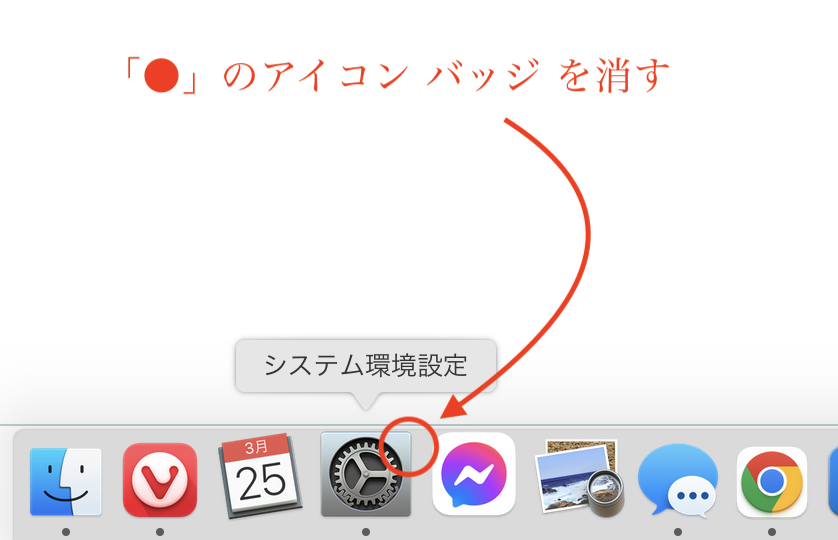
f:id:takuya_1st:20220325030501p:plain

もとに戻せるのか?

戻せます

defaults write com.apple.systempreferences AttentionPrefBundleIDs 1 && killall Dock

コマンドを実行するだけでいいのは便利よね。

参考資料

https://apple.stackexchange.com/questions/344278/how-can-i-disable-the-red-software-update-notification-bubble-on-the-system-pref?rq=1

https://osxdaily.com/2020/05/12/disable-red-badge-icon-system-preferences-macos/



以上の内容はhttps://takuya-1st.hatenablog.jp/entry/2021/09/27/232616より取得しました。
このページはhttp://font.textar.tv/のウェブフォントを使用してます

不具合報告/要望等はこちらへお願いします。
モバイルやる夫Viewer Ver0.14