multipass を windows にインストール
windows で ubuntu の実行環境を手軽に使いたかった。
choco install multipass
UAC のPSから使う。
multipass は UAC 昇格後のPSから使うように設計されている。
基本的な使い方は以下の通り。
新しくインスタンスを起動する
multipass launch --name sample01
メモリ・ディスク容量・CPU数を指定して、新しいインスタンスを作る。
multipass launch --name sample01 --disk 20G --cpus 8 -m 8G
シェルに入る。
multipass shell sample01
シェルに入る(別の方法)
## docker exec  / lxc exec 的な方法
multipass  exec sample01 bash
インスタンスを削除する(データは残る。)
multipass delete sample01
削除済みのインスタンスを完全に消去する。
multipass purge
wsl から使う。
私は WSL1 を使っているので直接EXEを叩けば使える。
alias を設定しておくと便利。
alias multipass=/mnt/c/ProgramData/chocolatey/bin/multipass.exe
標準はHyper-Vが使われる。
multipassはデフォルト設定では、Hyper-V を使うので、Hyper-Vの管理画面から、インスタンスを制御できる。
もしトラブったらそこを見ればいい。
UACなしだと、delete && purge ができない。
Admin権限のユーザーであればUAC昇格 なしでも launch や shell は動くのですが、delete purge がうまく動かずHyper-Vのインスタンスが消されずに残ってしまう。
もし、Hyper-Vを使っているのであれば、次のフォルダのアクセス権限を取得しておけば、削除される。(はず)
C:\Windows\System32\config\systemprofile\AppData\Roaming\multipassd
virtualbox をバックエンドに使用する。
purge がHyper-Vでうまく行かないのであれば、 Virtualboxを利用する。
hyper-Vの代わりにVirtualBoxを使うように設定する。
choco install virtualbox
multipass set local.driver=virtualbox
わたしの場合、フォルダのアクセス権限を取得しておいて、virtualbox で起動することにした。
virtualbox を使うと、ファイルは次にの場所に設置される。
仮想ハードディスクなどは次の場所に設置された。
C:\Windows\System32\config\systemprofile\AppData\Roaming\multipassd\virtualbox
万が一の場合は、ここのフォルダを全消ししたら良さそう。
multipass の Virtualbox を表示する。
https://multipass.run/docs/using-virtualbox-in-multipass-windows
hyper-v みたいに、仮想マシンの管理画面でMultipassのゲストを確認するには、次のようなコマンドで pstoolsを使って起動する。
choco install pstools
PsExec.exe -s -i $env:VBOX_MSI_INSTALL_PATH\VirtualBox.exe
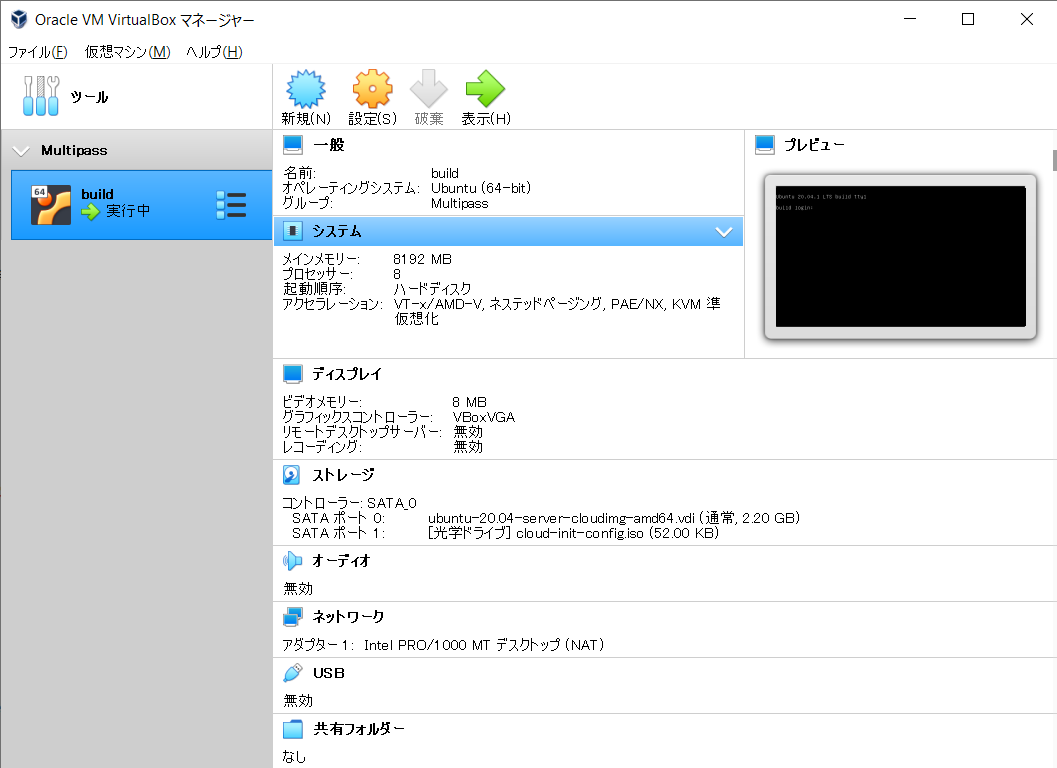
hyper-v に戻すには
multipass set local.driver=hyperv
multipass 便利ですね。
カーネルビルドとかやってると完全仮想化のマシンが欲しくなる。削除・作成・起動ができる環境が手に入るのはとても嬉しい。
multipass の bash-completion とかも
wsl で multipass 使うなら bash-completion もあれば便利 ubuntu から持ってきた bash-completion を bashrc に追記しておく
#export PATH="${PATH}:/mnt/c/ProgramData/chocolatey/bin/multipass.exe"
alias multipass=/mnt/c/ProgramData/chocolatey/bin/multipass.exe
# Copyright © 2017-2019 Canonical Ltd.
#
# This program is free software: you can redistribute it and/or modify
# it under the terms of the GNU General Public License version 3 as
# published by the Free Software Foundation.
#
# This program is distributed in the hope that it will be useful,
# but WITHOUT ANY WARRANTY; without even the implied warranty of
# MERCHANTABILITY or FITNESS FOR A PARTICULAR PURPOSE.  See the
# GNU General Public License for more details.
#
# You should have received a copy of the GNU General Public License
# along with this program.  If not, see <http://www.gnu.org/licenses/>.

_multipass_complete()
{
    _multipass_instances()
    {
        local state=$1

        local cmd="multipass list --format=csv"
        [ -n "$state" ] && cmd="$cmd | \grep -E '$state'"

        local instances=$( \eval $cmd | \grep -Ev '(\+--|Name)' | \cut -d',' -f 1 )

        local found

        _get_comp_words_by_ref -n := -w WORDS -i CWORD cur prev
        for instance in $instances; do
            found=0
            for ((i=2; i<CWORD; i++)); do
                if [[ "${WORDS[i]}" == ${instance} ]]; then
                    found=1
                    break
                fi
            done
            if [ ${found} == 0 ]; then
                opts="${opts} ${instance}"
            fi
        done
    }

    local cur cmd opts prev prev_opts
    COMPREPLY=()
    cur="${COMP_WORDS[COMP_CWORD]}"
    prev="${COMP_WORDS[COMP_CWORD-1]}"
    cmd="${COMP_WORDS[1]}"
    prev_opts=false
    multipass_cmds="transfer delete exec find help info launch list mount purge \
                    recover shell start stop suspend restart umount version get set"

    opts="--help --verbose"
    case "${cmd}" in
        "info")
            opts="${opts} --all --format"
        ;;
        "list"|"ls")
            opts="${opts} --format"
        ;;
        "delete")
            opts="${opts} --all --purge"
        ;;
        "launch")
            opts="${opts} --cpus --disk --mem --name --cloud-init"
        ;;
        "mount")
            opts="${opts} --gid-map --uid-map"
        ;;
        "recover"|"start"|"suspend"|"restart")
            opts="${opts} --all"
        ;;
        "stop")
            opts="${opts} --all --cancel --time"
        ;;
        "find")
            opts="${opts} --show-unsupported --format"
        ;;
    esac

    if [[ ${prev} == -* ]]; then
        case "${prev}" in
            "--format"|"-f")
                opts="table json csv yaml"
                prev_opts=true
            ;;
            "--cloud-init")
                _filedir
                return
            ;;
        esac
    fi

    if [[ "$prev_opts" = false ]]; then
        case "${cmd}" in
            "exec"|"stop"|"suspend"|"restart")
                _multipass_instances "Running"
            ;;
            "connect"|"sh"|"shell")
                _multipass_instances "Running"
                _multipass_instances "Stopped"
                _multipass_instances "Suspended"
            ;;
            "start")
                _multipass_instances "Stopped"
                _multipass_instances "Suspended"
            ;;
            "delete"|"info"|"umount"|"unmount")
                _multipass_instances
            ;;
            "recover")
                _multipass_instances "Deleted"
            ;;
            "mount")
                local source_set=0
                local prev
                _get_comp_words_by_ref -n := -w WORDS -i CWORD cur prev
                # Scan through the current command line to detect if the source
                # positional arg has been set.
                for ((i=2; i<CWORD; i++)); do
                    if [[ "${WORDS[i]}" != -* ]] && \
                       ([[ "${WORDS[i-1]}" != -* ]] || [[ "${WORDS[i-1]}" == *=* ]]); then
                            source_set=1
                            break
                    fi
                done

                if [ ${source_set} == 0 ] ; then
                    if [[ ${prev} != -* ]] || ([[ ${prev} == -* ]] && [[ ${prev} == *=* ]]); then
                        _filedir -d
                        return
                    fi
                elif [ ${source_set} == 1 ] && [[ ${prev} != -* ]]; then
                    _multipass_instances "Running"
                    _multipass_instances "Stopped"
                    _multipass_instances "Suspended"
                fi
            ;;
            "transfer"|"copy-files")
                _multipass_instances "Running"

                COMPREPLY=( $(compgen -W "${opts}" -- ${cur}) )
                if [[ "${#COMPREPLY[@]}" == "0" ]]; then
                    _filedir
                    return
                fi
            ;;
            "help")
                opts=$multipass_cmds
            ;;
        esac
    fi

    if [[ ${COMP_CWORD} -eq 1 ]]; then
        opts="${opts} ${multipass_cmds}"
    fi

    if [[ -n "${opts}" ]]; then
        COMPREPLY=( $(compgen -W "${opts}" -- ${cur}) )
    fi

    return 0
}
complete -F _multipass_complete multipass
