最近いくつかDocument Picture-in-Pictureの記事を見かけたので自分も何かしら動かしてみたいなということで、以前Picture-in-Pictureで実装したタイマーをDocument Picture-in-Pictureでも実装してみた
Document Picture in Picture Timer
動くものは上記で、以下はDocument Picture-in-PictureをReactの世界でうまく動かすためにやったことを書いている
ChromeのDocサイト
「動画」だけでなく、すべての要素でピクチャー イン ピクチャーで使用可能 | Web Platform | Chrome for Developers
これを読むと力技感あるがスタイルもWindow内のドキュメントに反映できるよう
他にも一般的な使い方が列挙されていて一通り使う分には困らなそうだった
で、いったんはドキュメントの通りに実装してみたが、次のような課題があった
appendだったり直接DOMに対して変更掛けに行く処理なのでせっかくならReactっぽく書きたい- Picture-in-Pictureさせると対象のNode以下でイベントハンドラなどをセットしていた場合にうまく動かない
- セットしているすべてのイベントハンドラに対してPicture-in-Picture内のNodeを新たに探してイベントハンドラをつけ直すみたいなことをすれば一応動く…
CreatePortal
さすがにこのままだと微妙だなということで調べてみたら、Issueに上がっていた
React components support? · Issue #85 · WICG/document-picture-in-picture
やりたいことはcreatePortalを使えばできるよとのこと
ポータルは DOM ノードの物理的な配置だけを変更します。それ以外のすべての点で、ポータルにレンダーする JSX は、レンダー元の React コンポーネントの子ノードとして機能します。例えば、子は親ツリーが提供するコンテクストにアクセスでき、イベントは React ツリーに従って子から親へとバブルアップします。
ドキュメントではモーダルを実装する例や非React DOM環境にReactコンポーネントをレンダーする用途で利用していた
特定のdocumentに対してReactコンポーネントを差し込むことができる
これは便利…
カウンタを実装
とりあえず、小さなコード量でReactのhookを使ってカウンタを実装してみた
Next.jsを使って単一ページ内にすべて書いた
import type { NextPage } from 'next';

import React, { useState, useRef } from 'react';
import { createPortal } from 'react-dom';

declare global {
  interface DocumentPictureInPictureOptions {
    width?: number;
    height?: number;
    disallowReturnToOpener?: boolean;
    preferInitialWindowPlacement?: boolean;
  }
  interface DocumentPictureInPicture {
    requestWindow: (options?: DocumentPictureInPictureOptions) => Promise<Window>;
  }

  var documentPictureInPicture: DocumentPictureInPicture;
}

interface ConditionalPortalProps {
  children: React.ReactNode;
  usePortal: boolean;
  portalContainer?: Element | null;
}

const ConditionalPortal: React.FC<ConditionalPortalProps> = ({ children, usePortal, portalContainer }) => {
  if (usePortal && portalContainer) {
    return createPortal(children, portalContainer);
  }
  return <>{children}</>;
};

const DocumentPinpReactPortal: NextPage = () => {
  const pipWindow = useRef<Awaited<ReturnType<DocumentPictureInPicture['requestWindow']>> | null>(null);
  const [isOpen, setIsOpen] = useState<boolean>(false);
  const [count, setCount] = useState<number>(0);
  const contentRef = useRef<HTMLDivElement | null>(null);

  const clickHandler = () => setCount((prev) => prev + 1);

  const createDocumentPinp = async () => {
    // close
    if (isOpen) {
      if (!pipWindow.current) return;
      pipWindow.current.close();
      setIsOpen((prev) => !prev);
    }
    // open
    else {
      pipWindow.current = await documentPictureInPicture.requestWindow({
        width: contentRef.current?.clientWidth,
        height: contentRef.current?.clientHeight,
      });

      if (!pipWindow.current) return;
      pipWindow.current.addEventListener('pagehide', (event: any) => {
        if (!pipWindow.current) return;
        pipWindow.current.close();
        setIsOpen(false);
      });

      // @ts-ignore
      [...document.styleSheets].forEach((styleSheet) => {
        try {
          const cssRules = [...styleSheet.cssRules].map((rule) => rule.cssText).join('');
          const style = document.createElement('style');

          style.textContent = cssRules;
          if (pipWindow.current !== null) {
            pipWindow.current.document.head.appendChild(style);
          }
        } catch (e) {
          const link = document.createElement('link');

          link.rel = 'stylesheet';
          link.type = styleSheet.type;
          link.media = styleSheet.media;
          link.href = styleSheet.href;
          if (pipWindow.current !== null) {
            pipWindow.current.document.head.appendChild(link);
          }
        }
      });
      setIsOpen((prev) => !prev);
    }
  };

  return (
    <>
      <ConditionalPortal usePortal={isOpen} portalContainer={pipWindow?.current?.document.body}>
        <div id="container">
          <div id="dpip" ref={contentRef}>
            <p>this is content!!!</p>
            <p>clicked {count}</p>
            <button onClick={clickHandler} className="rounded border">
              click!!!
            </button>
          </div>
        </div>
      </ConditionalPortal>

      <button onClick={createDocumentPinp} className="rounded border">
        Document PinP
      </button>
    </>
  );
};

export default DocumentPinpReactPortal;
動作
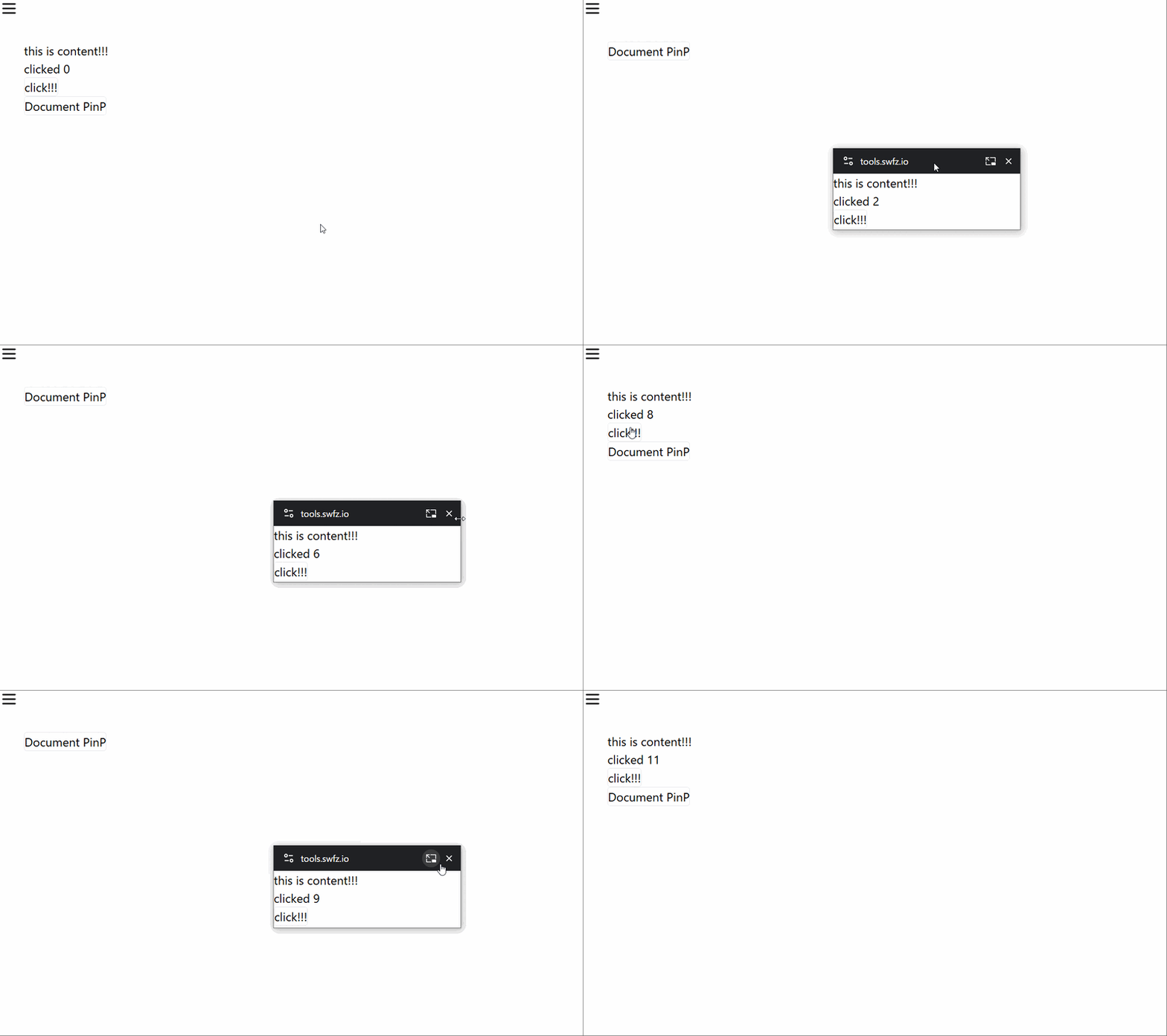
hookに持たせた状態をPicture-in-Pictureウィンドウにしても維持できている、クリックイベントも発火している
ポイントはPicture-in-Pictureウィンドウに移したい対象範囲のReactノードをConditionalPortalというコンポーネントでラップしてあげた点
ConditionalPortalコンポーネントでは、ウィンドウを開いているかの真偽値とPicture-in-Pictureウィンドウのdocument.bodyを受け取り、開いている場合はPicture-in-Pictureウィンドウへchildrenをレンダリングするように切り替えるようになっている
createPortalの第1引数はReactNodeを期待するらしく、TypeScriptのコード内でごにょごにょできなそうだった、試行錯誤した結果サンプルコードの状態に落ち着いた
まとめ
- Reactの世界でDocument Picture-in-Picture機能を使うため
createPortalを利用した - Picture-in-Pictureの対象範囲を専用のコンポーネントでラップしてあげることで切り替えをすっきり行えるようにした
これでReactの世界の中でDocument Picture in Pictureを扱えるようになった
無駄にイベントリスナを登録したりappendしたりする必要がなくなったのですばらしい!!!
活用方法は色々あるかなーと思うのでどんどん試作してみようと思う
余談
同じようなアプローチでReact+Document Picture-in-Pictureを使えるようにするPRが上がっていた
