Templaterのスクリプトを使ってラベルの切り替えをショートカットで行う
ToDoや何かしらのリストの項目に対してラベルを付け、何かしらの判別をして集計などに活かす場合に使える
ラベル切り替えを行いたい行にカーソルを置きショートカットを実行することで切り替える
イメージ
- sample
- [ ] task1
- 1度目実行
- [ ] task1 [label:: Aaaaa]
- 2度目実行
- [ ] task1 [label:: Bbbbb]
- 3度目実行
- [ ] task1
2つまで設定した場合は最初の何も付与していない状態に戻る
というような感じで、ショートカットを利用しよく使うラベルの切り替えをサクッと行う
スクリプト
パターンが2つあるのでそれぞれ紹介する
大まかなロジックはほぼ同じ
ラベルのキーは固定、値を切り替える
冒頭で紹介したイメージのパターン
- templates/switch_label.md
<%*
  const labelKey = "label"
  const getPattern = (state) => {
    return new RegExp(` \\[${labelKey}:: ${state}\\]`)
  }

  const editor = app.workspace.activeLeaf.view.editor
  const states = ["Aaaaa", "Bbbbb"]

  const line = editor.getLine(editor.getCursor().line)
  const stateIndex = states.findIndex(s => {
    const pattern = getPattern(s)
    return pattern.test(line)
  })

  let newLine = line

  if (stateIndex >= 0) {
    const p = getPattern(states[stateIndex])
    newLine = line.replace(p, '')
  }

  const newStateIndex = stateIndex + 1
  if (newStateIndex < states.length) {
    newLine = newLine + ` [${labelKey}:: ${states[newStateIndex]}]`
  }

  editor.setLine(editor.getCursor().line, newLine)
%>
statesの中身を実際に付与するラベルの値にする
ラベルのキーを切り替える、値は実行時の日付を付与
- templates/try_label.md
<%*
  const getPattern = (state) => {
    return new RegExp(` \\[${state}:: \\d{4}-\\d{2}-\\d{2}\\]`)
  }

  const editor = app.workspace.activeLeaf.view.editor
  const states = ["hoge", "fuga"]
  const d = tp.date.now("YYYY-MM-DD")

  const line = editor.getLine(editor.getCursor().line)
  const stateIndex = states.findIndex(s => {
    const pattern = getPattern(s)
    return pattern.test(line)
  })

  let newLine = line

  if (stateIndex >= 0) {
    const p = getPattern(states[stateIndex])
    newLine = line.replace(p, '')
  }

  const newStateIndex = stateIndex + 1
  if (newStateIndex < states.length) {
    newLine = newLine + ` [${states[newStateIndex]}:: ${d}]`
  }

  editor.setLine(editor.getCursor().line, newLine)
%>
イメージ
- sample
- [ ] task1
- 1度目実行
- [ ] task1 [hoge:: 2024-05-26]
- 2度目実行
- [ ] task1 [fuga:: 2024-05-26]
- 3度目実行
- [ ] task1
statesにある値をキーとして切り替える、値は実行時の日付
自分は「このTryはいつ実施した」というような情報を残せるようにDailyNoteやWeeklyNoteでのTryのリストにラベル付与している
ホットキー設定
まず、テンプレートスクリプトをホットキー設定できるように追加
Templaterプラグインの設定 -> Template hotkeys -> Add new hotkey for templateで今回のスクリプトを追加
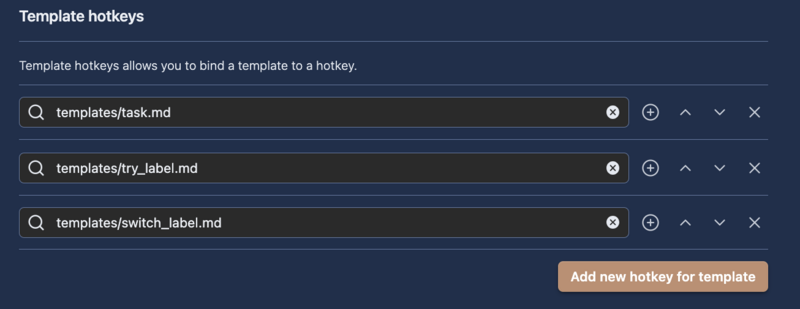
そして、ホットキー設定

あとは使うだけ
おわり
あまりMarkdownにObsidian特有の概念を入れないほうが良いと思うものの、だんだん入ってきている…
