前から気になっていたng generate libraryを使ってライブラリを作ってnpmに公開するところまでやってみる
以前は下記記事でやったようにng-packagrを使って色々設定して公開までこぎつけた
そのあたりの煩雑な部分をどのくらい吸収してくれるのかなという思いがあったので試してみました
題材は「keyupイベントで任意の時間入力に変化がなかったらイベントとして受け取る」ディレクティブを作ってみます
基本的に公式みてなぞってみる感じになる
作成、開発
- プロジェクトの作成
$ ng --version
    _                      _                 ____ _     ___
    / \   _ __   __ _ _   _| | __ _ _ __     / ___| |   |_ _|
   / △ \ | '_ \ / _` | | | | |/ _` | '__|   | |   | |    | |
  / ___ \| | | | (_| | |_| | | (_| | |      | |___| |___ | |
 /_/   \_\_| |_|\__, |\__,_|_|\__,_|_|       \____|_____|___|
                |___/


Angular CLI: 8.3.8
Node: 12.9.0
OS: linux x64
Angular:
...

Package                      Version
------------------------------------------------------
@angular-devkit/architect    0.803.8
@angular-devkit/core         8.3.8
@angular-devkit/schematics   8.3.8
@schematics/angular          8.3.8
@schematics/update           0.803.8
rxjs                         6.4.0

$ ng new ngx-libraries --style scss
- ライブラリプロジェクトの生成
$ cd ngx-libraries
$ npx ng g library filter-keyup-events
CREATE projects/filter-keyup-events/README.md (1089 bytes)
CREATE projects/filter-keyup-events/karma.conf.js (1035 bytes)
CREATE projects/filter-keyup-events/ng-package.json (168 bytes)
CREATE projects/filter-keyup-events/package.json (149 bytes)
CREATE projects/filter-keyup-events/tsconfig.lib.json (549 bytes)
CREATE projects/filter-keyup-events/tsconfig.spec.json (246 bytes)
CREATE projects/filter-keyup-events/tslint.json (247 bytes)
CREATE projects/filter-keyup-events/src/public-api.ts (207 bytes)
CREATE projects/filter-keyup-events/src/test.ts (670 bytes)
CREATE projects/filter-keyup-events/src/lib/filter-keyup-events.module.ts (283 bytes)
CREATE projects/filter-keyup-events/src/lib/filter-keyup-events.component.spec.ts (707 bytes)
CREATE projects/filter-keyup-events/src/lib/filter-keyup-events.component.ts (293 bytes)
CREATE projects/filter-keyup-events/src/lib/filter-keyup-events.service.spec.ts (390 bytes)
CREATE projects/filter-keyup-events/src/lib/filter-keyup-events.service.ts (146 bytes)
UPDATE angular.json (4933 bytes)
UPDATE package.json (1393 bytes)
UPDATE tsconfig.json (717 bytes)
npm WARN optional SKIPPING OPTIONAL DEPENDENCY: fsevents@1.2.9 (node_modules/webpack-dev-server/node_modules/fsevents):
npm WARN notsup SKIPPING OPTIONAL DEPENDENCY: Unsupported platform for fsevents@1.2.9: wanted {"os":"darwin","arch":"any"} (current: {"os":"linux","arch":"x64"})
npm WARN optional SKIPPING OPTIONAL DEPENDENCY: fsevents@1.2.9 (node_modules/watchpack/node_modules/fsevents):
npm WARN notsup SKIPPING OPTIONAL DEPENDENCY: Unsupported platform for fsevents@1.2.9: wanted {"os":"darwin","arch":"any"} (current: {"os":"linux","arch":"x64"})
npm WARN optional SKIPPING OPTIONAL DEPENDENCY: fsevents@1.2.9 (node_modules/karma/node_modules/fsevents):
npm WARN notsup SKIPPING OPTIONAL DEPENDENCY: Unsupported platform for fsevents@1.2.9: wanted {"os":"darwin","arch":"any"} (current: {"os":"linux","arch":"x64"})
npm WARN optional SKIPPING OPTIONAL DEPENDENCY: fsevents@1.2.9 (node_modules/@angular/compiler-cli/node_modules/fsevents):
npm WARN notsup SKIPPING OPTIONAL DEPENDENCY: Unsupported platform for fsevents@1.2.9: wanted {"os":"darwin","arch":"any"} (current: {"os":"linux","arch":"x64"})
npm WARN optional SKIPPING OPTIONAL DEPENDENCY: fsevents@2.1.0 (node_modules/fsevents):
npm WARN notsup SKIPPING OPTIONAL DEPENDENCY: Unsupported platform for fsevents@2.1.0: wanted {"os":"darwin","arch":"any"} (current: {"os":"linux","arch":"x64"})

added 103 packages from 53 contributors and audited 19348 packages in 17.162s
found 0 vulnerabilities
色々追加される
projects以下に一通りのファイルが生成される
package.jsonを見たら下記差分が出てたので内部的にはng-packagrを使っている模様
- package.json
   "devDependencies": {
     "@angular-devkit/build-angular": "~0.803.8",
+    "@angular-devkit/build-ng-packagr": "~0.803.8",
     "@angular/cli": "~8.3.8",
     "@angular/compiler-cli": "~8.2.9",
     "@angular/language-service": "~8.2.9",
@@ -39,8 +40,10 @@
     "karma-coverage-istanbul-reporter": "~2.0.1",
     "karma-jasmine": "~2.0.1",
     "karma-jasmine-html-reporter": "^1.4.0",
+    "ng-packagr": "^5.4.0",
     "protractor": "~5.4.0",
     "ts-node": "~7.0.0",
+    "tsickle": "^0.37.0",
     "tslint": "~5.15.0",
     "typescript": "~3.5.3"
   }
- ライブラリのビルド
npx ng build プロジェクト名でプロジェクトのビルドが走る(--projectで指定してもOK)
$ npx ng build filter-keyup-events
Building Angular Package

------------------------------------------------------------------------------
Building entry point 'filter-keyup-events'
------------------------------------------------------------------------------
Compiling TypeScript sources through ngc
Bundling to FESM2015
Bundling to FESM5
Bundling to UMD
Minifying UMD bundle
Copying declaration files
Writing package metadata
Built filter-keyup-events

------------------------------------------------------------------------------
Built Angular Package!
 - from: /home/vagrant/sandbox/ngx-libraries/projects/filter-keyup-events
 - to:   /home/vagrant/sandbox/ngx-libraries/dist/filter-keyup-events
------------------------------------------------------------------------------
- 開発
開発するときは--watchで変更のたびにビルドが走るようにすると良さそう
$ npx ng build --project filter-keyup-events --watch
- ディレクティブの追加
今回はコンポーネントではなくディレクティブを作ってみたかったので下記コマンドでfilter-keyup-eventsプロジェクトにディレクティブを生成した
$ npx ng g directive directives/filter-keyup-events --project filter-keyup-events
読み込み
とりあえず生成したライブラリを読み込んで使ってみる
コンポーネントであればそのままコンポーネントのタグを呼べばOK
- app.module.ts
imports: [
  FilterKeyupEventsModule
]
- app.component.html
<input libFilterKeyupEvents [intervalMs]="500" (filteredText)="filteredText($event)" type="text">
動作確認をしてOKそうであれば公開へ
公開
公開情報を整える
- projects/filter-keyup-events/package.json
とりあえず名前だけあればOK
"name": "@swfz/filter-keyup-events"
namespaceをつけたため、初回publish時はaccess=publicが必要
- pubish
npx ng build --project filter-keyup-events
cd projects/filter-keyup-events
npm publish --access=public
※事前にnpm loginでログイン済み
公開されました!
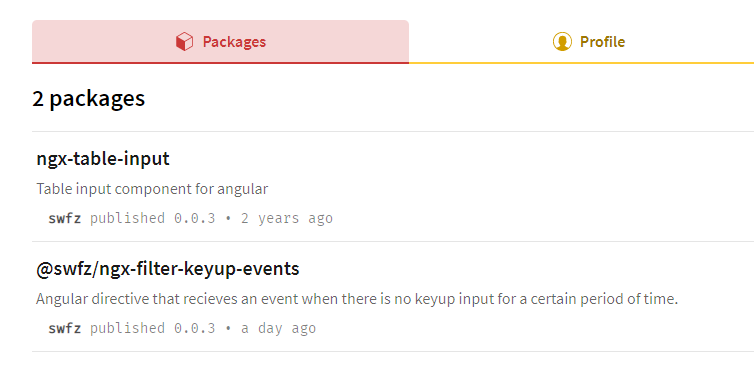
特に設定ファイル周りでつまずくことはなかったです
インストール
適当なプロジェクトでインストールして動作確認してみる
yarn add @swfz/ngx-filter-keyup-events
README通りに実装してみて確認
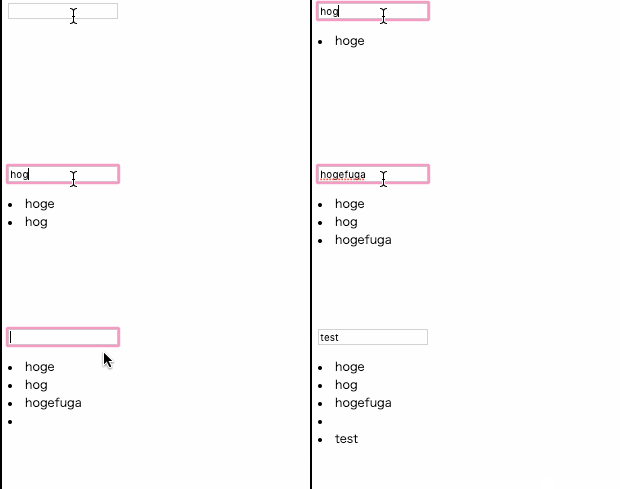
OK
まとめ
ng g libraryによって簡単にライブラリを作れるようになった- npmモジュールの公開周りの設定とか諸々を請け負ってくれているので設定周りで意識することがなくなった
projects以下に複数のライブラリをぶら下げてmonorepo的な感じで運用できそう?
ということで大分体験が良かったです
以前ng-packagrをインストールして自前で設定とかしてたので結構苦労したイメージがありますがこれなら簡単にライブラリの公開まで行えそうだなと思いました
試しに1つpublishしたので良かったら使ってみてください
- GitHub
ngx-libraries/projects/filter-keyup-events at master · swfz/ngx-libraries
- npm
