Google Cloud Dataflowを試してみるべく、GCP公式サイトにあるチュートリアルをやりました。
Java と Apache Maven を使用したクイックスタート | Cloud Dataflow | Google Cloud
このチュートリアルでダウンロードできるJavaのソースコードはファイル数が多く、コードも長いです。そこで、処理内容はできるだけそのままで、必要な要素を理解しやすいようにコードを短くしたサンプルを作成しました。
前提
- チュートリアルに従ってGCPプロジェクトでAPI有効化されていること
- GCPの中のCompute Engineのインスタンスで作業
- Javaインストール済み (11.0.2で作業しました)
- Mavenインストール済み (3.6.3で作業しました)
ソースコード
pom.xml とJavaソースの2ファイルです。
├── pom.xml
└── src
    └── main
        └── java
            └── org
                └── example
                    └── MySample.java
pom.xml
<?xml version="1.0" encoding="UTF-8"?>
<project xmlns="http://maven.apache.org/POM/4.0.0"
         xmlns:xsi="http://www.w3.org/2001/XMLSchema-instance"
         xsi:schemaLocation="http://maven.apache.org/POM/4.0.0 http://maven.apache.org/xsd/maven-4.0.0.xsd">
  <modelVersion>4.0.0</modelVersion>
  <groupId>org.example</groupId>
  <artifactId>mysample</artifactId>
  <version>0.1</version>
  <packaging>jar</packaging>
  <properties>
    <beam.version>2.20.0</beam.version>
    <maven-compiler-plugin.version>3.7.0</maven-compiler-plugin.version>
    <slf4j.version>1.7.25</slf4j.version>
  </properties>

  <build>
    <plugins>
      <plugin>
        <groupId>org.apache.maven.plugins</groupId>
        <artifactId>maven-compiler-plugin</artifactId>
        <version>${maven-compiler-plugin.version}</version>
        <configuration>
          <source>1.8</source>
          <target>1.8</target>
        </configuration>
      </plugin>
    </plugins>
  </build>

  <profiles>
    <profile>
      <id>dataflow-runner</id>
      <activation><activeByDefault>true</activeByDefault></activation>
      <dependencies>
        <dependency>
          <groupId>org.apache.beam</groupId>
          <artifactId>beam-runners-google-cloud-dataflow-java</artifactId>
          <version>${beam.version}</version>
          <scope>runtime</scope>
        </dependency>
      </dependencies>
    </profile>
  </profiles>

  <dependencies>
    <dependency>
      <groupId>org.apache.beam</groupId>
      <artifactId>beam-sdks-java-core</artifactId>
      <version>${beam.version}</version>
    </dependency>
    <dependency>
      <groupId>org.slf4j</groupId>
      <artifactId>slf4j-api</artifactId>
      <version>${slf4j.version}</version>
    </dependency>
    <dependency>
      <groupId>org.slf4j</groupId>
      <artifactId>slf4j-jdk14</artifactId>
      <version>${slf4j.version}</version>
      <scope>runtime</scope>
    </dependency>
  </dependencies>
</project>
MySample.java
package org.example;

import org.apache.beam.sdk.Pipeline;
import org.apache.beam.sdk.io.TextIO;
import org.apache.beam.sdk.options.Description;
import org.apache.beam.sdk.options.PipelineOptions;
import org.apache.beam.sdk.options.PipelineOptionsFactory;
import org.apache.beam.sdk.options.Validation.Required;
import org.apache.beam.sdk.transforms.Count;
import org.apache.beam.sdk.transforms.Create;
import org.apache.beam.sdk.transforms.DoFn;
import org.apache.beam.sdk.transforms.MapElements;
import org.apache.beam.sdk.transforms.PTransform;
import org.apache.beam.sdk.transforms.ParDo;
import org.apache.beam.sdk.transforms.SimpleFunction;
import org.apache.beam.sdk.values.KV;
import org.apache.beam.sdk.values.PCollection;

public class MySample {

  static class ExtractWordsFn extends DoFn<String, String> {
    @ProcessElement
    public void processElement(@Element String element, OutputReceiver<String> receiver) {
      String[] words = element.split(" ", -1);
      for (String word : words) {
        if (!word.isEmpty()) {
          receiver.output(word);
        }
      }
    }
  }

  static class CountWords
      extends PTransform<PCollection<String>, PCollection<KV<String, Long>>> {
    @Override
    public PCollection<KV<String, Long>> expand(PCollection<String> lines) {
      PCollection<String> words = lines.apply(ParDo.of(new ExtractWordsFn()));
      PCollection<KV<String, Long>> wordCounts = words.apply(Count.perElement());
      return wordCounts;
    }
  }

  static class FormatAsTextFn extends SimpleFunction<KV<String, Long>, String> {
    @Override
    public String apply(KV<String, Long> input) {
      return input.getKey() + ": " + input.getValue();
    }
  }

  public interface WordCountOptions extends PipelineOptions {
    @Description("Path of the file to read from")
    @Required
    String getInputPath();
    void setInputPath(String value);

    @Description("Path of the file to write to")
    @Required
    String getOutputPath();
    void setOutputPath(String value);
  }

  static void runWordCount(WordCountOptions options) {
    Pipeline p = Pipeline.create(options);

    String inputPath = options.getInputPath();
    String outputPath = options.getOutputPath();

    p.apply("ReadLines", TextIO.read().from(inputPath)).
      apply(new CountWords()).
      apply(MapElements.via(new FormatAsTextFn())).
      apply("WriteCounts", TextIO.write().to(outputPath));

    p.run().waitUntilFinish();
  }

  public static void main(String[] args) {
    WordCountOptions options =
        PipelineOptionsFactory.fromArgs(args).withValidation().as(WordCountOptions.class);

    runWordCount(options);
  }
}
実行方法
$ mvn compile exec:java -Dexec.mainClass=org.example.MySample -Dexec.args="--project=PROJECT_ID --region=us-central1 --stagingLocation=STAGING_GS_PATH --inputPath=gs://apache-beam-samples/shakespeare/kinglear.txt --outputPath=OUTPUT_GS_PATH --runner=DataflowRunner"
上記コマンドの中、以下の3箇所は自分の環境に合わせて書き換えます。
PROJECT_ID: GCPのプロジェクトID、STAGING_GS_PATH: Dataflowの実行に必要なjarファイルなどを置くGCSのパス。このパスの中に自動で必要なファイルがアップロードされる。例:gs://sample-bucket/dataflow/staging/OUTPUT_GS_PATH: 出力先GCSパス。 例:gs://sample-bucket/dataflow/outputと指定するとgs://sample-bucket/dataflow/output-00000-of-00003のような名前のファイルが作成される
コマンドの中で入力として指定している gs://apache-beam-samples/shakespeare/kinglear.txt にはApacheが用意しているサンプル入力ファイルがあり、誰でも読み込み可能です。
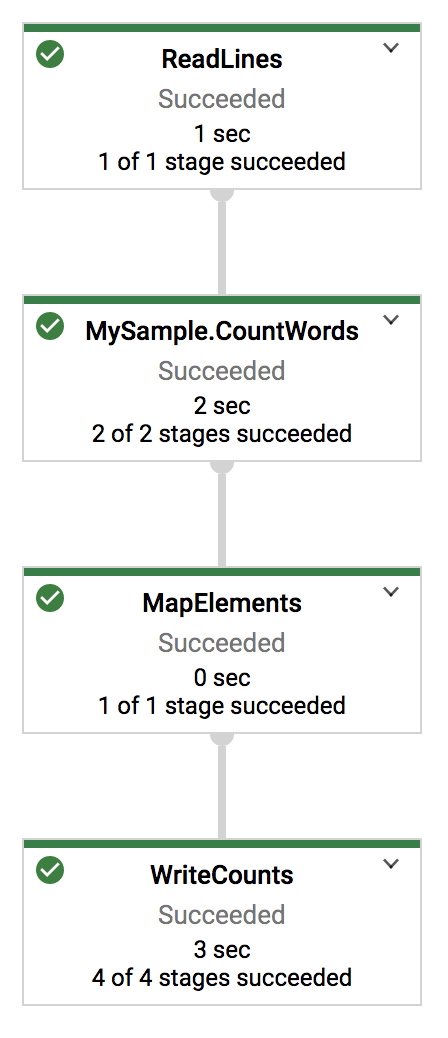
このコマンドを実行すると、3分弱で完了します。GCPコンソールでDataflowのジョブを見ると次のように表示されています。
以上。
