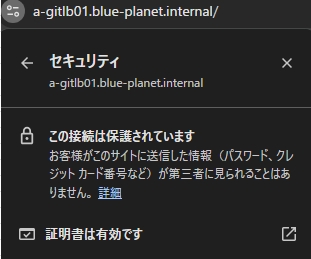
・GitLab18.3にサーバ証明書を設置してHTTPS化したい。
・具体的な手順を教えてほしい。
こういった疑問に答えます。

本記事の内容
この記事を書いている私は、某SIerに勤務しながら、
WEB系エンジニア・インフラエンジニアに憧れて、プログラミングおよびインフラ技術の勉強をしています。
こういった私が、解説していきます。
私が実機で試したコマンドや画像を載せて書いています。
記事の信頼性担保に繋がると思います。
GitLab18.3にサーバ証明書を設置してURLをHTTPS化する手順
設定ファイルの変更
/etc/gitlab/gitlab.rb
     22 ## GitLab URL
     23 ##! URL on which GitLab will be reachable.
     24 ##! For more details on configuring external_url see:
     25 ##! https://docs.gitlab.com/omnibus/settings/configuration.html#configuring-the-external-url        -for-gitlab
     26 ##!
     27 ##! Note: During installation/upgrades, the value of the environment variable
     28 ##! EXTERNAL_URL will be used to populate/replace this value.
     29 ##! On AWS EC2 instances, we also attempt to fetch the public hostname/IP
     30 ##! address from AWS. For more details, see:
     31 ##! https://docs.aws.amazon.com/AWSEC2/latest/UserGuide/instancedata-data-retrieval.html
     32 external_url 'https://a-gitlb01.blue-planet.internal'  ←★★★変更

  (中略)

   1794 ################################################################################
   1795 ## GitLab NGINX
   1796 ##! Docs: https://docs.gitlab.com/omnibus/settings/nginx.html
   1797 ################################################################################
   1798
   1799 # nginx['enable'] = true
   1800 # nginx['client_max_body_size'] = '0'
   1801 # nginx['redirect_http_to_https'] = false
   1802 # nginx['redirect_http_to_https_port'] = 80
   1803
   1804 ##! Most root CA's are included by default
   1805 # nginx['ssl_client_certificate'] = "/etc/gitlab/ssl/ca.crt"
   1806
   1807 ##! enable/disable 2-way SSL client authentication
   1808 # nginx['ssl_verify_client'] = "off"
   1809
   1810 ##! if ssl_verify_client on, verification depth in the client certificates chain
   1811 # nginx['ssl_verify_depth'] = "1"
   1812
   1813 # nginx['ssl_certificate'] = "/etc/gitlab/ssl/#{node['fqdn']}.crt"
   1814 # nginx['ssl_certifiicate_key'] = "/etc/gitlab/ssl/#{node['fqdn']}.key"
   1815 nginx['ssl_certificate'] = "/etc/gitlab/ssl/a-gitlb01.blue-planet.internal.crt"  ←★★★変更
   1816 nginx['ssl_certifiicate_key'] = "/etc/gitlab/ssl/a-gitlb01.blue-planet.internal.key"  ←★★★変更
証明書ファイルを配置
/etc/gitlab/ssl/a-gitlb01.blue-planet.internal.crt
/etc/gitlab/ssl/a-gitlb01.blue-planet.internal.key

再構築とサービス再起動
[root@a-gitlb01 ~]# gitlab-ctl reconfigure
[root@a-gitlb01 ~]# gitlab-ctl restart
ブラウザで表示確認