
・CentOS8にPostfixとDovecotでメールサーバを構築したい。
・SSL/TLSで暗号化して送受信ができるようにした。
・具体的な手順を教えてほしい。
こういった疑問に答えます。
本記事の内容
この記事を書いている私は、某SIerに勤務しながら、
WEB系エンジニア・インフラエンジニアに憧れて、プログラミングおよびインフラ技術の勉強をしています。
こういった私が、解説していきます。
私が実機で試したコマンドや画像を載せて書いています。
記事の信頼性担保に繋がると思います。
- 本記事の内容
- CentOS8にPostfixとDovecotで構築したメールサーバでSSL/TLSで送受信を暗号化する手順
- メールサーバのサーバ証明書を作成
- Postfixの設定変更
- Dovecotの設定変更
- ファイアーウォールの設定変更
- メールソフトでの確認テスト
- まとめ
CentOS8にPostfixとDovecotで構築したメールサーバでSSL/TLSで送受信を暗号化する手順
前提
今回の環境は、下記の記事の手順でメールサーバを構築しています。
メールサーバのサーバ証明書を作成
ローカルネットワーク内のルートCA、中間CAの構築
下記の記事の手順で、ローカル内のプライベートCA、中間CAが作成済の状態です。
メールサーバの署名要求ファイル作成
openssl.cnf をコピーしてopenssl-req.cnf を作成
cp /etc/pki/tls/openssl.cnf /etc/pki/tls/openssl-req.cnf
[root@SV-EARTH certs]# cp /etc/pki/tls/openssl.cnf /etc/pki/tls/openssl-req.cnf
vi /etc/pki/tls/openssl-req.cnf
[ req ]
default_bits        = 2048
default_md      = sha256
default_keyfile     = privkey.pem
distinguished_name  = req_distinguished_name
attributes      = req_attributes
#x509_extensions   = v3_ca # The extensions to add to the self signed cert

# Passwords for private keys if not present they will be prompted for
# input_password = secret
# output_password = secret

# This sets a mask for permitted string types. There are several options.
# default: PrintableString, T61String, BMPString.
# pkix  : PrintableString, BMPString (PKIX recommendation before 2004)
# utf8only: only UTF8Strings (PKIX recommendation after 2004).
# nombstr : PrintableString, T61String (no BMPStrings or UTF8Strings).
# MASK:XXXX a literal mask value.
# WARNING: ancient versions of Netscape crash on BMPStrings or UTF8Strings.
string_mask = utf8only

req_extensions = v3_req # The extensions to add to a certificate request
#x509_extensions = v3_ca # The extensions to add to the self signed cert←コメントアウトreq_extensions = v3_req # The extensions to add to a certificate request←有効化
[ v3_req ]

# Extensions to add to a certificate request

basicConstraints = CA:FALSE
keyUsage = nonRepudiation, digitalSignature, keyEncipherment
subjectAltName = @alt_names

[ alt_names ]
DNS.1 = *.sv-earth.ad.planet.jp
subjectAltName = @alt_names←追記[ alt_names ]←追記DNS.1 = *.sv-earth.ad.planet.jp←追記
メールサーバの秘密鍵と署名要求CSRファイルを同時に作成
cd /etc/pki/tls/certs/
SSLEAY_CONFIG="-config /etc/pki/tls/openssl-req.cnf" /etc/pki/tls/misc/CA -newreq
[root@SV-EARTH certs]# cd /etc/pki/tls/certs/
[root@SV-EARTH certs]# SSLEAY_CONFIG="-config /etc/pki/tls/openssl-req.cnf" /etc/pki/tls/misc/CA -newreq
Ignoring -days; not generating a certificate
Generating a RSA private key
.......................................................................+++++
......+++++
writing new private key to 'newkey.pem'
Enter PEM pass phrase:★★★秘密鍵のパスワード★★★
Verifying - Enter PEM pass phrase:★★★秘密鍵のパスワード★★★
-----
You are about to be asked to enter information that will be incorporated
into your certificate request.
What you are about to enter is what is called a Distinguished Name or a DN.
There are quite a few fields but you can leave some blank
For some fields there will be a default value,
If you enter '.', the field will be left blank.
-----
Country Name (2 letter code) [XX]:JP
State or Province Name (full name) []:Tokyo
Locality Name (eg, city) [Default City]:Shinagawa-ku
Organization Name (eg, company) [Default Company Ltd]:PLANET Inc.
Organizational Unit Name (eg, section) []:★★★空のまま[Enter]キー★★★
Common Name (eg, your name or your server's hostname) []:sv-earth.ad.planet.jp
Email Address []:admin@ad.planet.jp

Please enter the following 'extra' attributes
to be sent with your certificate request
A challenge password []:★★★空のまま[Enter]キー★★★
An optional company name []:★★★空のまま[Enter]キー★★★
Request is in newreq.pem, private key is in newkey.pem
作成した秘密鍵ファイルと署名要求ファイルをメールサーバ用のディレクトリに移動
[root@SV-EARTH tls]# mkdir /etc/pki/interCA/sv-earth
[root@SV-EARTH tls]# mv newkey.pem /etc/pki/interCA/sv-earth/newkey.pem
[root@SV-EARTH tls]# mv newreq.pem /etc/pki/interCA/sv-earth/newreq.pem
署名用のCNFファイルの作成
cp /etc/pki/tls/openssl.cnf /etc/pki/tls/openssl-sv-earth.cnf
vi openssl-sv-earth.cnf
[ CA_default ]

dir     = /etc/pki/interCA  # Where everything is kept
[ usr_cert ]

# These extensions are added when 'ca' signs a request.

# This goes against PKIX guidelines but some CAs do it and some software
# requires this to avoid interpreting an end user certificate as a CA.

basicConstraints=critical, CA:FALSE

# Here are some examples of the usage of nsCertType. If it is omitted
# the certificate can be used for anything *except* object signing.

# This is OK for an SSL server.
nsCertType          = server

# For an object signing certificate this would be used.
# nsCertType = objsign

# For normal client use this is typical
# nsCertType = client, email

# and for everything including object signing:
# nsCertType = client, email, objsign

# This is typical in keyUsage for a client certificate.
# keyUsage = nonRepudiation, digitalSignature, keyEncipherment
keyUsage = critical, digitalSignature
extendedKeyUsage = serverAuth,clientAuth

# This will be displayed in Netscape's comment listbox.
nsComment           = "OpenSSL Generated Certificate"

# PKIX recommendations harmless if included in all certificates.
subjectKeyIdentifier=hash
authorityKeyIdentifier=keyid,issuer

# This stuff is for subjectAltName and issuerAltname.
# Import the email address.
# subjectAltName=email:copy
# An alternative to produce certificates that aren't
# deprecated according to PKIX.
# subjectAltName=email:move
subjectAltName=@alt_names
[ alt_names ]
DNS.1 = *.sv-earth.ad.planet.jp
中間CAがメールサーバの署名要求CSRファイルに署名しサーバ証明書を作成
openssl ca -in /etc/pki/interCA/sv-earth/newreq.pem \
-out /etc/pki/interCA/sv-earth/newcert.pem \
-keyfile /etc/pki/interCA/private/interCA_key.pem \
-cert /etc/pki/interCA/interCA_cert.pem \
-config /etc/pki/tls/openssl-sv-earth.cnf \
-policy policy_anything
[root@SV-EARTH tls]# openssl ca -in /etc/pki/interCA/sv-earth/newreq.pem \
> -out /etc/pki/interCA/sv-earth/newcert.pem \
> -keyfile /etc/pki/interCA/private/interCA_key.pem \
> -cert /etc/pki/interCA/interCA_cert.pem \
> -config /etc/pki/tls/openssl-sv-earth.cnf \
> -policy policy_anything
Using configuration from /etc/pki/tls/openssl-sv-earth.cnf
Check that the request matches the signature
Signature ok
Certificate Details:
        Serial Number: 2 (0x2)
        Validity
            Not Before: Oct 25 00:40:59 2020 GMT
            Not After : Oct 25 00:40:59 2021 GMT
        Subject:
            countryName               = JP
            stateOrProvinceName       = Tokyo
            localityName              = Shinagawa-ku
            organizationName          = PLANET Inc.
            commonName                = sv-earth.ad.planet.jp
            emailAddress              = admin@ad.planet.jp
        X509v3 extensions:
            X509v3 Basic Constraints: critical
                CA:FALSE
            Netscape Cert Type:
                SSL Server
            X509v3 Key Usage: critical
                Digital Signature
            X509v3 Extended Key Usage:
                TLS Web Server Authentication, TLS Web Client Authentication
            Netscape Comment:
                OpenSSL Generated Certificate
            X509v3 Subject Key Identifier:
                25:1A:31:37:53:10:A5:31:27:C7:D3:43:93:64:0F:DA:6D:39:92:3F
            X509v3 Authority Key Identifier:
                keyid:51:01:1C:CF:0D:28:0F:6E:6B:5F:B7:00:A7:3B:A7:30:42:4E:D0:7E

            X509v3 Subject Alternative Name:
                DNS:*.sv-earth.ad.planet.jp
Certificate is to be certified until Oct 25 00:40:59 2021 GMT (365 days)
Sign the certificate? [y/n]:y


1 out of 1 certificate requests certified, commit? [y/n]y
Write out database with 1 new entries
Data Base Updated
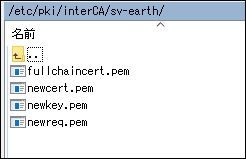
メールサーバのサーバ証明書を中間証明書と結合
cat /etc/pki/interCA/sv-earth/newcert.pem /etc/pki/interCA/interCA_cert.pem >> /etc/pki/interCA/sv-earth/fullchaincert.pem
[root@SV-EARTH sv-earth]# cat /etc/pki/interCA/sv-earth/newcert.pem /etc/pki/interCA/interCA_cert.pem >> /etc/pki/interCA/sv-earth/fullchaincert.pem
秘密鍵ファイルのパスワード除去
openssl rsa -in newkey.pem -out newkey.pem
[root@SV-EARTH sv-earth]# openssl rsa -in newkey.pem -out newkey.pem
Enter pass phrase for newkey.pem:
writing RSA key
Postfixの設定変更
設定ファイル「main.cf」の修正
修正前ファイルのバックアップ
cp -p /etc/postfix/main.cf /etc/postfix/main.cf.original_bk3
[root@SV-EARTH postfix]# cp -p /etc/postfix/main.cf /etc/postfix/main.cf.original_bk3
「main.cf」ファイルの修正
vi /etc/postfix/main.cf
[root@SV-EARTH postfix]# vi /etc/postfix/main.cf
# TLS CONFIGURATION
#
# Basic Postfix TLS configuration by default with self-signed certificate
# for inbound SMTP and also opportunistic TLS for outbound SMTP.

# The full pathname of a file with the Postfix SMTP server RSA certificate
# in PEM format. Intermediate certificates should be included in general,
# the server certificate first, then the issuing CA(s) (bottom-up order).
#
#smtpd_tls_cert_file = /etc/pki/tls/certs/postfix.pem
smtpd_tls_cert_file = /etc/pki/interCA/sv-earth/fullchaincert.pem


# The full pathname of a file with the Postfix SMTP server RSA private key
# in PEM format. The private key must be accessible without a pass-phrase,
# i.e. it must not be encrypted.
#
#smtpd_tls_key_file = /etc/pki/tls/private/postfix.key
smtpd_tls_key_file = /etc/pki/interCA/sv-earth/newkey.pem

# Announce STARTTLS support to remote SMTP clients, but do not require that
# clients use TLS encryption (opportunistic TLS inbound).
#
smtpd_tls_security_level = may

smtpd_tls_session_cache_database = btree:/var/lib/postfix/smtpd_scache
smtpd_tls_session_cache_timeout = 3600s
smtpd_tls_received_header = yes
smtpd_tls_loglevel = 1

# Directory with PEM format Certification Authority certificates that the
# Postfix SMTP client uses to verify a remote SMTP server certificate.
#
smtp_tls_CApath = /etc/pki/tls/certs

# The full pathname of a file containing CA certificates of root CAs
# trusted to sign either remote SMTP server certificates or intermediate CA
# certificates.
#
smtp_tls_CAfile = /etc/pki/tls/certs/ca-bundle.crt

# Use TLS if this is supported by the remote SMTP server, otherwise use
# plaintext (opportunistic TLS outbound).
#
smtp_tls_security_level = may
meta_directory = /etc/postfix
shlib_directory = /usr/lib64/postfix
設定ファイル「master.cf」の修正
修正前ファイルのバックアップ
cp -p /etc/postfix/master.cf /etc/postfix/master.cf.original_bk2
[root@SV-EARTH postfix]# cp -p /etc/postfix/master.cf /etc/postfix/master.cf.original_bk2
「master.cf」ファイルの修正
vi /etc/postfix/master.cf
[root@SV-EARTH postfix]# vi /etc/postfix/master.cf
# ==========================================================================
# service type  private unpriv  chroot  wakeup  maxproc command + args
#               (yes)   (yes)   (no)    (never) (100)
# ==========================================================================
smtp      inet  n       -       n       -       -       smtpd
#smtp      inet  n       -       n       -       1       postscreen
#smtpd     pass  -       -       n       -       -       smtpd
#dnsblog   unix  -       -       n       -       0       dnsblog
#tlsproxy  unix  -       -       n       -       0       tlsproxy
submission inet n       -       n       -       -       smtpd
#  -o syslog_name=postfix/submission
#  -o smtpd_tls_security_level=encrypt
#  -o smtpd_sasl_auth_enable=yes
#  -o smtpd_tls_auth_only=yes
#  -o smtpd_reject_unlisted_recipient=no
#  -o smtpd_client_restrictions=$mua_client_restrictions
#  -o smtpd_helo_restrictions=$mua_helo_restrictions
#  -o smtpd_sender_restrictions=$mua_sender_restrictions
#  -o smtpd_recipient_restrictions=
#  -o smtpd_relay_restrictions=permit_sasl_authenticated,reject
#  -o milter_macro_daemon_name=ORIGINATING
smtps     inet  n       -       n       -       -       smtpd
#  -o syslog_name=postfix/smtps
  -o smtpd_tls_wrappermode=yes
  -o smtpd_sasl_auth_enable=yes
#  -o smtpd_reject_unlisted_recipient=no
#  -o smtpd_client_restrictions=$mua_client_restrictions
#  -o smtpd_helo_restrictions=$mua_helo_restrictions
#  -o smtpd_sender_restrictions=$mua_sender_restrictions
#  -o smtpd_recipient_restrictions=
  -o smtpd_relay_restrictions=permit_sasl_authenticated,reject
#  -o milter_macro_daemon_name=ORIGINATING
Postfix設定変更後のチェック
postfix check
[root@SV-EARTH postfix]# postfix check
[root@SV-EARTH postfix]#
Postfixの再起動
systemctl restart postfix
systemctl status postfix
[root@SV-EARTH postfix]# systemctl restart postfix
[root@SV-EARTH postfix]# systemctl status postfix
● postfix.service - Postfix Mail Transport Agent
   Loaded: loaded (/usr/lib/systemd/system/postfix.service; enabled; vendor preset: disabled)
   Active: active (running) since Sun 2020-10-25 10:04:26 JST; 6s ago
  Process: 4658 ExecStop=/usr/sbin/postfix stop (code=exited, status=0/SUCCESS)
  Process: 4677 ExecStart=/usr/sbin/postfix start (code=exited, status=0/SUCCESS)
  Process: 4676 ExecStartPre=/usr/libexec/postfix/chroot-update (code=exited, status=0/SUCCESS)
  Process: 4673 ExecStartPre=/usr/libexec/postfix/aliasesdb (code=exited, status=0/SUCCESS)
 Main PID: 4745 (master)
    Tasks: 3 (limit: 47652)
   Memory: 5.0M
   CGroup: /system.slice/postfix.service
           tq4745 /usr/libexec/postfix/master -w
           tq4746 pickup -l -t unix -u
           mq4747 qmgr -l -t unix -u

10月 25 10:04:25 SV-EARTH systemd[1]: Stopped Postfix Mail Transport Agent.
10月 25 10:04:25 SV-EARTH systemd[1]: Starting Postfix Mail Transport Agent...
10月 25 10:04:26 SV-EARTH postfix/master[4745]: daemon started -- version 3.3.1, configuration /etc/postfix
10月 25 10:04:26 SV-EARTH systemd[1]: Started Postfix Mail Transport Agent.
ポート番号の確認
SMTPSの465番ポートが「LISTEN」になっていることを確認。
netstat -nat
[root@SV-EARTH postfix]# netstat -nat
Active Internet connections (servers and established)
Proto Recv-Q Send-Q Local Address           Foreign Address         State
tcp        0      0 0.0.0.0:25              0.0.0.0:*               LISTEN

tcp        0      0 0.0.0.0:110             0.0.0.0:*               LISTEN
tcp        0      0 0.0.0.0:143             0.0.0.0:*               LISTEN
tcp        0      0 0.0.0.0:465             0.0.0.0:*               LISTEN
Dovecotの設定変更
設定ファイル「10-ssl.conf」の修正
修正前ファイルのバックアップ
cp -p /etc/dovecot/conf.d/10-ssl.conf /etc/dovecot/conf.d/10-ssl.conf.original_bk2
[root@SV-EARTH conf.d]# cp -p /etc/dovecot/conf.d/10-ssl.conf /etc/dovecot/conf.d/10-ssl.conf.original_bk2
「10-ssl.conf」ファイルの修正
vi /etc/dovecot/conf.d/10-ssl.conf
[root@SV-EARTH conf.d]# vi /etc/dovecot/conf.d/10-ssl.conf
ssl
# SSL/TLS support: yes, no, required. <doc/wiki/SSL.txt>
# disable plain pop3 and imap, allowed are only pop3+TLS, pop3s, imap+TLS and imaps
# plain imap and pop3 are still allowed for local connections
ssl = required
ssl_cert、ssl_key (サーバ証明書と秘密鍵ファイルのパス)
# PEM encoded X.509 SSL/TLS certificate and private key. They're opened before
# dropping root privileges, so keep the key file unreadable by anyone but
# root. Included doc/mkcert.sh can be used to easily generate self-signed
# certificate, just make sure to update the domains in dovecot-openssl.cnf
#ssl_cert = </etc/pki/dovecot/certs/dovecot.pem
ssl_cert = </etc/pki/interCA/sv-earth/fullchaincert.pem
#ssl_key = </etc/pki/dovecot/private/dovecot.pem
ssl_key = </etc/pki/interCA/sv-earth/newkey.pem
設定ファイル「10-master.conf」の修正
修正前ファイルのバックアップ
cp -p /etc/dovecot/conf.d/10-master.conf /etc/dovecot/conf.d/10-master.conf.original_bk2
[root@SV-EARTH conf.d]# cp -p /etc/dovecot/conf.d/10-master.conf /etc/dovecot/conf.d/10-master.conf.original_bk2
「10-master.conf」ファイルの修正
vi /etc/dovecot/conf.d/10-master.conf
[root@SV-EARTH conf.d]# vi /etc/dovecot/conf.d/10-master.conf
service imap-login
# Internal user is used by unprivileged processes. It should be separate from
# login user, so that login processes can't disturb other processes.
#default_internal_user = dovecot

service imap-login {
  inet_listener imap {
    #port = 143
    port = 0
  }
  inet_listener imaps {
    port = 993
    ssl = yes
  }
service pop3-login
service pop3-login {
  inet_listener pop3 {
    #port = 110
    port = 0
  }
  inet_listener pop3s {
    port = 995
    ssl = yes
  }
}
Dovecotの再起動
systemctl restart dovecot
systemctl status dovecot
[root@SV-EARTH conf.d]# systemctl restart dovecot
[root@SV-EARTH conf.d]# systemctl status dovecot
● dovecot.service - Dovecot IMAP/POP3 email server
   Loaded: loaded (/usr/lib/systemd/system/dovecot.service; enabled; vendor preset: disabled)
   Active: active (running) since Sun 2020-10-25 10:11:52 JST; 7s ago
     Docs: man:dovecot(1)
           http://wiki2.dovecot.org/
  Process: 4803 ExecStop=/usr/bin/doveadm stop (code=exited, status=0/SUCCESS)
  Process: 4807 ExecStartPre=/usr/libexec/dovecot/prestartscript (code=exited, status=0/SUCCESS)
 Main PID: 4814 (dovecot)
    Tasks: 4 (limit: 47652)
   Memory: 5.0M
   CGroup: /system.slice/dovecot.service
           tq4814 /usr/sbin/dovecot -F
           tq4815 dovecot/anvil
           tq4816 dovecot/log
           mq4817 dovecot/config

10月 25 10:11:52 SV-EARTH systemd[1]: Stopped Dovecot IMAP/POP3 email server.
10月 25 10:11:52 SV-EARTH systemd[1]: Starting Dovecot IMAP/POP3 email server...
10月 25 10:11:52 SV-EARTH systemd[1]: Started Dovecot IMAP/POP3 email server.
10月 25 10:11:52 SV-EARTH dovecot[4814]: master: Dovecot v2.3.8 (9df20d2db) starting up for imap, pop3, lmtp
ポート番号の確認
POP3Sの995番ポートと、IMAPSの993番ポートが「LISTEN」になりました。
netstat -nat
[root@SV-EARTH conf.d]# netstat -nat
Active Internet connections (servers and established)
Proto Recv-Q Send-Q Local Address           Foreign Address         State
tcp        0      0 0.0.0.0:25              0.0.0.0:*               LISTEN
tcp        0      0 0.0.0.0:993             0.0.0.0:*               LISTEN
tcp        0      0 0.0.0.0:995             0.0.0.0:*               LISTEN
tcp        0      0 0.0.0.0:587             0.0.0.0:*               LISTEN
tcp        0      0 0.0.0.0:465             0.0.0.0:*               LISTEN
ファイアーウォールの設定変更
ファイアウォールに「SMTPS」「IMAPS」「POP3S」の追加
firewall-cmd --add-service=smtps --permanent
firewall-cmd --add-service=imaps --permanent
firewall-cmd --add-service=pop3s --permanent
firewall-cmd --reload
[root@SV-EARTH conf.d]# firewall-cmd --add-service=smtps --permanent
success
[root@SV-EARTH conf.d]# firewall-cmd --add-service=imaps --permanent
success
[root@SV-EARTH conf.d]# firewall-cmd --add-service=pop3s --permanent
success
[root@SV-EARTH conf.d]# firewall-cmd --reload
success
ファイアウォールの確認
firewall-cmd --list-all
[root@SV-EARTH conf.d]# firewall-cmd --list-all
public (active)
  target: default
  icmp-block-inversion: no
  interfaces: enp2s0
  sources:
  services: cockpit dhcpv6-client dns freeipa-ldaps freeipa-trust imap imaps pop3 pop3s samba smtp smtp-submission smtps
  ports: 3259-3268/tcp 49152-65535/tcp
  protocols:
  masquerade: no
  forward-ports:
  source-ports:
  icmp-blocks:
  rich rules:
メールソフトでの確認テスト
SMTPSとPOP3Sでのテスト
「Thunderpardはあなたのアカウント設定を見つけられませんでした。」
というメッセージが表示されてしまいます。
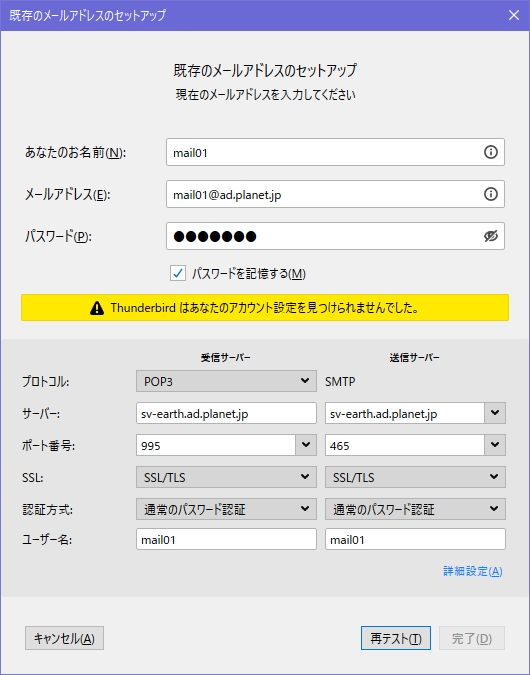
サーバ側には以下のログが出力されています。
Oct 25 11:16:43 sv-earth postfix/smtpd[5649]: connect from pc-ganymede[192.168.1.101]
Oct 25 11:16:43 sv-earth postfix/smtpd[5649]: SSL_accept error from pc-ganymede[192.168.1.101]: -1
Oct 25 11:16:43 sv-earth postfix/smtpd[5649]: warning: TLS library problem: error:14094418:SSL routines:ssl3_read_bytes:tlsv1 alert unknown ca:ssl/record/rec_layer_s3.c:1543:SSL alert number 48:
Oct 25 11:16:43 sv-earth postfix/smtpd[5649]: lost connection after CONNECT from pc-ganymede[192.168.1.101]
Oct 25 11:16:43 sv-earth postfix/smtpd[5649]: disconnect from pc-ganymede[192.168.1.101] commands=0/0
warning: TLS library problem: error:14094418:SSL routines:ssl3_read_bytes:tlsv1 alert unknown ca:ssl/record/rec_layer_s3.c:1543:SSL alert number 48: が出ていて、証明書で警告が出ているみたいです。
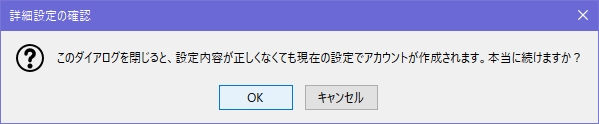
「詳細設定」ボタンを押すと、そのままの設定でアカウント作成をすることができます。
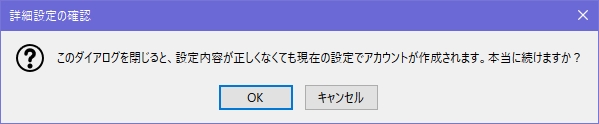
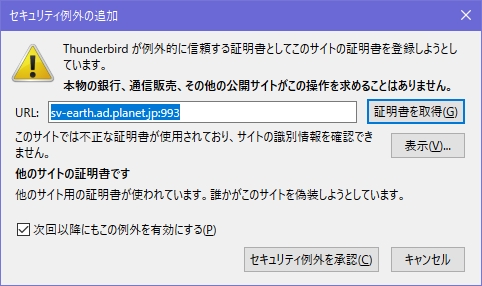
メール受信をしようとすると、「セキュリティ例外の追加」の警告メッセージが表示されます。
「セキュリティ例外を承認」ボタンをクリックすれば、メールが受信できるようになります。
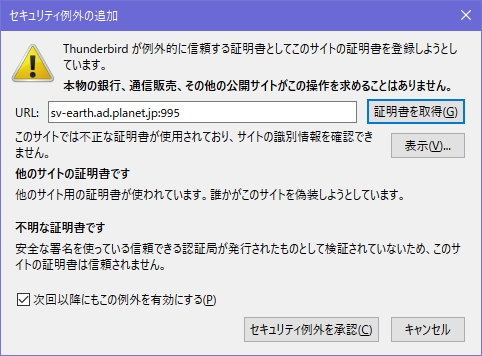
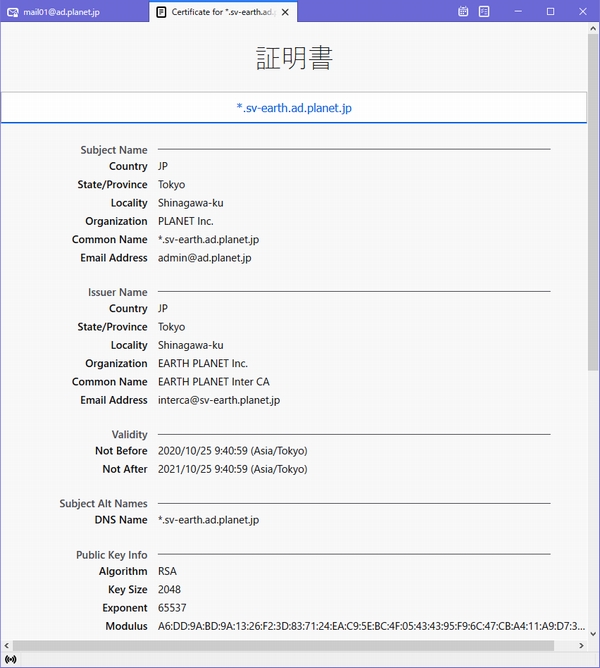
「表示」ボタンでサーバ証明書を表示することができます。
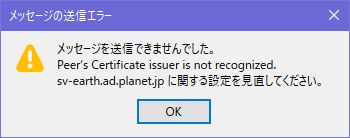
メールを送信しようとすると、「メッセージの送信エラー」が表示されてしまいます。
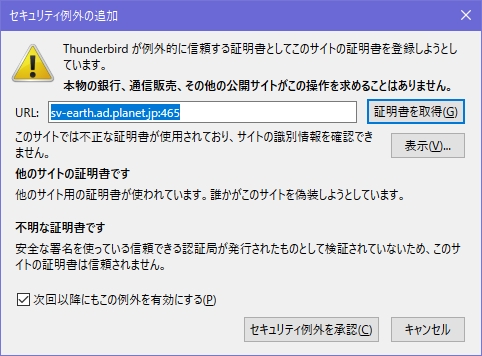
またも「セキュリティ例外の追加」の警告メッセージが表示されます。
「セキュリティ例外を承認」ボタンをクリックすると、メールが送信できるようになります。
SMTPSとIMAPSでのテスト
「Thunderpardはあなたのアカウント設定を見つけられませんでした。」
というメッセージが表示されてしまいます。
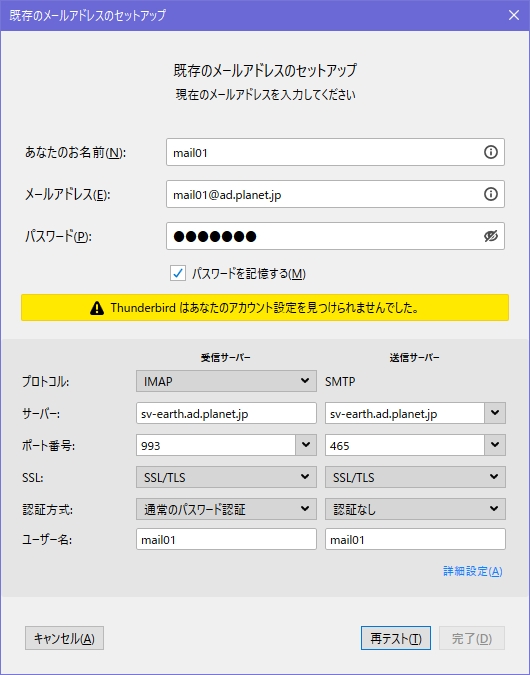
「詳細設定」ボタンを押すと、そのままの設定でアカウント作成をすることができます。
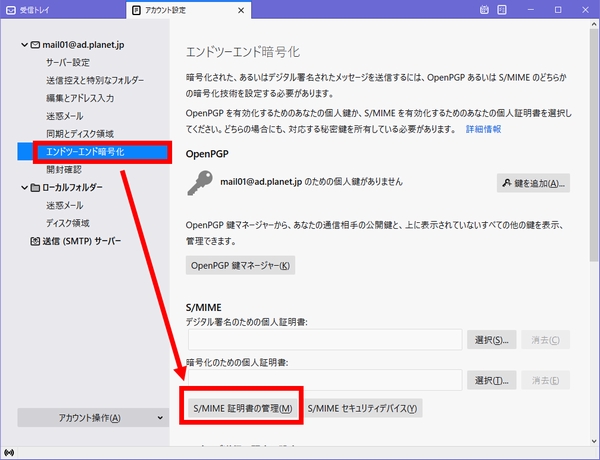
ThunderbirdにプライベートCAのルート証明書をインポート
アカウント設定>エンドツーエンド暗号化>S/MIME証明書の管理 をクリック。
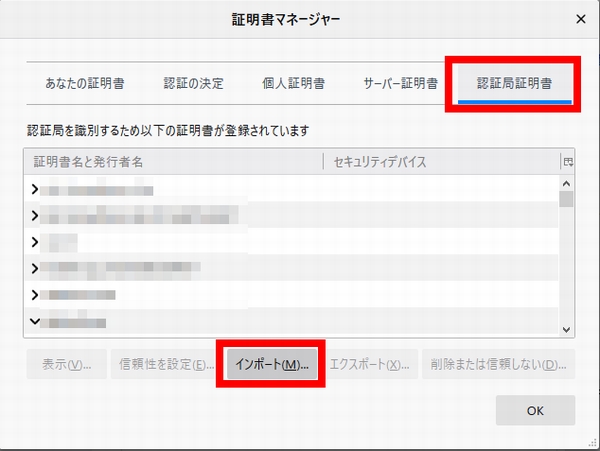
証明書マネージャー画面で「認証局証明書」タブを開き、「インポート」ボタンをクリック。
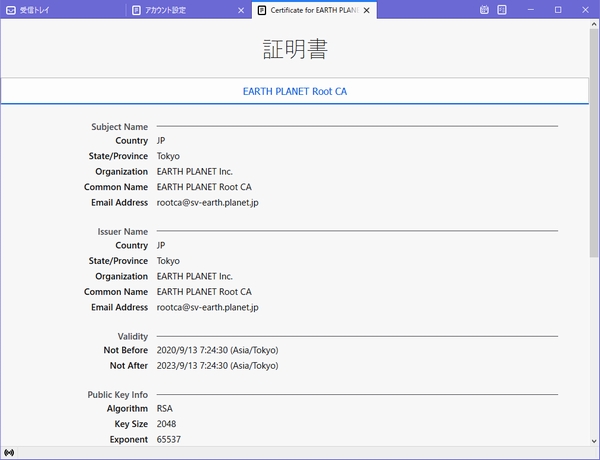
プライベートCAのルート証明書のファイルを選択。
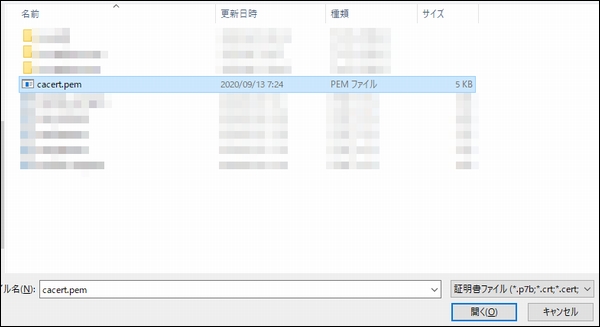
証明書のインポート
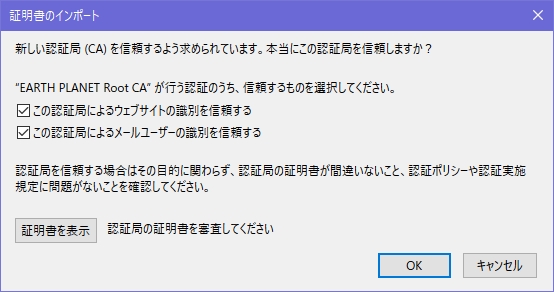
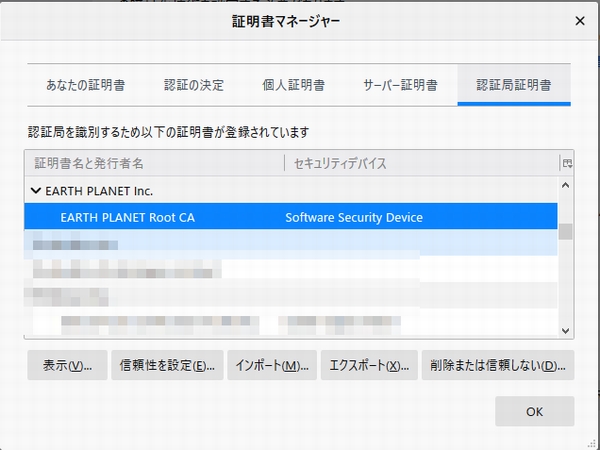
プライベートCAのルート証明書がインポートできました。
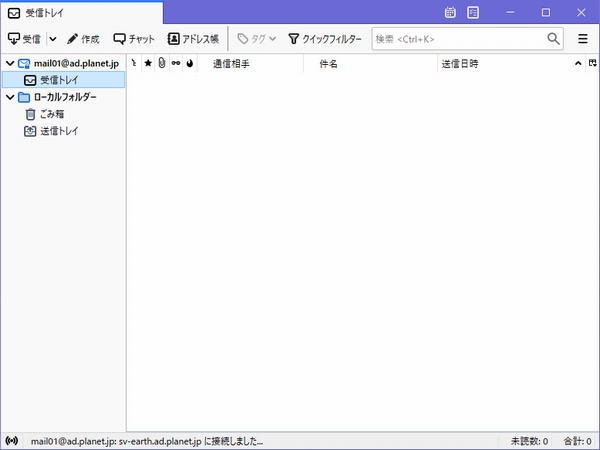
メール受信をしようとすると、「セキュリティ例外の追加」の警告メッセージが表示されます。
「セキュリティ例外を承認」ボタンをクリックすれば、メールが受信できるようになります。
メールを送信しようとすると、下記のエラーメッセージが表示されます。
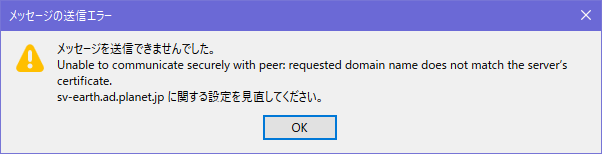
メッセージを送信できませんでした。
Unable to communicate securely with peer: requiested domain name does not match server's certificate.
sv-earth.ad.planet.jp に関する設定を見直してください。
「セキュリティ例外を承認」をクリックすると送信できるようになります。
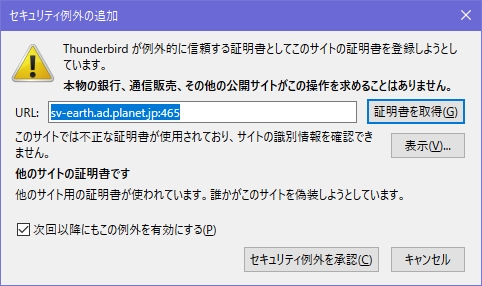
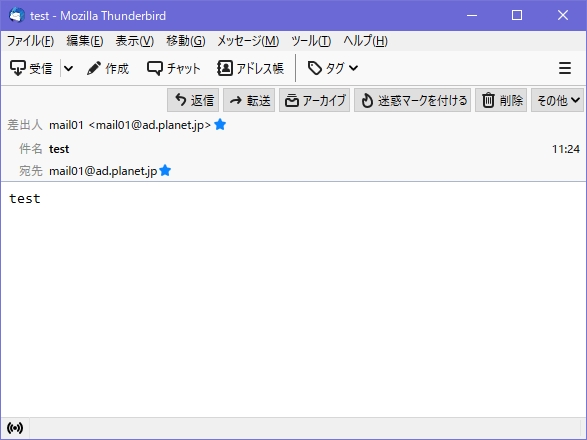
証明書マネージャー画面の「サーバー証明書」タブには、恒久的に例外承認されたサーバー証明書が追加されていました。
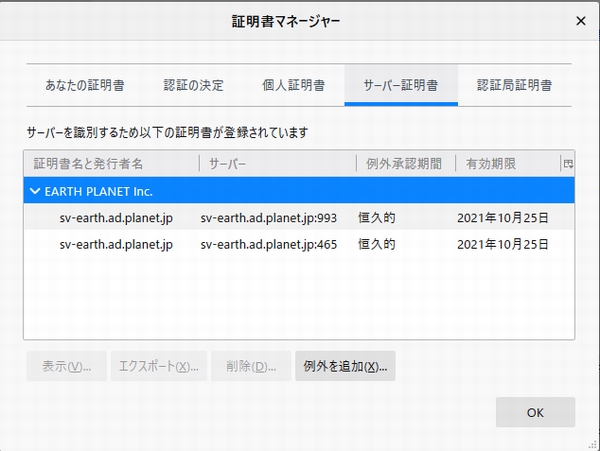
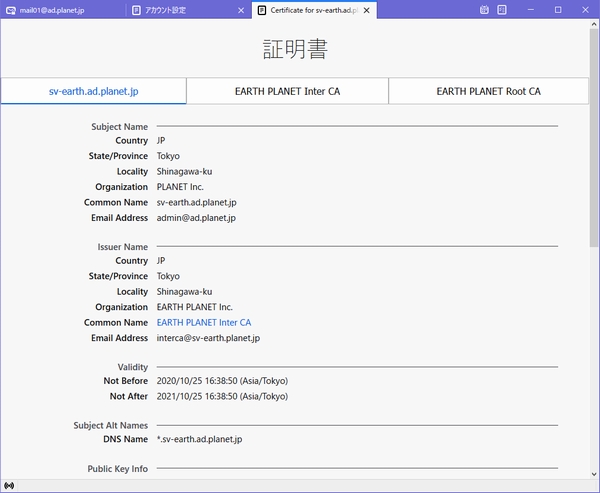
プライベートCAのルート証明書をインポートしたら、
「不明な証明書です」の警告は消えたのですが、
「他のサイトの証明書です」の警告が消えないのが原因不明で、まだ調査中です。
サーバ側のSMTPSの送信ログ
Oct 25 11:26:39 sv-earth postfix/smtpd[5851]: connect from pc-ganymede[192.168.1.101]
Oct 25 11:26:39 sv-earth postfix/smtpd[5851]: Anonymous TLS connection established from pc-ganymede[192.168.1.101]: TLSv1.3 with cipher TLS_AES_128_GCM_SHA256 (128/128 bits)
Oct 25 11:26:39 sv-earth postfix/smtpd[5851]: 66DD4CD9BC: client=pc-ganymede[192.168.1.101], sasl_method=PLAIN, sasl_username=mail01
Oct 25 11:26:39 sv-earth postfix/cleanup[5854]: 66DD4CD9BC: message-id=<611b457a-8e3b-c5d8-c543-07191543f6c2@ad.planet.jp>
Oct 25 11:26:39 sv-earth postfix/qmgr[5841]: 66DD4CD9BC: from=<mail01@ad.planet.jp>, size=728, nrcpt=1 (queue active)
Oct 25 11:26:39 sv-earth postfix/smtpd[5851]: disconnect from pc-ganymede[192.168.1.101] ehlo=1 auth=1 mail=1 rcpt=1 data=1 quit=1 commands=6
サーバ側のPOP3Sの受信ログ
Oct 25 11:18:09 sv-earth dovecot[5638]: pop3-login: Login: user=<mail01>, method=PLAIN, rip=192.168.1.101, lip=192.168.1.102, mpid=5668, TLS, session=<i5rIbHWyM8bAqAFl>
Oct 25 11:18:09 sv-earth dovecot[5638]: pop3(mail01)<5668><i5rIbHWyM8bAqAFl>: Disconnected: Logged out top=0/0, retr=0/0, del=0/5, size=7616
サーバ側のIMAPSの受信ログ
Oct 25 11:26:39 sv-earth dovecot[5746]: imap-login: Login: user=<mail01>, method=PLAIN, rip=192.168.1.101, lip=192.168.1.102, mpid=5857, TLS, session=<l/Yti3WyTMbAqAFl>
Oct 25 11:26:39 sv-earth dovecot[5746]: imap(mail01)<5857><l/Yti3WyTMbAqAFl>: Logged out in=517 out=595 deleted=0 expunged=0 trashed=0 hdr_count=0 hdr_bytes=0 body_count=0 body_bytes=0
Oct 25 11:26:41 sv-earth dovecot[5746]: imap-login: Login: user=<mail01>, method=PLAIN, rip=192.168.1.101, lip=192.168.1.102, mpid=5859, TLS, session=<WK5Pi3WyTcbAqAFl>
Oct 25 11:26:54 sv-earth dovecot[5746]: imap(mail01)<5859><WK5Pi3WyTcbAqAFl>: Connection closed (IDLE running for 0.001 + waiting input for 0.001 secs, 2 B in + 10+10 B out, state=wait-input) in=865 out=2081 deleted=0 expunged=0 trashed=0 hdr_count=1 hdr_bytes=242 body_count=0 body_bytes=0
Oct 25 11:26:54 sv-earth dovecot[5746]: imap-login: Login: user=<mail01>, method=PLAIN, rip=192.168.1.101, lip=192.168.1.102, mpid=5863, TLS, session=<s40MjHWyT8bAqAFl>
まとめ
今回は、CentOS8にPostfixとDovecotで構築したメールサーバでSSL/TLSで送受信を暗号化する手順を紹介しました。
