.NET 11 の Preview 1 が出ました。それhどういうことでしょう? そう、C# 15 です!
ちなみに今回のコードは、Visual Studio の Preview 版で実行しています。
■ コレクション式の引数
早速新機能「コレクション式の引数」を試してみましょう。
公式情報はこちら。
■ 公式ドキュメントのコードをコピペしてみる エラー ~ 解消
プロジェクトを作って、公式ドキュメントのコードを貼り付けてみるとエラーになります。
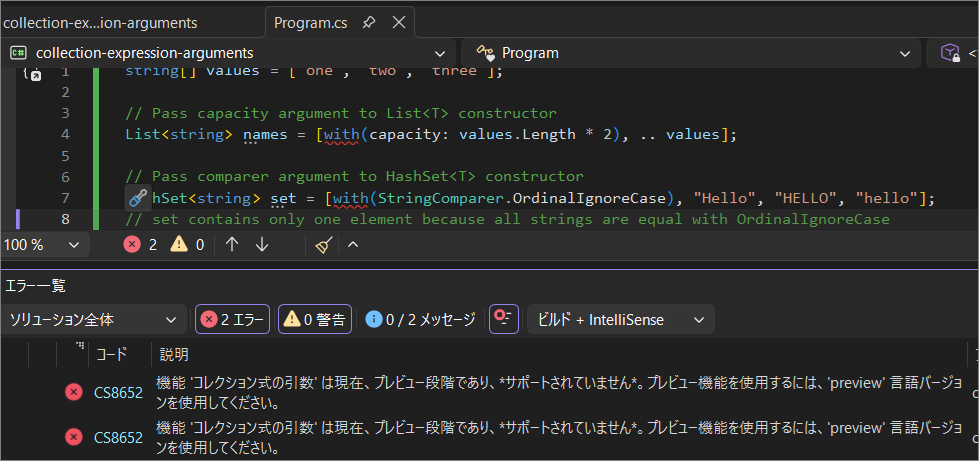
機能 'コレクション式の引数' は現在、プレビュー段階であり、*サポートされていません*。プレビュー機能を使用するには、'preview' 言語バージョンを使用してください。
まだ Preview 機能なので、.csproj に変更が必要です。
■ 言語バージョン preview
.csproj に次の要素を追加します。
<LangVersion>preview</LangVersion>
追加前
<Project Sdk="Microsoft.NET.Sdk">

  <PropertyGroup>
    <OutputType>Exe</OutputType>
    <TargetFramework>net11.0</TargetFramework>
    <ImplicitUsings>enable</ImplicitUsings>
    <Nullable>enable</Nullable>
  </PropertyGroup>

</Project>
追加後
<Project Sdk="Microsoft.NET.Sdk">

  <PropertyGroup>
    <OutputType>Exe</OutputType>
    <TargetFramework>net11.0</TargetFramework>
    <ImplicitUsings>enable</ImplicitUsings>
    <Nullable>enable</Nullable>
    <LangVersion>preview</LangVersion>
  </PropertyGroup>

</Project>
これでエラーなく、ビルド~実行できます。
■ 新機能
コレクション式でコレクションを初期化する際にコンストラクター引数を渡せるようになった。
コレクション式の一番目の要素の位置に with(引数) と書きます。
■ 動作確認クラス
例えばこんなクラス。コンストラクタ引数があります。
class MyCollection<T> : List<T>
{
    public MyCollection(string message) => Console.WriteLine($"MyCollection created with message: {message}");
    public new void Add(T item) => Console.WriteLine($"added:{item}");
}
クラスの使用
with("saitama!") とコンストラクタに "saitama!" を渡しています。
MyCollection<string> values = [with("saitama!"), "one", "two", "three"];
実行結果
MyCollection created with message: saitama!
added: one
added: two
added: three
計画通り! コンストラクタに saitama! が渡りました。
■ その他挙動確認
元からあった、with() を使用しないコレクション式はどうなるでしょう?
MyCollection<string> values2 = ["one", "two", "three"]; // エラー コレクション式の型には、引数なしで呼び出すことができる適用可能なコンストラクターが必要です。

class MyCollection<T> : List<T>
{
    public MyCollection(string message) => Console.WriteLine($"MyCollection created with message: {message}");
    public new void Add(T item) => Console.WriteLine($"added:{item}");
}
エラーメッセージ
コレクション式の型には、引数なしで呼び出すことができる適用可能なコンストラクターが必要です。
引数なしのコンストラクタが使われますね。実際に引数なしのコンストラクタを用意してみます。
// 引数ありのコンストラクタが使われる
MyCollection<string> values = [with("saitama!"), "one", "two", "three"];
// MyCollection created with message: saitama!
// added: one
// added: two
// added: three

// 引数なしのコンストラクタが使われる
MyCollection<string> values2 = ["one", "two", "three"];
// MyCollection created without message
// added: one
// added:two
// added:three

class MyCollection<T> : List<T>
{
    public MyCollection(string message) => Console.WriteLine($"MyCollection created with message: {message}");
    public MyCollection() => Console.WriteLine($"MyCollection created without message");
    public new void Add(T item) => Console.WriteLine($"added:{item}");
}
計画通り! 引数なしのコンストラクタが呼ばれました。
■ 今回の挙動確認コード
GitHub にプッシュしています。
github.com
■ 備えよう
「コレクション式の引数」いいですね。使っていきましょう!
