以前に Pleasanter のテストプロジェクトを作った話を書きました。
■ 環境準備
しかし、皆さんテストを書きましょう! と言っても環境という障壁が存在します。そのために GitHub Codospace です。
写真のようにするとテストを GitHub Codespace 上で実行、作成できます。
このリポジトリで
github.com
緑の Code から、Codespaces の +。
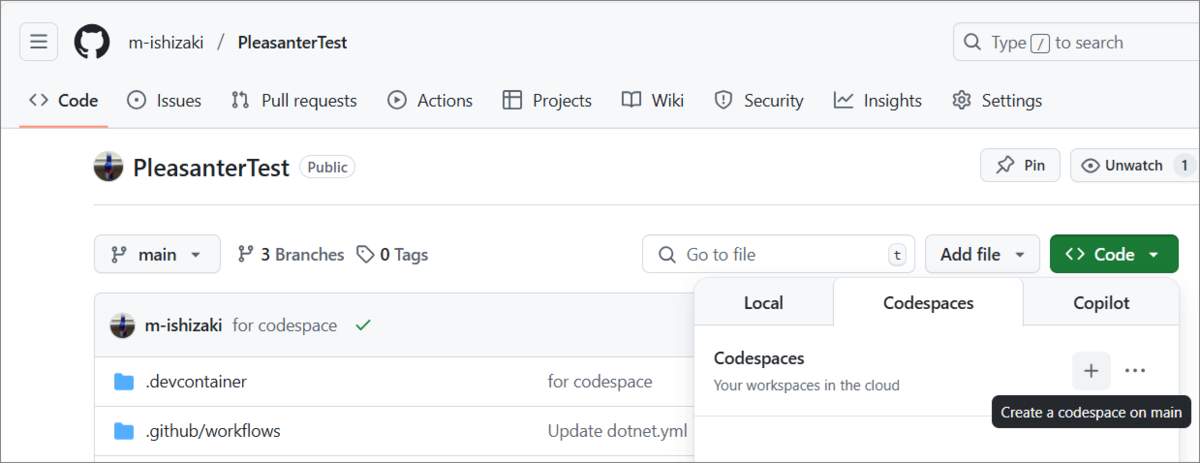
GitHub 上のスペースが作られ、Web ブラウザでブラウザ版の VSCode が開きます。たったこれだけ。実際手軽!
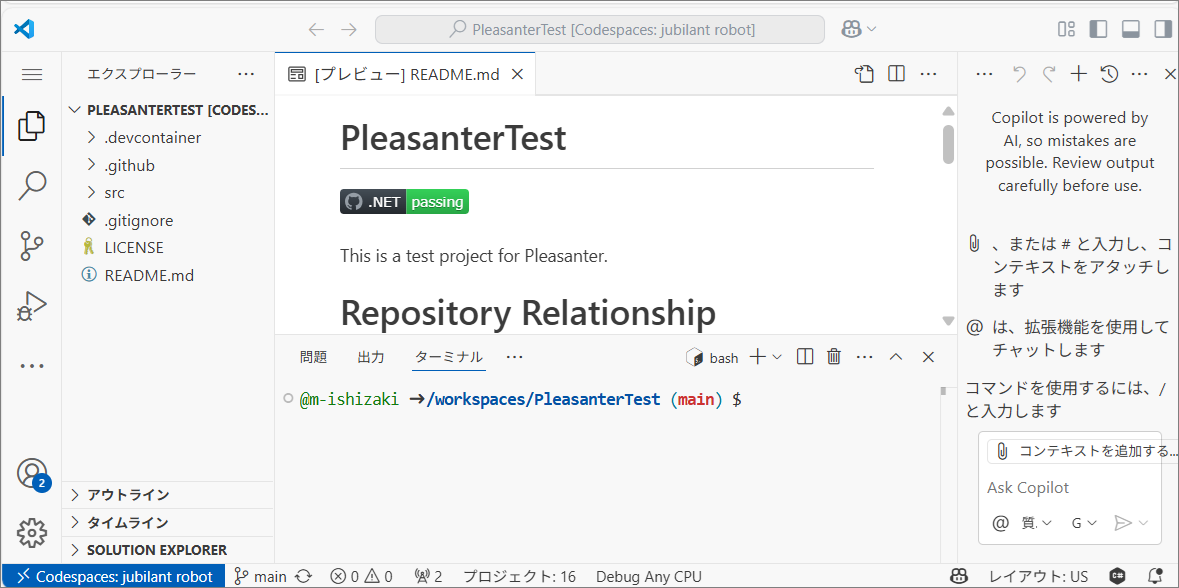
■ 環境ができたら
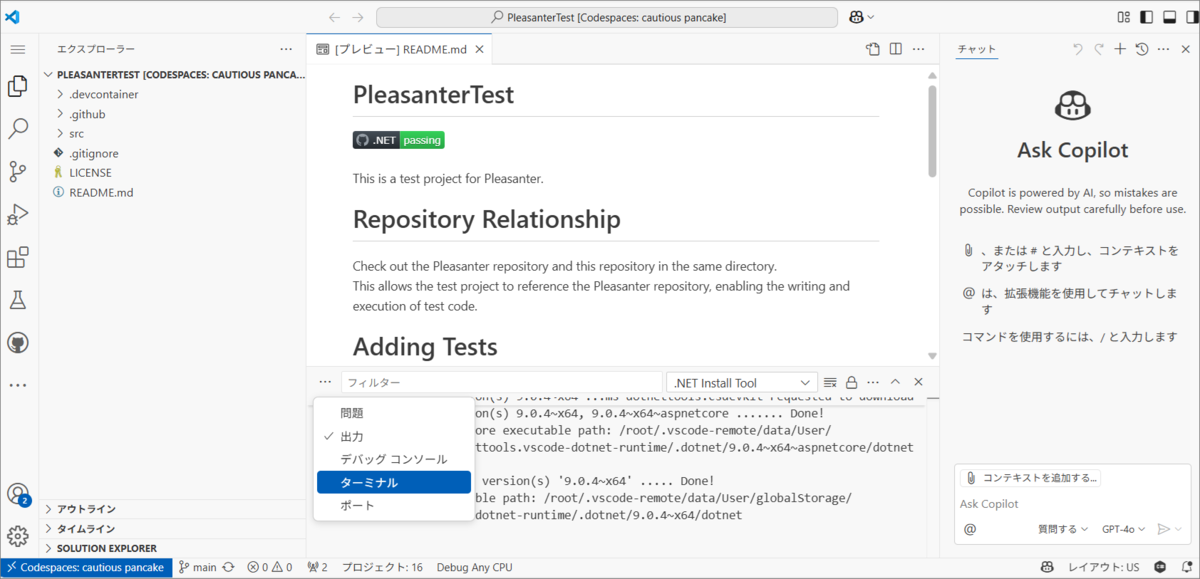
ターミナルでテストを実行します。起動時にターミナルが表示されていなければ、画像のような、こんな操作で開いてください。
■ テスト実行
ターミナルでテスト コマンドを実行。
dotnet test ./src/PleasanterTest/PleasanterTest
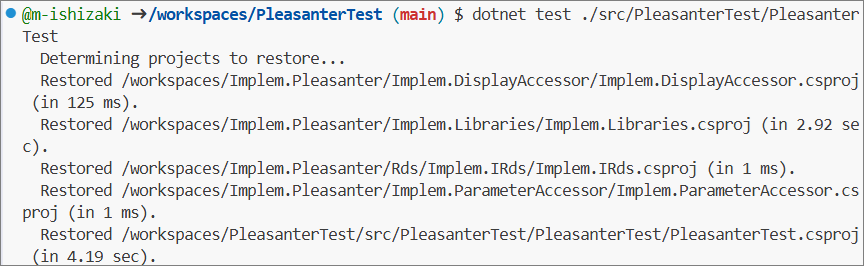
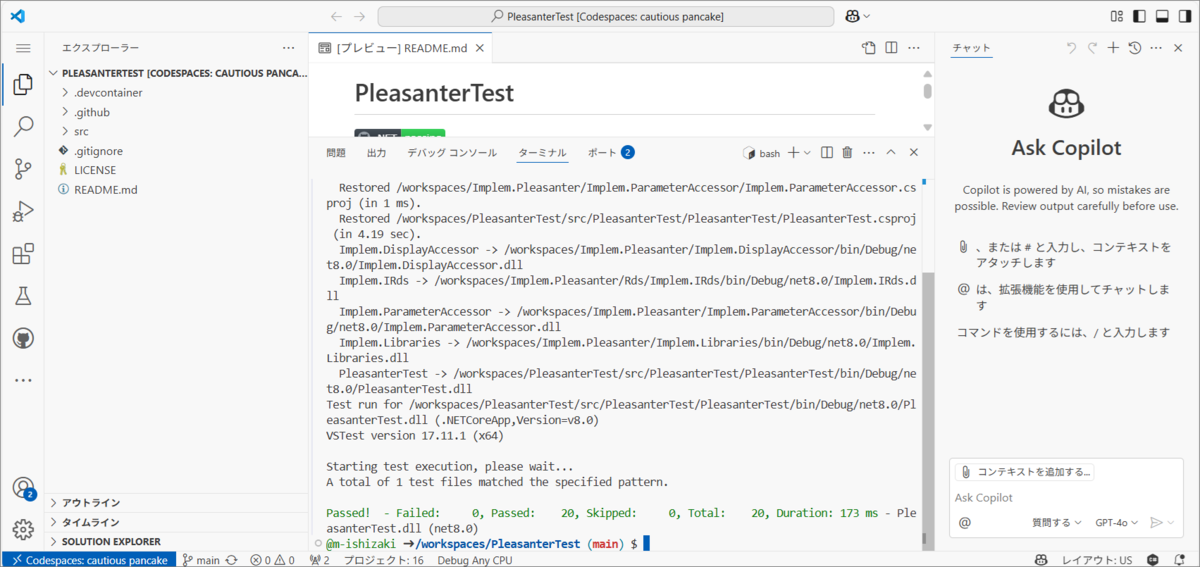
テストが実行できました。実際手軽!
■ テストを書く
起動時にはテストを書くソースコードファイルが開いているわけではないので、画像を参考にソースコードファイルを開いてテストを書いてください。
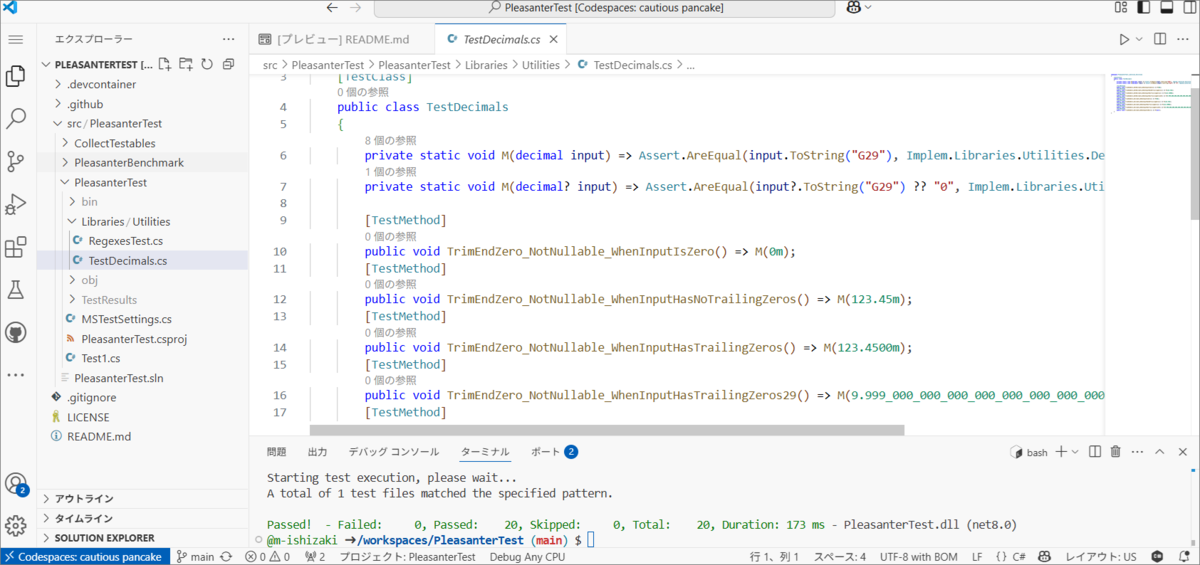
さあ、キミもテストを書かないか?
■ テスト環境の設定について
.devcontainer\devcontainer.json で仮想マシンの設定をするのですが、途中起きたエラーの一つをメモ。
(!) Packages for moby not available in OS debian bookworm (amd64). To resolve, either: (1) set feature option '"moby": false' , or (2) choose a compatible OS version (eg: 'ubuntu-20.04').
 ERROR: Feature "Docker (Docker-in-Docker)" (ghcr.io/devcontainers/features/docker-in-docker) failed to install! Look at the documentation at ********/devcontainers/features/tree/main/src/docker-in-docker for help troubleshooting this error.

#16 ERROR: process "/bin/sh -c cp -ar /build-features-src/docker-in-docker_1 /dev-container-features && chmod -R 0755 /dev-container-features/docker-in-docker_1 && cd /dev-container-features/docker-in-docker_1 && chmod +x ./devcontainer-features-install.sh && ./devcontainer-features-install.sh && rm -rf /dev-container-features/docker-in-docker_1" did not complete successfully: exit code: 1
対策は、"moby": false という設定を入れること。こんな感じ
{
    "name": ".NET in Codespaces",
    "image": "mcr.microsoft.com/dotnet/sdk:9.0",
    "features": {
        "ghcr.io/devcontainers/features/docker-in-docker:2": {
            "moby": false
        },
■ .NET 9 と 8 を入れる
イメージに "image": "mcr.microsoft.com/dotnet/sdk:9.0", を指定し、ghcr.io/devcontainers/features/dotnet:2 で "version": "8.0", を書くと、9 と 8 が両方入ります。
最終的には、9 入れる必要ないと判断して、この設定は破棄しましたが、必要な時は結構あるでしょう。

なんで、.NET 8?
Pleasanter が .NET 8 でしかビルドできない設定になっているからです。
.NET 9 のイメージから作ったマシンでビルドしようとすると。

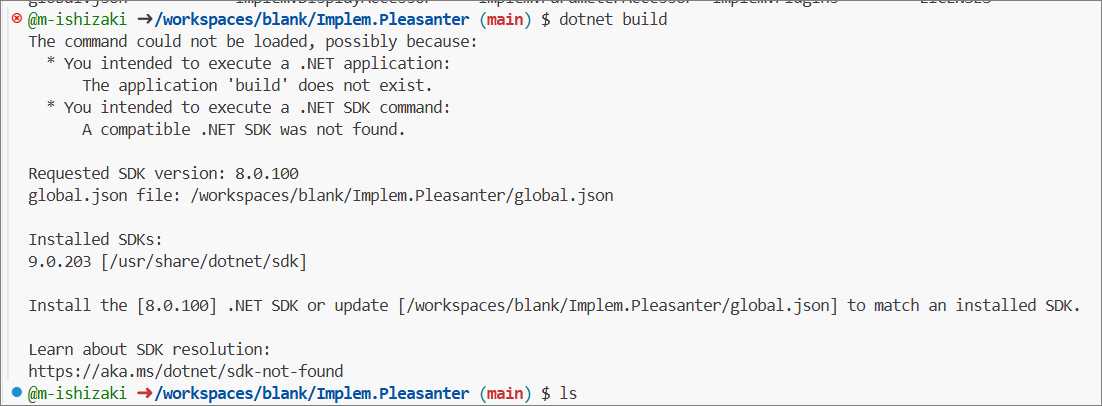
無念。
.NET 9 と 8 を入れた時の devcontainer.json
{
    "name": ".NET in Codespaces",
    "image": "mcr.microsoft.com/dotnet/sdk:9.0",
    "features": {
        "ghcr.io/devcontainers/features/docker-in-docker:2": {
            "moby": false
        },
        "ghcr.io/devcontainers/features/github-cli:1": {
            "version": "2"
        },
        "ghcr.io/devcontainers/features/powershell:1": {
            "version": "latest"
        },
        "ghcr.io/devcontainers/features/common-utils:2": {},
        "ghcr.io/devcontainers/features/dotnet:2": {
            "version": "8.0",
            "dotnetRuntimeVersions": "8.0",
            "aspNetCoreRuntimeVersions": "8.0"
        }
    },
    "customizations": {
        "vscode": {
            "extensions": [
                "GitHub.copilot",
                "GitHub.vscode-github-actions",
                "ms-dotnettools.csdevkit",
                "editorconfig.editorconfig"
            ]
        }
    },
    "forwardPorts": [
        8080,
        8081
    ],
    "postCreateCommand": "git clone https://github.com/pleasanter-developer-community/Implem.Pleasanter.git ../Implem.Pleasanter",
    "hostRequirements": {
        "memory": "8gb",
        "cpus": 2
    },
    "remoteEnv": {
        "DOTNET_MULTILEVEL_LOOKUP": "0",
        "TARGET": "net9.0"
    }
}
■ Visual Studio Code の拡張機能
マシン作成時に、Visual Studio Code の拡張機能を入れておくことも可能。
customizations の vscode の extensions です。今回は、 editorconfig 拡張機能や C# DevKit を入れています。
GitHub Copilot は Chat の拡張機能を指定していませんが、二つはセットなので、片方だけ書いておけば両方入ります。
    "customizations": {
        "vscode": {
            "extensions": [
                "GitHub.copilot",
                "GitHub.vscode-github-actions",
                "ms-dotnettools.csdevkit",
                "editorconfig.editorconfig"
            ]
■ 仮想マシン作成時にコマンドを実行する
仮想マシン作成時にコマンドを実行することができます。つまり、Codespace を作る際のリポジトリのほかのリポジトリも別のディレクトリに Clone することも可能ということ。
"postCreateCommand": "git clone https://github.com/pleasanter-developer-community/Implem.Pleasanter.git ../Implem.Pleasanter",
■ CPUコア数
.NET のテンプレートから作ると最低 4 ですが、2 にしたかったので、"cpus": 2 としてみました。
    "hostRequirements": {
        "memory": "8gb",
        "cpus": 2
    }
■ ポート
必要ないと思いますが、Pleasanter が Web アプリなので、ポート開けておくか、と思って。
    "forwardPorts": [
        8080,
        8081
    ],
けど、考えてみたらデータベースないと動かないので、ポートだけ開けていても全く意味がなかったですね。
■ 最終的にこう
最終的にこういう devcontainer.json になりました。
{
    "name": ".NET in Codespaces",
    "image": "mcr.microsoft.com/dotnet/sdk:8.0",
    "features": {
        "ghcr.io/devcontainers/features/docker-in-docker:2": {
            "moby": false
        },
        "ghcr.io/devcontainers/features/github-cli:1": {
            "version": "2"
        },
        "ghcr.io/devcontainers/features/powershell:1": {
            "version": "latest"
        },
        "ghcr.io/devcontainers/features/common-utils:2": {},
        "ghcr.io/devcontainers/features/dotnet:2": {
            "version": "none",
            "dotnetRuntimeVersions": "8.0",
            "aspNetCoreRuntimeVersions": "8.0"
        }
    },
    "customizations": {
        "vscode": {
            "extensions": [
                "GitHub.copilot",
                "GitHub.vscode-github-actions",
                "ms-dotnettools.csdevkit",
                "editorconfig.editorconfig"
            ]
        }
    },
    "forwardPorts": [
        8080,
        8081
    ],
    "postCreateCommand": "git clone https://github.com/pleasanter-developer-community/Implem.Pleasanter.git ../Implem.Pleasanter",
    "hostRequirements": {
        "memory": "8gb",
        "cpus": 2
    }
}
